Freezer inventory Excel Template – Download (2026)
4
Free download
Track boiler service dates, reminders, costs and engineer details for each property in one UK Excel sheet set.


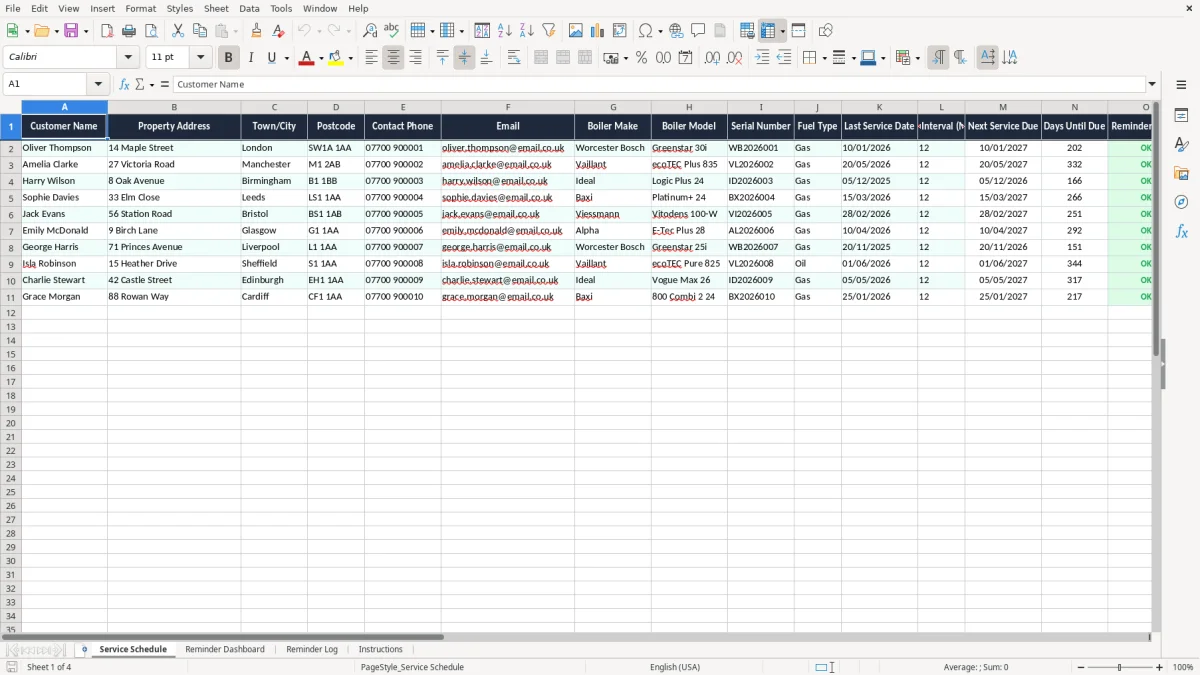
This boiler service reminder Excel template helps you track every customer’s last service date, next due date, reminder status and service cost in one place. It includes a service schedule, a reminder dashboard, a reminder log and instructions.
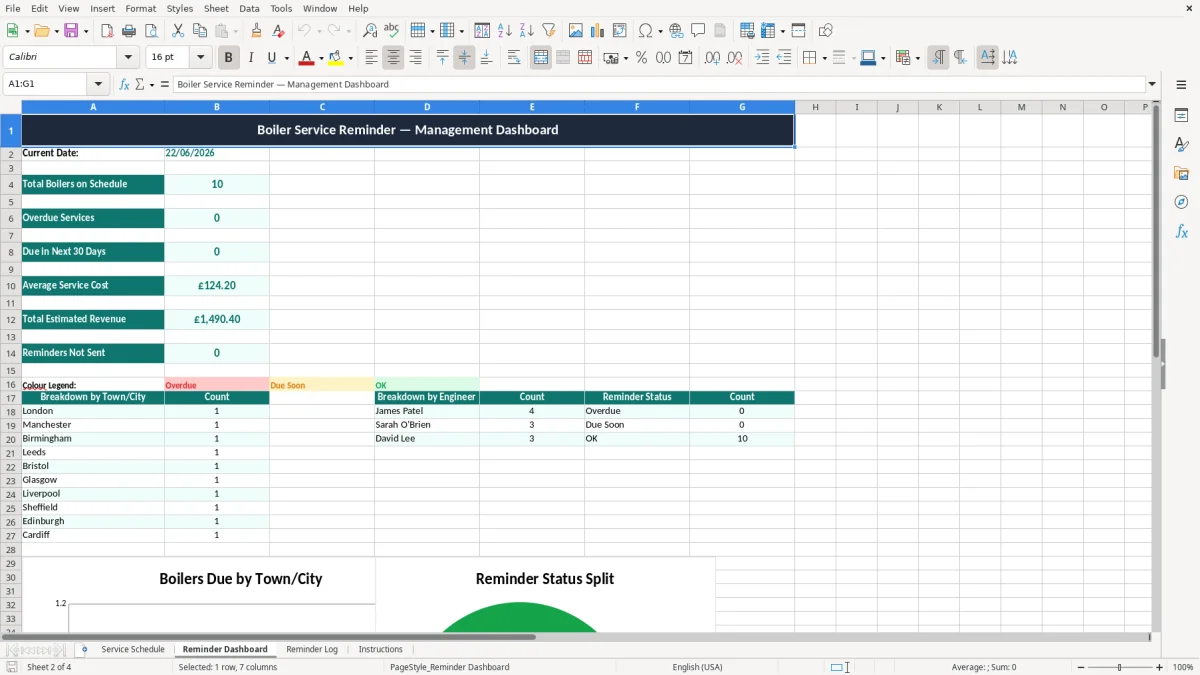
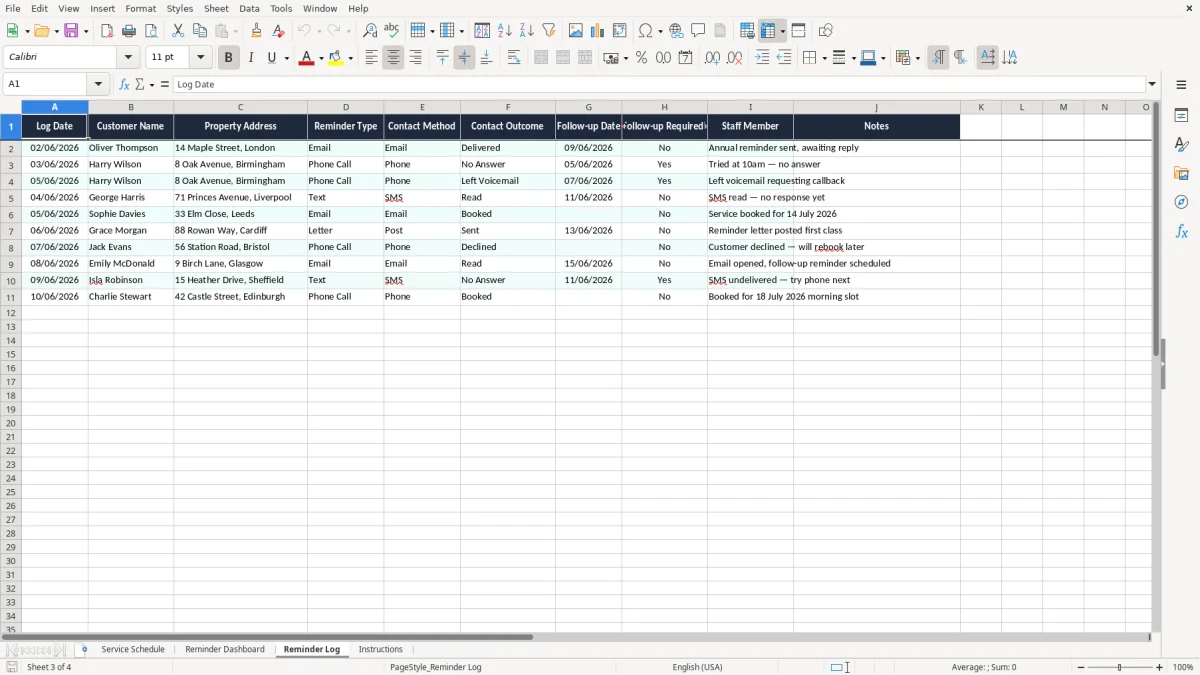
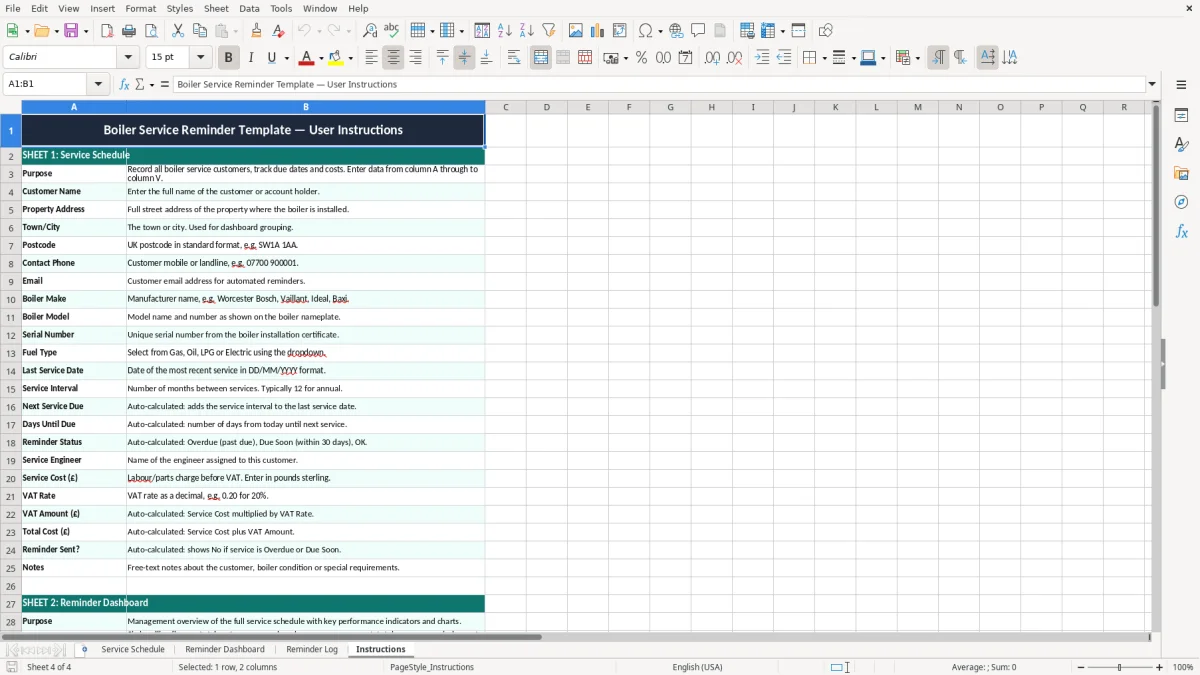
Use it if you manage domestic boiler servicing for landlords, homeowners or small heating firms and need a simple way to avoid missed annual services. Image 1 shows the main service schedule, image 2 the dashboard, image 3 the reminder log and image 4 the instructions sheet.
The layout is built for practical work: you enter customer and boiler details once, then follow the due-date fields and reminder status to keep jobs moving.
This template suits the heating engineer who services 20 domestic boilers a month, the office manager at a small plumbing firm, and the landlord keeping a few rental properties in order. When you have 40 or 50 annual service dates to chase, a missed reminder can push a job into the heating breakdown season and cost you a booking worth £85 to £120.
You normally reach for this at the start of the month, before the diary fills up, or in the run-up to autumn when boiler calls spike. A sole trader with 120 service customers can use the schedule to sort jobs due in the next 30 days, while a firm with 4 engineers can split the list by engineer and postcode.
Image 1 shows the Service Schedule with one row per customer and columns for boiler make, model, serial number, fuel type, last service date, service interval and next service due. Image 2 shows the Reminder Dashboard, which is the place to see due and overdue work at a glance before you start ringing round.
If you service 18 boilers in a week at £90 each, that is £1,620 of billable work. Losing just 2 of those because a reminder was missed means £180 gone, and the calendar often stays empty until the next available slot.
If you are a sole trader, keep your records for 5 years after the 31 January Self Assessment deadline for that tax year. If you run a limited company, keep business records for 6 years, which covers service history, invoices and reminder logs linked to your accounts.
The sheet includes service cost, VAT rate, VAT amount and total cost. That matters because standard-rate VAT is 20%, so a £95 service charge gives £19.00 VAT and a £114.00 total; if you are not VAT-registered, you would leave the VAT fields unused.
The next service due date is built from the last service date plus the service interval in months. If the boiler was last serviced on 10/01/2026 and the interval is 12 months, the next due date is 10/01/2027, which is the sort of date you want visible before the winter diary fills up.
Keep the reminder log with the schedule so you can show what was sent, when it was sent and who responded. That is useful evidence if a customer says they were never contacted and you need to show a clear chase history.
The usual failure is not the boiler record itself; it is the missing reminder. If you have 60 annual services and 10 are left to memory, you will lose time every month re-checking old invoices, phone notes and WhatsApp messages.
A date entered in the wrong format, such as 01/10/2026 when you meant 10/01/2026, sends the reminder at the wrong time and can create a false sense of security. In a small firm, one missed service at £110 plus VAT is not a disaster, but six missed reminders across a season can easily mean £660 of lost turnover.
If you do not mark whether a reminder has been sent, you end up double-contacting customers or missing them altogether. That leads to extra admin and awkward calls, especially if you are trying to fill a van route for one engineer across 15 postcodes.
Image 3 shows the Reminder Log, which is where the history is kept instead of buried in inboxes. A log of 40 sent reminders, with dates and outcomes, is enough to prove who was chased and when.
A boiler left until it fails may turn a planned £90 service into a £180 emergency call-out, but only if you have the diary space. Good reminder control keeps the annual service work in the ordinary week, not in a panic slot at 7.30pm.
Use the schedule every Friday afternoon or first thing Monday morning, before you start new bookings. That gives you a fixed habit, and it is better than checking dates only when a customer rings you.
If you are handling 500+ service records, multiple engineers and automated texts, you will outgrow a manual workbook and need proper job management software. For a small firm with 1, 2 or 3 vans, though, this spreadsheet is usually the simplest way to stay on top of annual servicing.
Image 2 should become your starting point each week: due soon, overdue and completed work are all visible without scrolling through the full schedule. That is the quickest way to turn the file into a habit rather than another forgotten tab.
It tracks customer details, property address, boiler make and model, serial number, fuel type, last service date, service interval, next service due, reminder status, engineer, service cost, VAT and notes.
Yes. It works for a landlord with 3 rental boilers just as well as for a heating firm with 150 domestic service records, because each row holds one property and its service history.
Add the service interval in months to the last service date. For example, a service on 12/03/2026 with a 12-month interval gives a next due date of 12/03/2027.
Yes. It includes service cost, VAT rate, VAT amount and total cost. At the standard VAT rate of 20%, a £100 service shows £20 VAT and a £120 total.
The reminder log gives you a simple record of what reminders were sent, when they were sent and what follow-up is still needed. That is useful when you need a clear contact history.
Update it at least once a week, and ideally every time a service is completed or a reminder is sent. If you leave it until month end, the due-date list will already be out of date.
Excel template by
Guide written by