Freelance Invoice Excel – Free Template (2026)
7
Free download
Track business bank transactions, VAT rates, running balance and net amounts with this cash book Excel template for UK sole traders and small firms.


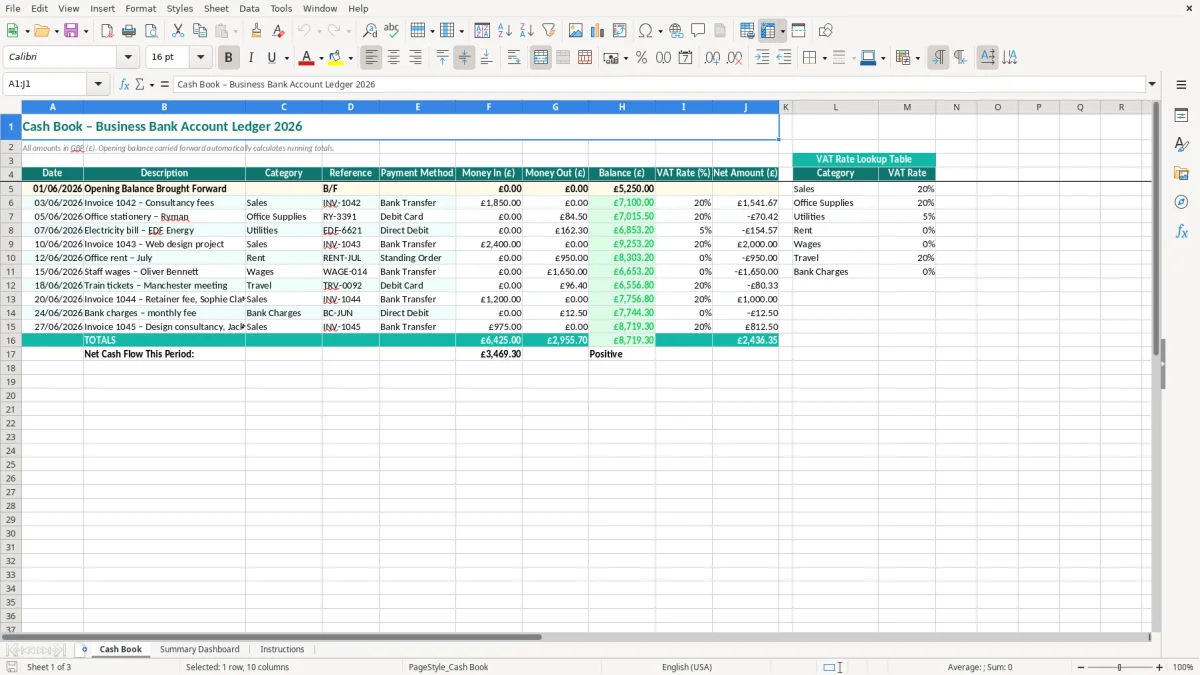
A cash book Excel template is a transaction ledger for recording money received and paid through a business bank account. This 2026 version contains date, description, category, reference, payment method, money in, money out, running balance, VAT rate and net amount columns, plus a summary dashboard and instructions.
Use the Cash Book sheet to enter each bank transaction in pounds and keep a running view of available funds. The VAT lookup table beside the ledger helps you apply rates consistently, while the Summary Dashboard gives you a quicker view of the figures you have entered.
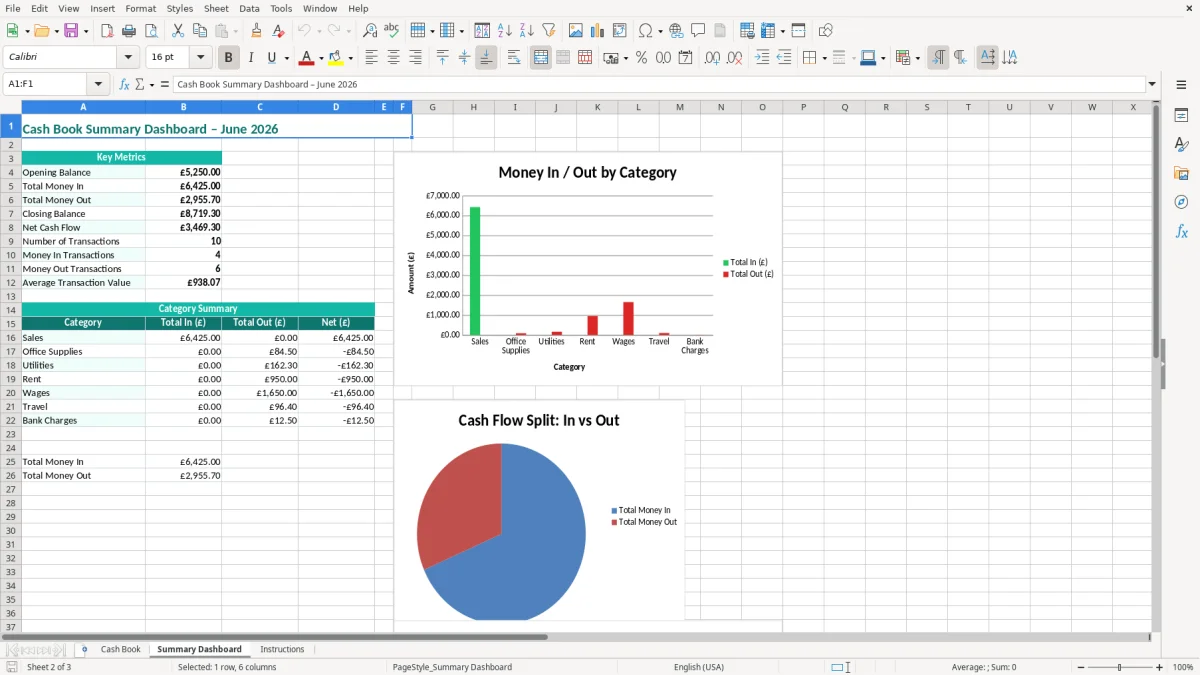
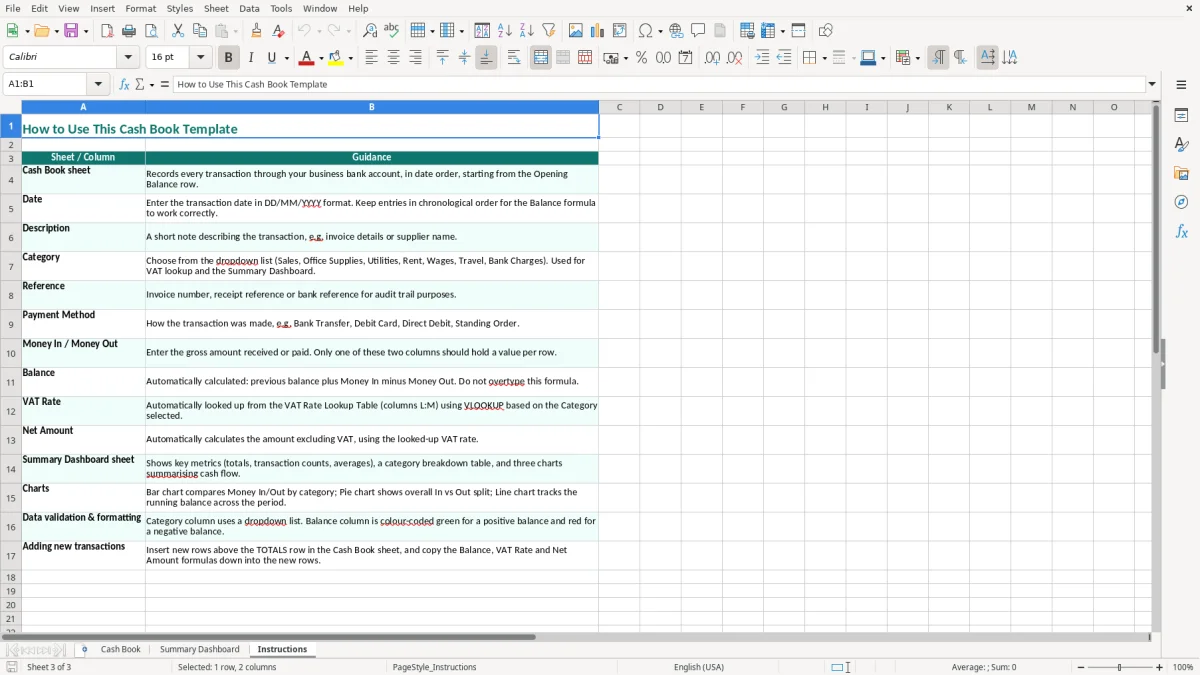
Image 1 shows the teal-formatted Cash Book ledger and its ten transaction columns. Image 2 shows the Summary Dashboard, and image 3 contains the Instructions sheet explaining the intended setup.
A cash book is most useful when one bank account holds the day-to-day trading activity and you need a simple audit trail rather than a full accounting package. A sole trader may update it every Friday before checking upcoming payments, while a bookkeeper at a small Ltd company may post the entries after the monthly bank statement arrives.
For example, consider a plumbing firm with four employees. In one week it receives £6,000 from completed jobs, pays £1,200 for materials, £240 for fuel and £3,100 towards wages and other regular costs. Entering those items separately makes the movement in the bank account visible instead of leaving the owner to judge the position from a single balance.
The Cash Book sheet is suited to recording actual bank movements: a customer receipt, a supplier payment, a bank charge or a transfer. The Description and Reference fields are particularly valuable when a payment appears on the statement as an abbreviated name and you need to identify it later.
An office manager at a tradesperson's firm can enter transactions during the week and send the workbook to the external bookkeeper at month-end. A club treasurer can use the same approach for subscriptions, hall hire, equipment purchases and grant receipts, provided the account being tracked is kept separate from personal spending.
Image 1 shows the ledger with the ten fields needed to describe each movement, including Category and Payment Method. Image 2 is the Summary Dashboard, which is useful when a committee or business owner wants the headline figures without scanning every row.
The workbook is a sensible starting point for a small volume of transactions. If an online shop has 300 orders a month, however, importing a bank feed or sales report into accounting software will usually be safer than typing every receipt into a spreadsheet.
A cash book is evidence for your bookkeeping, not automatically a complete tax record. HMRC expects you to keep records of sales, income, business expenses, purchase documents, bank statements and calculations. A company normally keeps accounting records for 6 years from the end of the relevant financial year; a self-employed person generally keeps records for 5 years after the 31 January Self Assessment deadline.
The cash book should therefore be supported by invoices, receipts and bank statements. If a sole trader's 2025/26 online return is filed by 31 January 2027, the underlying records are normally retained until at least 31 January 2032. Use a clear file name and a regular backup rather than treating the workbook as the only evidence.
If you are VAT-registered, the workbook's VAT Rate (%) field can help you distinguish standard-rate transactions at 20%, reduced-rate transactions at 5% and zero-rated transactions. The VAT registration threshold is £90,000 of taxable turnover in a rolling 12-month period in 2026, not profit and not simply the balance paid into the bank.
Suppose you record a £1,200 gross purchase at 20% VAT. The net value is £1,000 and the VAT is £200. Keep the supplier's valid VAT invoice before reclaiming the £200; a category or rate entered in Excel does not create evidence that the tax was chargeable.
For a cash-basis trader, the timing of payment can be central to the profit calculation. A traditional profit and loss account may instead require accruals and prepayments, so do not assume that every cash book total is the taxable profit of a company.
VAT-registered businesses submitting quarterly returns under Making Tax Digital (MTD) need digital records and compatible submission software. This workbook can organise source data, but it is not by itself MTD filing software. Review the 6 April to 5 April tax year separately from a Ltd company's accounting year, which may end on another date.
The most expensive cash book errors are usually small entries repeated every week. I have seen a business record card receipts as bank income but forget the associated card-fee payment, leaving the ledger £35 short after a month. That difference then creates unnecessary time during reconciliation and can conceal a genuine missing payment.
A common VAT mistake is entering the net amount in Money In (£) when the bank received the gross amount. A £2,400 customer payment at 20% VAT is £2,000 net and £400 output VAT, but the bank movement is £2,400. Recording £2,000 as the receipt understates the bank balance by £400 and distorts the VAT review.
The opposite error occurs with purchases: someone enters the VAT-exclusive figure in Money Out (£), even though £600 left the bank. If the purchase was £500 plus £100 VAT, the cash book must reflect the £600 payment; the net and VAT analysis can sit alongside it.
Using the invoice date instead of the bank transaction date can move a receipt into the wrong month. That matters when you are checking cash available for payroll or comparing a quarter's bank movements with a VAT return. A duplicated supplier payment of £850 is not a harmless spreadsheet error: it overstates costs and may remain unnoticed until the supplier statement or bank reconciliation.
Transfers between two business accounts are another trap. Entering the transfer as income in one account and failing to record the matching payment in the other makes the combined position appear £2,000 higher when the transfer was only £2,000 moved internally.
If one person types Fuel, another types Vehicle fuel and a third types Van costs, category totals become unreliable. The result is often a wasted two-hour tidy-up before year-end accounts. Image 1's Category and Reference fields are useful only when you apply a short, agreed list and record the supporting document against the same reference.
The simplest routine is to attach the Cash Book to an event that already happens. Enter transactions every Friday, then complete a fuller check when the monthly bank statement arrives. For a business with 80 entries a month, spending 15 minutes each Friday is far less painful than reconstructing all 80 from memory at year-end.
Keep the entry style consistent. For example, use Customer receipt - ABC Ltd rather than changing descriptions between ABC, ABC payment and bank receipt. The Summary Dashboard is then more useful because its totals are based on comparable entries.
Keep one master workbook, save a dated backup at month-end and restrict editing of the lookup area to the person responsible for bookkeeping. The Instructions sheet, shown in image 3, is a useful handover point when a volunteer treasurer or new office administrator takes over.
Do not add a second opening balance halfway through a year. If you need to start a new period, copy the file, retain the previous closing balance as the new opening figure and label the copy clearly. That preserves the trail between periods.
A spreadsheet is appropriate for a modest ledger with one or a few bank accounts. Move to bookkeeping software when you have several hundred monthly transactions, recurring invoices, stock, payroll, multiple VAT schemes or more than one person entering data. At 300 online orders a month, automated bank feeds and sales integration usually save more time and reduce duplicate-entry risk than extending a manual cash book.
It records money received and paid through a business bank account. This template includes transaction details, categories, references, payment methods, VAT rates, net amounts and a running balance, with a separate Summary Dashboard and Instructions sheet.
Yes. The Cash Book sheet is designed to carry the opening balance forward and calculate running totals as you enter Money In (£) and Money Out (£). Check the closing figure against the bank statement after each reconciliation.
Yes, as a record-organising tool. It includes a VAT Rate (%) column and a VAT Rate Lookup Table, including standard-rate, reduced-rate and zero-rated options. Keep valid VAT invoices and use compatible software when you need to submit an MTD VAT return.
No. A cash book records bank movements, while a profit and loss account measures income and expenses for an accounting period and may include accruals, prepayments and depreciation. A cash receipt is not necessarily sales income for every accounting method.
Update it at least weekly if the business has regular transactions, then reconcile it to the bank statement at month-end. A firm with 80 monthly entries could enter about 20 each Friday instead of trying to reconstruct the full month later.
A sole trader can use it to organise income and expense records for Self Assessment, but it should be supported by invoices, receipts and bank statements. Review the figures carefully and retain the records for the required period; the workbook does not replace professional tax or accounting software.
Excel template by
Guide written by