Freelance Invoice Excel – Free Template (2026)
7
Free download
Create dividend vouchers for a UK limited company, with shareholder details, shareholdings, dividend calculations and a summary sheet.


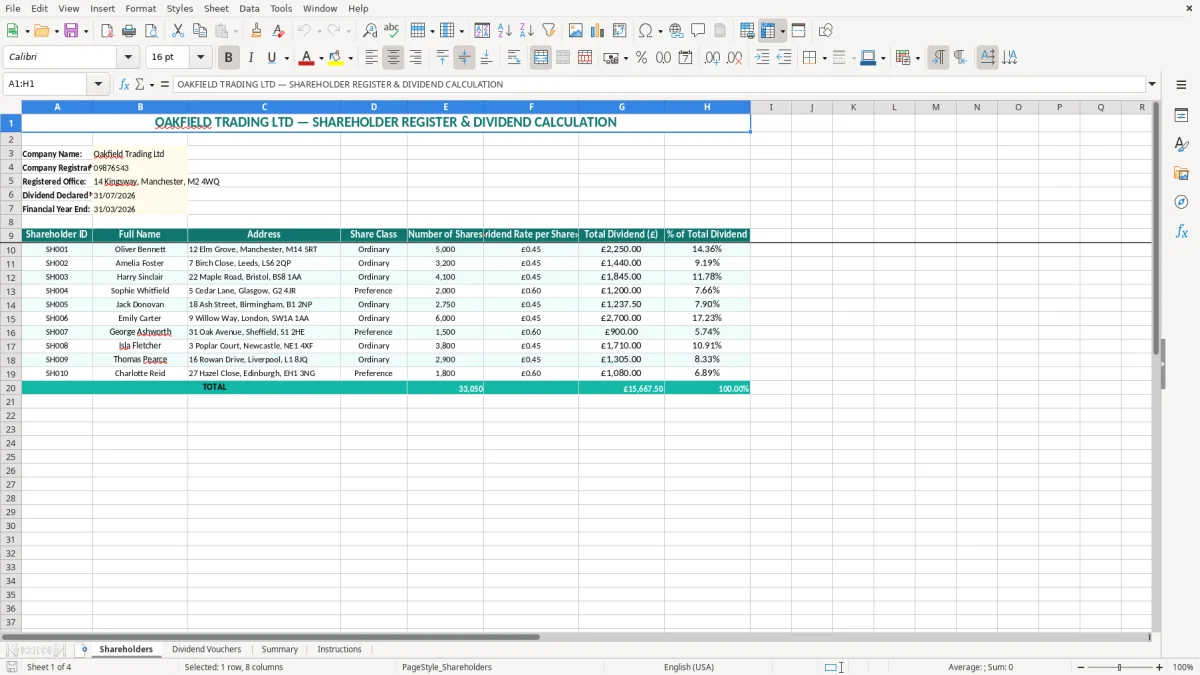
This dividend voucher Excel template helps a UK limited company record a dividend and prepare voucher details for each shareholder. It contains a shareholder register, per-share dividend calculations, voucher information, a summary sheet and instructions for completing the workbook.
Enter the company details, declaration date, financial year end and shareholder data on the Shareholders sheet. The workbook is set up for an example company, so replace Oakfield Trading Ltd and the sample names, addresses and figures before issuing any voucher.
A director of a small Ltd company usually reaches for a dividend voucher template after deciding how much can be distributed from available profits. The bookkeeper may be entering the figures at month-end, while the director checks the declaration against the latest management accounts and the company's share register.
This workbook suits a company with a straightforward share structure, such as a family-owned trading company with two ordinary shareholders. If one shareholder owns 5,000 shares and another owns 3,200, a rate of £0.45 per share gives dividends of £2,250 and £1,440 respectively, making a total distribution of £3,690.
Image 1 shows the Shareholders sheet. The company information appears at the top, followed by columns for Shareholder ID, Full Name, Address, Share Class, Number of Shares, Dividend Rate per Share (£), Total Dividend (£) and % of Total Dividend. The yellow input areas make it clear which sample details need replacing.
That layout is useful when a director declares an interim dividend during the year or a final dividend after the year-end accounts have been prepared. A bookkeeper can compare the number of shares with the statutory register, enter one rate per share and then inspect the totals without rebuilding a calculation.
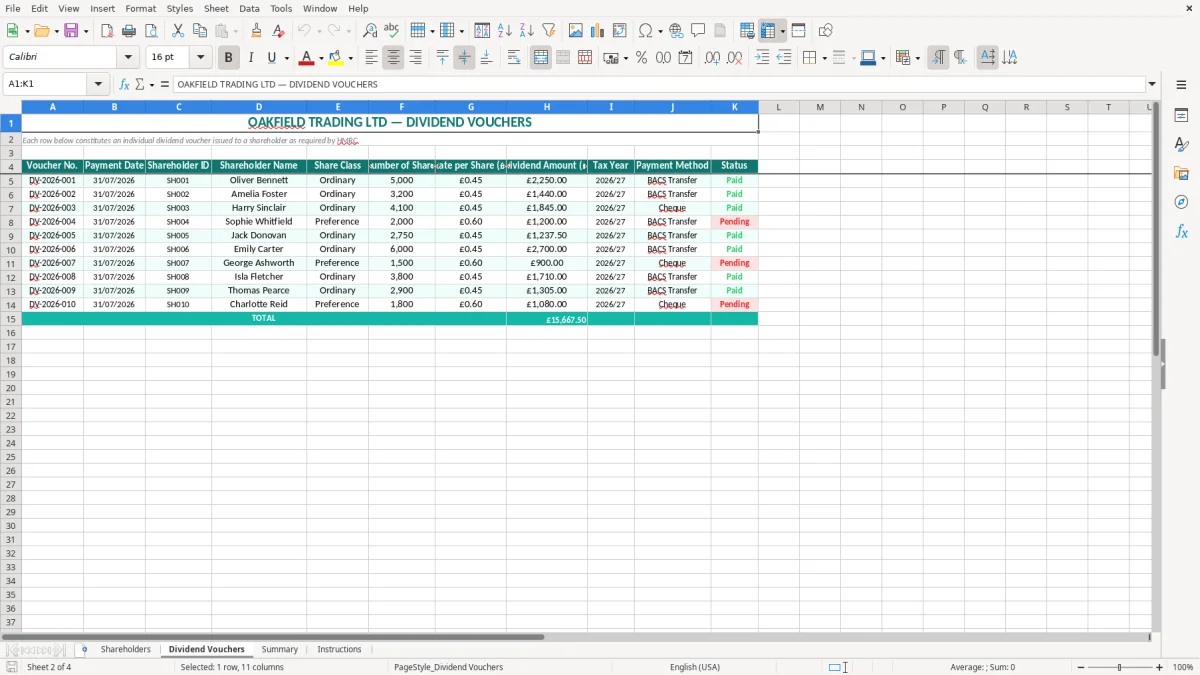
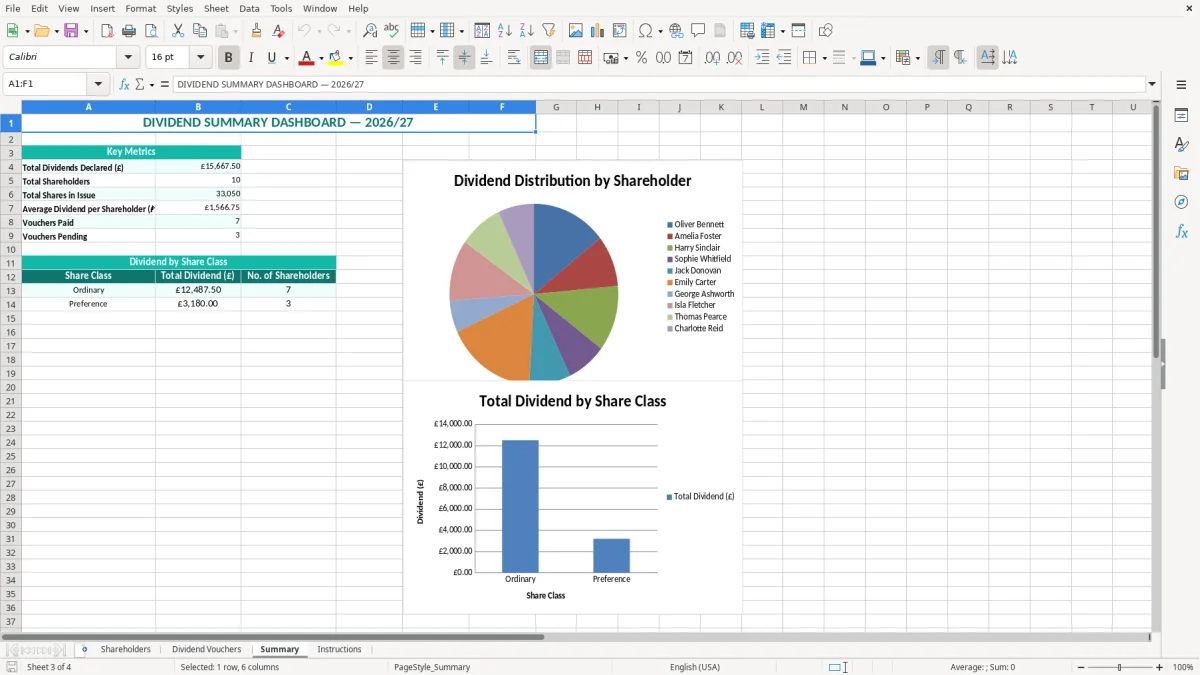
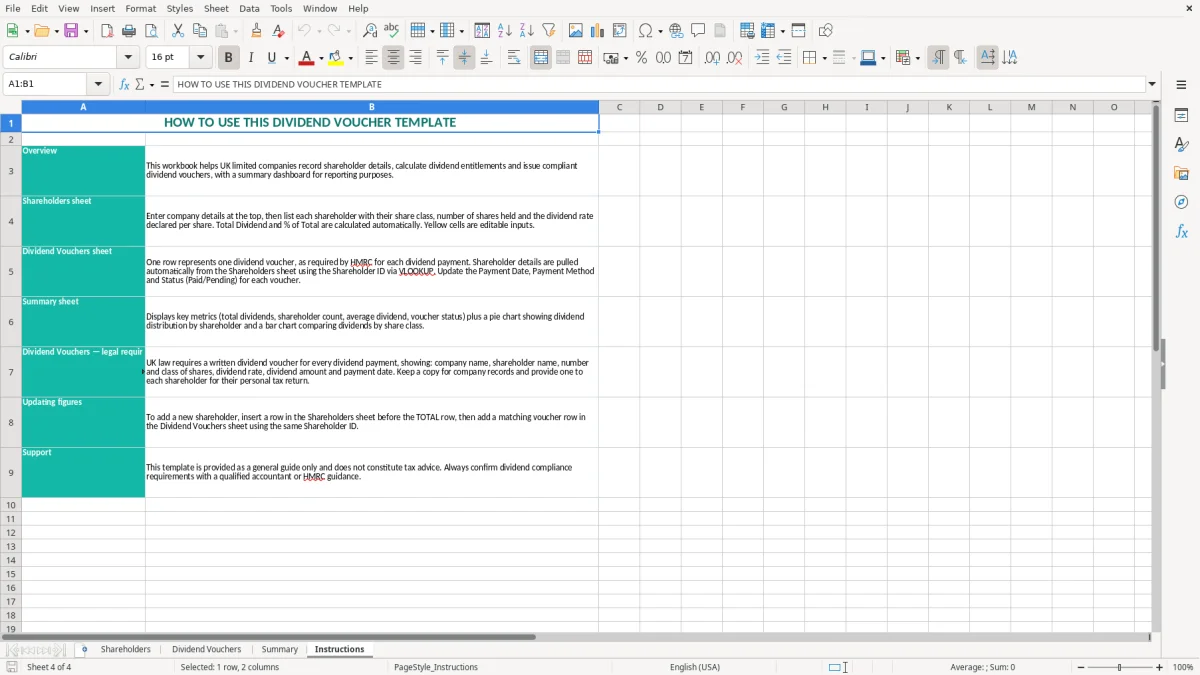
Image 2 shows the Dividend Vouchers sheet, which is intended to turn the checked shareholder information into individual voucher details. Images 3 and 4 show the Summary and Instructions sheets, giving you a review point and a practical guide rather than leaving the calculation on its own.
For a company with 20 shareholders, the spreadsheet is still manageable if the share class is simple. For multiple share classes, alphabet shares or different rights, use the file as a controlled starting point and extend the calculation only after checking the articles and share terms.
A dividend voucher should identify the company, the shareholder, the dividend date and the amount paid. In practice, include the company name, registered office, company registration number, shareholder name and address, the share class, the number of shares, the dividend per share and the total dividend. If the company is a Ltd, keep the voucher with the board approval and accounting records.
Dividends are not a business expense deducted from company profit. The directors must first establish that the company has sufficient distributable profits under the Companies Act 2006. A £10,000 bank balance is not automatically £10,000 available for dividend: unpaid bills, corporation tax, accruals and prior losses may reduce the distributable amount.
The company normally pays a dividend without deducting income tax or National Insurance. The shareholder reports taxable dividends through Self Assessment when required. For the 2026–27 tax year, running from 06/04/2026 to 05/04/2027, the dividend allowance is £500; dividends above the allowance are taxed according to the shareholder's income tax band.
Do not add an old-style tax credit to a modern voucher. The voucher records the cash dividend actually declared. A shareholder receiving £3,690 across several vouchers must consider the total dividend income, not just one payment, when checking their personal tax position.
Keep company accounting records for 6 years from the end of the relevant financial year. The company should also retain the dividend declaration, board minutes, dividend vouchers and evidence supporting distributable profits. The voucher does not replace the formal decision to declare the dividend or the company's register of members.
The Shareholders sheet includes the declared date and financial year end, while the company number and registered office support identification. Check that the registered details agree with Companies House; a voucher showing an outdated address is an avoidable correction for both the company and shareholder.
The most damaging mistake is declaring a dividend that the accounts cannot support. I have seen a director use the cash balance as the limit, pay £8,000, and discover after the year-end that £5,000 of corporation tax and supplier accruals left only £2,500 of distributable profit. The result is an overdrawn director's loan or an unlawful dividend that has to be documented and recovered.
A common spreadsheet error is entering 0.45 as £45.00 per share, or entering £0.45 in a field formatted as a whole number. For 5,000 shares, the intended result is £2,250; the wrong unit can produce £225,000. Check the rate, currency format and multiplication before anyone signs the paperwork.
Another frequent problem is using the current shareholding instead of the holding on the relevant record date. If a shareholder sold 1,000 of 5,000 shares before the declaration, paying the old holder £2,250 at £0.45 per share creates a £450 allocation error. The Shareholders sheet's ID and share-count columns make this comparison easier, but they do not replace the statutory register.
Missing addresses, an incorrect company number or a duplicated voucher date can lead to several replacement documents and confused personal tax returns. A bookkeeper handling six shareholders may spend an hour correcting one copied address across six vouchers; checking image 2 against image 1 before issue is quicker.
Do not treat the Summary sheet as proof that a dividend is legal. A total of £3,690 can reconcile perfectly while the directors' minutes, share rights or distributable profits are wrong. The spreadsheet controls arithmetic; the directors remain responsible for the decision and the supporting company records.
Use the workbook at a fixed point in the dividend process rather than opening it only when a shareholder asks for paperwork. The most reliable routine is to prepare the management accounts first, confirm distributable profits, approve the dividend, and then complete the Shareholders and Dividend Vouchers sheets on the same day.
For example, if the approved dividend is £3,690 and the workbook totals £3,690, the arithmetic agrees. If it totals £3,645, stop and investigate a changed shareholding, a missing shareholder or an incorrect rate rather than adjusting the summary figure manually.
Protect formula cells and use a consistent naming convention once you prepare vouchers every quarter. Conditional formatting can flag blank names or zero shares, but keep the control simple: a second review is more dependable than adding complicated formulas that nobody understands.
Move to accounting software or a company secretarial system when you have several share classes, frequent transfers, different dividend rights or dozens of shareholders. A spreadsheet remains sensible for a small owner-managed company with a stable register, but it becomes a liability when one change has to be copied across 40 records and the audit trail is unclear.
A dividend voucher is a record showing the dividend paid by a company to a shareholder. It normally identifies the company and shareholder, gives the declaration or payment date, states the shareholding and dividend amount, and is retained with the company's dividend records.
Yes. It is designed for a UK limited company with a straightforward shareholder register and includes company name, registration number, registered office, share class, share numbers and dividend calculations. Replace the sample Oakfield Trading Ltd details before use.
Include the company's name, registered office and registration number, the shareholder's name and address, the relevant share class, dividend date, number of shares, dividend rate per share and total dividend. Keep the voucher with the board approval and evidence that the dividend was supported by distributable profits.
Normally, the company pays the dividend gross and does not deduct income tax or National Insurance. The shareholder considers the dividend allowance and their total dividend income for the 2026–27 tax year, and reports the amount through Self Assessment when required.
Cash alone is not enough. The directors must confirm that the company has sufficient distributable profits after considering liabilities, tax, accruals and previous losses. A £10,000 bank balance may support a much smaller lawful dividend once those amounts are taken into account.
Multiply each shareholder's number of shares by the dividend rate per share and compare the total with the approved dividend. For example, 5,000 shares at £0.45 equals £2,250. Then check the Summary sheet and confirm that the shareholder percentages reconcile to the full distribution.
Excel template by
Guide written by