Mileage Log Excel Template – Free (2026)
0
Free download
Organise UK leads, contacts, follow-ups and sales opportunities with a practical CRM Excel template for small businesses.


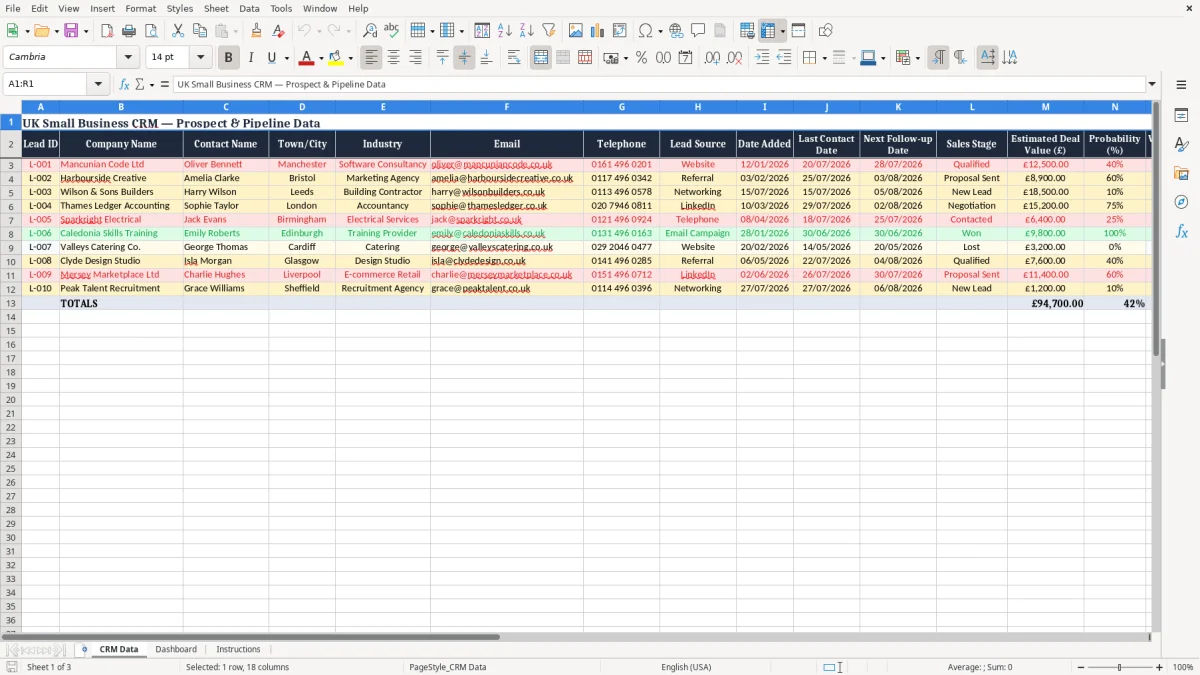
Keep customer relationships, sales activity and follow-up tasks organised with this practical CRM Excel template for UK small businesses. Designed for sole traders, consultants, agencies, trades businesses and small sales teams, the workbook provides a straightforward way to record prospects, manage opportunities and review your pipeline without the cost or complexity of dedicated CRM software.
Use familiar Excel features to store contact details, monitor sales stages, assign ownership and maintain a clear record of conversations. Values are shown in pounds sterling, while fields for UK towns, cities and telephone numbers make the template suitable for businesses working across the UK.
Start by replacing the sample records with your own prospects and customers. Add one row for each lead or opportunity, then complete the company, contact, location, email, telephone, industry and lead source fields. Record the date the lead was added and update the last contact date after every meaningful interaction.
Set a realistic next follow-up date and select the appropriate sales stage. Enter the estimated deal value in pounds and add a probability percentage to support pipeline forecasting. Assign the opportunity to a sales owner and use the notes field to capture relevant details from calls, meetings, emails and proposals.
Review the follow-up information at the beginning of each working day, complete overdue actions and update the record immediately afterwards. At least once a week, review the pipeline by stage, owner and lead source so you can identify stalled opportunities, likely wins and gaps in marketing activity. Save dated backups and restrict workbook access to authorised users.
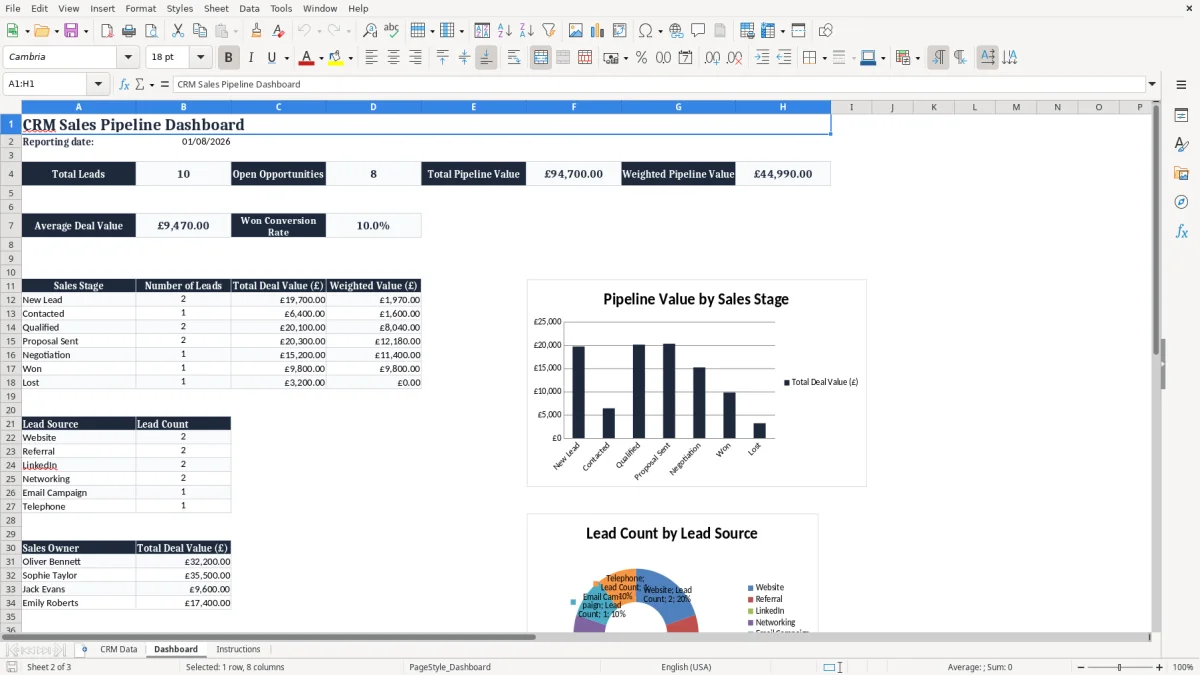
Many small businesses need a reliable way to manage enquiries, but do not need the expense or administration of a large CRM platform. This CRM Excel template provides a practical starting point for organising prospects and customer activity in one familiar file.
It is suitable for a sole trader managing personal contacts, an agency tracking proposals, a consultancy following up qualified opportunities or a small sales team sharing responsibility for new business.
The workbook includes fields that reflect common UK business needs. Record company names, contact names, towns or cities, industries, email addresses and telephone numbers, then add the source of each enquiry.
Sources can include a website, referral, networking event, LinkedIn contact or another channel used by your business. Keeping this information together makes it easier to understand where opportunities originate and which activities deserve more attention.
Because the template is built in Excel, it is easy to adapt without specialist technical knowledge. You can change headings, add internal categories or adjust sales stages to match the way your business works.
The format also makes it simple to filter records by owner, location, stage or follow-up date. This can be especially useful for businesses that serve a defined local area or divide responsibility across a small team.
A spreadsheet should be kept current to remain useful. Encourage everyone who uses it to update records after calls, meetings and emails.
With a consistent process, the template can become a dependable daily sales tool rather than an occasional list of contacts. It gives owners a clearer view of active opportunities while keeping administration manageable for a growing UK business.
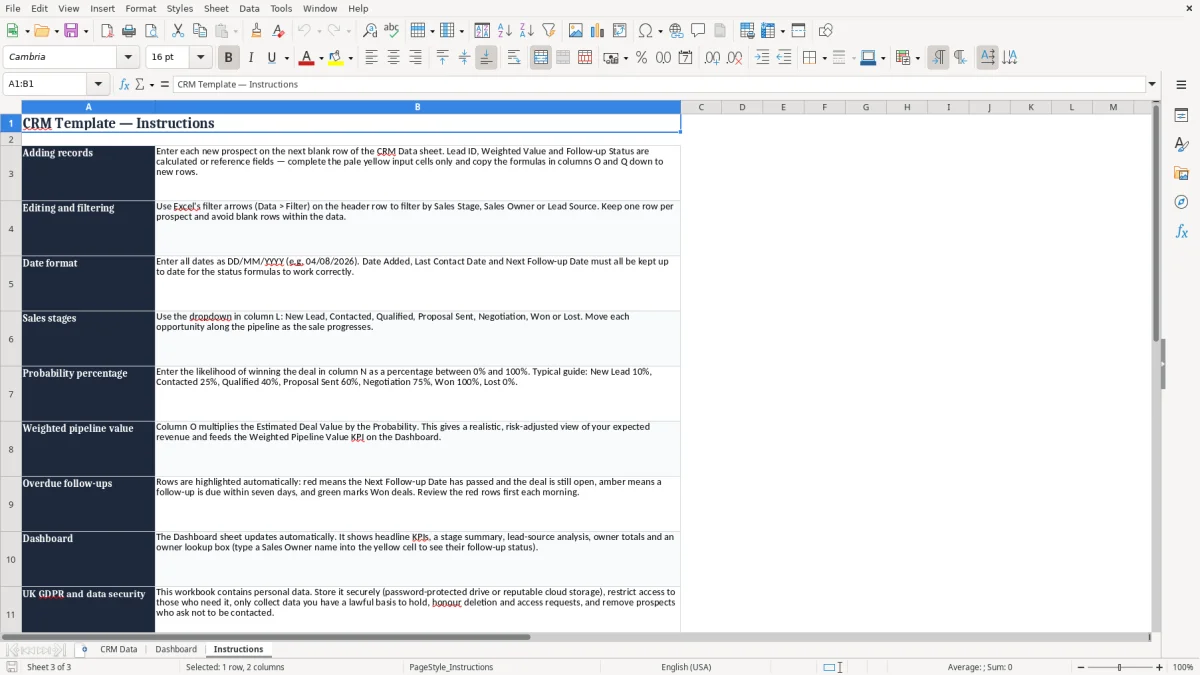
Successful customer relationship management depends on knowing what happened previously and what needs to happen next. This template gives each prospect a clear record, helping you move beyond scattered notes, inbox searches and personal reminders.
The Date Added and Last Contact Date fields show the history of activity, while Next Follow-up Date creates a visible action point for the next conversation.
Use the Sales Stage field to describe where an opportunity is in your process. A new enquiry might begin as New Lead, then move to Contacted or Qualified after an initial discussion.
When a proposal has been sent, the Proposal Sent stage helps you identify opportunities that may need a timely response. You can customise these stages for your own process, including discovery, negotiation, won and lost if those labels are more useful.
The Follow-up Status field supports daily prioritisation. Review the list for overdue actions, upcoming calls and prospects that have not been contacted recently.
After completing an action, update the Last Contact Date, choose a new follow-up date and add a short note. This simple habit keeps information accurate and gives other team members useful context if responsibility changes.
The Notes field can capture practical details such as a requested service, decision-making timeline, budget discussion, meeting outcome or proposal feedback. Avoid storing information that is unnecessary for your sales process.
Personal data should be handled carefully, with access limited to people who need it and retention practices appropriate for your business. Used consistently, the spreadsheet creates a shared view of customer activity and reduces the risk of promising leads being forgotten.
That shared view becomes more useful when the next step is tracking each opportunity through a sales pipeline tracker.
A list of leads becomes more useful when it helps you make decisions about future revenue. This CRM Excel template includes Estimated Deal Value, Probability and Weighted Value fields so a small business can assess opportunities in a structured way.
Enter the potential value of each deal in pounds sterling, then apply a realistic probability percentage based on the evidence available.
For example, a £10,000 opportunity with a 40% probability has a weighted value of £4,000. This does not guarantee revenue and should not replace judgement, but it provides a more balanced view than adding every possible deal at its full value. Reviewing both total estimated value and weighted value can help you distinguish between a large but uncertain opportunity and several smaller opportunities that are more likely to close.
Sales stages provide useful context for probability. A new enquiry may have a low percentage, while a qualified opportunity with confirmed requirements could justify a higher figure.
A proposal that is awaiting feedback should still be assessed carefully rather than automatically treated as highly likely. Agreeing simple internal rules for probabilities can make reports more consistent when several people update the workbook.
Use the pipeline information during a weekly review. Look for opportunities with no recent contact, deals that have remained at one stage for too long and follow-ups that are approaching. You can also compare values by Sales Owner, Lead Source, industry or location to understand where effort is being spent.
If your business has seasonal demand, a date-based review may help you plan capacity and cash flow conversations. Excel is useful at an early stage because it remains transparent and flexible.
Every small business develops its own way of finding, qualifying and converting customers. A useful CRM template should support that process rather than force you into a complicated system.
Begin with the existing fields, then make small changes as you learn what information genuinely helps your team. You might add expected close date, priority, service category, customer type, region or a reason for lost opportunities.
The sample data can be replaced with your own records, and the sales owner list can be changed to match your team. If you work alone, you can use the owner field for different territories, business divisions or enquiry channels instead.
Lead Source can be adapted to include local advertising, trade shows, repeat customers, partner referrals and online campaigns. These changes can make the workbook more relevant while preserving its straightforward structure.
A consistent naming convention is important. Decide whether company names should include legal suffixes, how telephone numbers will be entered and which sales stage definitions everyone will use.
Consistency improves filtering and makes summaries more meaningful. It is also worth deciding how often inactive or lost leads will be reviewed, archived or removed in line with your internal policy.
Protect formula cells and keep a secure master copy before sharing the file. If the workbook contains personal information, store it in an appropriate location, limit access to authorised users and follow your data protection procedures, including UK GDPR requirements where relevant.
Do not use the spreadsheet to collect sensitive information that is not required for sales activity. The best result comes from updating records after each contact, reviewing actions daily and discussing pipeline movement weekly.
A CRM Excel template is a structured spreadsheet for recording contacts, sales opportunities, communications, follow-ups and pipeline values. It gives a small business a central place to manage customer relationships.
It is suitable for UK sole traders, start-ups, consultants, agencies, trades businesses and small sales teams that need a simple way to manage prospects and opportunities.
Yes. Use the Sales Owner field to assign each lead and filter the data by team member. You can change the owner names to suit your organisation.
Weighted value is the estimated deal value multiplied by the probability of winning the opportunity. For example, a £10,000 deal with a 40% probability has a weighted value of £4,000.
Yes. Adapt the stages to match your process, such as New Lead, Contacted, Qualified, Discovery, Proposal Sent, Negotiation, Won and Lost.
Excel can be effective for a small number of users and a manageable volume of leads. As your team or database grows, you may benefit from a dedicated CRM with user permissions, automated reminders and a shared online database.
Excel template by
Guide written by