Mileage Log Excel Template – Free (2026)
16
Free download
UK quotation workbook with a formatted quotation sheet, quote log, dashboard and instructions for small businesses and sole traders.


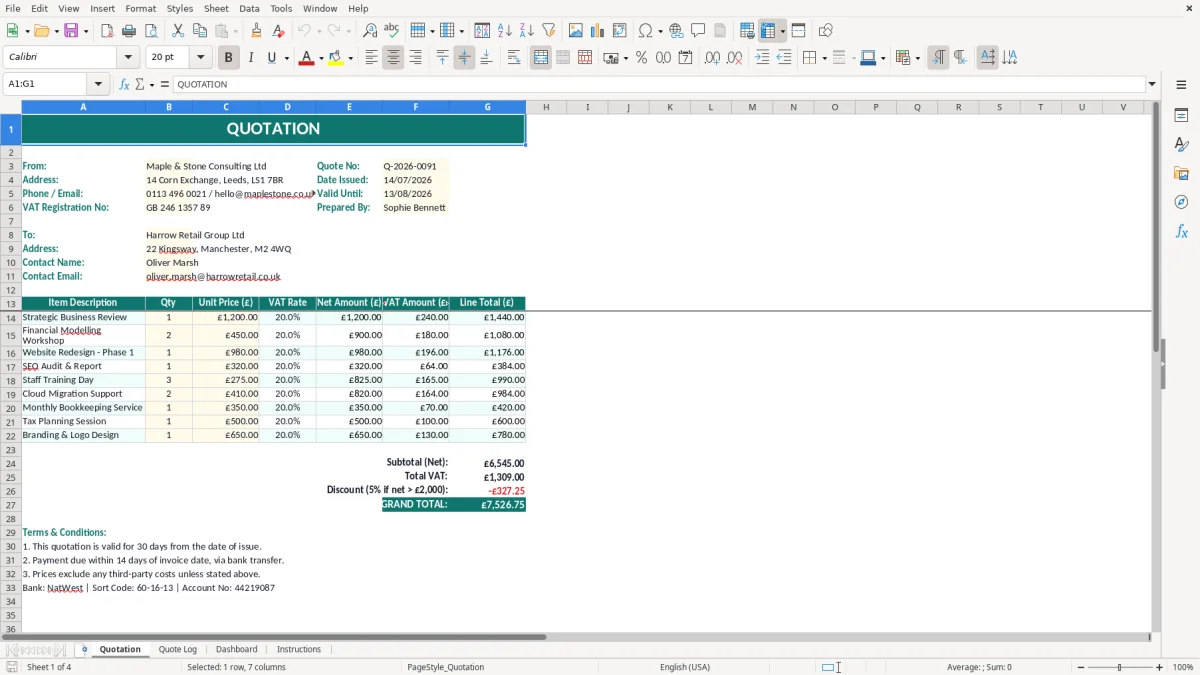
This quotation Excel template is a formatted workbook for preparing, recording and reviewing customer quotations. It contains a Quotation sheet with your business details, quote number and issue date, plus a Quote Log, Dashboard and Instructions sheet.
Use it before starting work to give customers a clear written price, scope and validity period. The teal headings, pale input cells and currency formatting make the quotation easy to complete and present professionally.
A quotation is useful when the customer needs to approve a price before you commit to the work. A sole trader electrician may quote for a £2,400 consumer unit replacement, while a four-person building firm may price a £18,500 kitchen extension before ordering materials or booking labour.
This workbook suits the point between an enquiry and an invoice. You can prepare the document during a sales call, after a site visit or at the end of a weekly estimating session, then keep the outcome in the Quote Log rather than leaving it in an inbox.
An office manager at a plumbing firm can use the Quotation sheet for a commercial boiler replacement. The From block already gives a clear place for the company's name, address, telephone number, email address and VAT registration number, while the quote number and issue date identify the document.
For a consultancy, the same structure works for a fixed-fee project. A proposal for 12 days at £450 a day gives a basic price of £5,400 before VAT; showing the calculation clearly helps the client understand what they are accepting.
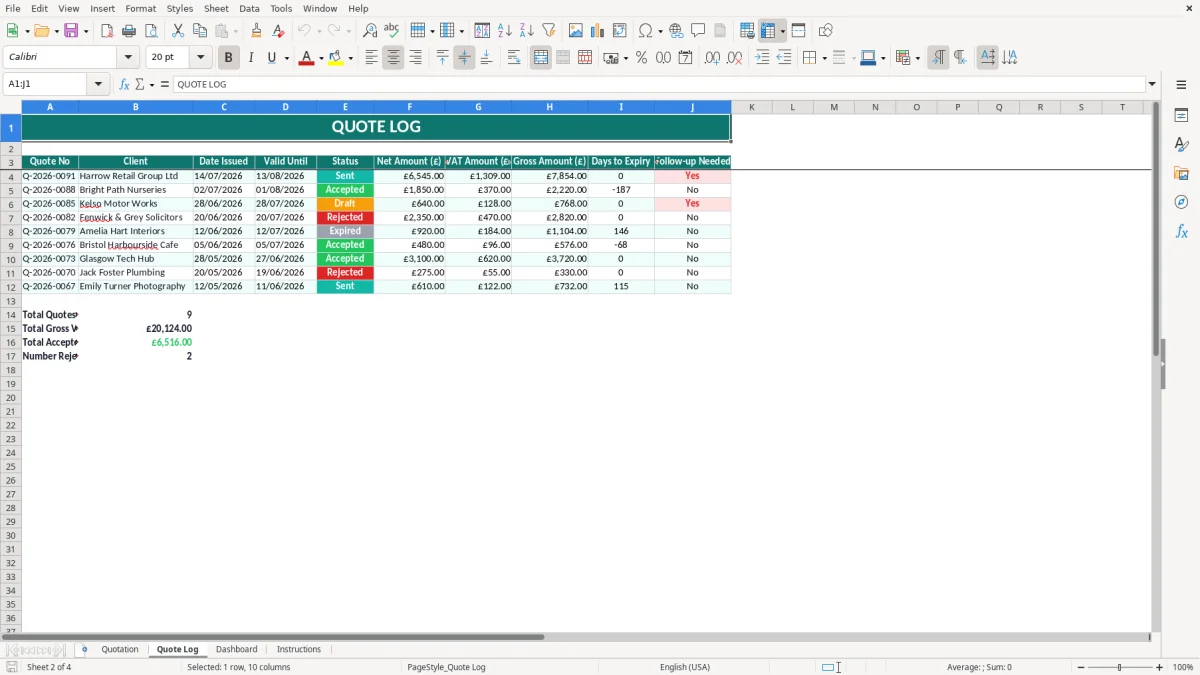
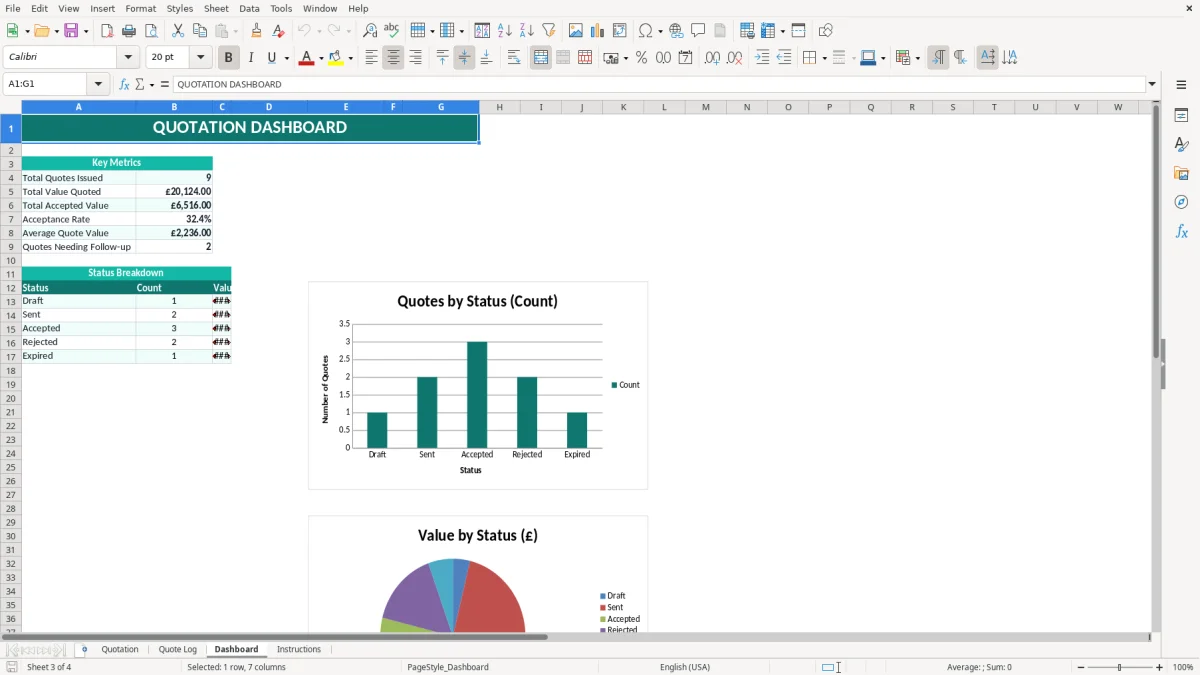
A bookkeeper at an Ltd company may maintain the Quote Log every Friday, after checking which estimates were sent during the week. The Dashboard then provides a useful management view, while the original Quotation sheet remains the customer-facing record.
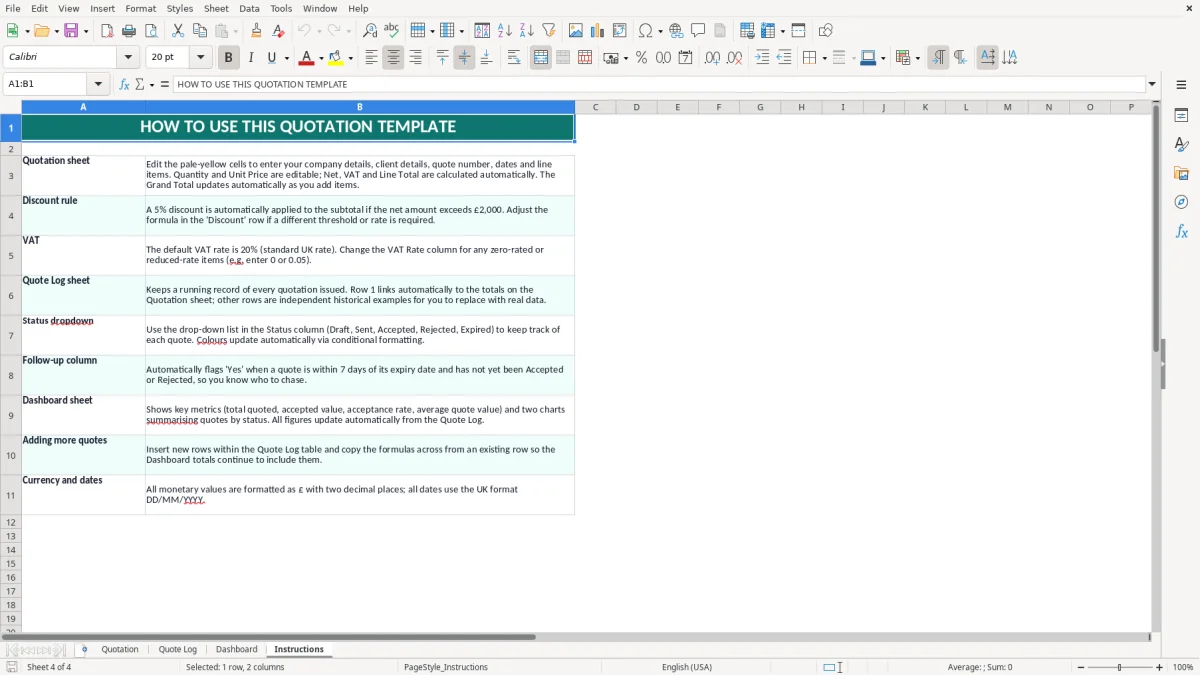
Use image 1 to identify the main Quotation layout: the title spans columns A to G, the business information sits on the left and the quote metadata sits on the right. Images 2, 3 and 4 show the Quote Log, Dashboard and Instructions sheets respectively, so you can see how the workbook separates preparation, tracking, review and guidance.
The same review cycle naturally leads into a cash flow forecast when managers need to see whether those quotations are likely to translate into enough incoming cash.
A quotation is not the same as a VAT invoice, but it should give the customer enough information to make an informed decision. Put your legal business name and address on the document; an Ltd company should use the name registered at Companies House. A sole trader should show their trading name and personal name where required.
Give each quotation a unique sequential reference. Q-2026-0091 is more useful than a vague file name such as quote-final, because you can refer to it in an email, the Quote Log and later correspondence. Record the date issued in the template's DD/MM/YYYY format and state how long the price remains open.
If you are VAT-registered, show your VAT registration number and explain whether prices are exclusive or inclusive of VAT. The standard VAT rate is 20%, although reduced-rate 5% and zero-rated supplies apply to specific goods and services. For example, £5,400 of standard-rated work produces £1,080 VAT and a customer total of £6,480.
Do not call a quotation an invoice or use it to account for output VAT. Once the customer accepts and you supply the work, issue a VAT invoice containing your name and address, a unique invoice number, invoice date, customer details and VAT shown separately where applicable.
Include the scope, exclusions, payment terms and acceptance method in the quotation. A 14-day deposit requirement is easier to administer than an informal request for payment, particularly where materials must be ordered before work starts.
Remember that a sole trader has unlimited liability, whereas an Ltd company is a separate legal entity registered at Companies House. The quotation should identify the correct entity; using a director's personal details for a limited company can create confusion over who is contracting with the customer.
The expensive mistakes usually happen before the customer ever sees the final figure. A tradesperson may price 30 hours at £45, giving £1,350, but forget £280 of materials and £95 delivery. The apparent £1,350 quotation then becomes a job costing £1,725 before overheads, leaving a £375 hole.
Another recurring problem is issuing several versions with the same reference. A customer accepts Q-2026-0091 by email, while the business later works from a revised file with an extra £600 of work. Without a clear log entry or revision note, the dispute can take several hours to resolve and may end with the business absorbing the difference.
Use the Quote Log as the control point. Record whether a quotation is awaiting a decision, accepted, declined or revised, and keep the reference consistent across the email, workbook and eventual invoice. Do not overwrite the original price when the scope changes; create a new reference or revision that shows what changed.
A VAT-registered consultancy that quotes £8,000 without saying whether VAT is included can face an awkward £1,600 conversation when the customer assumes the total is £8,000. Decide whether the figure is net or VAT-inclusive before sending it and state that choice plainly.
Scope omissions create a similar risk. If a builder excludes waste removal, scaffolding and making good, those items need to be visible. A £12,000 quote that later requires £1,400 of omitted work may produce a complaint even when the additional charge is commercially reasonable.
Old customer details, a mistyped email address or the wrong issue date can make a small firm look careless. Before issuing, check the business identity block, quote number, date, customer name, quantities and currency-formatted values; then compare the final total with your own job costing.
The workbook becomes useful when quotation preparation and follow-up happen at fixed times. Set aside 20 minutes every Friday to enter new quotations in the Quote Log and review open opportunities on the Dashboard. For a business issuing 12 estimates a week, that routine prevents 48 or more monthly records being left in email folders.
Connect the follow-up to an existing event. A sole trader can review quotes when completing the weekly bank reconciliation; an office manager can do it after the Monday diary meeting. A short note stating the next contact date is more effective than leaving the quotation marked simply as sent.
Excel is a sensible choice for a small firm with 20 or 30 live quotations, especially when one person controls the file. It becomes less suitable when five staff edit it at once, the Quote Log reaches several thousand rows or you need automatic stock, customer-credit and sales-order links.
At that point, move to a quoting or accounting system with user permissions, an audit trail and controlled document versions. Until then, protect the workbook, keep one master copy and take a dated backup after each weekly update.
The workbook contains four sheets: Quotation, Quote Log, Dashboard and Instructions. The Quotation sheet includes a formatted business information block, quote number, issue date and quotation layout; the other sheets support tracking, review and setup.
Yes. Replace the example Maple & Stone Consulting Ltd details with your own trading and personal business details, then use the quotation sheet for customer work. If you are VAT-registered, include your VAT registration number and state whether prices include VAT.
No. A quotation sets out proposed work and pricing; it does not normally record a completed supply. Issue a proper VAT invoice when required, showing the invoice number, invoice date, customer details and VAT separately if you are VAT-registered.
The standard VAT rate is 20%, while the 5% reduced rate and zero rate apply only to specified supplies. For example, £2,000 of standard-rated work has £400 VAT and a total of £2,400. Check the treatment of your particular goods or services before issuing the quote.
Use a unique, consistent reference for each quotation, such as Q-2026-0091. Do not reuse a number for a revised scope; issue a new reference or clearly marked revision so the accepted version can be identified.
State a definite period in the quotation, such as 14 or 30 days, particularly where labour or material costs may change. A stated validity period gives you a clear basis for revising the price after it expires and avoids relying on an informal email exchange.
Excel template by
Guide written by