Mileage Log Excel Template – Free (2026)
0
Free download
Manage UK customer records in Excel with contacts, addresses, VAT details, follow-ups, account managers and customer value.


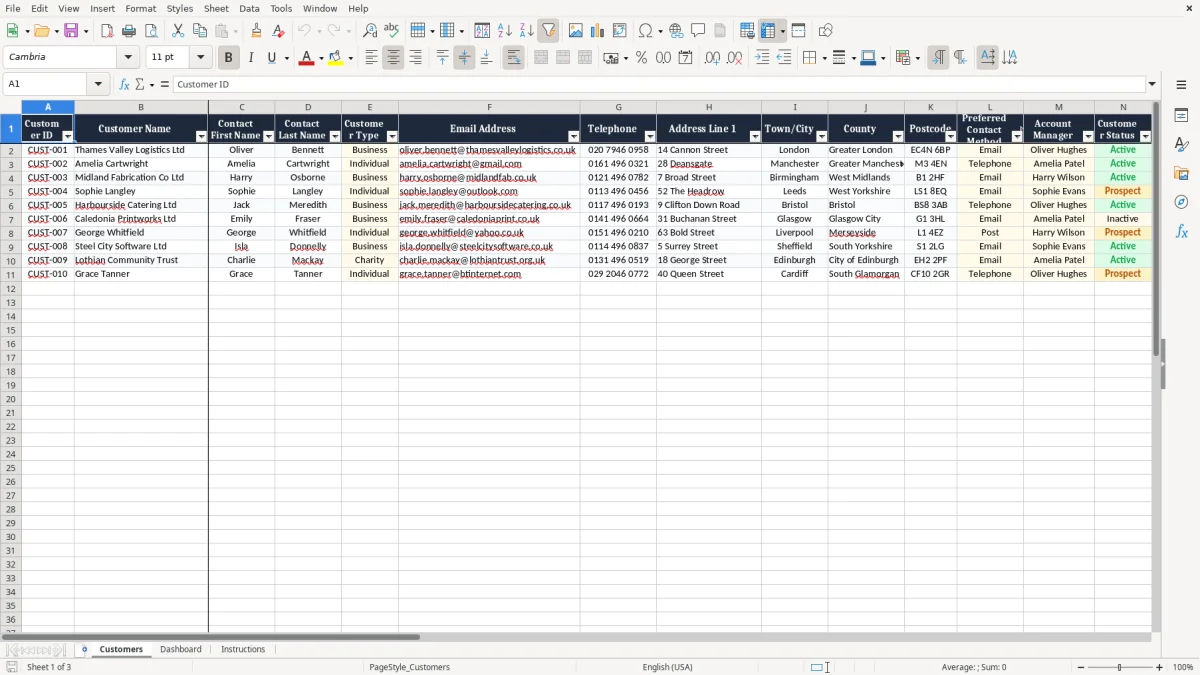
Keep customer information organised in one practical Excel workbook. This UK-focused customer database template gives small businesses, sole traders and growing teams a clear way to record contact details, addresses, customer status, account managers, follow-up dates, VAT information and lifetime value.
It is simple to customise, easy to filter and suitable for everyday customer administration without the cost or complexity of dedicated CRM software.
Open the workbook in Microsoft Excel or a compatible spreadsheet application. Review the example customer records to understand how each column is intended to be used, then replace the sample data with your own information. Add one customer per row and give each record a unique Customer ID.
Complete the customer name, contact details, address, customer type, account manager and status fields wherever possible. Use the date columns to record when a customer joined, when they were last contacted and when the next follow-up is due. Enter lifetime value in pounds sterling and complete the VAT fields when they apply.
Use the available drop-down selections to keep entries consistent. When the database is populated, apply filters to view active customers, individual customers, business customers, records assigned to a particular account manager or customers requiring follow-up.
Review the worksheet regularly so that contact information, customer status and planned actions remain accurate. Save a secure backup and restrict access to authorised users, particularly where the workbook contains personal information.
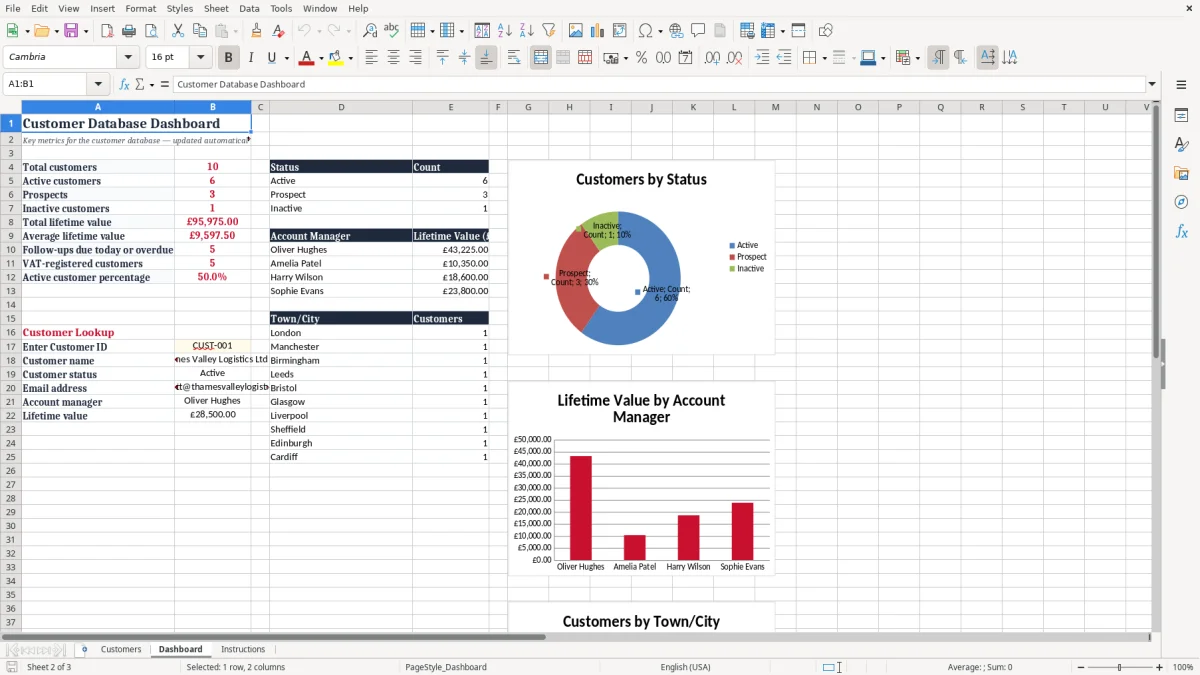
Managing customer information in a consistent format can make everyday administration much easier. This customer database Excel template is designed for UK businesses that want a straightforward record of clients, customers and contacts.
Instead of keeping information across emails, notebooks and separate files, you can use one workbook to create a central customer list that is simple to review and maintain. Each row is intended for one customer, while the columns provide a clear structure for the details your team needs most often.
The template includes fields for customer names, contact people, email addresses, telephone numbers and full UK address information. Town or city, county and postcode fields make it suitable for businesses serving customers across England, Scotland, Wales and Northern Ireland. You can also record whether a customer is an individual or a business, making the database flexible for sole traders, agencies, consultants, retailers and service providers.
The workbook is useful when you need a lightweight customer management system without introducing specialist software. Excel is familiar to many teams, works well for small and medium-sized lists and can be adapted as your processes change. You can add new records, update existing information, sort the list and use filters to find the customers relevant to a particular task.
The template also gives your team a consistent starting point for customer administration. Clear headings and dedicated fields reduce the risk of overlooking important information and make it easier for colleagues to understand the records. Whether you are building your first customer list or replacing an unstructured spreadsheet, this UK customer database template provides a practical foundation for organised record keeping.
With that structure in place, a small business CRM can extend the same records into a clearer follow-up system for calls, notes and ongoing customer activity.
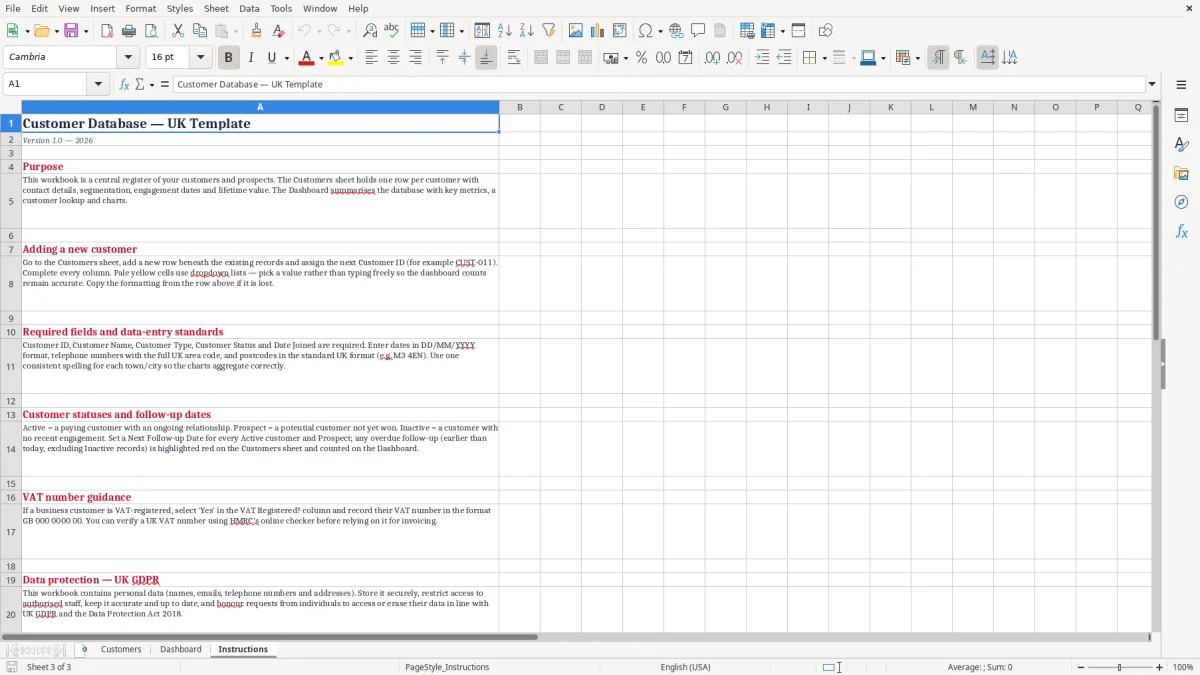
A useful customer database should do more than store names and email addresses. It should help you remember who is responsible for each account, when a customer was last contacted and what action should happen next.
This Excel template includes fields for account manager, customer status, preferred contact method, last contact date and next follow-up date, giving you a simple way to support regular customer communication.
Use the account manager field to assign ownership across a sales or service team. When responsibilities are clear, it becomes easier to identify who should answer a query, arrange a review or contact a customer about a new opportunity.
The customer status field can help distinguish active customers from records that are inactive, pending or require attention. The contact method field can record whether a person prefers email, telephone or another agreed channel.
Date fields are useful for planning. Enter the last contact date after a call, meeting or email exchange, then add the next follow-up date when an action has been agreed.
You can filter or sort the worksheet by follow-up date to create a simple daily or weekly task list. This approach is helpful for account reviews, renewals, quotations, service checks and general relationship management.
The notes field provides space for short reminders, such as communication preferences, agreed discounts or important account context. Although an Excel database will not replace a full CRM system for complex automation, it can provide an effective overview for smaller teams. Regular updates are important.
Encourage users to update the record after each significant interaction and agree consistent terms for statuses, customer types and contact methods. With a small amount of maintenance, the spreadsheet can become a reliable reference for customer activity and planned follow-ups.
Regular updates are important, and as the record grows, a sales pipeline tracker becomes the natural next step for managing follow-ups and planned opportunities.
Businesses in the UK often need customer records that include more than basic contact information. This template includes fields for UK address details, VAT registration and lifetime value, helping you keep useful commercial information alongside customer communication records.
The address fields include Address Line 1, Town or City, County and Postcode. Separating these details makes it easier to read records, search for customers in a particular area and prepare information for internal administration.
You can enter telephone numbers in the format used by your business, including area codes where appropriate. The VAT Registered field lets you indicate whether a customer is VAT registered, while the VAT Number field provides space for the relevant number where one has been supplied. Always check VAT information against appropriate records and do not treat the spreadsheet as a substitute for accounting or tax software.
The Lifetime Value field is formatted for pounds sterling and can help you understand the overall commercial importance of a customer. You might use it for a historical total, an estimated value or a figure based on your own reporting method.
Choose one definition and apply it consistently so that comparisons remain meaningful. The Customer Type field can distinguish businesses from individuals, and the Customer ID provides a stable reference that can be used in discussions, invoices or related files.
Notes can capture concise information that does not fit naturally into another column. When handling these records, remember that customer information may include personal data. Store the workbook securely, use access controls where available and share it only with people who need it for legitimate business purposes.
Review your procedures against applicable UK data protection obligations, including the UK GDPR and the Data Protection Act 2018. These features make the template useful for customer administration while leaving room for your business to define its own accounting, privacy and reporting processes.
Every business manages customers slightly differently, so a good spreadsheet should be easy to adapt. This customer database Excel template provides a structured starting point, but you can adjust it to suit your organisation, industry and workflow.
Begin by reviewing the existing headings and deciding which fields your team will use regularly. You may want to add columns for lead source, service package, renewal date, industry, sales region, contract reference or marketing consent.
If you add fields, keep the same one-customer-per-row structure so filtering and sorting continue to work effectively. Replace the sample entries with real records, but retain a copy of the original workbook if you want to refer back to the examples. Use consistent spelling and formatting for customer types, statuses, account managers and contact methods.
Consistency is especially important when filtering or creating reports. For example, choose one standard term for an active customer rather than using several variations.
You can also adjust column widths, freeze the heading row and apply filters to make larger lists easier to navigate. Consider agreeing simple data-entry rules before several people begin editing the file.
Decide who owns updates, how often records should be reviewed and how follow-up dates should be maintained. A monthly data check can identify missing email addresses, outdated telephone numbers, incomplete postcodes and overdue actions.
Back up the workbook regularly and use a suitable secure location rather than relying on a single local copy. If the database becomes difficult to manage because of its size, the number of users or the need for automation, it may be time to consider dedicated CRM software. For many small UK businesses, however, a well-maintained Excel customer database remains a flexible and cost-effective way to organise essential records and support consistent customer service.
It is a pre-formatted spreadsheet for recording and managing customer information, including contact details, addresses, status, follow-ups, VAT information and customer value.
Yes. It includes UK-oriented fields such as counties, postcodes, telephone details, VAT registration, VAT numbers and pound sterling values.
Yes. The Customer Type field allows you to distinguish between individual and business customers in the same database.
Yes. Use the Last Contact Date and Next Follow-up Date fields to record recent communication and plan future actions.
Yes. You can add columns, change headings, update sample records and adapt the workbook to your business processes.
Store the workbook securely, limit access to authorised users, maintain backups and follow applicable UK data protection requirements.
Excel template by
Guide written by