Landlord Gas Safety Tracker Excel Template – Free (2026)
0
Free download
Cost recipes by ingredient, packaging, labour, wastage and yield, with selling price guidance and a dashboard for UK food businesses.


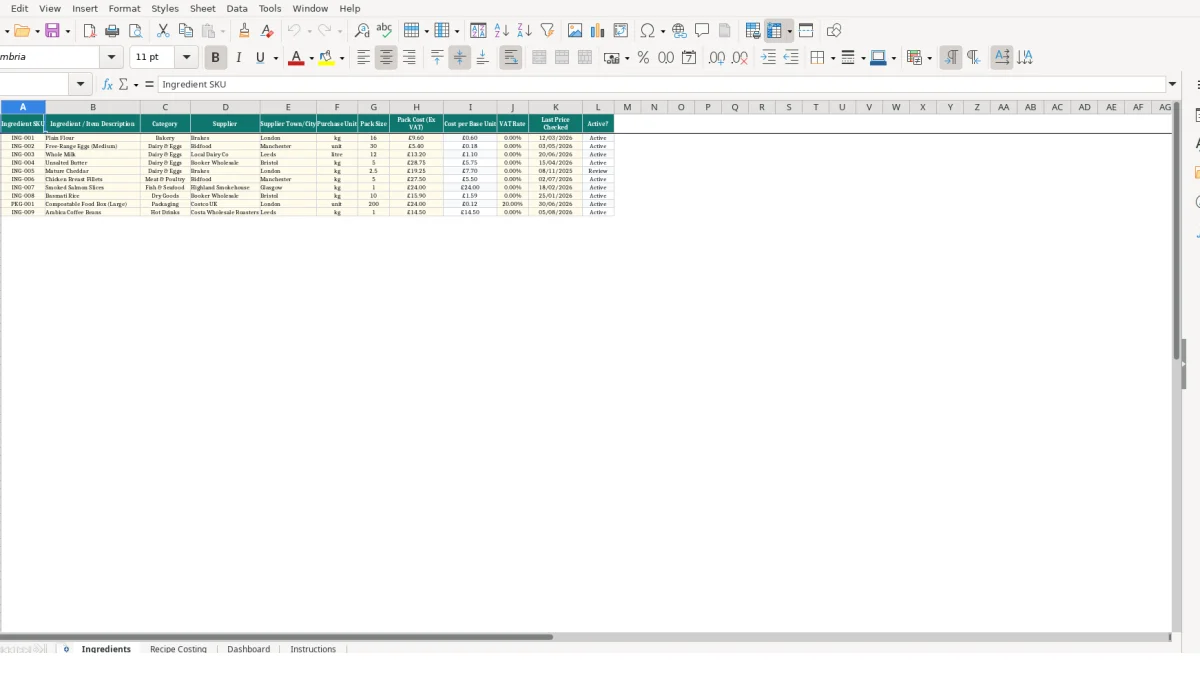
This recipe costing Excel template helps UK cafés, caterers, bakeries and food businesses calculate batch costs, cost per portion and suggested selling prices. It includes an ingredient catalogue, recipe costing sheet, management dashboard and instructions sheet, covering ingredient prices, packaging, labour, wastage, yields and target gross profit.
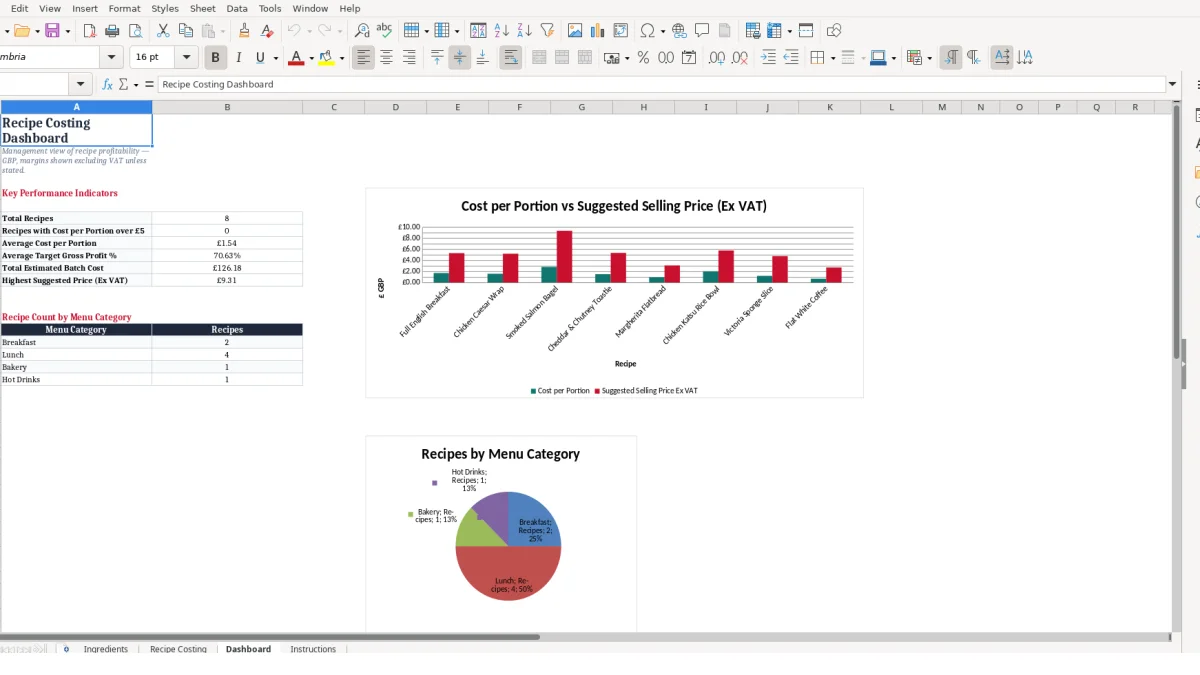
You enter supplier pack prices and recipe inputs once, then Excel calculates the main ingredient cost, total batch cost and portion cost. The Dashboard gives you a compact view of recipe volumes, average costs, target margins and recipes costing more than £5 per portion.
A recipe costing workbook is useful when you produce the same food item repeatedly but buy ingredients in supplier packs rather than in recipe-sized quantities. A café owner can use it before changing a breakfast menu, while a catering manager can use it when pricing a batch for an event or reviewing an existing menu line.
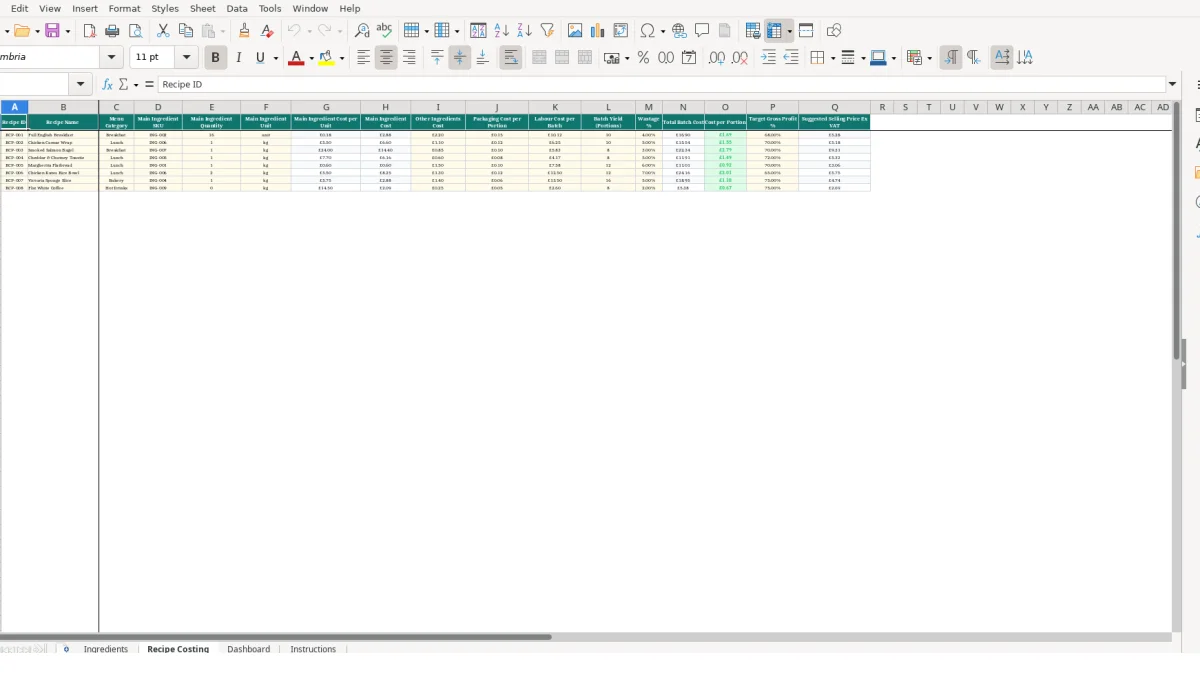
The sample Full English Breakfast shows why batch costing is more useful than guessing from a retail menu price. It uses 16 eggs, £2.20 of other ingredients, £0.15 packaging per portion, £10.12 labour and a yield of 10 portions; the workbook applies 4% wastage to the ingredient element before calculating the batch and portion cost.
That gives you a defined basis for a price discussion: ingredients, packaging and labour are visible rather than buried in one estimate. A small café with eight active recipes can review all eight rows before printing a revised menu, rather than re-costing every dish from supplier invoices by hand.
Bakeries often buy flour, dairy and toppings in larger packs, while selling individual slices, loaves or pastries. The Ingredients sheet records Plain Flour as a 16 kg pack costing £9.60 excluding VAT, so its calculated cost per base unit is £0.60; that reference cost can then feed recipes that use the flour as their nominated main ingredient.
Use a separate recipe row for each sellable product, not one blended row for an entire product family. A tray bake yielding 24 portions and a whole cake yielding 10 portions may use similar ingredients, but their packaging cost per portion, labour allocation and yield are different commercial decisions.
A caterer can use the file when comparing proposed dishes before quoting internally or setting a menu. For example, the sample Chicken Caesar Wrap uses 1.2 kg of its main ingredient, £1.10 of other ingredients, £0.12 packaging per portion, £6.25 labour, a yield of 10 and 5% wastage.
The workbook is designed for one row per recipe, so it is best for a concise, controlled menu list rather than an unstructured collection of kitchen notes. Keep preparation method and allergen information in your established operational records; this template focuses on cost inputs and calculated pricing guidance.
The workbook separates supplier pricing from recipe-level assumptions. This is the right design: enter pack costs once on Ingredients, then use the ingredient SKU on Recipe Costing so the main ingredient cost per unit is retrieved with VLOOKUP rather than typed again on every recipe row.
On Ingredients, Cost per Base Unit is calculated as Pack Cost Ex VAT divided by Pack Size through IFERROR. The sample eggs are a pack of 30 costing £5.40, giving £0.18 per unit; if pack size is blank or zero, the formula returns 0 instead of displaying an error.
Use consistent units. If an ingredient is bought in kg, enter the quantity in kg on the corresponding recipe line; a 1.2 kg recipe quantity matched against a cost calculated per kg will produce a meaningful main ingredient cost, while mixing grams and kg will not.
Total Batch Cost uses the formula (main ingredient cost plus other ingredients cost) multiplied by one plus wastage, then adds packaging for every portion and labour per batch. In the Full English sample, the £0.15 packaging input is multiplied by its 10-portion yield, so packaging contributes £1.50 to the batch total rather than £0.15.
Cost per Portion divides Total Batch Cost by Batch Yield. If a batch total were £32.00 and the yield were 10, the calculated portion cost would be £3.20; changing the yield to 8 would make it £4.00, demonstrating why you should enter realistic usable portions rather than an intended yield.
Suggested Selling Price Ex VAT divides cost per portion by one minus the Target Gross Profit percentage. At a hypothetical £3.20 portion cost and a 68% target gross profit, the calculation gives £10.00; treat this as a starting point and round it to a suitable menu price where appropriate.
The Dashboard uses COUNTIF to count rows above £5 per portion, alongside average portion cost, average target gross profit, total estimated batch cost and the highest suggested price. Its category counts cover Breakfast, Lunch, Bakery and Hot Drinks, so use those labels consistently if you want those summary counts to reflect your entries.
Recipe costing usually fails through small mismatches that appear harmless in isolation: an old supplier price, the wrong SKU, a pack size entered in a different unit, or an optimistic yield. Each error flows into the calculated selling-price guidance, so correcting the source record is more reliable than editing a final result.
The Ingredients sheet marks an item Review when its Last Price Checked date is before 01/01/2026. That is a practical prompt, not proof that a price is wrong, but it gives you a short list to verify against supplier invoices before relying on the cost per base unit.
For example, if flour remains recorded as £9.60 for 16 kg, the base-unit cost stays £0.60. If a verified new pack price is £12.00 but the old value remains, the calculated cost is understated by £0.15 per kg; a recipe using 4 kg would miss £0.60 before wastage is applied.
Do not type a replacement figure into Main Ingredient Cost per Unit on Recipe Costing. That cell is driven by a VLOOKUP using the Main Ingredient SKU, and manual overrides create a hidden split between the ingredient catalogue and the recipe row.
If a recipe points to an unknown SKU, the lookup returns 0 through IFERROR. A zero cost may look plausible in a busy sheet, so investigate any recipe whose main ingredient cost seems unexpectedly low, especially where a new SKU has just been added.
Packaging Cost per Portion is multiplied by Batch Yield, whereas Labour Cost per Batch is added once. Putting £1.50 of batch packaging into the per-portion field for a 10-portion recipe adds £15.00, while putting £0.15 per portion into a batch-only field adds only £0.15: both distort the result materially.
Wastage is applied to the combined main and other ingredient costs, not to packaging or labour. A hypothetical £20.00 ingredient total with 5% wastage becomes £21.00 before those separate costs are added, so avoid inflating packaging and labour by embedding them in Other Ingredients Cost.
A costing file becomes useful when it is linked to the point at which prices and production decisions change. Make the Ingredients sheet the controlled source for supplier prices, and make Recipe Costing the place where you test the effect on portions and menu pricing before a change reaches customers.
Set a short weekly slot after your supplier invoice check to update pack cost and Last Price Checked for changed items. If you update three ingredients, review recipes using those SKUs immediately; a £0.20 rise in a base-unit cost affects a recipe using 1.2 units by £0.24 before wastage.
Run a monthly menu review using the Dashboard alongside the Recipe Costing sheet. Look at the average cost per portion, highest suggested selling price and total estimated batch cost, then inspect individual recipes rather than changing every target gross profit percentage at once.
For a menu with eight recipes, this gives you eight controlled rows to check rather than a separate calculation for each dish. Use the supplied menu categories consistently: Breakfast, Lunch, Bakery and Hot Drinks are the categories counted on the Dashboard.
This template is suitable for an internal recipe-pricing process with a manageable number of recipes and a single main ingredient lookup per recipe. Move to a dedicated system when you need multi-ingredient quantities on every recipe, live purchasing integration, stock depletion, production scheduling or several people editing prices at the same time.
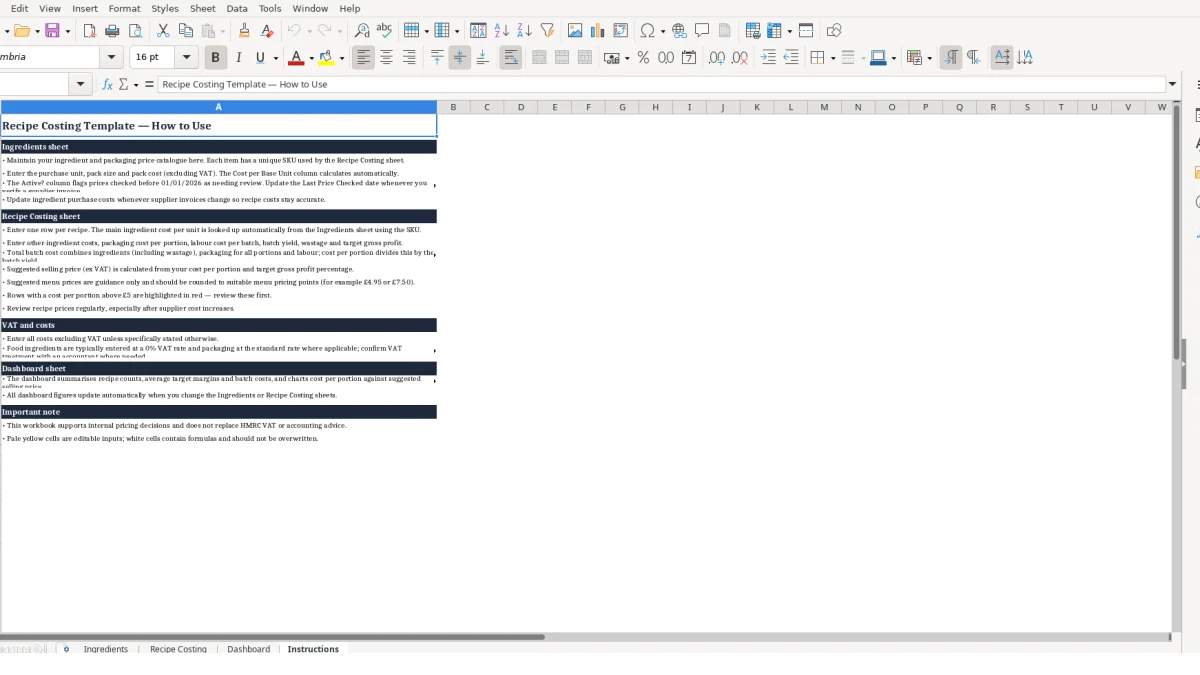
Until then, protect the formula cells and only edit the intended inputs. The Instructions sheet states that pale yellow cells are editable and white cells contain formulas; preserve that distinction when you add rows or customise the workbook.
It calculates cost per base unit for ingredients, main ingredient cost, total batch cost, cost per portion and suggested selling price excluding VAT. The batch calculation includes other ingredients, packaging per portion, labour per batch, batch yield and wastage percentage.
On the Ingredients sheet, Cost per Base Unit is calculated by dividing Pack Cost Ex VAT by Pack Size. For example, a £5.40 pack of 30 eggs calculates to £0.18 per egg.
Yes. Enter Labour Cost per Batch and Packaging Cost per Portion on the Recipe Costing sheet. Packaging is multiplied by the batch yield, while labour is added once to the batch total.
The formula returns zero when the ingredient SKU cannot be found or a source value causes an error. Check that the Main Ingredient SKU exactly matches a SKU on the Ingredients sheet and that the pack cost and pack size are entered correctly.
The Active? formula displays Review when Last Price Checked is before 01/01/2026 and Active otherwise. Use it as a prompt to verify older supplier prices and update the checked date after review.
No. The Recipe Costing sheet labels the output Suggested Selling Price Ex VAT, and the Dashboard states that margins are shown excluding VAT unless stated otherwise. Enter costs excluding VAT unless a field specifically states otherwise.
Excel template by
Guide written by