Freelance Invoice Excel – Free Template (2026)
7
Free download
Free CIS subcontractor statement Excel workbook to check gross payments, allowable costs, deductions and net amounts, with UK guidance reviewed in October 2026.


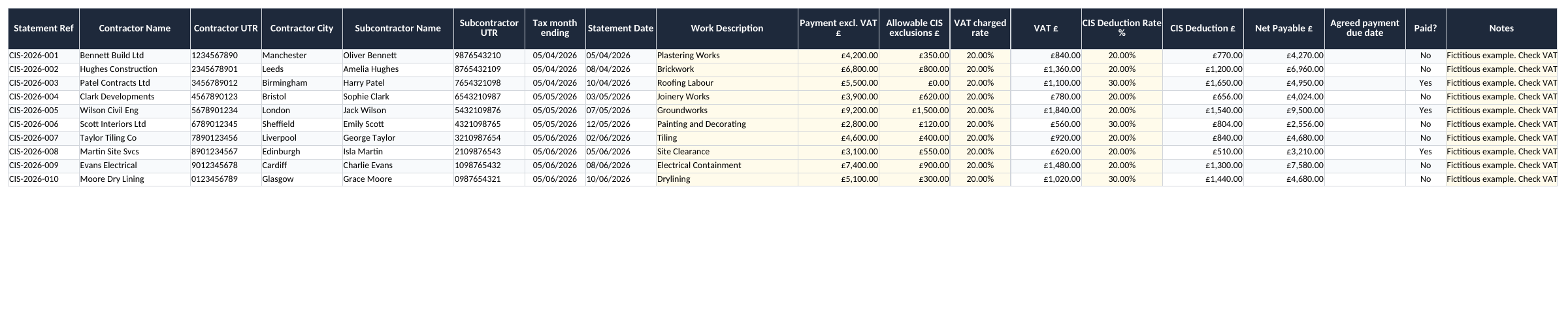
A CIS payment is easier to check when the amount before deductions, allowable costs, VAT and deduction are kept separate. This free Excel workbook gives you a register for those figures, a summary dashboard and a contractor reference list. Use it to reconcile the numbers on payment and deduction records, with the supporting documents alongside it.
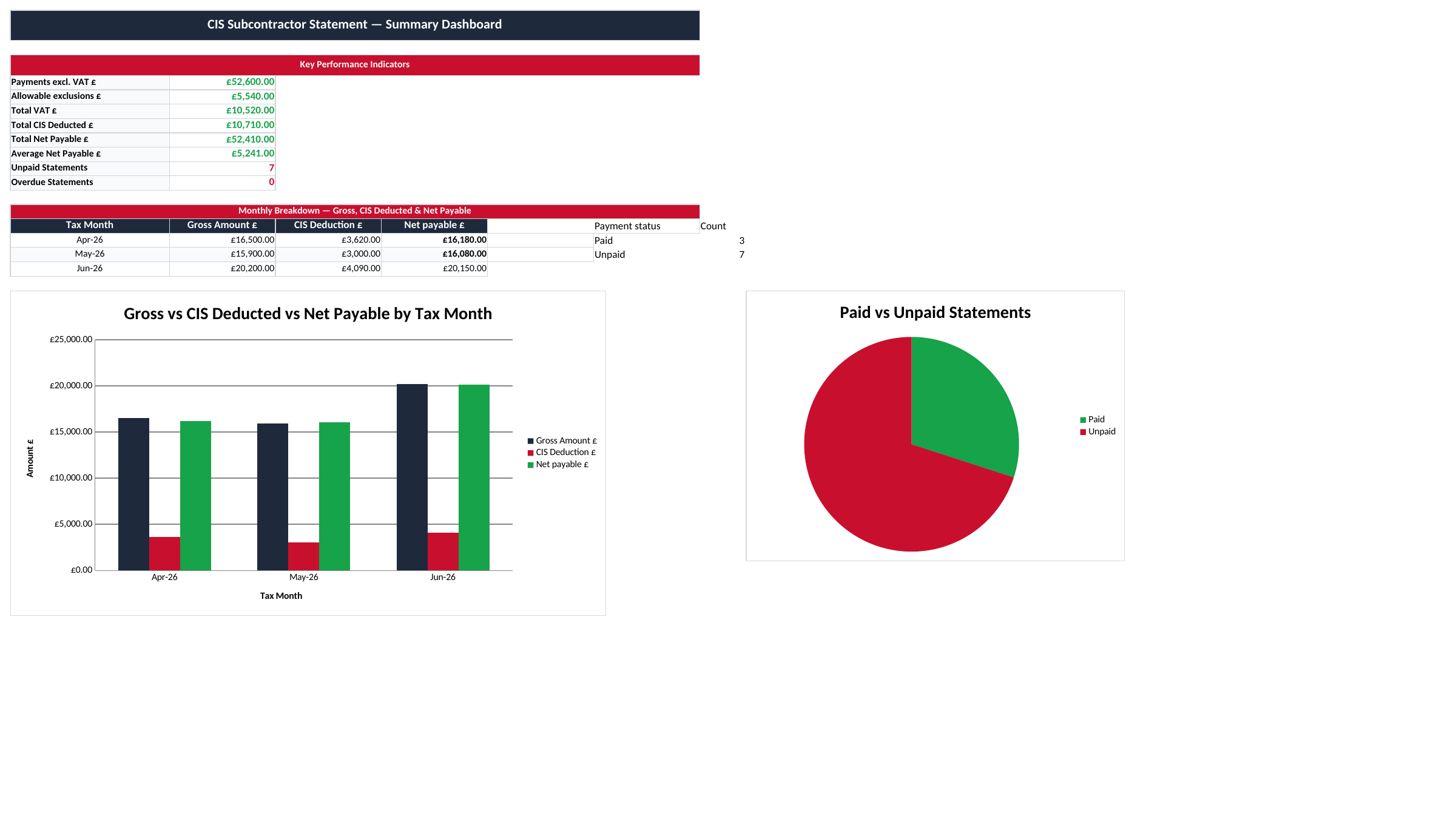
The workbook contains CIS Statements, Summary Dashboard, Contractor Lookup and Instructions. Despite the name of the first tab, it is a working register rather than a ready-to-issue statutory statement. A row is useful for checking the calculation and payment position; it does not contain every field or presentation detail needed for every recipient.
If you need to issue a payment and deduction statement, use the HMRC payment and deduction statement or a suitable compliant output from your accounting system. Cross-check it against this register. Do not send a worksheet containing several subcontractors’ UTRs and financial details to one recipient.
Before replacing the ten fictional examples, decide what one row represents in your records. Use a unique statement or payment reference and keep the invoice, payment evidence and issued or received statement linked to it. Where a statement summarises several payments, reconcile that group deliberately instead of recording both the individual payments and their combined total as separate expenditure.
Contractor Lookup is a manual contact directory. It does not verify a subcontractor, retrieve an HMRC response or populate the register automatically. A contractor’s identity is not a basis for choosing the subcontractor’s deduction rate.
In the revised register, J is Payment excl. VAT. K holds allowable costs excluded from the CIS deduction calculation, and N holds the deduction rate confirmed for the subcontractor. The arithmetic is (J − K) × N, rounded to pennies. The net-payable calculation then adds any VAT actually charged and subtracts the CIS deduction.
For a worked example, enter £1,000 excluding VAT, £200 of allowable exclusions and a 20% deduction rate. The deduction base is £800 and the CIS deduction is £160. If £200 of ordinary VAT is charged, the calculated payment is £1,040. With no VAT charged to the contractor, the same arithmetic gives £840. The reason for the VAT treatment must be checked separately.
| Component | Entry or calculation | Amount |
|---|---|---|
| Payment excluding VAT | J | £1,000 |
| Allowable exclusions | K | £200 |
| Deduction base | £1,000 − £200 | £800 |
| CIS deduction at 20% | £800 × 20% | £160 |
| Net with £200 VAT charged | £1,000 + £200 − £160 | £1,040 |
The exclusions field is not a general business-expenses deduction. HMRC’s rules identify costs that may be taken out of the calculation, including qualifying materials paid for directly by the subcontractor. Retain evidence and establish the treatment of each cost. The spreadsheet only subtracts the number you enter.
Enter percentages as 20% or 0.20, not the whole number 20. Missing or invalid numeric inputs leave calculated amounts blank; a blank is a prompt to check the record, not proof that nothing is payable. Materials or other exclusions greater than the payment also need correction.
HMRC tells the contractor the deduction rate when the subcontractor is verified. The standard rates are 20% for registered subcontractors, 30% for unregistered subcontractors and 0% for gross payment status. The official guidance on making CIS deductions explains the basis and excluded costs.
Record the relevant verification evidence with your supporting documents and enter the confirmed rate in N. The dropdown limits ordinary entry to the three rates, but it does not establish which one applies. Pasting data can also bypass spreadsheet validation, so review imported figures before relying on the totals.
If you are checking a deduction suffered as a subcontractor, compare the contractor’s statement with the actual payment received and investigate differences. A mismatch may concern VAT, an excluded cost, a partial payment or a rate that needs checking; simply changing the spreadsheet percentage to force a matching balance hides the question you need to resolve.
The VAT charged rate in L controls the VAT amount added to the payment. It is a cash calculation input, not a decision about the legal VAT treatment. Do not automatically add 20% to every construction payment.
The domestic reverse charge applies to many construction services, subject to the relevant conditions and exceptions. Check HMRC’s construction reverse-charge guidance for the transaction. Where reverse charge applies, no VAT is charged to the contractor in this cash calculation; enter zero in the charged-rate field and clearly record the treatment in Notes.
That zero does not mean the supply is legally zero-rated. The workbook does not generate the required VAT invoice wording, make VAT-return entries or test whether the parties and services meet the reverse-charge conditions. Keep the actual invoice and the accounting treatment as the authoritative records.
CIS tax months run from the 6th to the following 5th. In G, enter the date at the end of the relevant tax month, such as 5 June 2026 for 6 May to 5 June. H is the statement date. Q is a separate, manually entered contractual payment due date.
Where deductions are made, HMRC requires the payment and deduction statement within 14 days of the tax-month end: in that example, by 19 June. This statement deadline is not a universal 30-day payment term. The revised workbook therefore leaves the agreed payment date for you to enter from the actual terms.
Paid? is a manual Yes/No field. An unpaid row can be highlighted once a valid due date has passed. The file does not read a bank feed, send reminders or determine whether a dispute changes what is owed. Keep the paid status and supporting evidence aligned.
The dashboard’s sample monthly breakdown covers tax months ending in April, May and June 2026. Its overall totals cover the ten initial rows, regardless of month or paid status. Change the month labels and extend the summary deliberately for later periods; the sample chart is not an automatically rolling tax-year report.
Start a review with the source document and follow the amounts across the row: payment excluding VAT, exclusions, charged VAT, deduction and net amount. Then compare the net amount with the payment record. If an invoice is settled in parts, make sure the rows and statements reflect the payments you are actually reconciling.
The initial formulas and summaries use rows 2 to 11. Insert extra rows inside the existing data block, copy the calculation cells and verify the dashboard totals and monthly references. Changing the contractor directory does not extend those ranges or fill a statement for you.
Keep UTRs as text where necessary so a leading zero is not lost. Restrict access to the full register and share only the records a recipient needs. For project expenditure beyond CIS payments, the construction job costing template can provide a separate view; avoid counting the same payment again when combining reports.
This file does not submit monthly CIS returns, verify subcontractors or prepare a Self Assessment or Corporation Tax return. Use the checked register to support those processes, with the current requirements for your role confirmed through HMRC or your accountant.
The download is a working register. Use the HMRC statement form or a compliant accounting output when issuing the required statement, and check it against your register. Share only the relevant subcontractor’s information.
Excel template by
Guide written by