Funeral Cost Planner Excel Template (2026)
0
Free download
Plan seven days of meals, track calories and compare daily food costs with a UK household meal planner Excel template.


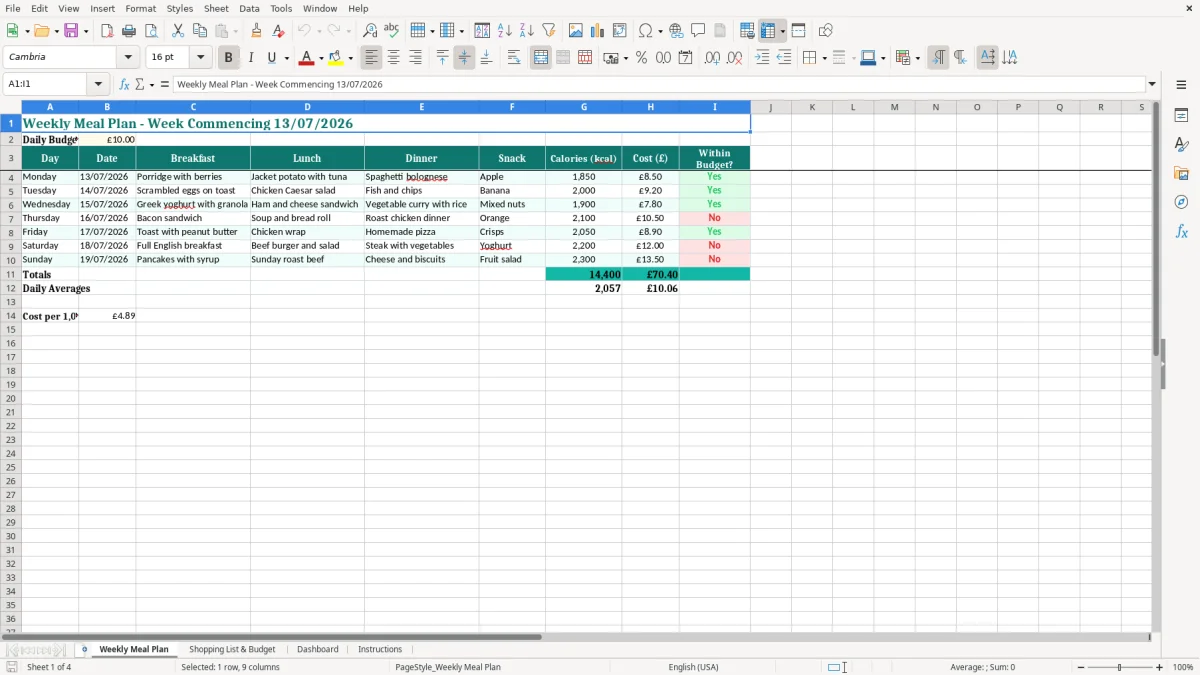
This meal planner Excel template helps you organise seven days of breakfasts, lunches, dinners and snacks while tracking daily calories and food costs. It contains a Weekly Meal Plan, Shopping List & Budget, Dashboard and Instructions sheet, so you can plan meals and check spending in one workbook.
The Weekly Meal Plan includes dates, meal descriptions, calories, cost and a budget check for each day. Image 1 shows the teal table layout and the £10.00 daily budget target; the workbook starts with a sample week commencing 13/07/2026, which you can replace with your own dates and meals.
Use the Shopping List & Budget sheet to turn the plan into a practical food shop, then review the overall position on the Dashboard. The Instructions sheet explains the intended workflow, making this suitable for a family, house share, student or private individual managing weekly meals.
A meal planner is most useful when the person buying food is also making decisions about what the household will eat. A parent planning five packed lunches, a student managing a limited maintenance budget and a couple trying to reduce supermarket spending all face the same weekly problem: several meals need deciding before the shopping is done.
The Weekly Meal Plan gives you seven rows, with separate columns for breakfast, lunch, dinner and snack. That structure suits a household of two just as well as a family of four. If four people eat a £10 planned day, the household food cost is £40 for that day; the template's £10.00 target is therefore best treated as a per-day planning figure unless you choose to define it differently.
Use the sheet on a Friday evening before the weekend shop, or on Sunday when you know the commitments for the coming week. A tradesperson leaving home at 6.30am may need portable lunches from Monday to Friday, while a family with football training on Wednesday may need a meal that takes 20 minutes rather than a recipe requiring an hour.
Image 1 shows the sample menu with dishes such as porridge with berries, chicken Caesar salad and spaghetti bolognese. You can replace those entries with your own meals, including leftovers after a Sunday roast or a low-cost meal on the day before payday.
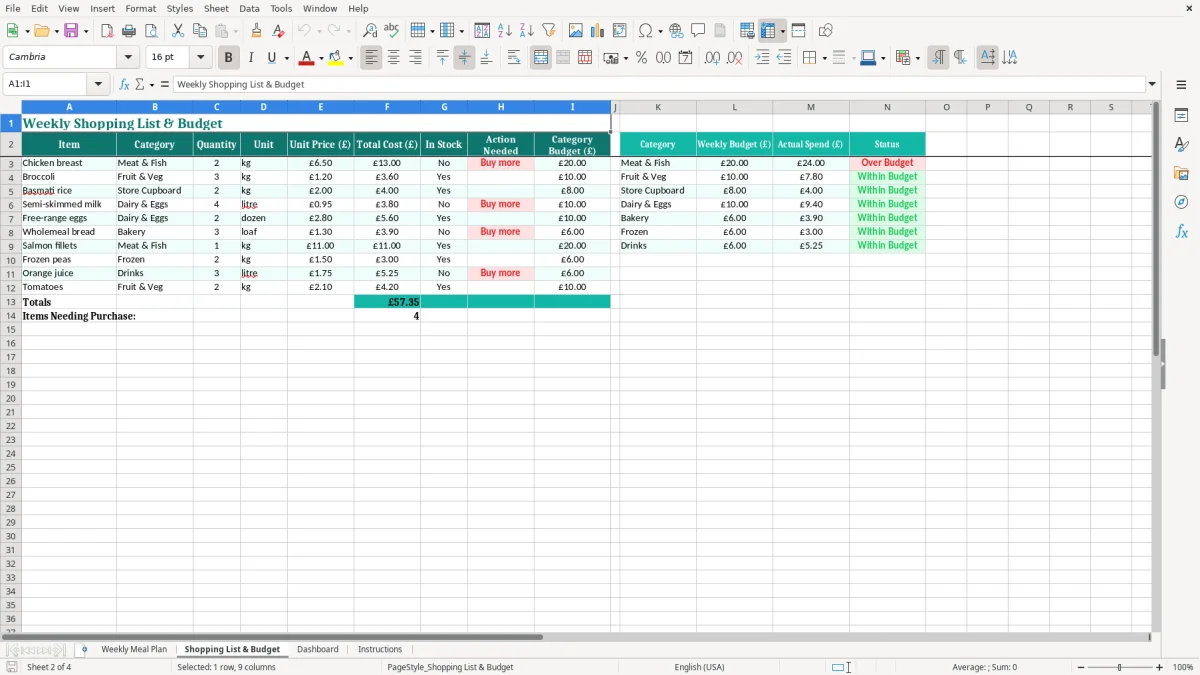
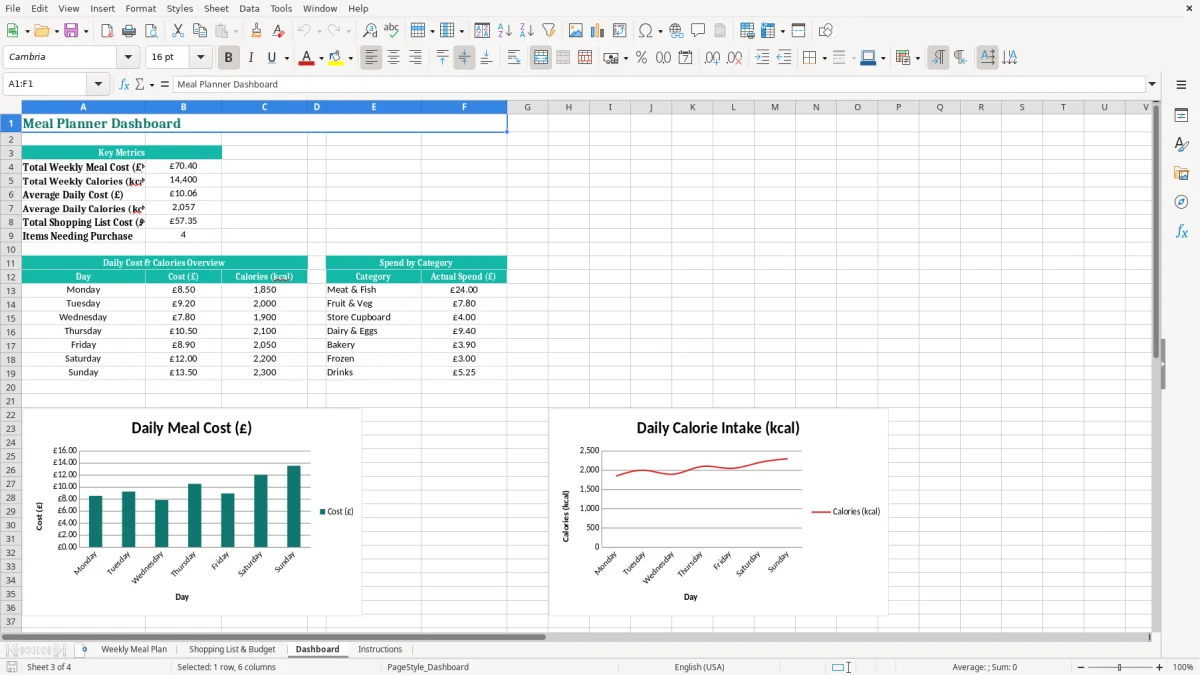
The separate Shopping List & Budget sheet is valuable when the plan has more than one purpose. It lets you move from deciding that Tuesday's dinner is fish and chips to considering the expected cost of the complete shop. Image 2 shows the shopping and budget worksheet, while image 3 provides the dashboard view for a quicker check.
For example, an online grocery order containing 25 planned items might total £78.40, while the seven daily meal costs entered in the plan total £64.90. That £13.50 difference is not automatically an error: it may represent ingredients such as cooking oil or a multipack that will be used in a later week. Recording the distinction is more useful than forcing every receipt into one day's figure.
The Calories (kcal) column records an estimate for each day's planned intake. The sample values range from 1,850 kcal on Monday to 2,200 kcal on Saturday, but those figures are not a medical target. Calorie needs differ by age, body size, activity, pregnancy and health conditions, so use the column to compare your own plans rather than treating the workbook as clinical advice.
The NHS Eatwell Guide is a sensible UK reference when you are choosing meals: base meals around a balance of fruit and vegetables, starchy carbohydrates, protein sources and dairy or alternatives, while limiting foods high in fat, salt and sugar. The familiar five-a-day message is a useful planning prompt, not a requirement that every day's spreadsheet must pass or fail.
The workbook's example starts on 13/07/2026 and runs to 19/07/2026. Keep the dates as DD/MM/YYYY when you replace them, because that is the normal UK display and prevents 13/07/2026 being misread as a US date. A meal plan date is not the same as a use-by date on food packaging.
Follow the Food Standards Agency distinction between use-by and best-before dates. A use-by date is a safety deadline for highly perishable food; do not plan to eat it after that date. A best-before date concerns quality, so a product may still be usable afterwards if it has been stored properly and passes your checks.
Enter the expected cost in pounds and pence, such as £8.50 for Monday and £12.00 for Saturday. If a £10.00 target applies to each day, Saturday is £2.00 over target; a weekly total of £56.90 can still be below a seven-day target of £70.00. That is a better judgement than rejecting the whole plan because one meal is expensive.
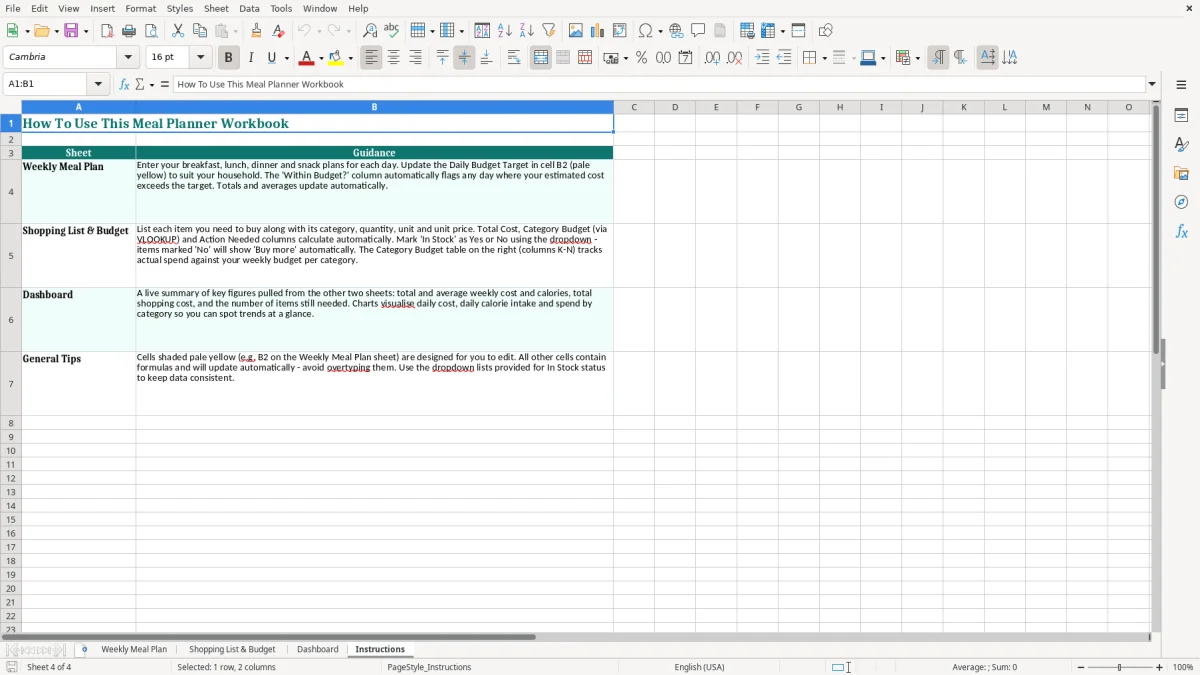
Do not use the calorie or budget result to make claims about nutrition or affordability that the workbook cannot support. Image 4 shows the Instructions sheet, which should be your starting point when you need to understand the intended entries and layout.
That same habit of separating daily figures from the weekly total carries into a savings target tracker, where each pound still has to be counted against the goal you set.
The first failure I see in household planning is a menu built around seven different recipes, all requiring fresh ingredients and separate preparation. A family may plan roast chicken, curry, homemade pizza and several salads, then discover on Thursday that work finished late and the ingredients for two meals have been abandoned.
That creates a real cost. If £6 of vegetables and £4 of fresh meat are thrown away, the week has lost £10 before the next shop. Entering a quick meal, leftovers or a freezer option in the Dinner column is usually better than creating an ambitious plan that collapses by Wednesday.
A second problem is recording only the portion used. Suppose a recipe uses half a £4.00 bag of rice and the sheet records £2.00, but the remaining rice is never used. The apparent daily cost may be £8.00 while the till receipt is £10.00. That £2.00 gap multiplied over four similar shops is £8.00 a month that the household cannot explain.
Use the Shopping List & Budget sheet to distinguish an estimated meal cost from the amount actually bought. If the plan uses three chicken breasts but the shop requires a pack of six, carry the unused quantity into a future week instead of pretending it has disappeared.
Some users enter costs but never act on the Within Budget? result. A £12.00 Saturday against a £10.00 daily target is not necessarily a problem, but seven days at £12.00 produces £84.00 against a £70.00 weekly equivalent: £14.00 over the target.
The opposite mistake is cutting every meal to the lowest possible price and then buying emergency takeaway food. If a failed plan causes two £18.00 takeaways, the £36.00 recovery cost can outweigh the savings from removing a £3.00 ingredient from each of four meals. Use the Dashboard to see the pattern rather than judging one row in isolation.
Finally, do not confuse the calorie total with a quality score. A 2,100 kcal day may still lack variety, and a lower total may be unsuitable for a particular person. The workbook is a planning and budgeting tool, not a substitute for professional dietary advice.
Choose one fixed planning time, such as 7pm on Friday before the Saturday shop. Set aside 15 minutes to review the previous week, select seven main meals and check which ingredients are already in the cupboard. A routine is more likely to survive than opening the workbook only when everyone is already hungry.
Use short meal descriptions such as vegetable curry with rice rather than copying a full recipe into a cell. Keep the same spelling for repeated meals so that your Dashboard remains easier to read, and enter costs in the same way each week: planned daily cost in the Cost (£) column, with larger supermarket purchases considered separately.
At the end of the week, spend five minutes comparing planned and actual spending. If the plan total was £62.00 and the receipt total was £74.50, investigate the £12.50 difference while you still remember whether it was a bulk purchase, an impulse item or an inaccurate estimate.
This four-sheet workbook is well suited to one household and a straightforward weekly cycle. It becomes less suitable when you need allergy-controlled menus for several people, stock quantities across many weeks, automatic recipe costing or shared editing by several users.
Keep a copy of each finished week rather than overwriting the only record. After 12 weekly files, for example, you can compare whether the average food spend is £72 or £86 and decide whether a dedicated meal-planning or budgeting system would save enough time to justify its cost.
At that point, a trip expense tracker becomes the obvious next step for separating transport, pitch fees and supplies into a budget you can compare across each week’s file.
It contains four worksheets: Weekly Meal Plan, Shopping List & Budget, Dashboard and Instructions. The main plan has columns for day, date, breakfast, lunch, dinner, snack, calories (kcal), cost (£) and Within Budget?
Yes. The Weekly Meal Plan sheet includes a Daily Budget Target (£) input set to £10.00 in the sample. Change that figure to suit your household, then review the daily budget result after entering your planned costs.
No. Enter your estimated daily calories in the Calories (kcal) column. The sample includes values such as 1,850 kcal and 2,200 kcal, but the workbook does not replace dietary guidance or a professional assessment.
Yes. Use the meal descriptions for the meals prepared for the household and enter the daily cost you want to monitor. If different people eat substantially different meals, include that detail in the meal names or use separate saved weekly copies.
Use it after completing the Weekly Meal Plan to organise the ingredients and expected shopping spend. Remember that a supermarket receipt can include full packets or ingredients for later weeks, so the planned meal cost and the amount paid may not be identical.
Yes. Save a copy for each week, update the dates and replace the sample meals. Keeping the completed files with dates such as week commencing 20/07/2026 preserves a useful record of your household's menus and food spending.
Excel template by
Guide written by