Mileage Log Excel Template – Free (2026)
0
Free download
Track UK sales opportunities, forecast revenue and manage follow-ups with this practical sales pipeline Excel template in pounds sterling.


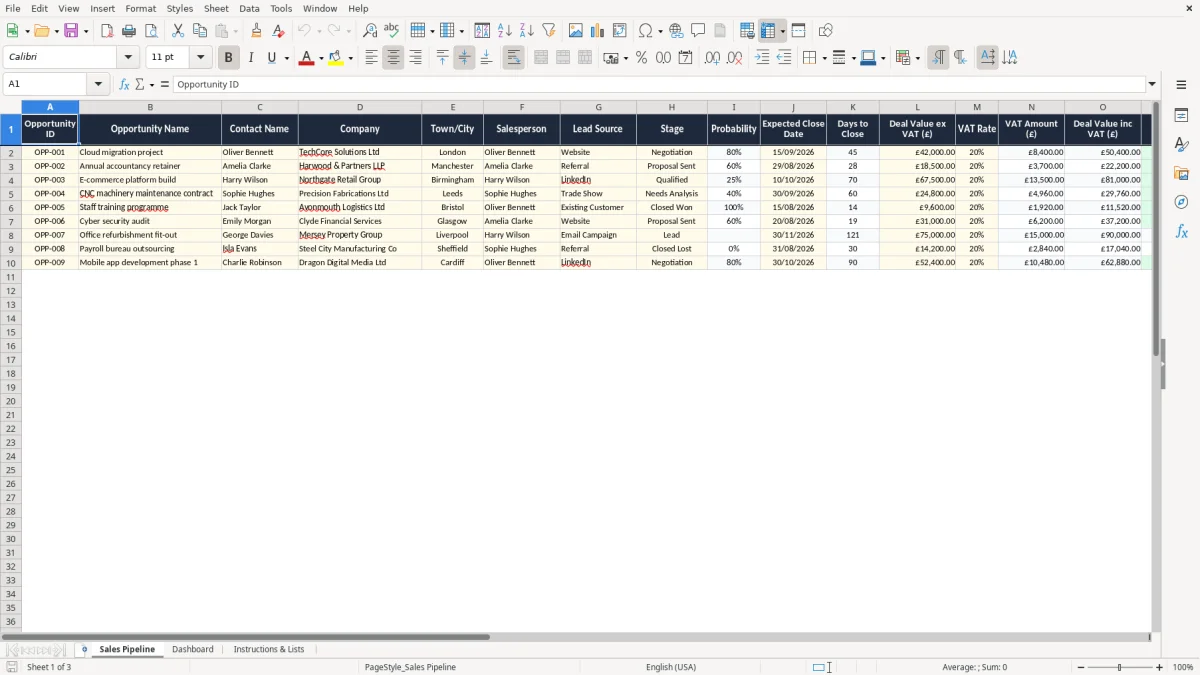
Take control of your sales process with this easy-to-use sales pipeline Excel template for UK businesses. Record opportunities, monitor deal stages, track expected close dates and review weighted revenue forecasts in one organised workbook. Designed for small businesses, sales teams, consultants and account managers, the template gives you a clear view of every active opportunity.
Use the Sales Pipeline sheet to keep customer and deal information up to date, then review the Dashboard sheet to identify priorities, forecast revenue and measure sales performance. Deal values are entered in pounds sterling and exclusive of VAT, while dates use the UK format DD/MM/YYYY.
Open the Sales Pipeline sheet and enter each active opportunity in a new row using the yellow input cells. Add the company name, contact details, opportunity value, expected close date and next action. Select the relevant pipeline stage and salesperson from the supplied dropdown menus.
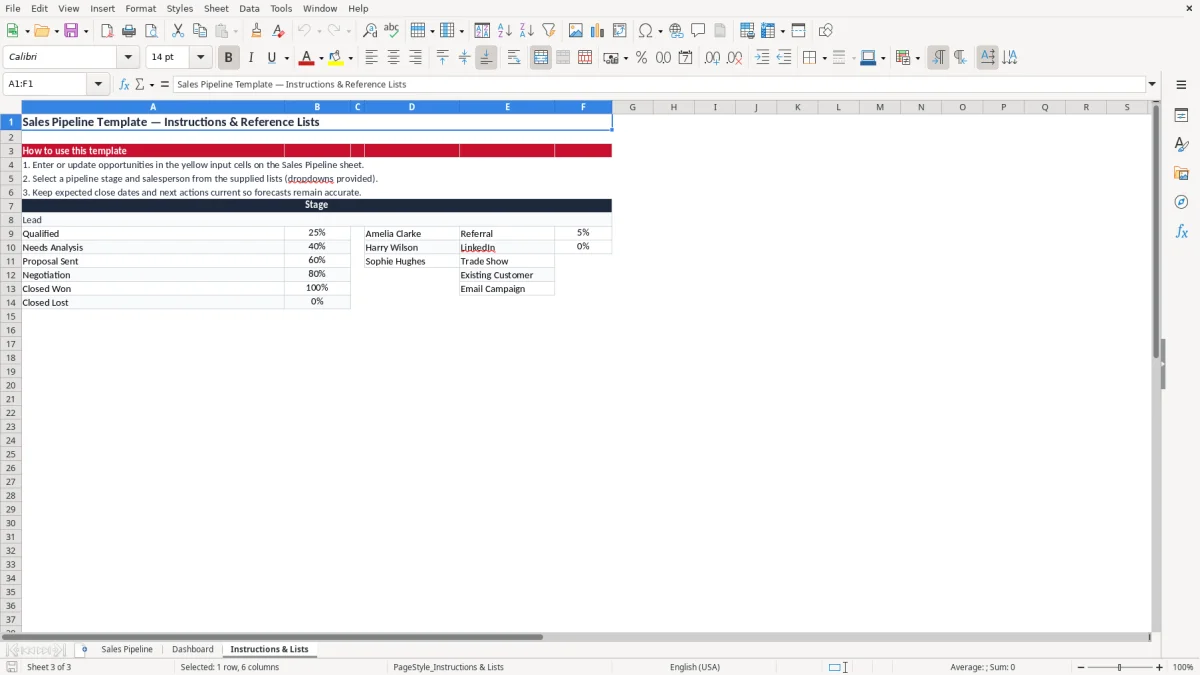
Enter deal values in pounds sterling, excluding VAT, and keep expected close dates and follow-up actions current. Use the Instructions & Lists sheet to review the available stages, probabilities and salesperson lists. Once your opportunities have been entered, open the Dashboard sheet to review total pipeline value, weighted forecast, stage performance and conversion information.
Update, close or remove opportunities regularly so the dashboard reflects your current sales position. The workbook assumes the UK standard VAT rate of 20% for guidance, but you should check the rate applicable to your transaction before invoicing or reporting.
A sales pipeline provides a practical way to understand where every opportunity sits in the buying journey. Instead of relying on scattered notes, email threads or separate spreadsheets, this UK sales pipeline Excel template gives you one place to record essential deal information.
Add the company, contact, opportunity value, sales stage, expected close date, salesperson and next action for each prospect. This makes it easier to see which deals are new, which require a proposal, which are being negotiated and which are ready to close.
The template is suitable for businesses that want a straightforward sales management system without the cost or complexity of dedicated CRM software. It can support a solo consultant managing prospective clients, a small agency tracking projects or a growing sales team reviewing opportunities in a regular meeting. Highlighted input cells help distinguish information that needs to be entered or updated, while dropdown lists encourage consistent data entry across the workbook.
Keeping the pipeline current is essential. A deal with an old close date or no next action can create an unrealistic view of future revenue. Review opportunities frequently, update their stage when the buyer progresses and record the next practical step.
This may be a discovery call, proposal, product demonstration, quotation or follow-up email. With consistent updates, the spreadsheet becomes a useful working view of sales activity rather than a static list of prospects. UK date formatting and pound sterling currency formatting also make the template familiar for British businesses and teams.
That same discipline also makes a sales performance dashboard more reliable, since the figures behind it stay current instead of drifting from the live pipeline.
A key purpose of a sales pipeline is to support a more realistic revenue forecast. The total value of all open opportunities can be useful, but it may overstate what is likely to close.
This template uses stage probabilities to calculate a weighted forecast, giving you an estimate based on the current position of each deal. For example, a £10,000 opportunity with a 50% probability contributes £5,000 to the weighted pipeline forecast.
Weighted forecasting is not a guarantee of revenue. It is a planning tool that helps you compare possible outcomes and focus attention on the deals most likely to generate income.
If several opportunities are at an early stage, their contribution to the weighted forecast will be lower than opportunities at negotiation or final review. As a deal progresses, its probability can increase, making the forecast more responsive to genuine sales activity.
Use the expected close date alongside the weighted value to support monthly or quarterly planning. Opportunities with close dates in the near future may need immediate action, particularly if the next step has not been scheduled.
Deals with distant dates can remain in the pipeline, but should still have a clear owner and follow-up plan. Managers can use the dashboard to discuss forecast movement, challenge outdated assumptions and identify gaps in future revenue.
The workbook is designed for deal values entered exclusive of VAT. This helps keep sales forecasting focused on net revenue rather than tax collected on behalf of the government. Apply the VAT treatment appropriate to your business and transaction when preparing quotes, invoices or formal financial reports.
Consistent pipeline stages make sales performance easier to understand. This template includes a structured process that can cover lead generation, qualification, proposal activity, negotiation and closed outcomes.
Selecting a stage from the supplied dropdown list helps prevent inconsistent descriptions, such as using several different labels for the same point in the sales cycle. The probability linked to each stage also supports the weighted forecast shown in the workbook.
Assigning every opportunity to a salesperson is useful for both individual planning and team management. Sales representatives can review their own upcoming actions, while managers can compare pipeline value and activity across the team.
This can highlight where additional coaching, support or lead allocation may be needed. The reference lists can be adapted to suit your organisation, so you can replace the example salespeople or modify stages to reflect your own process.
The next-action field turns the pipeline into an action plan. Rather than simply recording that a prospect is active, write down the next meaningful step.
Examples include confirming a meeting, sending a proposal, calling a decision-maker, answering a question or arranging a contract review. A clear next action makes handovers easier and reduces the chance of opportunities becoming inactive.
Review the pipeline during weekly or fortnightly sales meetings. Focus on changes since the previous review, deals without a recent action, close dates that need revision and opportunities that have remained at one stage for too long. This simple routine can improve data quality and help the team concentrate on progress instead of only discussing total pipeline value.
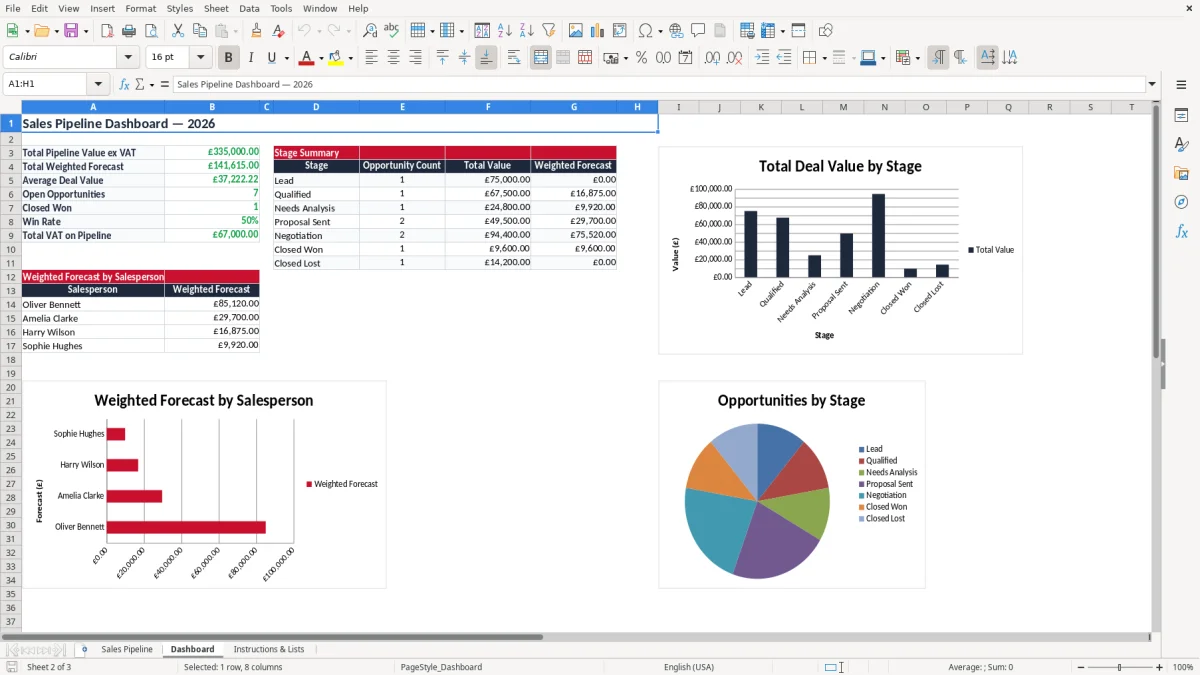
The Dashboard sheet turns opportunity data into a concise view of sales performance. It helps you review total pipeline value, weighted forecast, stage distribution and conversion information without manually adding figures from individual rows.
Charts and summary tables make patterns easier to spot, particularly when you are preparing a team meeting, monthly report or management update.
Use the total pipeline value to understand the full potential of current opportunities, then compare it with the weighted forecast for a more cautious view of likely revenue. Reviewing the number and value of deals at each stage can show whether future sales depend on a small number of large opportunities or a broader group of smaller prospects. Stage analysis may also reveal that leads are being generated but not progressing, or that negotiations are taking longer than expected.
Salesperson information provides another useful perspective. You can identify who has the largest open pipeline, where follow-up activity is concentrated and whether opportunities have been assigned an owner. These figures should be considered alongside deal quality, sales cycle length and customer fit rather than used as the only measure of performance.
For UK businesses, the workbook uses pound sterling formatting and DD/MM/YYYY dates. Deal values are exclusive of VAT, and the instructions reference the UK standard VAT rate of 20% as general guidance.
VAT rules can vary by transaction, product, service and customer circumstances, so confirm the correct treatment with a qualified adviser or HMRC guidance. The template is intended for sales planning and pipeline management, not as a substitute for accounting, tax or financial reporting software.
A sales pipeline Excel template is a ready-made spreadsheet for recording and managing sales opportunities. It helps you track where each deal is in the sales process, when it may close and how much revenue it could generate.
Yes. The template uses pounds sterling, UK date formatting and guidance for entering deal values exclusive of VAT. It is suitable for many small businesses, sales teams, consultants and agencies.
A weighted sales forecast estimates likely revenue by multiplying each opportunity value by its probability of closing. For example, a £10,000 opportunity with a 50% probability contributes £5,000 to the weighted forecast.
Yes. The workbook includes reference lists for stages, probabilities and salespeople. You can adapt these lists to match your own sales process, team structure and reporting requirements.
Yes. Opportunities can be assigned to salespeople, allowing you to review individual pipeline activity and compare performance on the dashboard. Each opportunity should have a clear owner.
Enter deal values exclusive of VAT. Apply the VAT treatment appropriate to your business and transaction when preparing quotes, invoices or financial reports. The template references the UK standard VAT rate of 20% for general guidance.
Excel template by
Guide written by