Funeral Cost Planner Excel Template (2026)
0
Free download
Track vehicle costs, VAT, mileage and business use across 3 Excel sheets, with summaries by category, month and registration.


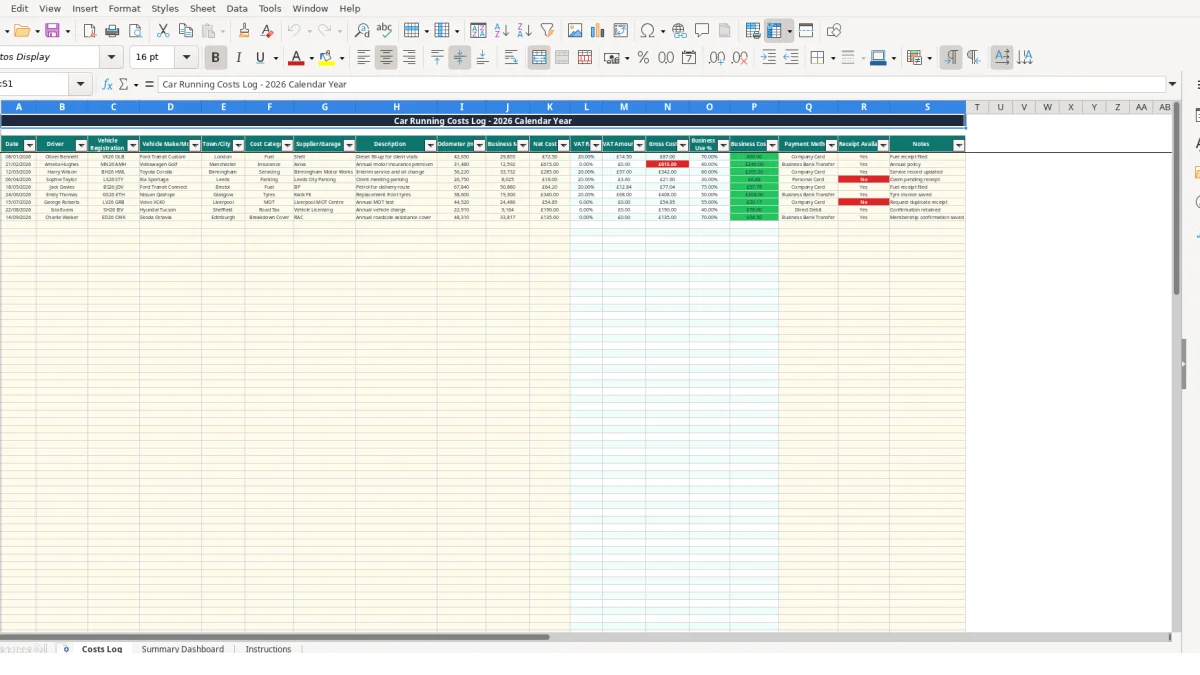
This car running costs Excel template records vehicle expenses, mileage and business use in one workbook. It contains a Costs Log for entries, a Summary Dashboard for calculated totals by category, month and vehicle, and an Instructions sheet with editable lookup lists.
Enter one cost per row, including the date, driver, registration, supplier, odometer reading, business miles and net cost. The workbook calculates VAT amount, gross cost, business use percentage and business-attributable cost, while the dashboard summarises the information for management review.
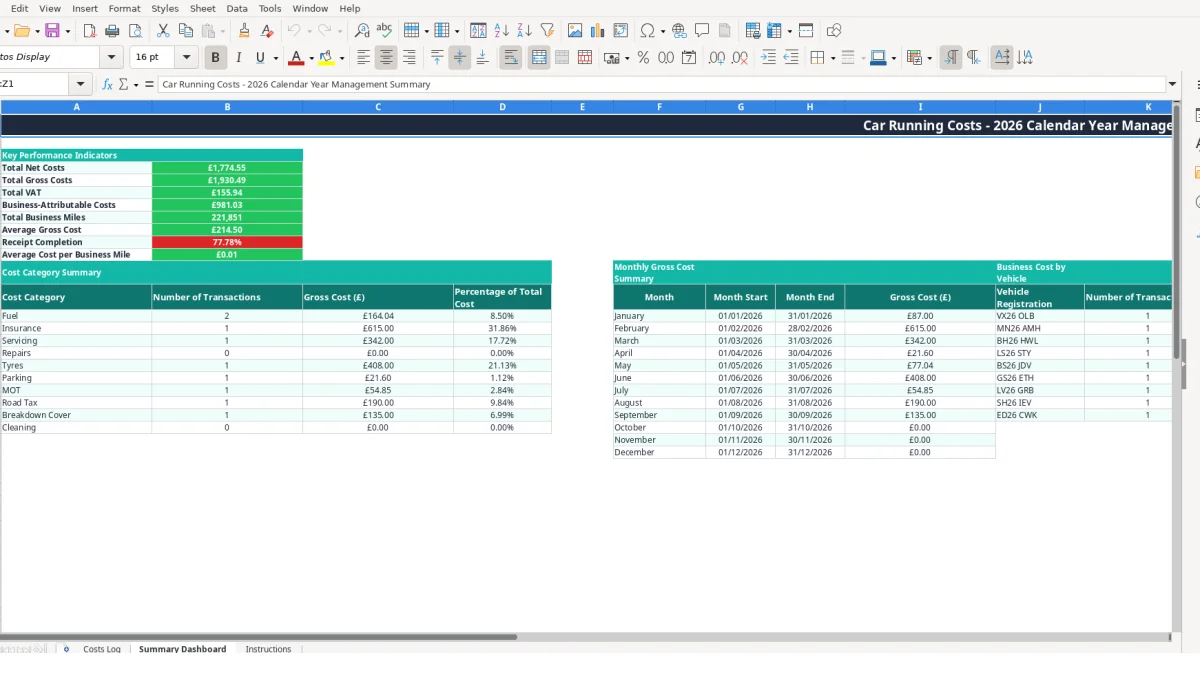
This workbook suits a small business owner, fleet coordinator, office manager or bookkeeper who needs a consistent record of vehicle expenditure. It is designed for a 2026 calendar-year log, with separate records for drivers such as Oliver Bennett, Amelia Hughes and Harry Wilson, and vehicles including VX26 OLB, MN26 AMH and BH26 HWL.
A trades business might enter a £72.50 diesel purchase for a Ford Transit Custom, including 29,855 business miles and an odometer reading of 42,650 miles. A separate row can record a £285 servicing invoice for a Toyota Corolla, with the garage and service description retained alongside the amount.
Use the Costs Log whenever a transaction occurs rather than waiting until several receipts accumulate. One row for fuel, one for insurance and one for servicing gives the dashboard distinct transactions to count and compare.
At month-end, review the dashboard's total gross cost and business-attributable cost. For example, a £615 insurance entry for a Volkswagen Golf can be assessed alongside fuel and repair entries instead of being mixed into an unexplained annual figure.
The dashboard groups gross cost by category, monthly gross cost from January to December, and business cost by vehicle registration. That makes it useful for a three-vehicle operation where the question is not only how much was spent, but which type of cost and which vehicle generated it.
The Costs Log separates user inputs from calculated outputs. You enter the date, vehicle, category, mileage and net cost; formulas then populate columns L to P. This is the right approach: keep source information in the row and let stable formulas produce the totals consistently.
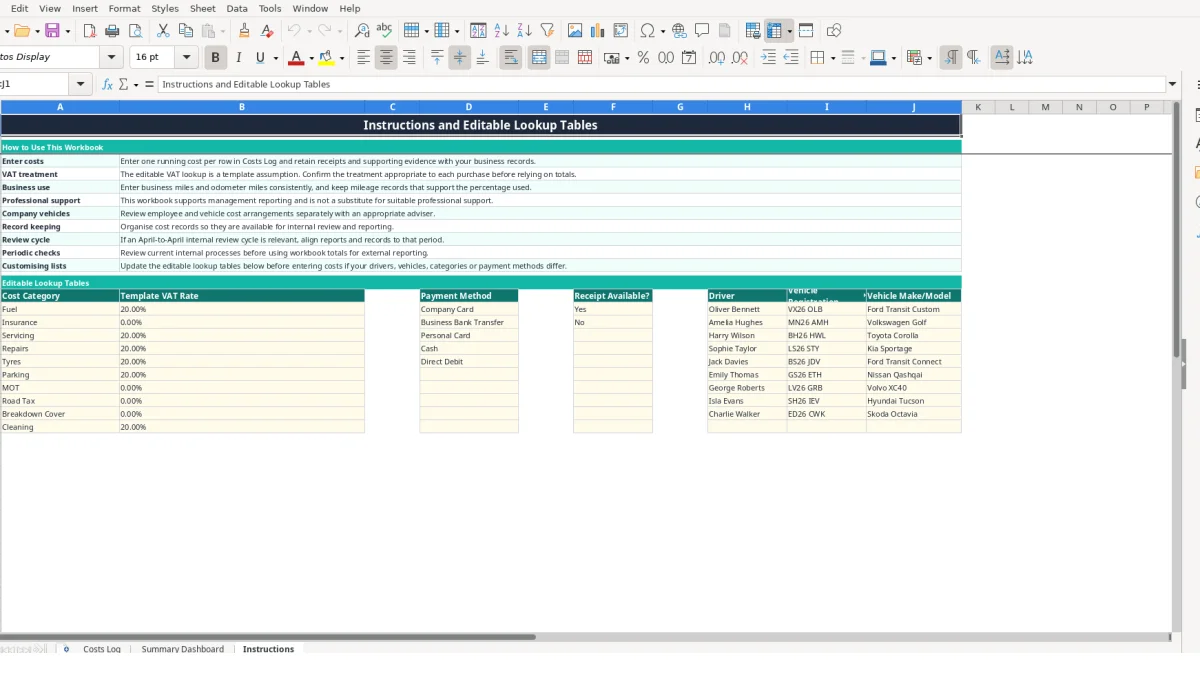
The VAT rate is looked up from the Instructions sheet according to the selected cost category. For a hypothetical £100.00 net fuel entry using the template's 20% lookup value, the calculated VAT amount is £20.00 and gross cost is £120.00. Confirm the appropriate treatment before relying on the result.
If Insurance is linked to the template's 0% lookup value, a hypothetical £615.00 net entry produces £0.00 VAT and £615.00 gross cost. The lookup values are editable assumptions, not an automatic decision about every purchase.
Business use percentage is calculated as business miles divided by odometer miles. Using 29,855 business miles and 42,650 odometer miles gives approximately 70.00%; applying that percentage to a £120.00 gross cost gives approximately £84.00 business cost.
The dashboard uses SUM for totals, AVERAGE for average gross cost, COUNTIF for counts and receipt completion, and SUMIF or SUMIFS for category, vehicle and monthly summaries. Do not overwrite these formula columns when adding a new row.
The most damaging error is entering a cost without a reliable vehicle registration or category. The dashboard can only group a transaction correctly when the selected value matches the lookup list, so free-text variants such as VX26OLB and VX26 OLB can split one vehicle into two apparent records.
Business use depends directly on the two mileage inputs. If a £120.00 gross purchase is entered with 29,855 business miles and 42,650 odometer miles, the business cost is about £84.00. If 2,985 is entered by mistake, the percentage falls to about 7.00% and the calculated business cost falls to about £8.40.
That hypothetical £75.60 difference on one row becomes £756 across 10 similar entries. Check that odometer miles and business miles use the same unit and that business miles are not greater than the odometer figure.
Entering a gross invoice in Net Cost causes VAT and gross cost to be calculated again, overstating the record. For a £615.00 gross invoice with a 20% assumption, entering £615.00 as net produces £738.00 gross instead of the intended amount.
A missing receipt status also weakens the dashboard's receipt-completion calculation. Select Yes or No for every completed row and use Notes to identify where the supporting document is filed.
Make the Costs Log part of an existing finance routine rather than treating it as an occasional clean-up task. A practical pattern is to enter costs when the company card statement or receipt is checked, then review the dashboard once at month-end.
If 12 monthly reviews each take 20 minutes, the full-year routine takes 240 minutes, or four hours. That is easier to control than reconstructing 60 transactions after year-end, particularly when several drivers and vehicles are involved.
Update Instructions before new entries if a driver, vehicle or payment method changes. Use the dropdowns rather than typing alternatives; the formulas rely on consistent category and registration values.
Retain the workbook with the related receipts and mileage support. The Instructions sheet states that the VAT lookup is a template assumption and that the workbook supports management reporting rather than replacing suitable professional support.
Consider a dedicated fleet or accounting system when more than 107 available log rows, numerous users, frequent vehicle changes or stronger audit controls make manual entry difficult. Until then, the three-sheet structure provides a workable boundary between entry, calculation and review.
It includes Costs Log, Summary Dashboard and Instructions sheets. The log records vehicle costs and mileage; the dashboard calculates totals and summaries; Instructions contains editable lookup tables and usage guidance.
The sample categories include Fuel, Insurance and Servicing, and the lookup area provides space for further categories such as Repairs and Tyres. Select the category from the validated list before entering the transaction.
Yes. The selected category retrieves a VAT rate from the editable Instructions lookup, then calculates VAT amount and gross cost. The workbook states that these rates are template assumptions, so confirm the appropriate treatment for each purchase.
Business use percentage is calculated from business miles divided by odometer miles. Business cost is then calculated by applying that percentage to gross cost.
Yes. The Costs Log includes vehicle registration and vehicle make or model fields, while the dashboard summarises transaction counts and business cost by registration. Add or amend vehicle values in the Instructions lookup table.
It is intended to support management reporting. Review the Instructions sheet, retain receipts and mileage evidence, and obtain suitable professional support before using totals for external reporting or decisions.
Excel template by
Guide written by