Tenancy Deposit Excel Template – Free Tracker (2026)
0
Free download
Track rental income, mortgage payments, property costs and net cash flow across a small UK buy-to-let portfolio.


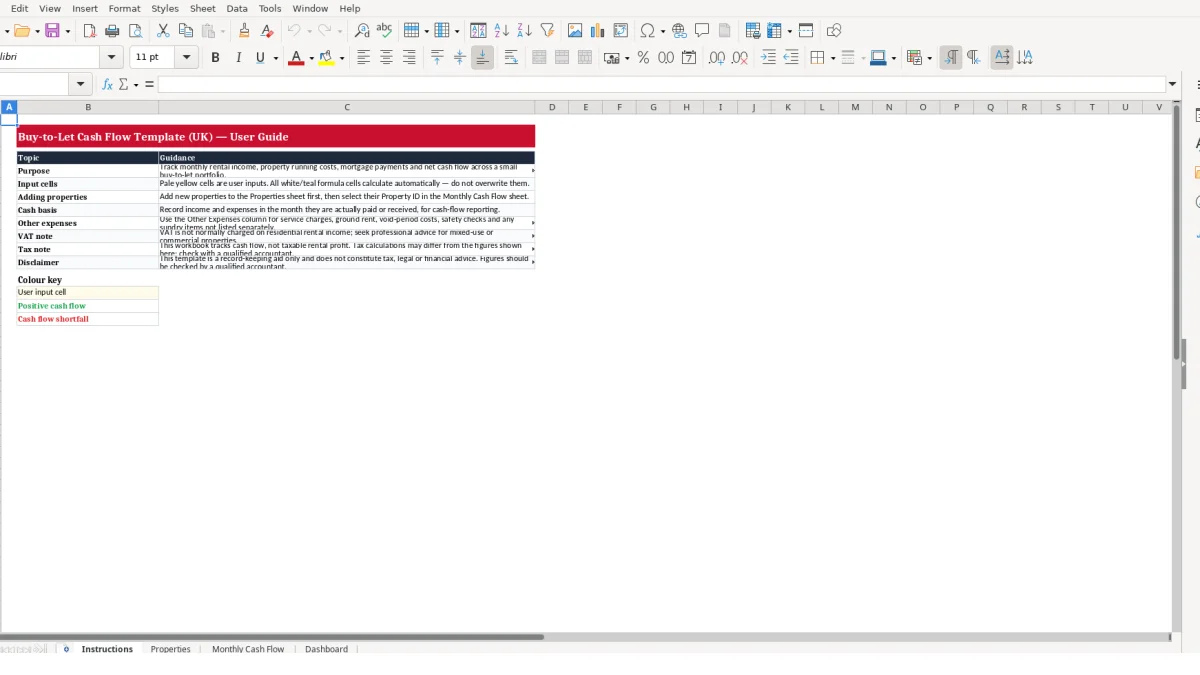
This buy-to-let cash flow Excel template records monthly rent received, other income, mortgage payments, property running costs and net cash flow for a small UK portfolio. It includes an Instructions sheet, a property register, a monthly transaction-style cash flow sheet and a dashboard for portfolio totals and monthly summaries.
You enter each property once on the Properties sheet, then record what was actually paid or received in Monthly Cash Flow. The workbook calculates cash flow, margin and a positive or shortfall status for each record.
Use it to see whether rental receipts are covering mortgage payments, letting fees, insurance, repairs and other property costs. It is a cash-flow record, not a calculation of taxable rental profit.
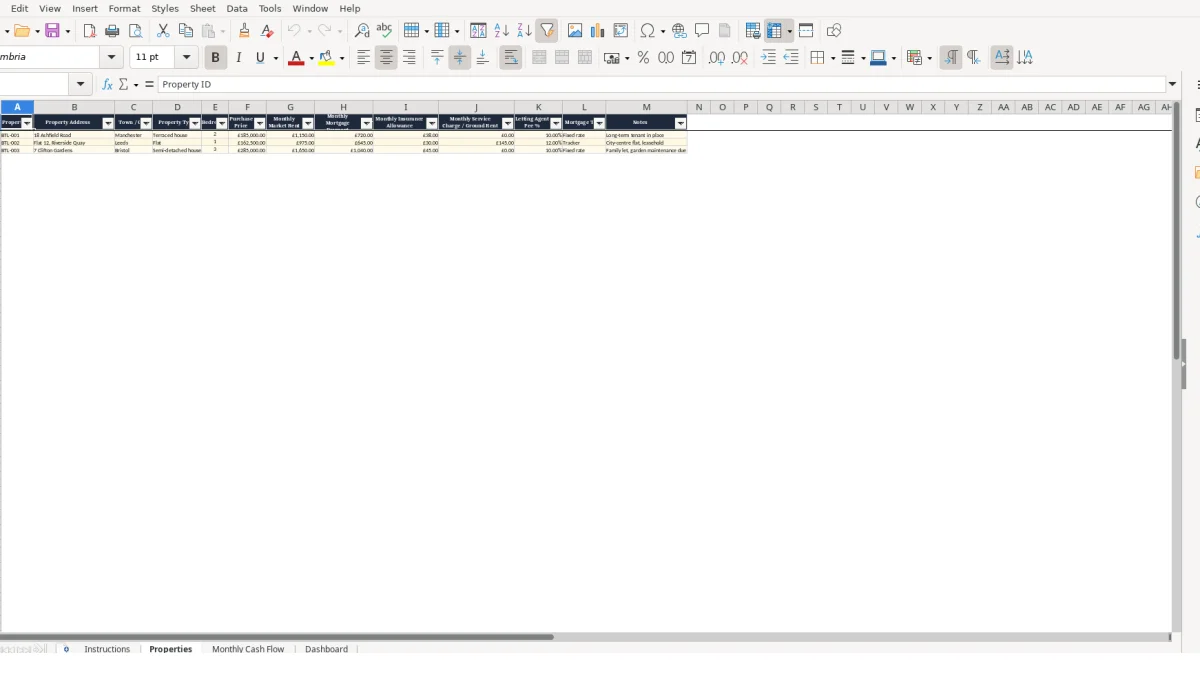
A buy-to-let owner uses this workbook when rental money and property costs are moving through different bank transactions but need to be viewed property by property. It suits a landlord with a small portfolio, a couple managing jointly owned rentals, or a property manager preparing a clear monthly internal review.
The key point is timing. The Instructions sheet directs you to record income and expenses in the month they are actually received or paid, so the record answers a practical cash question: what did this property add to, or take from, available cash this month?
Consider the illustrative BTL-001 record. The Properties sheet holds monthly market rent of £1,150, a £720 mortgage payment, £38 insurance allowance and a 10.00% letting agent fee. If £1,150 is received and there are no repairs or other expenses, total expenses are £873 and net cash flow is £277.
If only £900 arrives in a later month, the letting agent fee calculated from rent received becomes £90, while the mortgage and insurance remain £720 and £38. Total income is £900, total expenses are £848 and the row shows £52 net cash flow; it remains positive, but the margin is much tighter.
Different properties need separate records because their recurring costs are not interchangeable. The illustrative Leeds flat, BTL-002, has £975 monthly market rent, a £645 mortgage payment, £30 insurance allowance, £145 service charge or ground rent and a 12.00% agent fee.
With £975 rent received, its calculated agent fee is £117. Total expenses are £937, leaving £38 before any repairs or further costs. A £185 repair would turn that month into a £147 cash flow shortfall, which is much easier to spot when it is attached to the correct Property ID.
Update the row after rent clears and again when invoices or direct debits have been paid. The Dashboard then combines the monthly records into total rental income, total other income, total expenses and net portfolio cash flow.
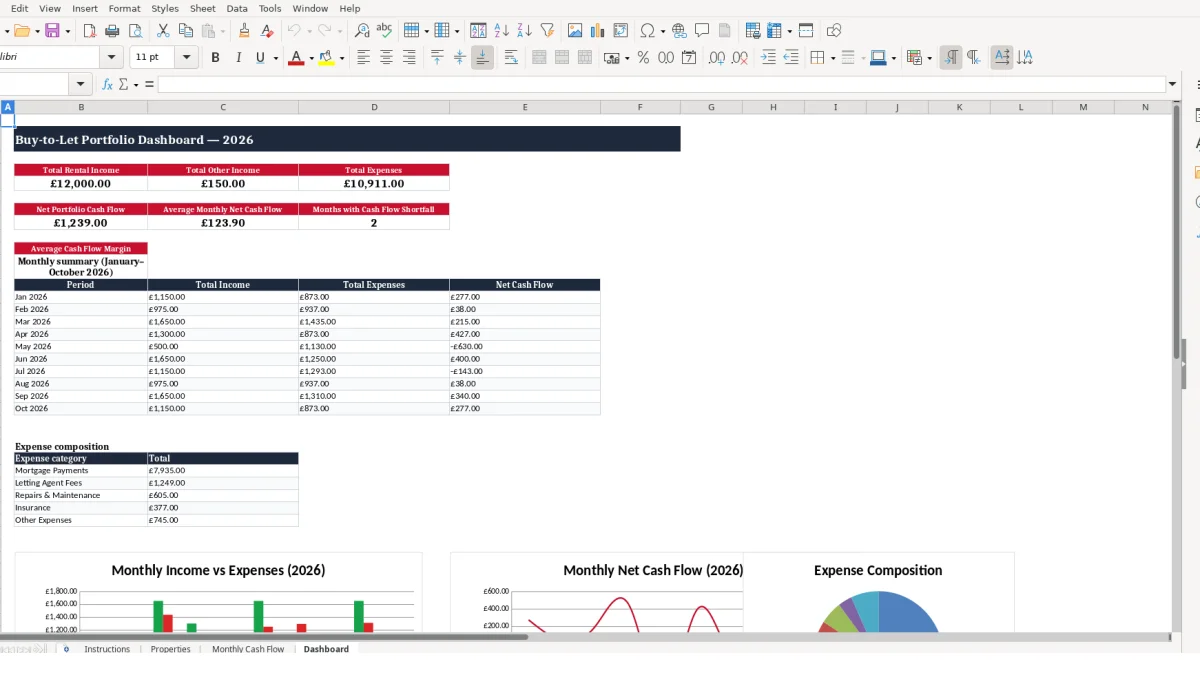
Use image 2 for the property register, image 3 for monthly entries and image 4 for the portfolio review. Keep the purpose narrow: this is a cash-flow tool, not a substitute for advice on VAT, tax or investment decisions.
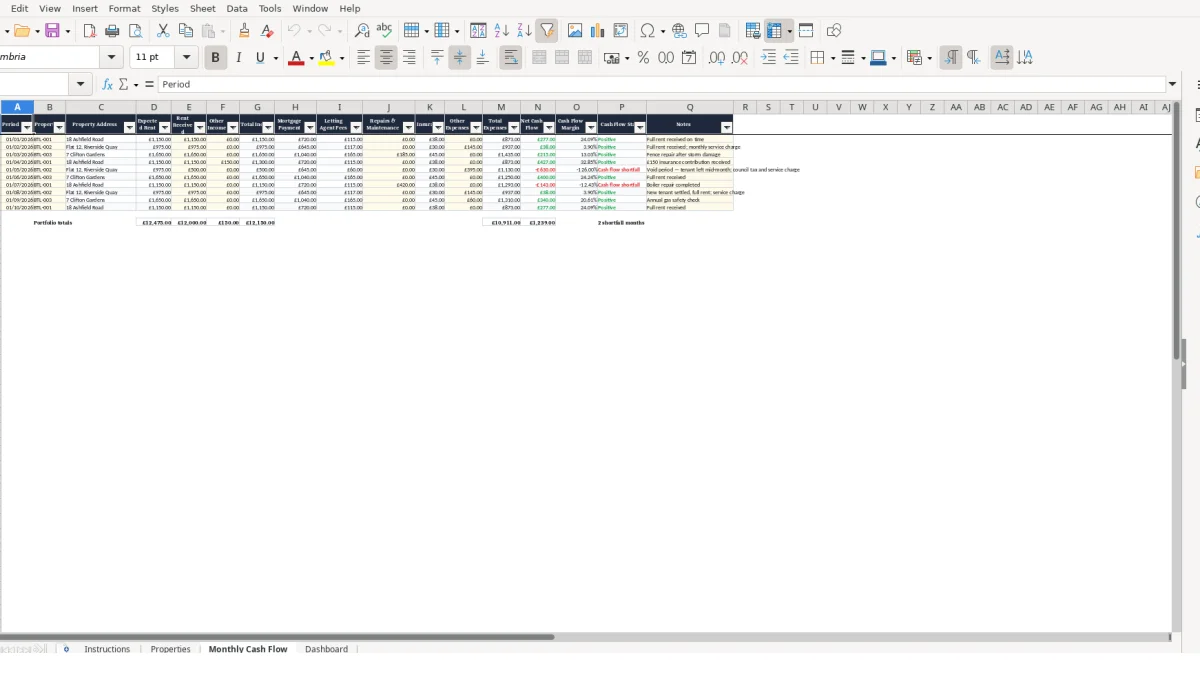
The workbook separates stable property details from month-specific cash entries. This is the right design for a small portfolio: enter the recurring reference data once on Properties, then use the Monthly Cash Flow sheet for actual receipts and costs without repeatedly typing addresses, mortgage figures or fee percentages.
Each monthly row begins with Period and Property ID. The address, Expected Rent, Mortgage Payment and Insurance are retrieved with VLOOKUP from the Properties range, while Rent Received, Other Income, Repairs & Maintenance, Other Expenses and Notes are entered for that individual period.
For example, selecting BTL-002 retrieves expected rent of £975, mortgage payment of £645 and insurance of £30 from the illustrative property register. You then enter the actual rent received rather than overwriting the expected amount, preserving a useful comparison between plan and cash.
Total Income is calculated as Rent Received plus Other Income using SUM. Letting Agent Fees are calculated as Rent Received multiplied by the fee percentage held for the selected property; £975 at 12.00% produces £117.
Total Expenses is the sum of mortgage payment, letting agent fees, repairs and maintenance, insurance and other expenses. If the £145 service charge is entered in Other Expenses for BTL-002, then £645 + £117 + £0 + £30 + £145 gives £937 total expenses.
Net Cash Flow is Total Income less Total Expenses. Cash Flow Margin is Net Cash Flow divided by Total Income, with an IF formula returning 0 if total income is zero, which avoids a divide-by-zero error when no income has been recorded.
The Dashboard totals rent received across rows 2 to 11, separately totals other income and expenses, and calculates portfolio net cash flow. It also uses COUNTIF to count rows marked Cash flow shortfall, rather than relying on you to scan each month manually.
The monthly summary uses SUMIF against the Period column to group total income, total expenses and net cash flow by month. Do not type over calculated cells: amend the Properties sheet for recurring reference figures or the monthly input fields for actual cash movements.
Buy-to-let cash flow records usually fail through small classification and timing errors rather than difficult arithmetic. A workbook can calculate perfectly from incorrect inputs, so the most valuable check is whether every amount belongs to the right property, period and cost category.
Expected Rent is a lookup from the Properties sheet; Rent Received is a separate monthly input. Treating the £1,150 expected rent for BTL-001 as if it had arrived masks part-payments, arrears and void periods.
In a hypothetical month where £0 is received but £720 mortgage and £38 insurance still leave the account, Total Income should be £0 and Total Expenses should be £758 before other costs. The margin formula returns 0 in that case, while Net Cash Flow is negative and Cash Flow Status reports a shortfall.
The property register contains a Monthly Service Charge / Ground Rent field, but the monthly cash flow calculation includes an Other Expenses input rather than automatically retrieving that figure. This requires a deliberate monthly entry, which is appropriate because cash-flow reporting should reflect when the charge was paid.
If the BTL-002 £145 charge is omitted, calculated expenses fall from £937 to £792 in the example with £975 rent. That makes net cash flow appear as £183 instead of £38, overstating available cash by £145 for that month.
A Property ID must match the register entry exactly for the lookup formulas to return the relevant address and recurring values. Adding a new property first on Properties, then selecting its ID in Monthly Cash Flow, is safer than manually copying a property name or mortgage payment into each row.
The supplied Properties range currently covers the listed entries in rows 2 to 4. If you extend the portfolio beyond that illustrated range, test the lookup references and dashboard ranges before relying on the totals; otherwise, a new record may not be included as intended.
Use Notes to explain a meaningful movement, such as a one-off repair or delayed rent. A £185 repair is more useful when its reason is visible than when it appears as an unexplained change in the repairs column.
Finally, investigate every Cash flow shortfall row rather than netting it off mentally against a stronger month. A portfolio total can remain positive while one property is repeatedly consuming cash.
This spreadsheet works when it becomes part of the rental-money routine, not a retrospective annual tidy-up. Set one fixed update point after regular rent receipts and direct debits have cleared, then add a second short review after repair invoices or letting-agent statements arrive.
Enter the Period and Property ID first, then record the cash movements you can verify. For example, on a £975 rent month for BTL-002, enter the £975 rent receipt when it arrives, then add the £145 charge and any repair cost once paid rather than guessing the final total in advance.
At the end of the month, check the calculated Total Expenses and Net Cash Flow against your bank activity. A difference of £145 may be a missing service charge; a difference of £117 on the illustrative flat may point to the calculated 12.00% letting agent fee being compared with the wrong payment.
The supplied Dashboard summary covers 10 monthly periods from January to October 2026. If you need a longer reporting period or more rows, extend formulas, SUMIF ranges and chart sources carefully, then test totals with a known example before using the revised file.
A spreadsheet remains practical when one person can keep the property register and monthly entries current, and the review takes minutes rather than hours. Move to a dedicated system when you need automated bank feeds, many users, a larger volume of properties or reporting beyond this workbook’s maintained ranges.
Until then, the strongest habit is simple: enter actual cash, retain notes for exceptions and investigate shortfall statuses every month. That gives you a dependable operating view without confusing cash flow with taxable profit.
It tracks monthly rent received, other income, mortgage payments, letting agent fees, repairs and maintenance, insurance, other expenses, total expenses, net cash flow and cash flow margin for each recorded property period.
No. The Instructions sheet states that the workbook tracks cash flow rather than taxable rental profit. Use the figures as a record-keeping aid and check tax treatment with a qualified accountant where needed.
Add it to the Properties sheet first, with a distinct Property ID and the available recurring details. You can then select that Property ID in Monthly Cash Flow so the lookup formulas can retrieve the property information.
The Monthly Cash Flow sheet calculates letting agent fees by multiplying Rent Received by the Letting Agent Fee percentage retrieved from the selected property record. The calculation is based on actual rent received in that row.
Use Other Expenses for items not listed separately, including service charges, ground rent, void-period costs, safety checks and sundry property costs. Enter them in the month they were actually paid for cash-flow reporting.
It means the calculated Net Cash Flow for that row is below zero. Net Cash Flow is Total Income less Total Expenses, and the Dashboard counts the rows with this status in its reporting range.
Excel template by
Guide written by