Funeral Cost Planner Excel Template (2026)
0
Free download
Plan a UK wedding budget with estimated and actual costs, remaining funds, guest planning and a dashboard for couples and families.


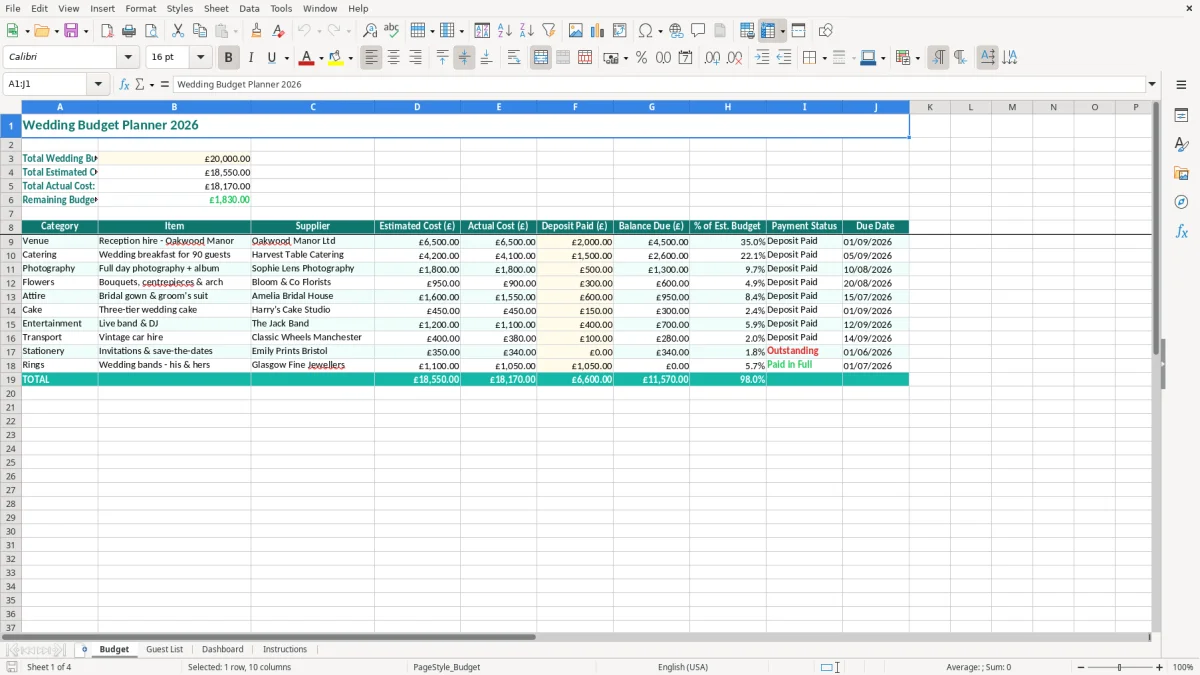
This wedding budget Excel template helps you plan and monitor the cost of a UK wedding. It contains a Budget sheet for your total allowance, estimated costs, actual costs and remaining budget, plus Guest List, Dashboard and Instructions sheets.
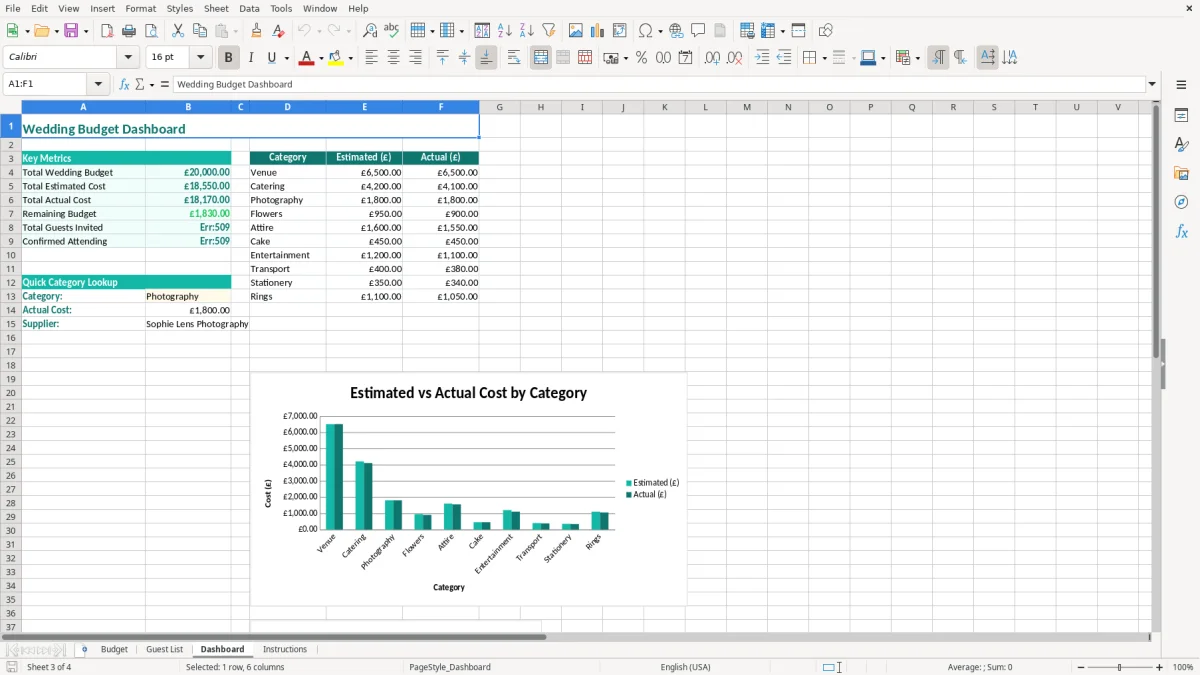
Enter your overall budget in the highlighted input cell, then compare supplier estimates with what you actually pay. The Budget sheet uses SUM formulas for the totals, while the Dashboard gives you a visual summary of the figures you have entered.
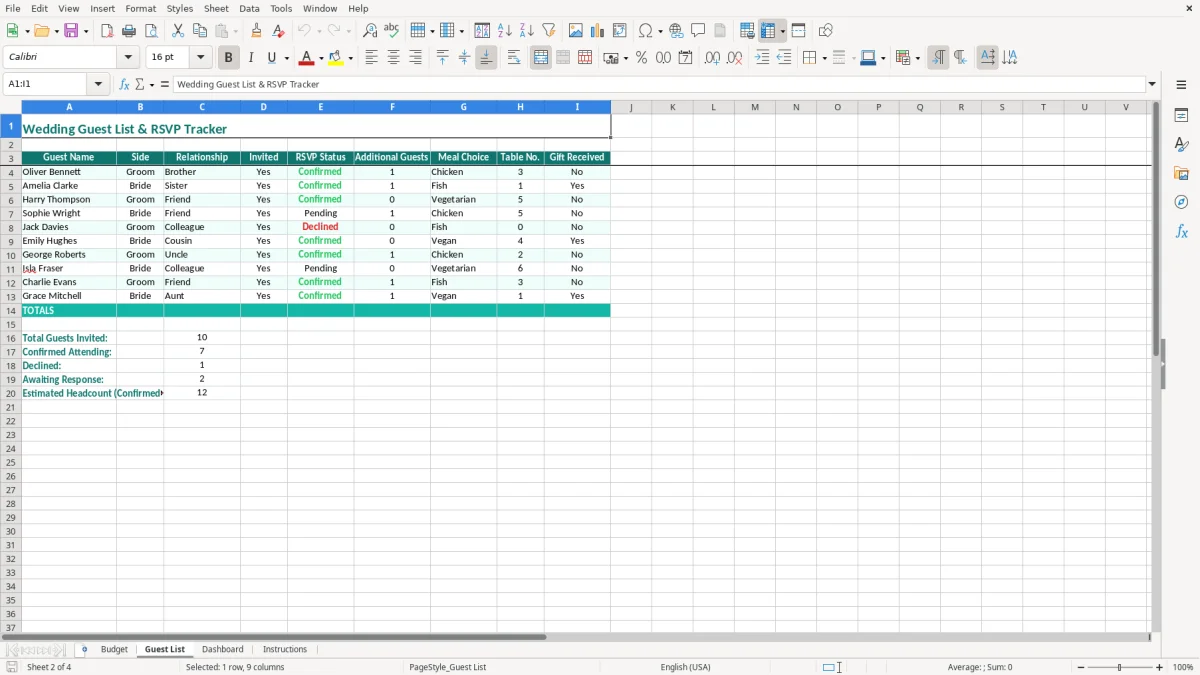
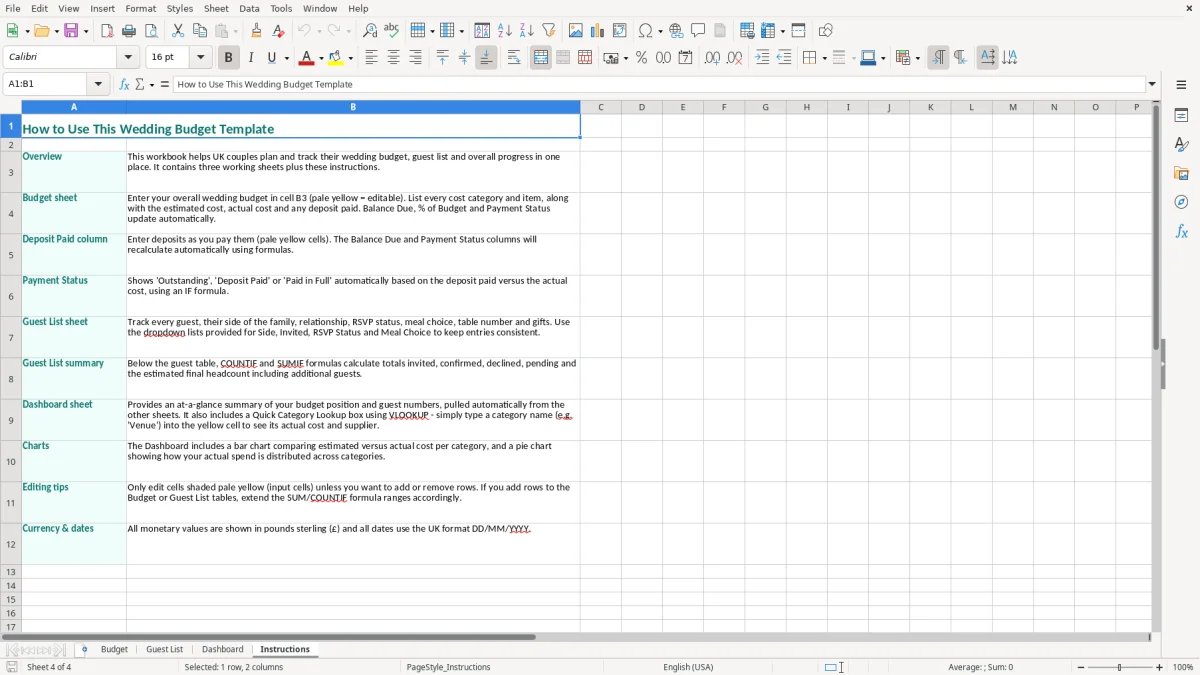
Image 1 shows the teal-formatted Budget sheet, with the £20,000 example budget at the top and the wedding cost table below. Image 2 shows the Guest List sheet, followed by the Dashboard in image 3 and the guidance in Instructions in image 4.
A couple usually needs a wedding budget at the point when the venue, date and guest numbers begin to turn an idea into financial commitments. A venue manager may quote £8,500, a caterer may price a meal at £75 per head and a photographer may require a £1,200 booking payment. Without one running total, it is easy to agree to each cost separately and lose sight of the combined figure.
The Budget sheet suits couples planning at home, parents contributing to the reception, and a wedding planner coordinating several suppliers. A couple with a £20,000 ceiling can enter that amount at the top, put the venue estimate into the relevant budget row and add other supplier estimates in the table. The Total Estimated Cost then provides an early test of whether the plan fits before deposits are paid.
Use the sheet when comparing venues, normally several months before the ceremony, and update it after each quotation. If the estimated total reaches £19,250 against a £20,000 allowance, the remaining £750 is not a comfortable spare fund once alterations, transport or last-minute stationery are considered. My practical preference is to reserve 5% to 10% of the total for overlooked costs, which would mean £1,000 to £2,000 on a £20,000 wedding.
The Guest List sheet is useful when the headcount is still moving. For example, adding 20 guests at £75 each increases catering by £1,500 before drinks, place settings and table hire. Keep those decisions visible alongside the financial figures rather than treating the guest list as an unrelated administrative task.
Image 1 shows the Budget layout: the title is across the top, the key totals sit in cells near the upper left, and the detailed cost table begins below. Images 2 and 3 separate guest planning from the financial overview, making the workbook easier to discuss at a monthly planning meeting.
A wedding budget is not a tax return, but UK pricing rules still affect the figures you enter. A VAT-registered supplier normally charges the standard VAT rate of 20% on many wedding services. A quotation of £2,000 before VAT becomes £2,400 including VAT, so compare like with like and record the amount you will actually pay. Do not assume every supplier is VAT-registered or that every item on a package follows the same treatment.
Ask each supplier for a written quotation showing the service, date, price, deposit, balance and any VAT included. If a photographer quotes £1,500 including VAT and requires a 30% deposit, the first payment is £450 and the remaining balance is £1,050. Enter the full expected cost in the estimate rather than entering only the deposit; otherwise the workbook understates the commitment.
Supplier agreements should state what happens if the venue, caterer or couple cancels. The Consumer Rights Act 2015 requires services to be provided with reasonable care and skill, and agreed descriptions and prices matter. A deposit may be described as non-refundable, but the contract should still explain the cancellation position and any costs the supplier is retaining.
Save the quotation, signed contract and payment confirmation with a consistent file name. The spreadsheet is a planning record, not a substitute for those documents. A sensible file might identify the supplier, wedding date and whether the amount is an estimate, deposit or final payment.
Guest names, dietary requirements and contact details are personal data under the UK GDPR. Keep the Guest List sheet limited to what you need, restrict access to the workbook and avoid emailing an unprotected copy to a large group. The ICO expects you to handle personal data securely and retain it no longer than necessary.
For a £20,000 wedding, a 10% contingency is £2,000. Put that allowance into your financial decision-making even if it is not a supplier invoice; the best budget is the one that reflects the cash you must have available.
That allowance also needs a place in the months before the wedding, so a savings tracker keeps the contingency building alongside deposits and final payments.
The most damaging mistake is recording deposits as though they were the full supplier cost. A couple pays a £1,000 venue deposit and enters £1,000 as the venue estimate, although the contract total is £6,000. The workbook appears to leave £5,000 available, but that money is already committed. Enter the complete contract value in the estimate and use the actual-cost figure to record payments made.
Another problem is changing the estimate every time an invoice arrives. That removes the comparison the workbook is designed to provide. If the original catering estimate was £4,500 and the final invoice is £4,950, keep £4,500 in the estimate and enter £4,950 in actual cost. The £450 difference tells you precisely what changed.
VAT is also frequently missed. A band quoted at £1,800 plus 20% VAT costs £2,160, a £360 difference. Across six suppliers, apparently small exclusions can turn into more than £1,000 of unplanned spending. Ask whether each quoted figure includes VAT before you compare suppliers.
Headcount changes are expensive because they affect several categories at once. Ten additional daytime guests at £75 each add £750 to catering; if chair hire is £8 each, the same change adds another £80. A guest list that is not updated can therefore make the budget look safe while the real cost is already £830 higher.
Do not ignore transport, alterations, postage, corkage, ceremony fees or supplier meals. Five overlooked items at £150 each consume £750, which is most of the £800 left on a £20,000 plan. Use the Dashboard before authorising another purchase, and investigate any red Remaining Budget result rather than treating it as a formatting issue.
A wedding can be within budget overall but still create a cash shortage in one month. Four balances of £750 due in the same week require £3,000 available immediately. This workbook focuses on the budget total, so keep a separate payment-date list or calendar for deposits and balances; confusing total affordability with payment timing is a common source of last-minute stress.
The workbook works best when you attach it to a fixed planning habit rather than opening it only when a supplier sends an invoice. Set a 20-minute review on the first Sunday of each month. Both partners can check new quotations, update actual payments and agree whether the remaining amount is still safe.
A fixed order prevents the common situation where one partner knows about a £600 alteration bill but the spreadsheet does not. Keep the original estimate visible so a later review can distinguish a genuine overspend from a decision to upgrade the service.
Use the highlighted input cells for figures and avoid typing over formula cells. Save a dated copy before a major change, such as increasing the guest count from 100 to 120. If the budget rises from £20,000 to £22,000, record why; otherwise the higher allowance can hide the fact that supplier prices have also increased.
Keep the file in a shared, access-controlled location rather than sending multiple versions by email. This matters particularly for the Guest List, which may contain addresses, telephone numbers or dietary information. Delete old copies when they are no longer needed.
For one wedding with perhaps 30 to 60 supplier and payment entries, this template is usually sufficient. Move to a dedicated planning or accounting system when several people need simultaneous access, you require payment reminders, or the Guest List grows beyond practical manual management. The right point to move is when version control takes longer than updating the £20,000 budget itself.
The Budget sheet subtracts Total Actual Cost from Total Wedding Budget (£). For example, with a £20,000 allowance and £17,500 of actual costs, Remaining Budget shows £2,500. The cell is formatted green at zero or above and red when the result is below zero.
Enter the full agreed supplier price in the estimated-cost column, then record deposits and later payments in the actual-cost column as they are paid. A £6,000 venue with a £1,000 deposit is a £6,000 commitment, not a £1,000 wedding cost.
The template provides the budget structure, but you must check each supplier quotation for VAT. A VAT-registered supplier charging £2,000 plus the standard 20% VAT rate will invoice £2,400, so budget for the amount you will actually pay.
Yes. Enter the total amount available from all agreed contributors as the wedding budget, or use a separate note to track who is funding each part. Keep the Budget sheet focused on the total cost and actual payments so the remaining figure stays clear.
Use the Guest List sheet for the attendee information provided in the workbook. Keep personal data limited to what you need for invitations and catering, restrict access to the file, and protect or remove the information when wedding planning is finished.
Red formatting means Total Actual Cost is higher than the amount entered in Total Wedding Budget (£). If actual costs are £20,450 against a £20,000 budget, the remaining figure is negative £450. Review the supplier commitments and either reduce costs or agree a higher affordable budget.
Excel template by
Guide written by