Funeral Cost Planner Excel Template (2026)
0
Free download
Track pet spending, VAT, reimbursable costs and monthly totals by pet, category and supplier in Excel.


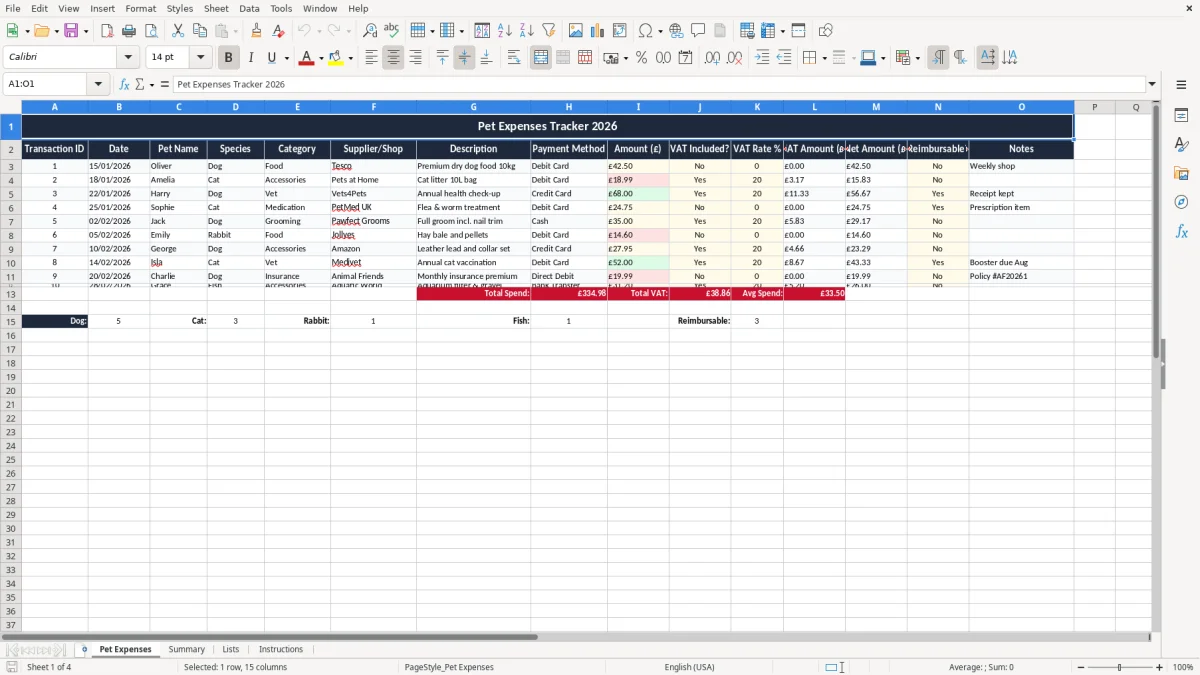
This Pet Expenses Tracker Excel template records each pet cost by date, pet name, category, supplier, payment method and amount. It also separates VAT where relevant, so you can see the net cost, VAT element and reimbursable items in one place.
Use it for a household with one pet or several, or for a small business that pays pet-related expenses on behalf of staff, clients or volunteers. The workbook has four sheets: Pet Expenses, Summary, Lists and Instructions.
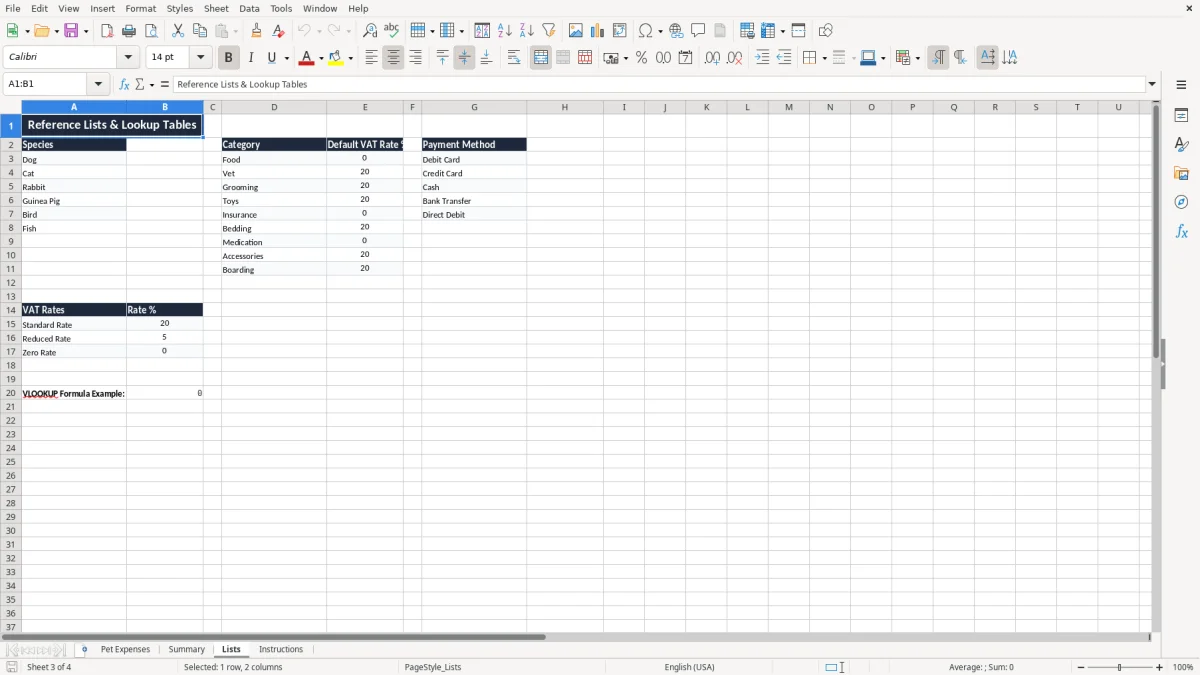
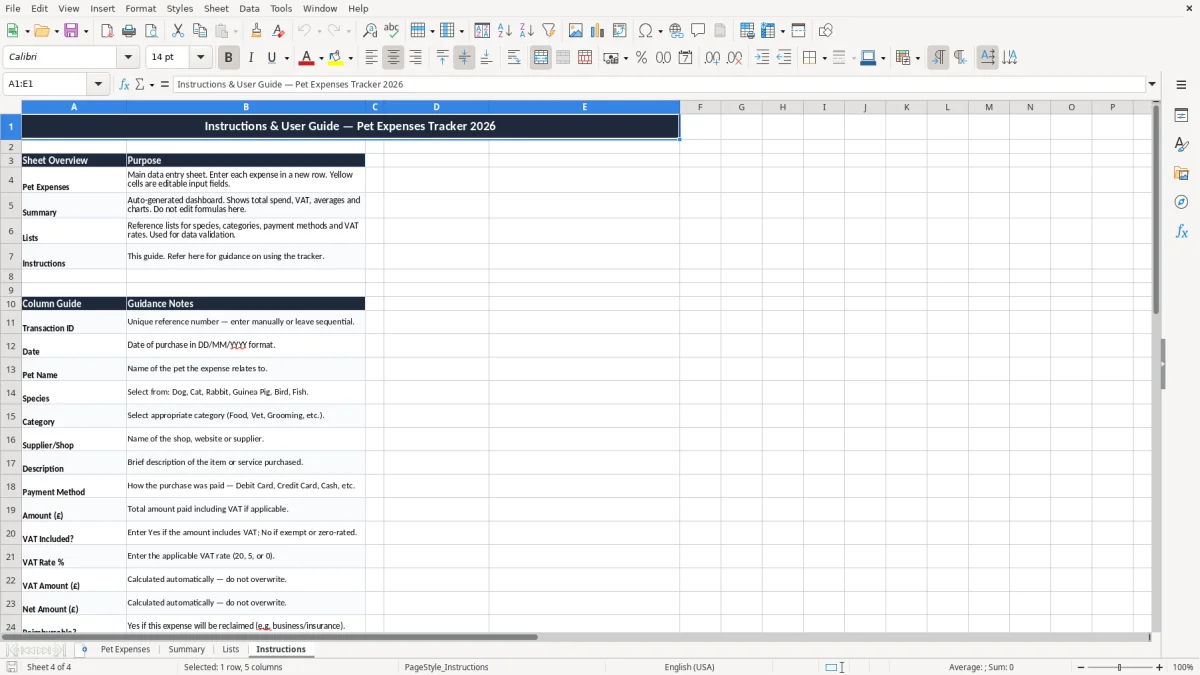
Image 1 shows the entry sheet with a clear table for each transaction. Image 2 shows the summary view, while images 3 and 4 hold the dropdown lists and the setup notes.
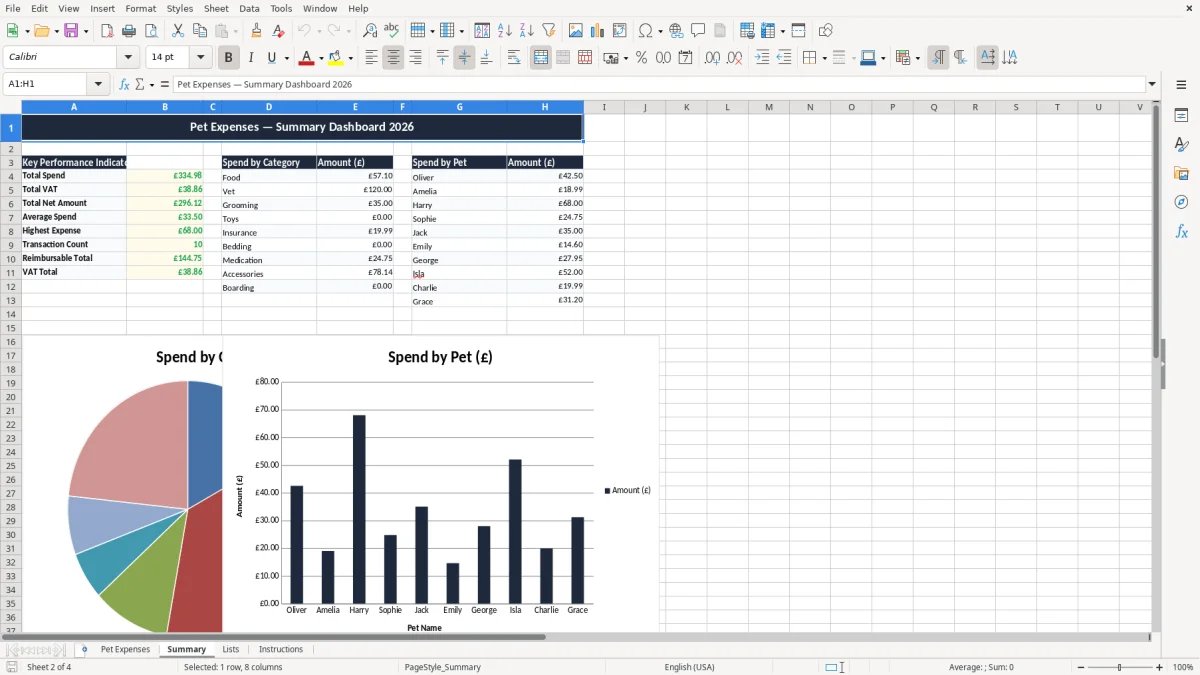
This sheet is for anyone who wants a clean record of pet spending without relying on scattered receipts. A dog owner who spends £42.50 on food, £18.99 on litter and £68 on a vet check-up can see the month’s total straight away instead of guessing from bank statements.
A small Ltd company may also use it where pet costs are paid first and reclaimed later, for example a foster home or animal care organisation. The Pet Expenses sheet (image 1) gives you the columns you need for that sort of work: transaction ID, date, pet name, species, category, supplier, description, payment method, amount, VAT and notes.
When you have two cats and a dog, the real problem is not the spending itself but knowing which pet is driving it. If Oliver the dog averages £90 a month and Amelia the cat averages £35, you can make a proper decision on food brands, insurance and annual check-ups.
Where money is being paid out and later recovered, you need a trail that is better than a bank feed. A row marked Reimbursable? Yes against a £68 vet invoice gives you a clear figure to chase, and it is much simpler than trying to rebuild the story from a WhatsApp message and a blurred receipt.
That same reimbursable trail becomes even clearer when the charge belongs to a shared outing, where a trip cost tracker keeps every fuel, pitch and meal line tied to the person or trip that should be recovered.
If you are VAT-registered, this sheet helps you split the gross amount from the VAT element. The standard rate is 20%, and if a £24.00 purchase includes VAT, the net amount is £20.00 and the VAT is £4.00; that is the figure you need if you reclaim input tax.
For UK records, keep supporting paperwork long enough to stand up to a check. Companies keep records for 6 years, and the self-employed keep records for 5 years after the 31 January Self Assessment deadline; that is the practical reason to keep supplier names, dates and descriptions in the file rather than only in a receipt box.
Transaction ID and date give each item a unique trail. VAT Included?, VAT Rate % and VAT Amount (£) make the tax treatment explicit, which is better than guessing later whether a £68 vet bill was gross or net.
If you buy a £42.50 bag of food from a retailer and the receipt shows VAT separately, the sheet lets you post it properly. That matters most when you are pulling figures together at quarter end under Making Tax Digital for a business that is VAT-registered, rather than leaving pet spending mixed into general sundries.
The common mistake is mixing pet spending with ordinary household shopping and then losing the detail. A £18.99 litter bag bought with the weekly food shop may look harmless, but if you do that for 20 items a month you can no longer see whether the cat is costing £45 or £85.
Another error is putting everything down as reimbursable without checking the receipt. If a business pays a £68 vet fee but the note is missing and the paperwork is not kept, you can spend an hour or more rebuilding the claim and still fail to get the money back promptly.
If you are VAT-registered and the sheet only shows the gross amount, you may lose the reclaim. On a month with £600 of eligible pet-related purchases, that can mean £100 of input VAT left unclaimed, which is a real cash flow loss rather than a tidy-up issue.
Write “Annual health check-up” or “Cat medication” rather than “pet stuff”. A vague line forces you to open the receipt again, and after three months that is exactly how claims get delayed, duplicated or forgotten.
If you leave 10 or 15 entries in a month outside the categories, the Summary sheet stops being useful. You need the split by food, vet, accessories and medication to see whether one pet is drifting from £30 a month to £120 a month without anyone noticing.
That same food, vet, accessories and medication split is what makes a household spending tracker useful for spotting where the monthly total is drifting.
Use the sheet at the point you buy something, not weeks later. The best habit is to open it on the same day as the pet shop trip or the vet visit, then spend 2 minutes entering the row before the receipt goes in a drawer.
Once you are handling dozens of pets, hundreds of rows, or claiming costs across several branches, a spreadsheet can start to creak. At that point you need a proper accounting or case-management system with a searchable audit trail, not just a workbook with good columns.
It records the date, pet name, species, category, supplier, description, payment method, amount, VAT details, reimbursable status and notes for each expense.
Yes. The sheet is set up to track multiple pets, so you can compare, for example, a dog spending £90 a month with a cat spending £35 a month.
Yes. If VAT is included, you enter the VAT rate and the workbook can show the VAT amount and net amount separately.
Yes. The Reimbursable? column lets you mark items that need to be repaid, such as a £68 vet bill or a shared medication purchase.
The workbook has four sheets: Pet Expenses, Summary, Lists and Instructions.
Keep supporting records for 6 years if you are trading through a company, or for 5 years after the 31 January Self Assessment deadline if you are self-employed.
Excel template by
Guide written by