Freelance Invoice Excel – Free Template (2026)
7
Free download
Track UK invoices, payments, overdue balances, credit limits and risk flags with a practical credit control Excel template for small businesses.


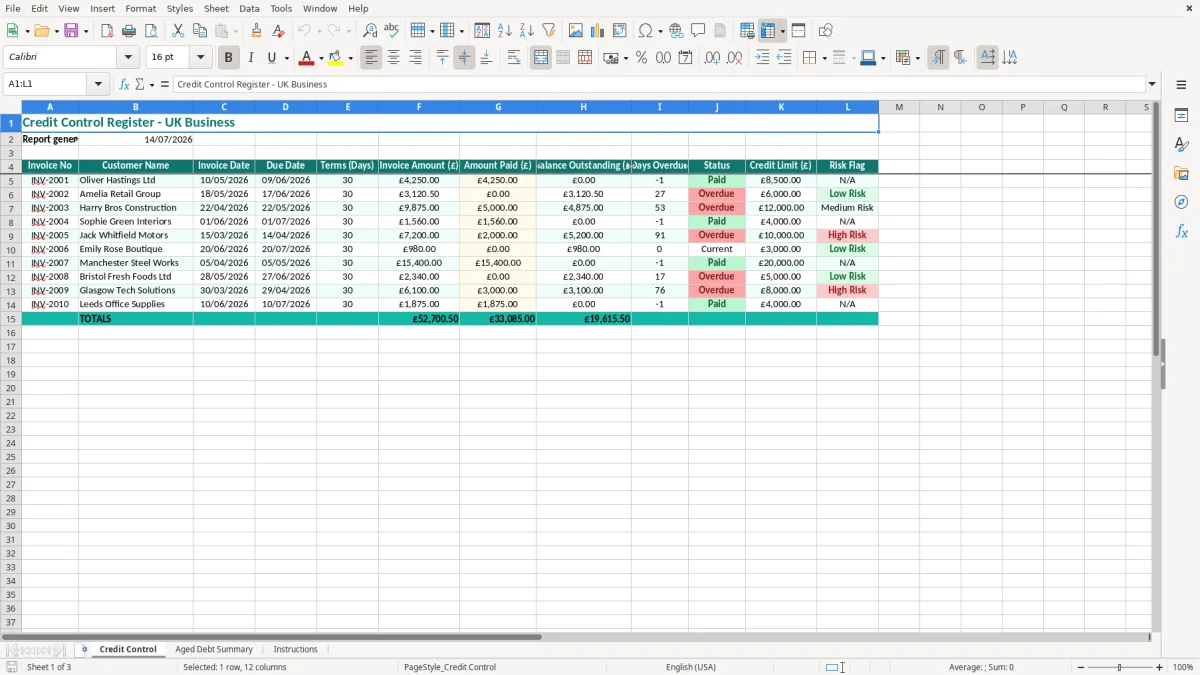
This credit control Excel template is a register for monitoring invoices, payments and overdue customer balances. It contains fields for invoice dates, due dates, payment terms, amounts owed, credit limits, status and risk flags, plus an aged debt summary.
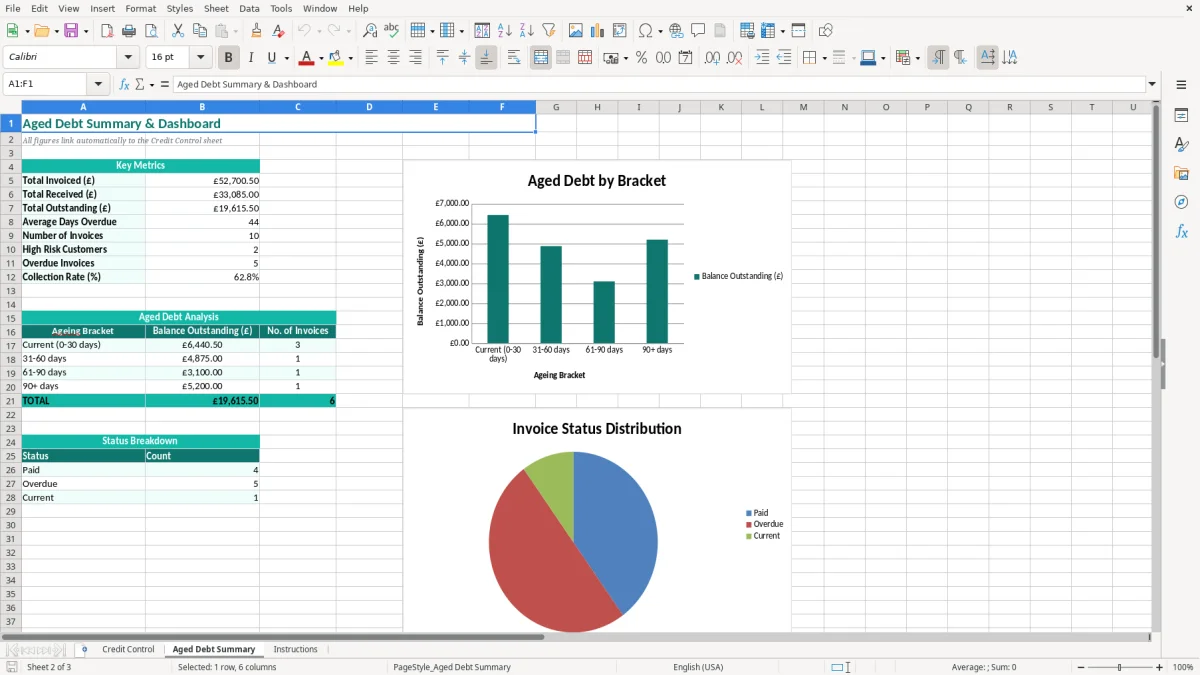
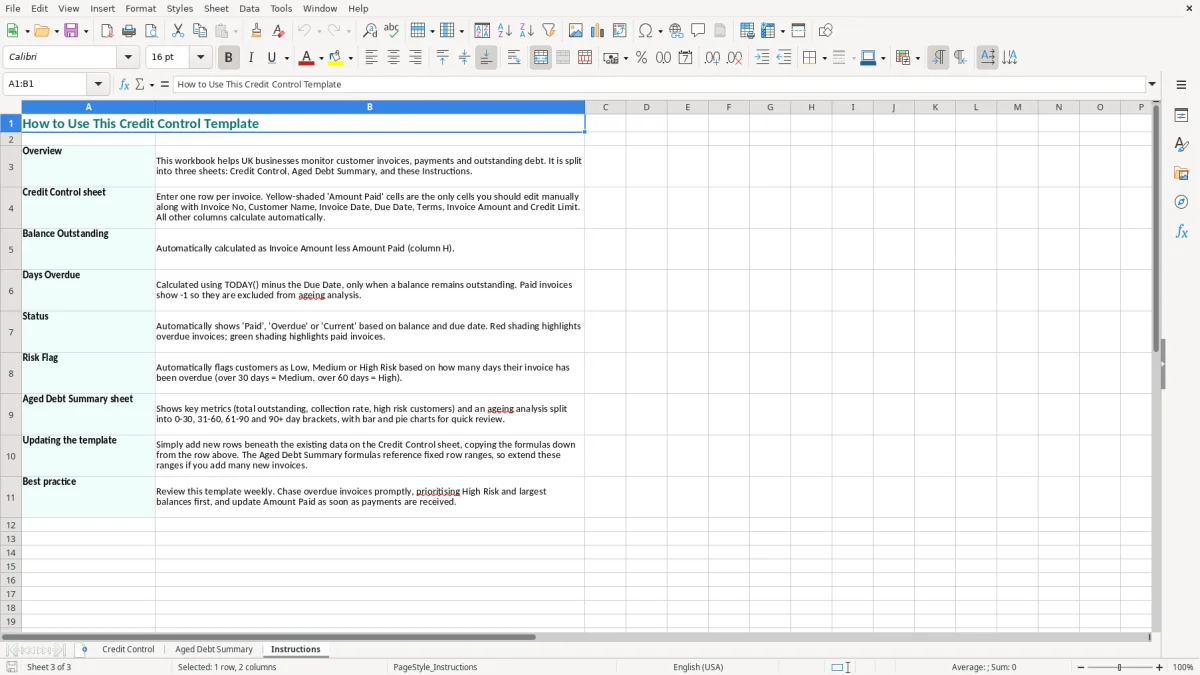
Use the Credit Control sheet to follow each invoice from issue to payment, then review the Aged Debt Summary when you need to decide which customers require a reminder or a firmer collection call. The Instructions sheet explains the layout, while image 1 shows the main register and image 2 shows the summary view.
A credit control spreadsheet is useful when your business sells on account and customers pay after delivery. An office manager at a plumbing firm may update it every Friday after checking the bank, while a bookkeeper at a small Ltd company may use it before the monthly management accounts are prepared.
The Credit Control sheet is built around one row per invoice. Image 1 shows the 12-column register: you can record the invoice number, customer name, invoice and due dates, agreed terms, invoice amount, amount paid, balance outstanding, days overdue, status, credit limit and risk flag. That structure suits a business with a manageable customer ledger rather than thousands of automated transactions.
Suppose a builder with four employees has sent Harry Bros Construction an invoice for £9,875 and received £5,000. The register shows £4,875 still exposed, alongside the due date and the customer's £12,000 credit limit. At the Friday review, the owner can see that this account deserves a call before approving another £6,000 of materials and labour.
The same process works for an online wholesaler with 300 orders a month if its accounting system produces a filtered list of unpaid invoices. Import the relevant records or enter the larger ledger in batches, then use the spreadsheet for the decision-making conversation rather than trying to replace the sales ledger.
Image 2 shows the separate Aged Debt Summary sheet. Use it before a VAT return, a cash-flow meeting or a month-end review to understand how much money is tied up in unpaid sales. A sole trader can use the sheet before paying suppliers; a bookkeeper can use it to give the director a short list of customers needing action.
The Instructions sheet is particularly useful when more than one person enters data. Agree that one person updates payments and another reviews overdue accounts, rather than allowing several versions of the register to circulate by email.
Your credit control record supports collection work, but it does not replace a compliant invoice or the underlying bookkeeping records. A UK invoice should include your business name and address, a unique sequential invoice number, the invoice date, customer details and the payment terms. If you are VAT-registered, show your VAT number and the VAT amount separately.
For example, an invoice for £1,000 of standard-rated work should show £200 VAT and a total of £1,200. The standard VAT rate is 20%; reduced-rate supplies can be 5% and qualifying goods or services can be zero-rated. The VAT registration threshold is £90,000 of taxable turnover, and quarterly returns may be submitted under Making Tax Digital (MTD).
The spreadsheet records Terms (Days), so enter the agreed period rather than relying on memory. With an invoice dated 10/05/2026 and 30-day terms, the due date is 09/06/2026. A date entered as 06/09/2026 would reverse the intended day and month, which is why the template uses the UK DD/MM/YYYY format.
For business-to-business debts, the Late Payment of Commercial Debts legislation generally allows statutory interest at 8% above the Bank of England base rate, together with fixed compensation of £40, £70 or £100 depending on the debt value. A £4,875 overdue balance is in the £1,000 to £9,999.99 band, so the fixed compensation is £70, subject to the legal conditions. Record the debt and your chase history accurately before adding charges.
Companies normally retain accounting records for 6 years; a self-employed person normally keeps records for 5 years after the 31 January Self Assessment deadline. Keep invoices, delivery evidence, statements, emails and credit notes with the relevant customer records. The spreadsheet is a control tool, not proof that a debt is legally payable.
Do not confuse a credit limit with a guarantee of payment. A customer with a £6,000 limit and an unpaid £3,120.50 invoice may still be a poor credit risk if the promised payment date has passed. The correct judgement is to combine the amount, age, status and recent payment behaviour before releasing further goods or labour.
The most expensive error is often not a dramatic bad debt; it is a small balance that nobody owns. I have seen businesses with £40,000 in total sales outstanding where five invoices of £2,000 to £4,000 were simply missed because the owner checked the bank but did not compare it with the invoice list.
If a £3,120.50 invoice is marked paid because a part-payment was mistaken for settlement, the customer can receive further work while the ledger quietly understates the debt. The Credit Control fields separate Invoice Amount (£), Amount Paid (£) and Balance Outstanding (£), so check the remaining balance against the bank statement and remittance advice.
A due date that is one month late can make a 30-day account appear current. That delays the first reminder and weakens your position when the customer says nobody contacted them. For a £9,875 invoice dated 22/04/2026 on 30-day terms, the expected due date is 22/05/2026; entering 22/06/2026 gives a completely different chasing priority.
Another common failure is treating every overdue invoice identically. A £150 consumer balance may need a polite automated reminder, while a £25,000 commercial account may justify a director-to-director call, a credit hold and a written payment plan. The Status and Risk Flag columns should describe the action and exposure, not merely say overdue.
A firm can set a £12,000 credit limit and still lose money by approving new work when £8,000 is already overdue. If another £6,000 order is accepted, exposure becomes £14,000, exceeding the agreed limit by £2,000 before any dispute or insolvency risk is considered.
Do not delete paid rows as soon as money arrives. That removes the evidence needed to explain why the customer was chased and makes month-end reconciliation harder. Keep the row, update Amount Paid (£), set the appropriate Status and retain a dated copy of the review. Five minutes of disciplined updating can prevent an hour of reconstructing the account later.
A credit control template only improves cash flow when somebody updates it at a fixed time. The simplest arrangement for a small firm is a 20-minute Friday review immediately after the bank has been reconciled: update receipts, check new due dates, then assign the next action to every overdue balance.
For example, if Friday's review finds £18,400 unpaid across 12 invoices, prioritise a £7,500 account that is 21 days overdue and above its credit limit before spending time on a £95 invoice due yesterday. That is a better use of limited credit control time, even though the smaller invoice is technically late.
Keep the original template as a clean master and save working copies with dates such as Credit-Control-2026-07-14.xlsx. Restrict editing to the input cells where possible, use the Instructions sheet to train a second user and avoid changing the column headings because the summary relies on a consistent layout.
After three months, compare the time spent maintaining the file with the value of the ledger. A business with 40 invoices a month can usually manage this approach; a wholesaler processing 300 orders a month will benefit from accounting software with automatic statements, payment matching, credit holds and GDPR-controlled user access. Move when manual updating causes missed receipts, duplicate records or delayed chasing—not simply because the spreadsheet has more rows.
That same shift to control and traceability also shows up in a subcontractor statement when CIS deductions and payments need a consistent record.
This template tracks invoice number, customer name, invoice date, due date, payment terms, invoice amount, amount paid, balance outstanding, days overdue, status, credit limit and risk flag. It also includes an Aged Debt Summary and an Instructions sheet.
Subtract Amount Paid (£) from Invoice Amount (£). For example, an invoice of £9,875 less payments of £5,000 leaves £4,875 outstanding. Reconcile both figures with your accounting records before sending a chase.
Yes. A sole trader can use it to monitor unpaid customer invoices, plan supplier payments and prepare information for bookkeeping and Self Assessment. Keep the invoice and payment evidence alongside the spreadsheet.
The register records invoice and overdue information, but you should calculate statutory interest separately before adding it to a customer statement. For qualifying business debts, the usual statutory rate is 8% above the Bank of England base rate, with fixed compensation of £40, £70 or £100 according to the debt value.
Enter the approved maximum exposure for that customer, in pounds. A £6,000 limit does not mean you should continue supplying a customer with £5,500 already overdue; review the outstanding balance, payment history and risk flag before accepting more work.
Update it at least weekly, ideally after reconciling the bank. A Friday review works well for many small businesses, while firms with daily receipts or high order volumes should update payments more frequently so the balance outstanding remains reliable.
Excel template by
Guide written by