Personal Finance

Household Budget Excel - Free Template

Track household income, bills, spending and variance with Budget Tracker, Summary and Instructions sheets for UK home finances.

2026-06-29
236 Downloads
4.8/5 Average rating
Download template

This household budget Excel template is a simple way to track income, bills and everyday spending in one place. It includes a Budget Tracker, Budget Summary and Instructions sheet, so you can see what comes in, what goes out and where the money is going.

Use it for a family budget, shared household costs or your own personal finances. The workbook is set up for monthly tracking, with budgeted amount, actual amount, variance, payment method and notes fields already laid out.

It is practical if you want a clear view of cash flow without moving to accounting software. You can start with a few entries, then build a proper monthly routine around the same file.

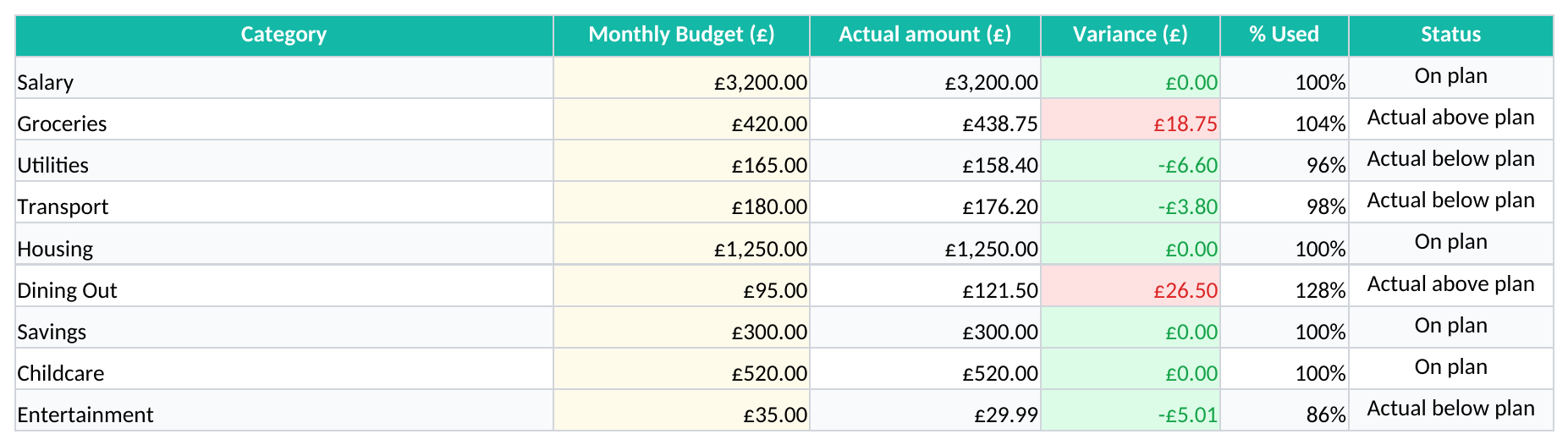
Screenshot 1: Budget Tracker tab - Excel template household budget excel template uk
Figure 1: Worksheet "Budget Tracker"

The key benefits of this Excel template

  • Tracks budgeted and actual spending in the same line, so you can spot overspend quickly.
  • Shows variance in pounds and percentage terms, which makes month-end review faster.
  • Separates household members, so shared costs are easier to follow.
  • Records payment method and paid-by details, which helps when you split bills.
  • Keeps income and expense entries in one sheet, cutting down on duplicate records.
  • Works for a single person, couple or family with several earners.
  • Gives you a summary sheet for a quick view before payday or month-end.

Step-by-step guide

  1. Open the Budget Tracker sheet and enter each income or expense line on a separate row. Use the date, month, category and subcategory fields so the record is easy to filter later.
  2. Fill in the budgeted amount and the actual amount for each item. This lets you compare planned spending with what you really paid out.
  3. Choose the household member, payment method and status. That makes it easier to see who paid, how it was paid and whether the item is settled.
  4. Use the Notes column for anything that needs extra context, such as a one-off repair or an annual insurance bill spread across the year.
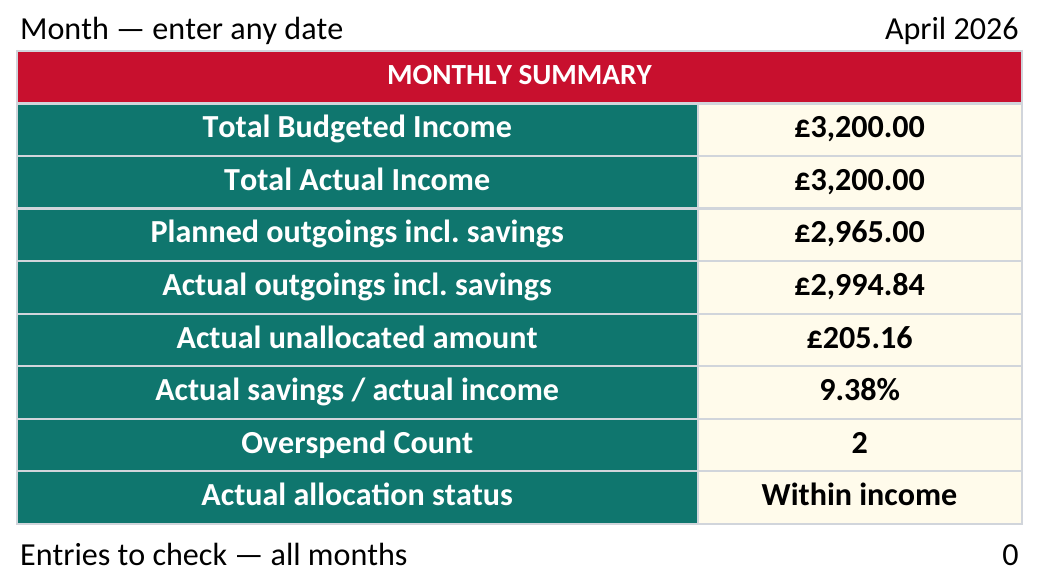
  5. Check the Budget Summary sheet for totals and variance. Use it as your monthly review before you move money between savings, bills and day-to-day spending.
  6. Follow the Instructions sheet if you want to keep the same process each month. A fixed routine is quicker than rebuilding the budget from scratch every time.
Screenshot 2: Budget Summary tab - Excel template household budget excel template uk
Figure 2: Worksheet "Budget Summary"

Features included

Budget Tracker sheet with 15 columns for income and spending entries.
Budget Summary sheet for a quick view of totals and differences.
Instructions sheet to help you keep the process consistent.
Fields for date, month, category, subcategory and description.
Separate budgeted amount, actual amount, variance and variance % columns.
Status, paid by, payment method and notes fields for practical household record-keeping.
Formatted headers and fixed column widths for easier reading on screen and when printed.

How household budget Excel fits real UK households

This template suits the people who have to make home money work in practice: a couple sharing rent and utilities, a family with school costs and food shopping, or one person trying to keep control of irregular spending. If you are looking at the bank balance every Friday and wondering where the month has gone, the Budget Tracker gives you the detail you need.

The layout is built for day-to-day use rather than theory. For example, a household with £3,200 of monthly income, £1,100 of fixed bills and £780 of shopping, travel and subscriptions can see the difference between planned and actual spending line by line.

Who uses it and when

You normally reach for this file at payday, just before direct debits go out, or at month-end when you need to check what is left. A shared household can use it to split costs fairly: one partner pays the rent, another covers groceries, and both can see the overall position in the same workbook.

What the sheet structure gives you

The Budget Tracker includes columns for date, month, household member, category, subcategory, type, description, budgeted amount, actual amount, variance, variance %, status, paid by, payment method and notes. That is enough to follow a £165 electricity bill against a £158.40 actual payment, or a £420 grocery budget against £438.75 spent, without opening a second file.

Screenshot 3: Instructions tab - Excel template household budget excel template uk
Figure 3: Worksheet "Instructions"

What HMRC expects you to keep for home money records

This is a household budget, not a tax return, but the record-keeping habits are the same ones you need when money matters. If you ever use the file for a sole trade side income, HMRC expects records to be kept for 5 years after the 31 January Self Assessment deadline that follows the relevant tax year.

The tax year runs from 6 April to 5 April. So, for income earned in the 2026 tax year, the online Self Assessment filing deadline is 31 January 2027, and the supporting records are then kept for 5 years after that deadline.

Why the columns matter

The date and month fields let you tie spending to a specific point in the year, which is useful when fuel bills or school costs rise in winter. The paid-by and payment method fields also make it easier to reconcile a shared account: if two adults each put in £600 for household costs, you can trace exactly which payment covered which bill.

When budget control becomes a real finance issue

If your household starts running a side business, the same disciplined record layout becomes valuable for VAT and income tracking. Once taxable turnover reaches the VAT registration threshold £90,000, you must register and, if registered, submit quarterly VAT returns under Making Tax Digital with the VAT amount shown separately on invoices.

At that point, the same figures are ready to feed a small business profit and loss sheet, where turnover, VAT and other costs can be grouped into a clearer monthly result.

Where household budgets usually go wrong and what it costs

The common problem is not that the numbers are missing; it is that the household stops updating the sheet after the first couple of weeks. A budget that begins with £2,400 of planned monthly spending but only records £1,150 of actuals is not a budget at all — it is an incomplete note.

Another failure is mixing annual bills into monthly spending without spreading them properly. If your car insurance is £480 a year and you treat it as a surprise once a year, you will always look short on cash even though the cost was predictable at £40 a month.

Typical mistakes that distort the picture

Some households enter card payments twice, once when the card is used and again when the bank clears it. That double counts spending by mistake and can make you think you overspent by £75 or £150 in a week when you did not.

Another issue is vague categories such as miscellaneous or other. If £310 of the month sits in an unnamed bucket, you cannot tell whether the real problem is food, transport, subscriptions or repairs, and you lose the chance to cut the right cost.

What it costs in practice

For a family with £2,800 of monthly income, a 3% leak is £84 a month, or over £1,000 a year. That is often the difference between building an emergency fund and relying on overdraft borrowing at the worst possible time.

For households that also use a car for work, mileage claim records are one of the clearer ways to separate business travel from everyday spending and avoid that kind of leak.

How to turn the budget sheet into a monthly habit

The file works best when you attach it to a fixed routine. Most households manage it well if they update the tracker on payday, then review the summary on the last day of the month or the evening before direct debits leave the account.

Simple habits that keep it alive

  • Set one 15-minute check-in each week, ideally after you look at online banking.
  • Copy the same month’s layout forward instead of rebuilding categories from scratch.
  • Use the status column to flag paid, pending and due items so nothing gets missed.
  • Keep the notes field for one-off bills, refunds and household repairs.
  • Use the summary sheet as your monthly decision point for savings, debt repayments and next month’s spending limits.

When a spreadsheet is no longer enough

If you have dozens of accounts, multiple credit cards, savings pots and joint commitments, the workbook will still work for tracking, but not for automation. At that point a proper budgeting app or bank-feed system may save time, especially if you need live balances instead of manual entry.

For most households, though, a clean Excel file is the simplest way to stay in control. You get the detail, the totals and the flexibility without paying for software you may not use fully.

Frequently asked questions about this template

Download
File format Excel (.xlsx)
Compatible software Excel, Google Sheets, LibreOffice
Price Free
Download now
The people behind this template
Eleanor Hartley

Excel template by

Eleanor Hartley

Chartered Certified Accountant (FCCA)

Eleanor Hartley is a Chartered Certified Accountant (FCCA) with more than 15 years' experience supporting UK small businesses, sole traders and bookkeepers. She has prepared VAT returns, Self Assessment filings and year-end accounts for hundreds of clients, and builds every template here to match how HMRC and UK businesses actually work.

Oliver Whitfield

Guide written by

Oliver Whitfield

Chartered Bookkeeper (MICB)

Oliver Whitfield is a chartered bookkeeper (MICB) and former practice manager who has spent over a decade helping UK sole traders and limited companies keep clean, HMRC-ready records. He writes the step-by-step guides on UK Sheets, turning VAT, payroll and Self Assessment rules into plain-English instructions anyone can follow.