Freelance Invoice Excel – Free Template (2026)
7
Free download
Track invoices, due dates, VAT, payments and overdue balances with four sheets for UK small businesses.


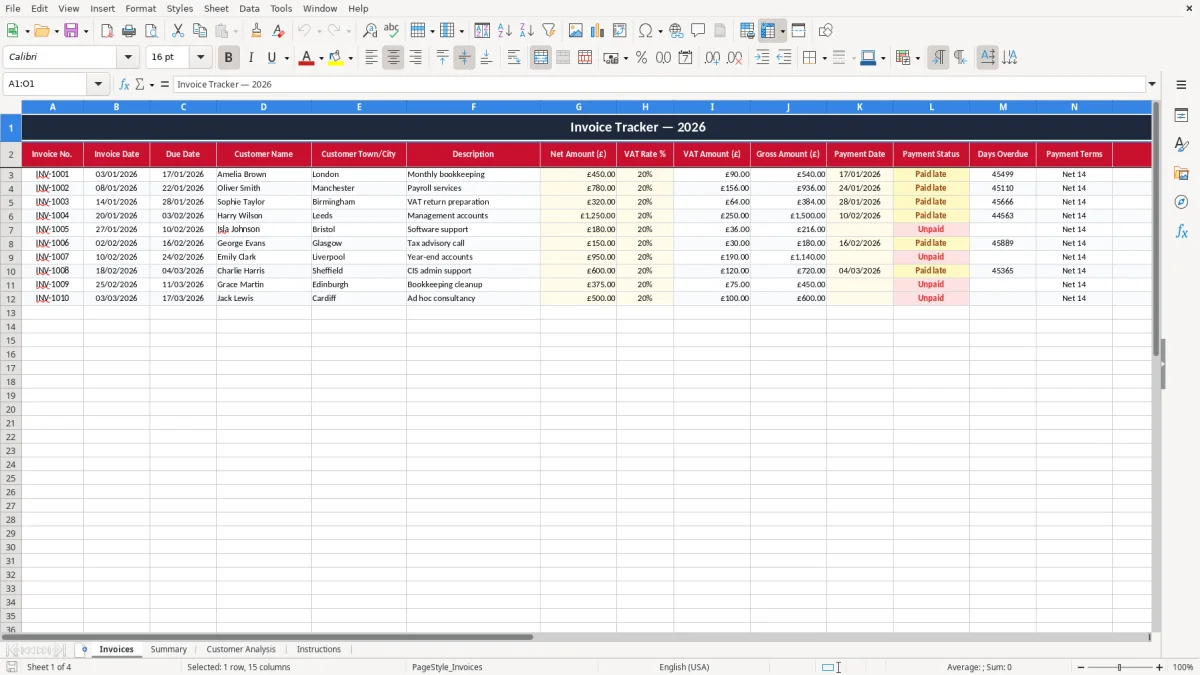
This Invoice Tracker Excel template helps you record invoices, due dates, VAT, payments and overdue amounts in one place. It includes four sheets: Invoices, Summary, Customer Analysis and Instructions.
Use it to keep a clean list of sales, see what is still unpaid, and check which customers are slow to settle. The workbook is built for UK businesses that want a simple way to monitor cash flow without moving straight to accounting software.
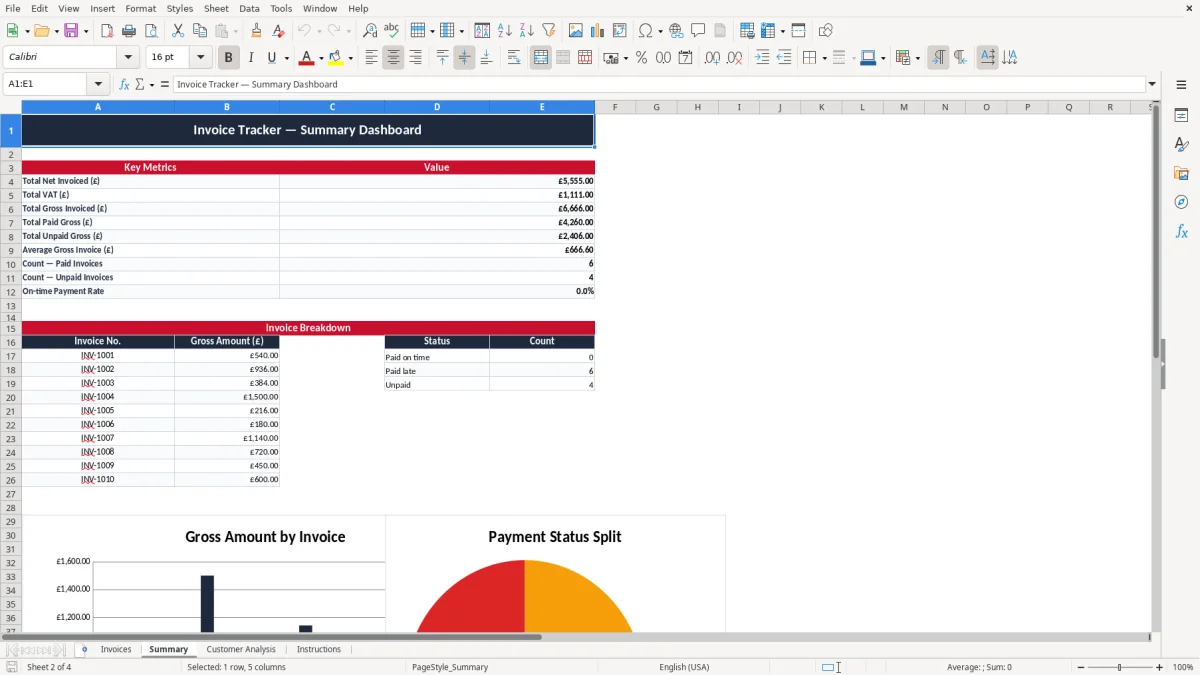
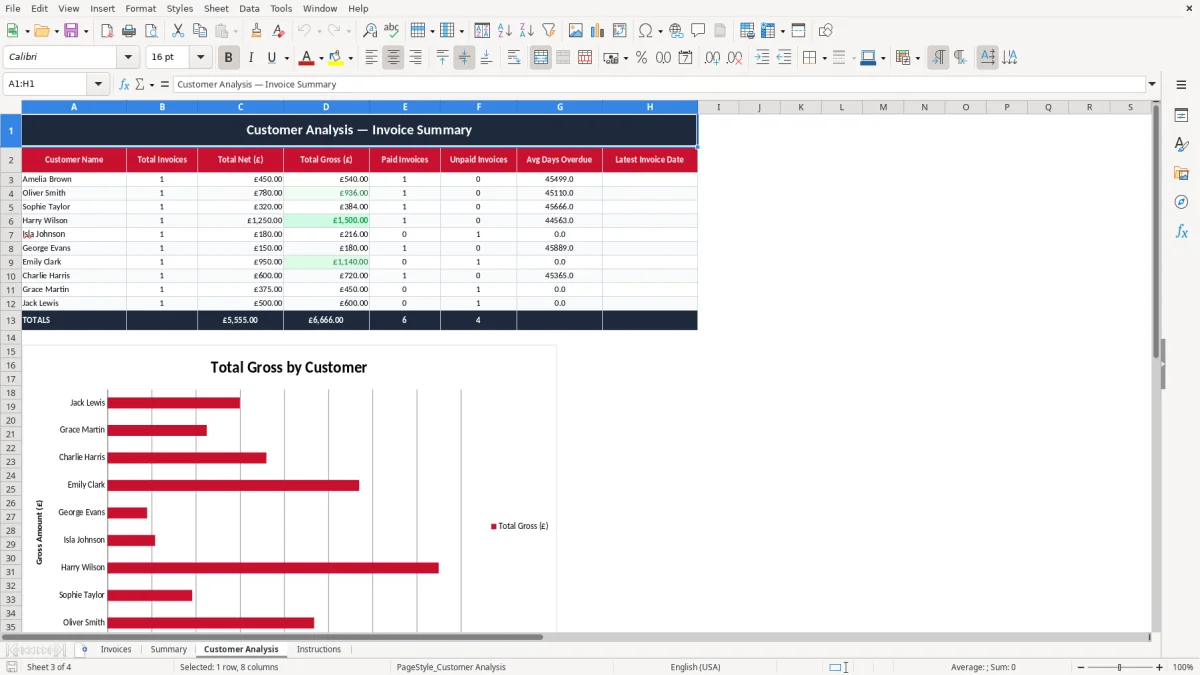
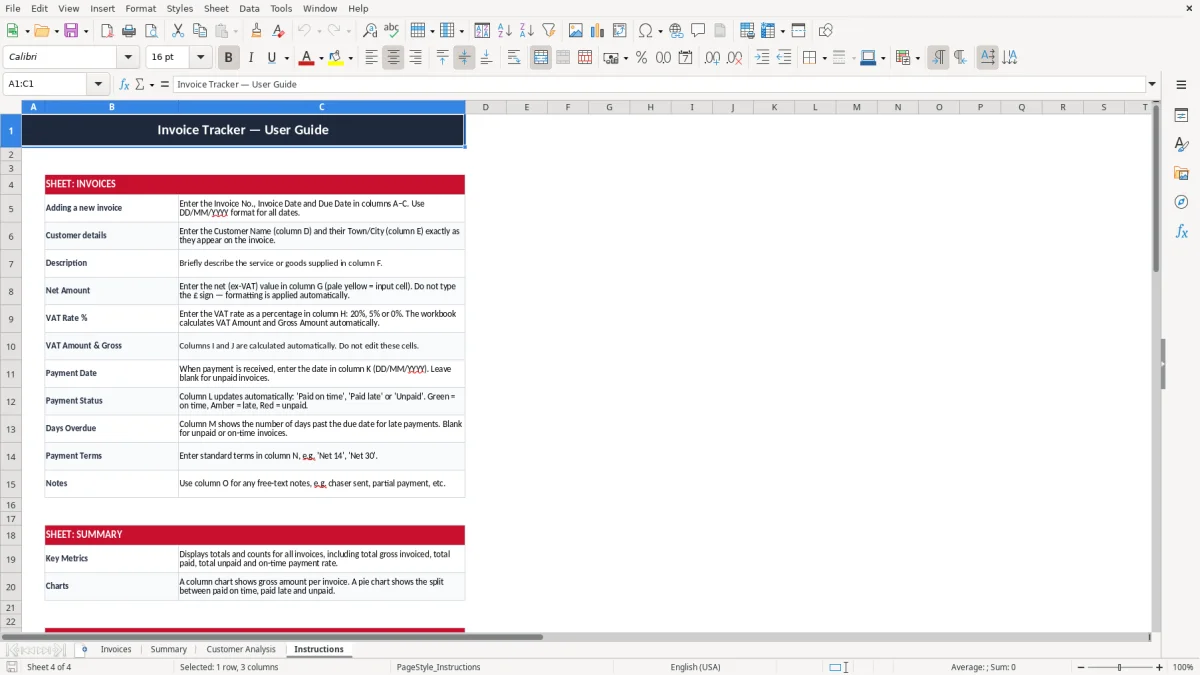
Image 1 shows the Invoices sheet, where each line tracks invoice number, invoice date, due date, customer details, net amount, VAT rate, VAT amount, gross amount, payment date and status. Image 2 is the Summary sheet, with totals and a small chart view; image 3 breaks down customers, and image 4 gives brief setup notes.
This workbook suits a sole trader sending 15 invoices a month, a Ltd company with a bookkeeper, or an office manager in a trade business chasing payments after each job. If you invoice £8,000 a month and even 10% slips past the due date, that is £800 tied up in cash flow when you may need wages or materials.
A sole trader doing Self Assessment can use the list to keep sales and receipts in order before the 31 January deadline. A Ltd company can use it alongside the profit and loss account to see which customers are still unpaid before month-end or year-end accounts.
A plumber with 4 employees, for example, may raise 40 invoices a month across maintenance and call-out work. If 6 of those are on 30-day terms and 2 are already 14 days late, the tracker gives you a clear chasing list instead of a pile of emails.
Image 1 shows the main register layout, with one line per invoice and separate columns for invoice date, due date, gross amount and payment status. That structure works well when you need to review a week’s worth of billing in under 10 minutes.
That same register becomes even more useful when the unpaid invoices need to be folded into a cash flow forecast for month-end planning.
For HMRC record-keeping, the practical rule is simple: keep business records for 6 years if you run a company, and keep Self Assessment records for 5 years after the 31 January deadline that follows the end of the tax year. If your 2026/27 tax return is due online by 31/01/2028, keep the supporting invoice records until at least 31/01/2033.
If you are VAT registered, this tracker helps you separate the VAT amount from the net sale. In 2026 the standard VAT rate is 20%, the reduced rate is 5%, and the zero rate applies to items such as most food, children’s clothing and books; a £250 net invoice at 20% VAT gives £50 VAT and £300 gross.
The VAT registration threshold in 2026 is £90,000 of taxable turnover in any rolling 12-month period. If you cross that level, you need to register and file quarterly VAT returns under Making Tax Digital (MTD) if you are in scope; your invoices should also show a unique invoice number, the date, your name and address, the customer details, and VAT shown separately if you are VAT registered.
The payment terms column in the sheet helps you distinguish 14-day and 30-day terms. For many small firms, 14 days is the better commercial choice because it shortens the time between invoicing and money in the bank.
That cash-flow timing matters at tax time too, when a separate record of self-assessment expenses keeps deductible spending clear.
The common mistake is not the invoice itself, but the gap between raising it and recording payment. A £1,200 job with 30-day terms that slips to 60 days can leave you funding labour, fuel and materials for an extra month; on 20 such jobs, that is £24,000 of working capital stuck in debtor balances.
If you leave the due date blank, the invoice may sit unnoticed until the customer complains or the debt is already old. That usually means wasted chasing time, and in a small office that can be 30 to 60 minutes a week simply working out what is late.
Another error is mixing net and gross figures. A £99.99 invoice at 20% VAT should not be copied in as £100 gross with VAT guessed later; if you do that across 50 invoices, you can easily build a small but annoying reconciliation difference at quarter end.
The days overdue field is useful because it turns delay into a number you can act on. If three customers are each 21 days late on £750 invoices, you are looking at £2,250 outstanding that should already have been cleared.
The best way to keep this file alive is to use it at the same time every week. For many small firms, Friday afternoon or the last working day before the VAT return works well because you already know what has been billed and what has been paid.
If you are handling several hundred invoices a month, need multi-user access, or want automated bank feeds, you have probably outgrown a manual tracker. At that point, accounting software with bank reconciliation and debtor reports will save more time than an Excel file can.
It gives you one register for invoice number, dates, customer details, VAT, payment status and overdue amounts. That makes it easier to chase debt and keep your sales records tidy.
Yes. The sheet separates net amount, VAT rate, VAT amount and gross amount, so it works well for UK VAT records at 20%, 5% or 0%.
It shows what is due, what is paid and what is overdue, so you can focus on the invoices that are holding back money. If £5,000 is still unpaid at month-end, you can see that immediately instead of hunting through emails.
The workbook has four sheets: Invoices, Summary, Customer Analysis and Instructions. That gives you a working register, a totals view, a customer breakdown and a simple setup guide.
Companies should keep records for 6 years. Self-employed traders should keep records for 5 years after the 31 January deadline for the relevant Self Assessment return.
Once the number of invoices, users or payment checks becomes too large for a manual file, software is the better option. If you are dealing with several hundred invoices a month or need live bank feeds, Excel will start to slow you down.
Excel template by
Guide written by