Funeral Cost Planner Excel Template (2026)
0
Free download
UK mortgage overpayment Excel template with calculator, 100 scenarios, allowance checks, interest savings, term reductions and dashboard charts.


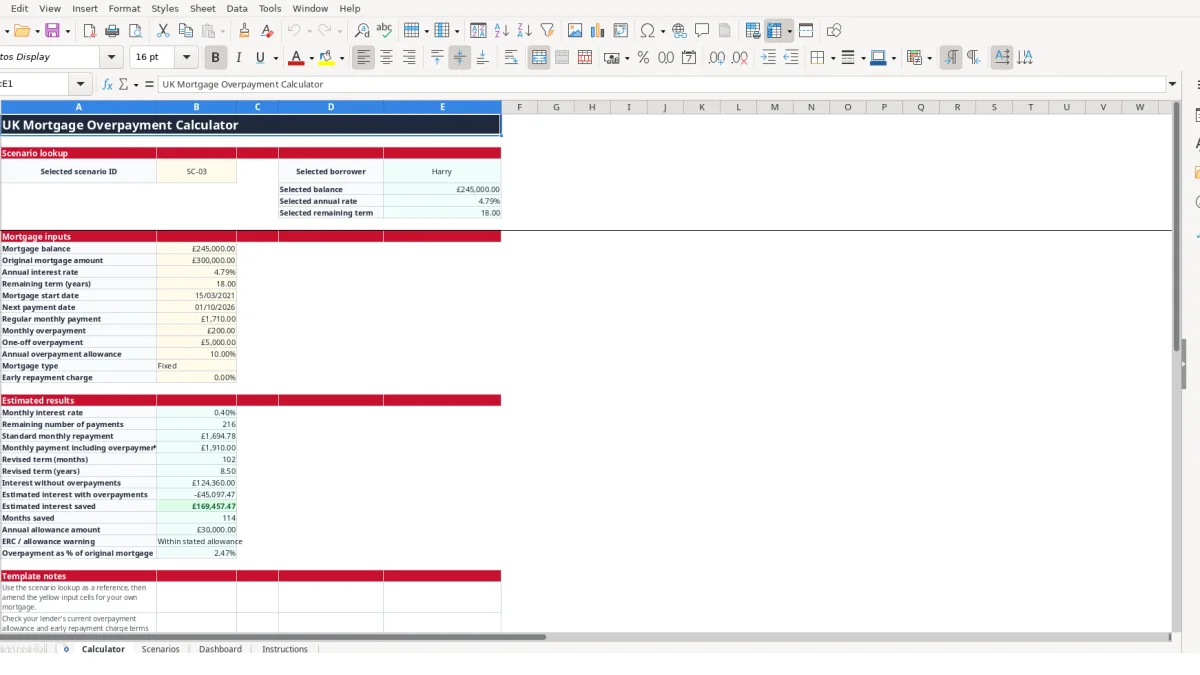
This UK mortgage overpayment Excel template estimates how regular monthly and one-off overpayments could affect your mortgage term and interest cost. It contains a Calculator, Scenarios sheet for up to 100 cases, Dashboard summaries with charts, and Instructions for entering lender-stated figures.
Enter the mortgage balance, annual interest rate, remaining term, regular payment, monthly overpayment and one-off overpayment. The workbook calculates an estimated revised term, interest saved, months saved and an ERC or allowance warning for each scenario.
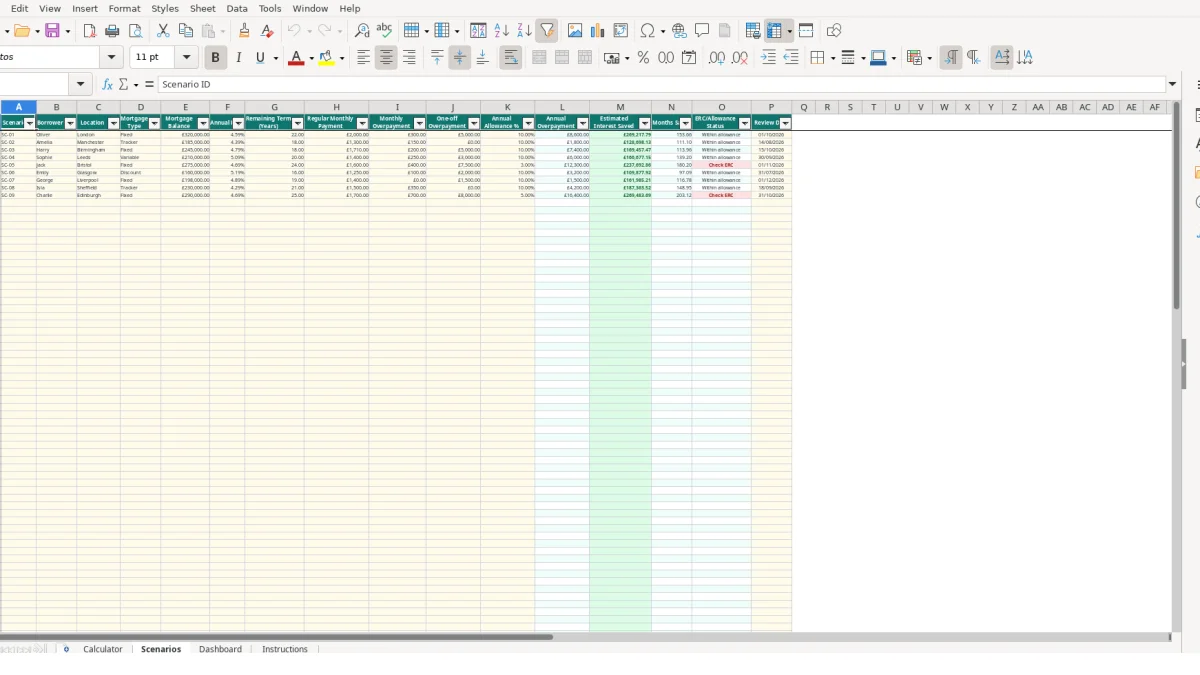
A mortgage overpayment spreadsheet is useful when you want to compare possible payment decisions before discussing them with your lender. Homeowners with fixed, tracker, variable or discount mortgages can record their current position, while brokers, administrators or household finance teams can keep several clearly labelled illustrations together. The workbook is for planning estimates, not a replacement for a lender's calculation.
Suppose a borrower has a £245,000 balance, an annual rate of 4.79%, 18 years remaining and a regular monthly payment of £1,710. The sample Calculator position adds a £200 monthly overpayment and a £5,000 one-off payment. Those figures give you a concrete starting point for comparing the cost and time effect of paying more.
You could then create alternatives in Scenarios: a £245,000 balance with no monthly overpayment, another with £100 per month, and a third with £300 per month and no one-off payment. Each row records the regular payment, recurring overpayment and one-off amount separately, so you can distinguish a continuing commitment from an isolated lump sum.
When a mortgage rate or payment changes, enter a fresh scenario rather than overwriting the previous one. For example, a borrower with a £185,000 balance, 18 years remaining, a £1,300 payment and a £150 monthly overpayment can be compared with a second row using a different rate or payment. The review date helps identify when the figures were last checked.
The Calculator can display selected information from scenario IDs SC-01 to SC-09. The Scenarios sheet itself is prepared for up to 100 entries, making it more suitable for a household comparing options over time or a team reviewing multiple borrower cases than a single isolated calculation.
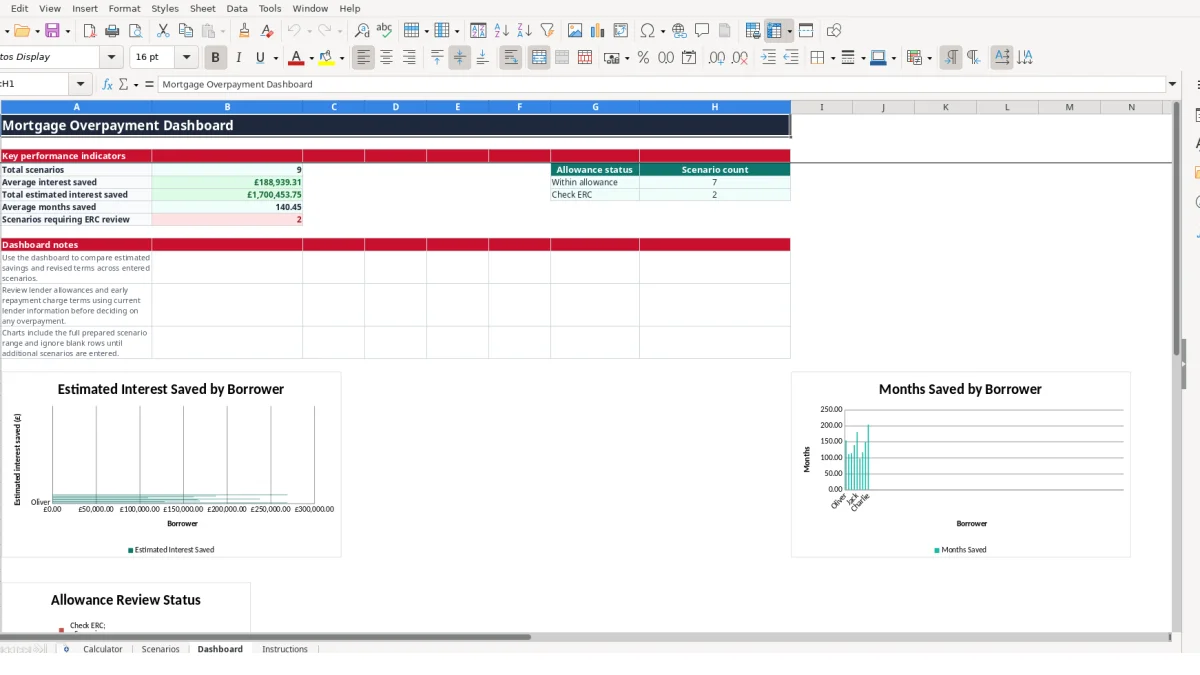
Use the Dashboard when several rows need a quick comparison. It reports total scenarios, average estimated interest saved, total estimated interest saved, average months saved and counts for allowance statuses. Treat every result as an estimate based on the figures entered, particularly where the mortgage product may change its rate or payment.
The workbook separates entered assumptions from calculated results. On Calculator, the input area includes balance, original mortgage amount, annual rate, remaining term, regular payment, monthly overpayment, one-off overpayment, annual allowance percentage, mortgage type and early repayment charge. The result area then turns those values into comparable estimates rather than requiring you to maintain duplicated calculations.
The Calculator converts an annual rate into a monthly interest rate by dividing the entered rate by 12. It converts the remaining term in years into a payment count by multiplying by 12. For a hypothetical £200,000 balance at 4.80% over 20 years, that means a monthly rate of 0.40% and 240 remaining payments before considering any overpayment.
The standard monthly repayment uses the Excel PMT function when the monthly rate is not zero. The workbook also handles a zero-rate case separately. The payment including overpayment adds the regular monthly payment and the monthly overpayment, so £1,500 plus £200 produces £1,700 before considering the one-off amount.
The revised term uses the NPER function where a rate is present and accounts for the one-off overpayment against the balance. The Calculator compares interest without overpayments with estimated interest after the revised payment pattern, then subtracts the latter from the former to show estimated interest saved. It also subtracts the revised payment count from the original count to show months saved.
Allowance checking is deliberately visible. Annual allowance amount is calculated as the original mortgage amount multiplied by the entered allowance percentage. A £300 monthly overpayment and £5,000 one-off payment create £8,600 of annual overpayment; against an original amount of £300,000 and an entered 10% allowance, the workbook compares £8,600 with £30,000 and displays Within stated allowance. This is a workbook calculation, not confirmation of lender terms.
Validation permits non-negative monetary entries, rates and allowances between 0 and 1, and remaining terms from 1 to 50 whole years. Mortgage type and scenario ID use lists. These controls are preferable to free text because a value such as Tracker must match the permitted list, while blank or incomplete inputs leave dependent results blank rather than presenting a misleading figure.
The most damaging error is entering a plausible figure in the wrong field. If £5,000 intended as a one-off payment is entered as the monthly overpayment, the annualised amount becomes £60,000 before the lump sum is added. The resulting revised term and allowance status would describe a completely different repayment plan.
The Calculator uses both the current mortgage balance and the original mortgage amount. The allowance amount is based on the original mortgage amount, while the repayment estimates use the current balance. For a current balance of £245,000 and original amount of £300,000, replacing both fields with £245,000 changes the allowance comparison as well as the mortgage calculation.
That distinction matters even when the rate and payment look correct. A hypothetical 10% allowance applied to £300,000 produces £30,000, whereas the same percentage applied to £245,000 produces £24,500. The £5,500 difference is enough to change a displayed allowance status for a larger planned overpayment.
Overwriting SC-03 after a rate change removes the earlier comparison. Instead, create a new scenario row with a different ID, retain the borrower and location, and use the review date to show when the assumption was checked. This preserves the distinction between a 4.79% illustration and a later rate or payment figure.
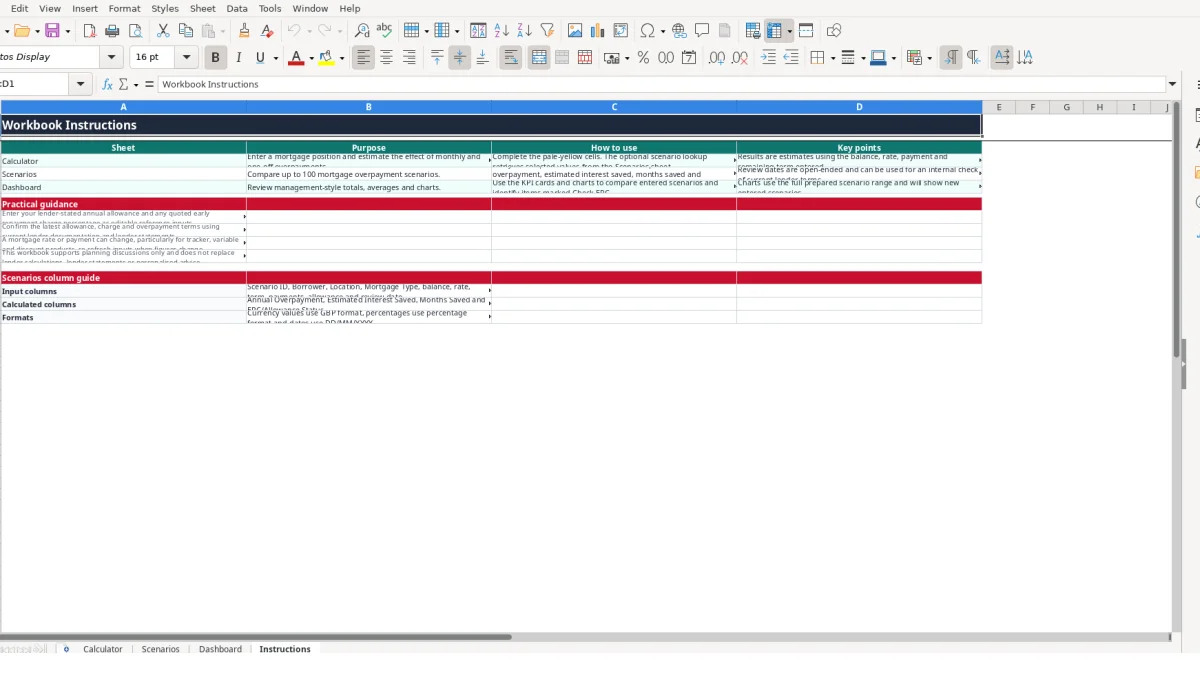
The mortgage type list includes Fixed, Tracker, Variable and Discount, but selecting a type does not calculate future rate movements or confirm the terms of that product. A tracker or variable scenario can therefore become outdated when the rate changes. The Instructions sheet specifically directs you to refresh figures and confirm allowance and charge terms using current lender documentation.
Do not treat Within allowance as proof that no charge applies. The workbook only compares the entered annual overpayment with the entered allowance percentage; it does not retrieve lender rules, calculate a quoted charge, or model every contractual condition. A row marked Check ERC identifies an item for review, not a confirmed charge.
Incomplete rows can produce blank calculated outputs. The Dashboard averages the calculated savings columns and counts statuses, so an empty or partly completed scenario should not be treated as a zero-saving recommendation. If 12 rows contain figures but 3 lack the inputs needed for interest calculations, inspect those rows before using the average as a comparison measure.
A mortgage overpayment workbook is most useful when you update it at a fixed point rather than only when a decision is imminent. Choose a repeatable review point, such as after checking the monthly statement or when a scheduled rate or payment change is confirmed. Enter the new figures in a new scenario row and keep the previous row as a reference.
Set aside 10 minutes to compare the balance and payment shown in your lender information with the Calculator inputs. If the balance has changed from £245,000 to £242,500, update the balance and record the date rather than continuing to use the old estimate. If the planned monthly overpayment remains £200, leave the recurring and one-off fields separate.
Give each comparison a clear ID and borrower name. For example, SC-04 could represent £200 per month plus £5,000 once, while SC-05 could represent £300 per month with no lump sum. The Dashboard then provides a quick comparison of estimated interest saved and months saved, while the Scenarios columns retain the assumptions behind each result.
The workbook has three Dashboard charts linked to the prepared scenario range. New entries can therefore be reviewed alongside existing rows, but you should still inspect the underlying figures before relying on a chart position or an average.
Consider a proper mortgage or financial system when you need live lender data, detailed payment schedules, multiple rate periods, transaction history, audit permissions or automated reminders. This workbook has no tables, defined names or auto-filter on the Dashboard, and its formulas are estimates based on entered assumptions. Keep it as a comparison tool where that level of control is sufficient, and obtain lender confirmation before making an overpayment decision.
It estimates the revised mortgage term, interest with and without overpayments, estimated interest saved and months saved. It accepts both a monthly overpayment and a one-off overpayment, then checks the annualised amount against the allowance percentage entered.
Yes. The Scenarios sheet has 100 prepared rows for comparing balances, annual rates, remaining terms, regular payments, monthly overpayments and one-off payments. It also calculates annual overpayment, estimated interest saved, months saved and ERC/allowance status for each row.
The mortgage type validation list includes Fixed, Tracker, Variable and Discount. Selecting a type records the product category, but the workbook does not forecast future rate movements or confirm the product's contractual terms.
Choose a scenario ID from SC-01 to SC-09 in Calculator cell B4. VLOOKUP retrieves the borrower, mortgage balance, annual rate and remaining term from the Scenarios sheet; you can then review or complete the Calculator inputs and outputs.
No. It only means that the workbook's calculation is within the allowance percentage you entered. Check current lender documentation, statements and any quoted early repayment charge terms before making a payment.
Check that the required inputs are complete and valid. Dependent formulas remain blank when values such as balance, rate, term, payment or overpayment inputs are missing, and the Scenarios calculations also require the relevant row fields to be populated.
Excel template by
Guide written by