Freelance Invoice Excel – Free Template (2026)
7
Free download
Free club treasurer report Excel template with a cash book, budget comparison and dashboard. Record receipts, reconcile balances and prepare a clear committee report.


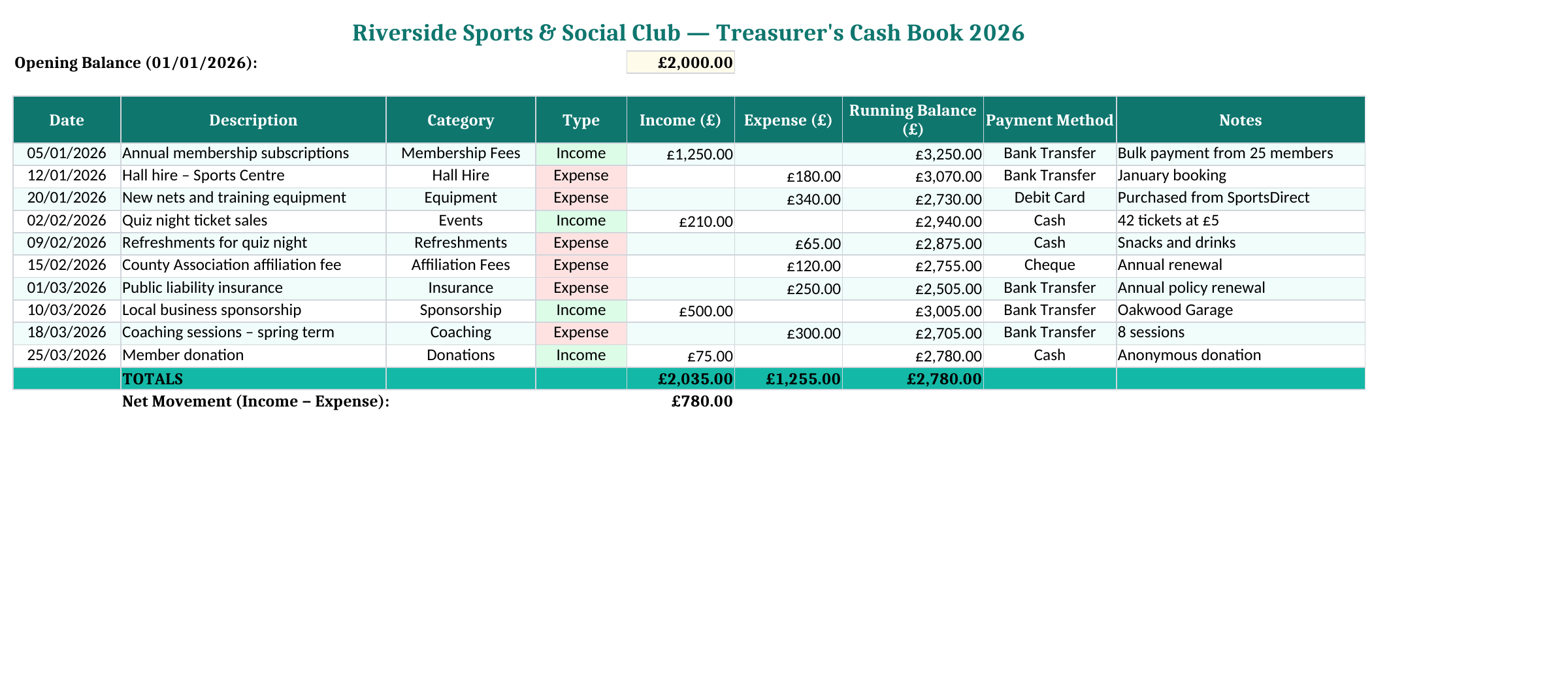
A treasurer’s report should let the committee understand what came in, what went out and how much money is available. This free club spreadsheet brings a cash book, budget comparison and meeting dashboard into one Excel file. It is a practical starting point for a small club whose records are still manageable in a shared workbook.
The Transactions sheet begins with an opening balance in E2. Replace the fictional Riverside Sports & Social Club heading and set the opening amount for the period you intend to report. Keep the statement or previous report that supports it. An unexplained opening figure makes every later balance difficult to trust.
This is a combined cash book: entries may be paid by cash, bank transfer, cheque, debit card or standing order. If you use it that way, the opening balance must cover the funds represented by the book. A bank statement alone will not equal the cash-book total when the club also holds physical cash or has uncleared payments.
Choose a clear reporting period before replacing the examples. The sample dates run through the early part of 2026; they do not make the workbook an automatic calendar-year filter. Dashboard labels summarise the transactions present in the file. Use a separate copy for a new reporting year, or adapt the formulas deliberately if you need date-filtered reports.
Keep the untouched download as a reference and a second copy for the club’s live figures. The example transactions show how the workbook behaves; they should not remain mixed into your own report.
Suppose the club starts with £1,000, receives £300 in subscriptions and pays £80 for equipment. Record the subscriptions in Income and the equipment payment in Expense, with a date, description and category for each. The cash-book balance becomes £1,220. The movement for the period is £220: that is the income less expenditure, not the opening balance less income.
| Report figure | Calculation | Result |
|---|---|---|
| Total income | Subscriptions received | £300 |
| Total expenditure | Equipment paid for | £80 |
| Net movement | £300 − £80 | £220 surplus |
| Cash-book balance | £1,000 + £300 − £80 | £1,220 |
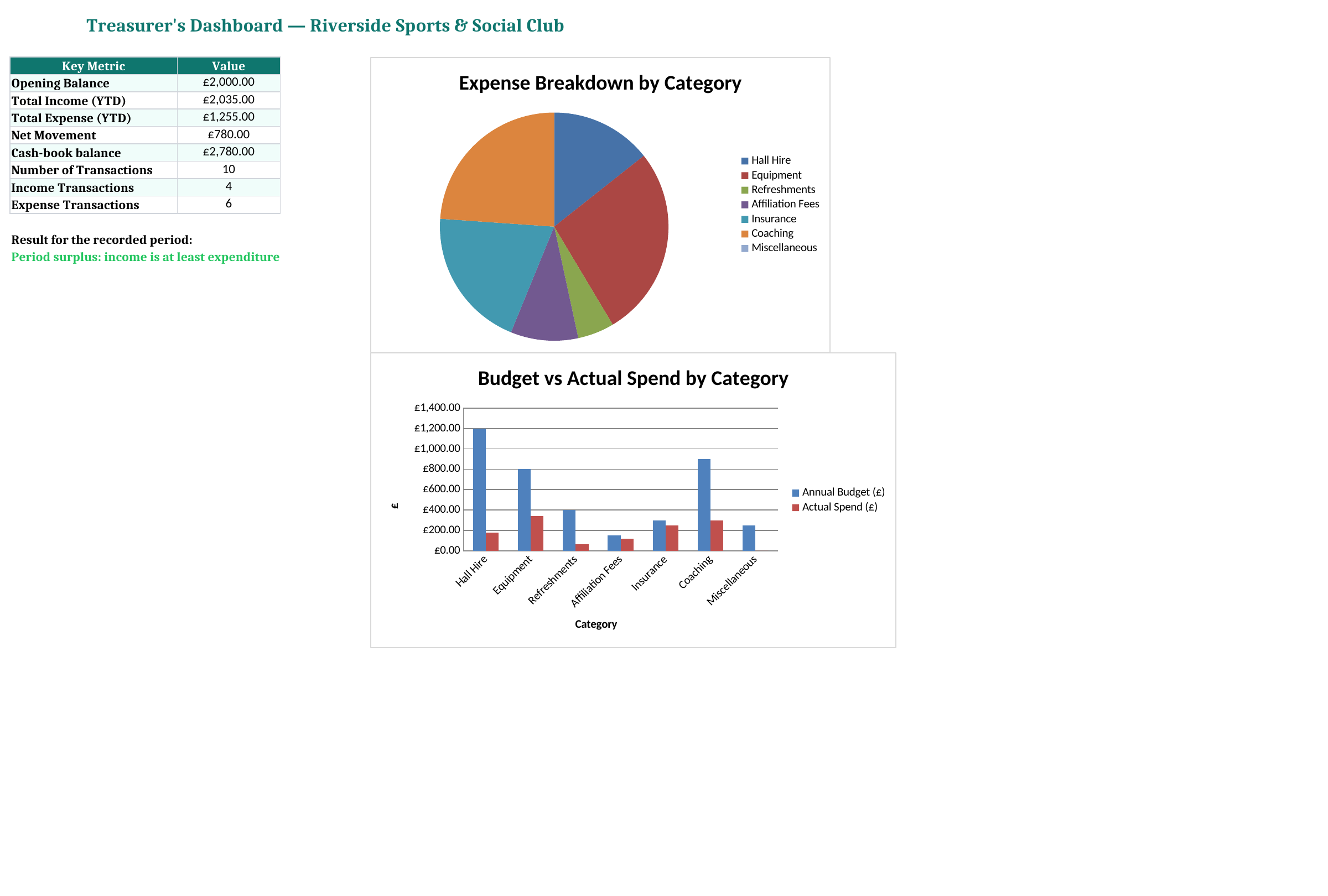
The revised Dashboard uses that net-movement calculation. A surplus tells you about the period’s cash flows. It does not, by itself, mean the club can spend the whole closing balance: some funds may be committed, restricted or needed for bills that have not yet been paid.
Use one row for each real receipt or payment. The Income or Expense label helps with filtering and transaction counts, but the cash calculation uses the amounts in columns E and F. Selecting Expense does not move a number out of the Income column. Make those fields agree before relying on the dashboard.
A cash deposit into the club’s bank account is especially easy to misrecord. If the receipt was already entered when cash was collected, banking that same cash does not create a second income item in this combined book. Keep evidence of the transfer and reconcile where the money is held.
Budget Summary separates expenditure from income targets. Enter the annual expense budgets for the categories already listed, such as Hall Hire, Equipment, Insurance and Coaching. Actual spending is pulled from the transaction categories, so consistent naming matters. “Equipment” and “Sports kit” will not be treated as the same category unless you adapt the workbook.
For spending, the variance is budget minus actual. A positive £120 means that amount remains against the budget; a negative figure means spending has passed it. The status changes to Near Limit when expenditure is above 80% of the budget, and Over Budget when it exceeds the budget. Those are simple review prompts, not forecasts of the final year-end result.
Income targets use the opposite comparison: actual income minus the target. Read the heading before interpreting a positive variance. A useful committee discussion might be that subscriptions are ahead of target while venue hire is almost fully spent, rather than simply announcing that both columns contain positive numbers.
If a category has no budget, its percentage calculation returns zero to avoid division by zero. Do not interpret that as “nothing spent”: look at the actual amount and status. When adding a new category, add it to the budget table and transaction list, then confirm that the charts and totals include it.
The Dashboard pulls together opening funds, income, expenditure, net movement, the cash-book balance and transaction counts. Two charts compare budget with actual spending and show the spending categories. Use them to identify the numbers the committee needs to discuss, then add the explanation that a formula cannot provide.
A useful report might say: “Subscriptions brought in £300 this month, equipment cost £80, and funds increased by £220. The balance is £1,220 before the hall invoice due next week.” Keep the unpaid invoice in your supporting notes; entering it as a cash payment before money leaves would confuse this cash-book method.
This workbook does not produce statutory accounts, restricted-fund schedules or an independent examination report. If your organisation is a charity, its reporting needs may be different from a small informal club’s. The charity accounts workbook can be considered separately, with the requirements for your organisation checked before use.
Reconcile the cash-book balance to bank funds, physical cash and any timing differences. Investigate a discrepancy before adjusting the opening balance or inventing a balancing transaction. Missing receipts, a deposit counted twice and an uncleared cheque all need different explanations.
The sample transaction block is rows 5 to 14, with totals immediately below. Insert additional rows within the block and copy the running-balance formula in G. Then check the totals, transaction counts, filters and budget results. A dropdown continuing farther down the worksheet does not mean every summary range has expanded.
Keep receipts and invoices under references that can be matched to the descriptions or Notes column. Save a dated copy when the committee approves a report, and control access to the working file so two people do not overwrite each other’s changes. For a paper or PDF copy, print the dashboard and the relevant cash-book rows after checking that all figures are legible.
The next treasurer should be able to follow the record without asking you to explain every entry. Consistent categories, documented reconciliations and a clear opening balance do more for that handover than adding extra charts.
Excel template by
Guide written by