Freelance Invoice Excel – Free Template (2026)
7
Free download
Track deductible self assessment expenses, VAT, suppliers and business purpose with a simple Expenses Log, Summary and Instructions.


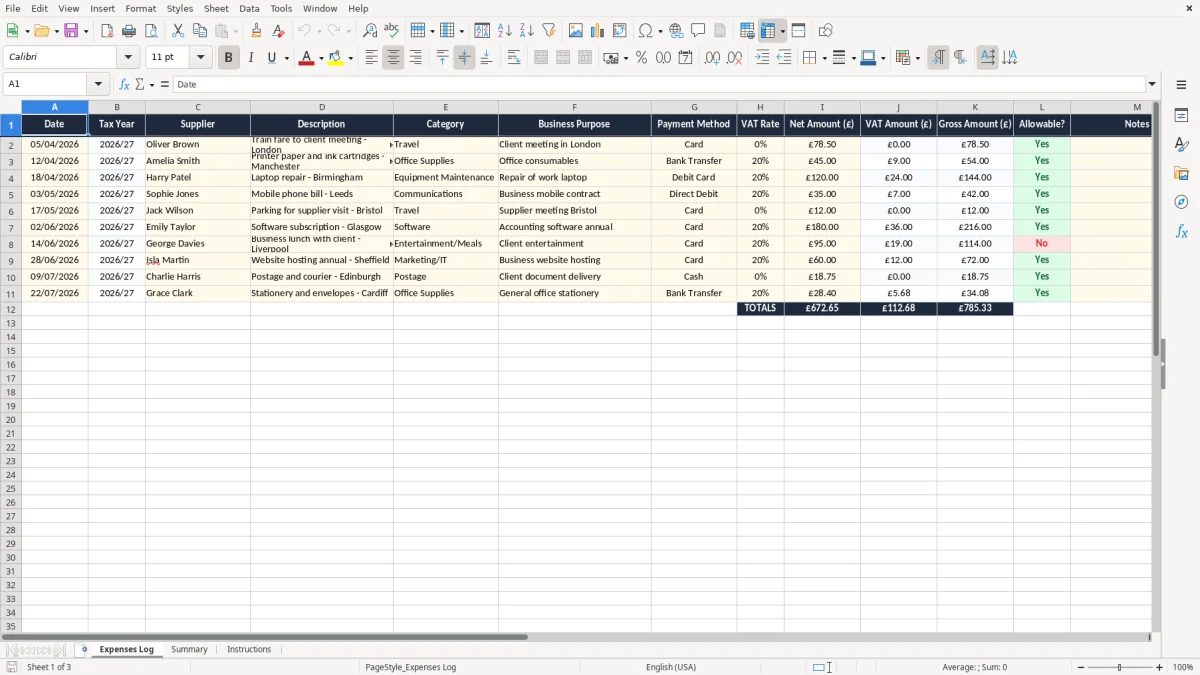
This Self Assessment expenses Excel template is a simple record for the costs you want to claim in your tax return. It includes an Expenses Log, a Summary and Instructions, so you can keep dates, suppliers, VAT, gross amounts and whether each item is allowable in one place.
Use it if you are a sole trader, landlord or other self-employed person working through Self Assessment. It is set out for day-to-day bookkeeping, not heavy accounting software, so you can keep the records HMRC expects without building a system from scratch.
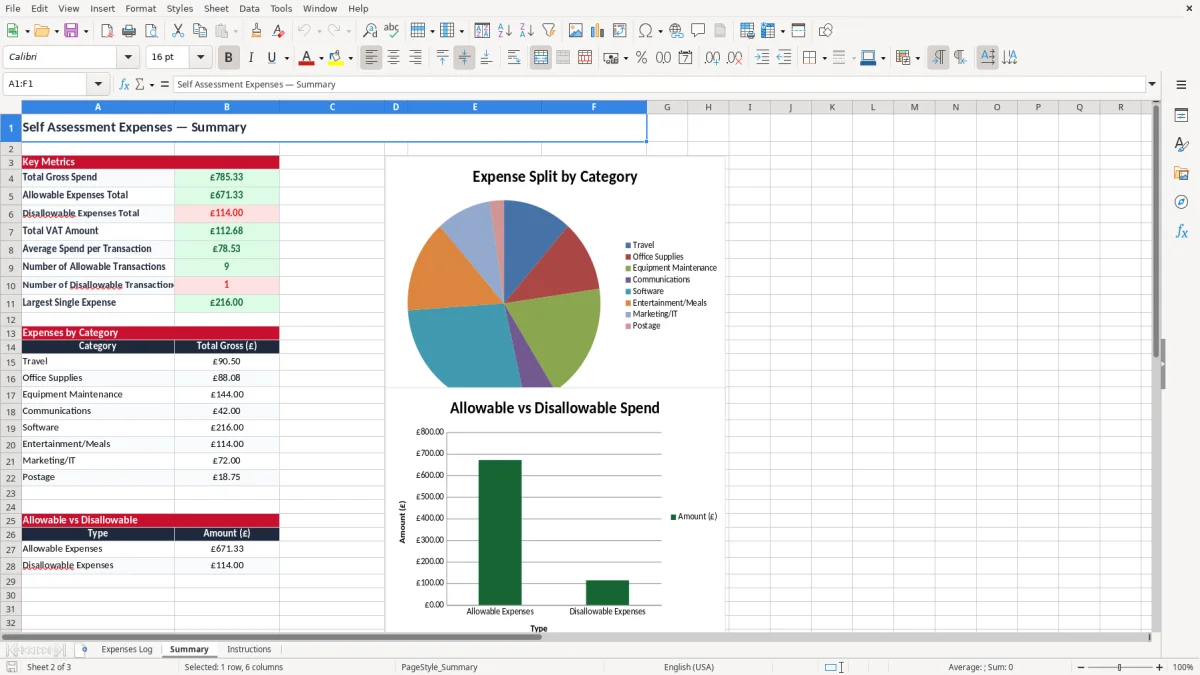
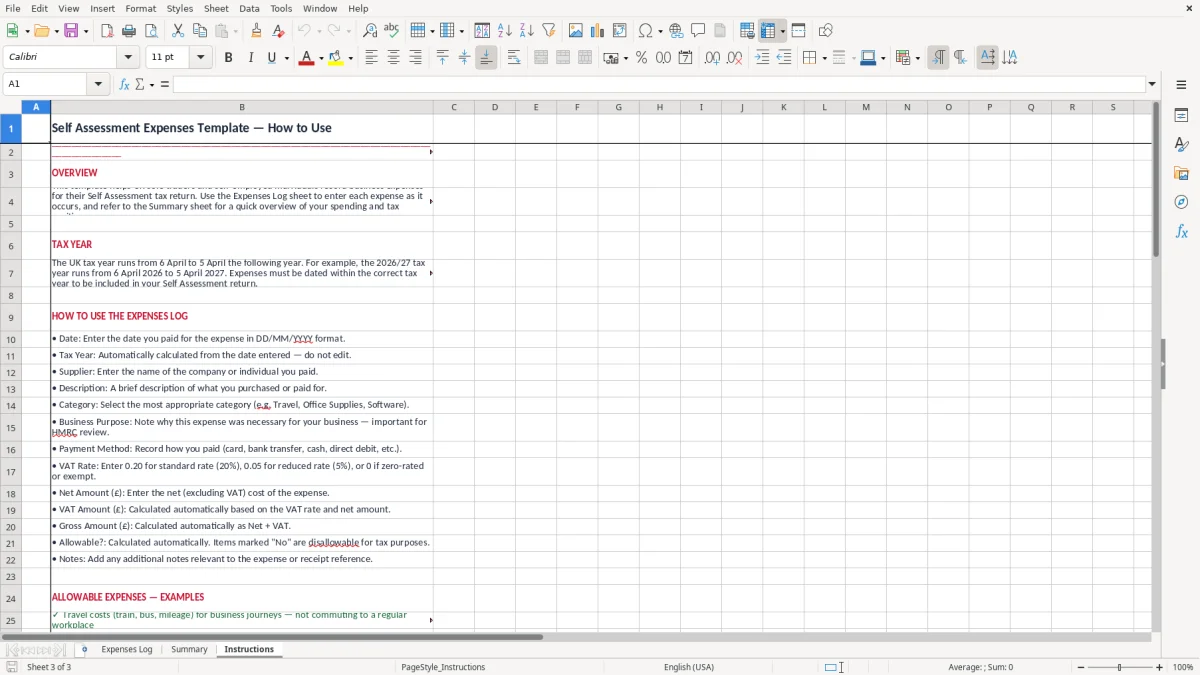
The workbook is built for practical use: image 1 shows the Expenses Log, image 2 shows the Summary, and image 3 shows the Instructions sheet. You can enter spending as you go, then review the totals before your HMRC deadline on 31 January.
This workbook is for the people who have to prove business spend at the point when the tax return is due, not at some idealised month-end. A sole trader with £48,000 of turnover, a landlord with repairs to track, or a contractor with mixed travel and subsistence can all use it to keep the evidence straight.
It also suits the bookkeeper who wants a simple client file for the 31 January online filing deadline, or the business owner who just wants one list of deductible costs instead of a shoebox of receipts. Image 1 shows the Expenses Log with columns for date, supplier, description, category and business purpose, which is exactly what you need when you are checking what can go on the return.
The pressure usually comes in January, when you have 10 months of paper receipts and a bank feed that only tells half the story. If you spent £640 on train fares, £215 on software and £180 on postage, the log lets you separate those lines quickly instead of rebuilding the year from memory.
A tradesperson with four invoices out a week may only have 30 to 50 expense lines in a quarter, while an online seller can have hundreds of small purchases. The sheet is plain enough for both: you enter the cost once, then the summary gives you a usable total without any extra bookkeeping software.
HMRC expects you to keep records that support the figures in your Self Assessment return. For the self-employed, keep the records for at least 5 years after the 31 January deadline for that tax year; for companies, the record-keeping period is 6 years.
The tax year runs from 6 April to 5 April, so a cost dated 28/03/2026 belongs in the 2025/26 tax year, not 2026/27. If you are VAT-registered, the spreadsheet also helps you keep the net and VAT split tidy: standard rate VAT is 20%, reduced rate 5%, and zero rate 0%, with quarterly returns under Making Tax Digital for most businesses.
You need enough detail to show what the cost was for and why it was business-related. The sheet’s Business Purpose, Notes and Allowable? fields cover the practical basics: for example, £74.80 for station fares to a client meeting is easier to support than a bare bank entry with no description.
If you buy £120 of items including VAT and £100 is allowable, the taxable cost you claim is the net amount, not the card total. That matters in a year with 60 or 70 expense lines, because a few wrong gross entries can distort the profit figure by several hundred pounds before you notice.
Those small VAT corrections also belong in a cash log, where the net amount and the reason for each spend stay visible alongside the receipt.
The usual problem is not missing a grand gesture of a mistake. It is 20 small items entered badly: a £14 lunch treated as fully allowable, petrol with no business note, or a receipt posted twice because it was paid by card and then copied into a spreadsheet again.
If you leave VAT and net mixed together, you can overstate expenses and then overclaim tax relief. On £3,000 of mixed spending, a simple 20% VAT confusion can shift the figures by £500, which is enough to change what you owe and create work when the return is reviewed.
Mixed-use costs are where people go wrong. A phone bill of £48 a month with only 70% business use should not be treated like a full business charge, and a private supermarket run coded as travel is exactly the sort of line that causes trouble when you check the figures before filing.
A receipt with no description means you are guessing later. If you have 150 lines at year end and 25 of them just say miscellaneous, you can easily lose half a day trying to remember what each item was for, which is poor bookkeeping and poor cash flow control.
That same level of detail belongs in a cash flow forecast, where each line needs a clear description before it can be trusted at year end.
The best way to use this sheet is to attach it to one fixed routine. Most sole traders do best by updating it once a week, or straight after the bank reconciliation, rather than waiting for a quarterly panic before the HMRC deadline.
If you are entering 40 expenses a month, that is usually 10 minutes at a time if you do it regularly. If you leave it for a year, the same work can turn into several hours of sorting and checking, which is why a small fixed routine beats a big annual tidy-up.
Once you are handling VAT returns, payroll, stock or several users at once, you may need proper bookkeeping software. For one person or a small team with simple expenses, though, this workbook is usually quicker, cheaper and easier to control than a full system.
It is for sole traders, landlords and other self-employed users who need a clear record of deductible costs. It also suits bookkeepers who want a simple client sheet to support the figures in a tax return.
The workbook contains three sheets: Expenses Log, Summary and Instructions. The log is for entries, the summary gives totals, and the instructions explain how to use the file.
The Expenses Log includes Date, Tax Year, Supplier, Description, Category, Business Purpose, Payment Method, VAT Rate, Net Amount, VAT Amount, Gross Amount, Allowable? and Notes. That gives you a full record for each expense line.
For Self Assessment, keep the records for at least 5 years after the 31 January filing deadline for that tax year. If you trade through a limited company, keep records for 6 years.
Yes. The sheet has separate net, VAT and gross fields, so you can record VAT-registered spending cleanly. Standard rate VAT is 20%, with reduced rate 5% and zero rate 0%.
Use the Allowable? field to mark costs that are wholly and exclusively for the business. If a cost is mixed-use, record the business portion only and keep the note clear enough to justify the figure later.
Excel template by
Guide written by