Freelance Invoice Excel – Free Template (2026)
7
Free download
Track unpaid invoices by age, review credit limits and monitor debtor exposure with this UK aged debtors Excel template for small businesses.


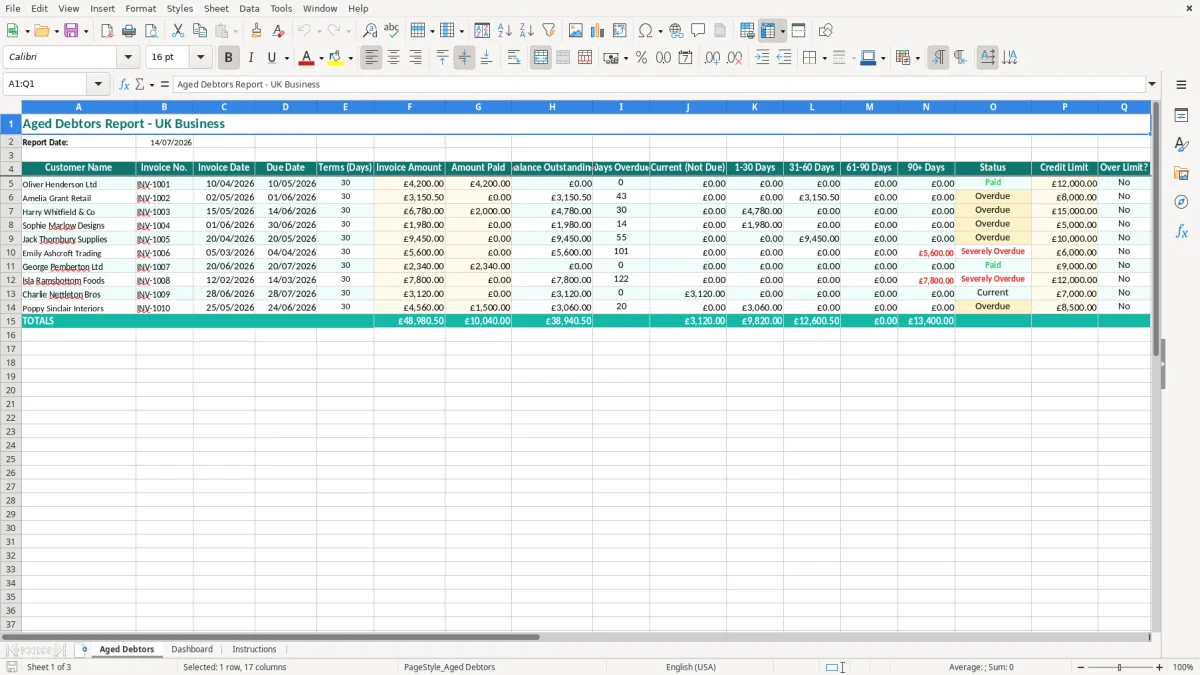
An aged debtors Excel template lists unpaid customer invoices by due date and separates balances into current, 1–30, 31–60, 61–90 and 90+ day buckets. This workbook contains an Aged Debtors sheet for invoice-level records, a Dashboard for management review and an Instructions sheet to guide setup.
Enter the report date, customer, invoice details, payment received and credit limit. The layout then gives you a practical view of cash flow, overdue balances, customer status and accounts that may need credit control action.
An aged debtors report is usually prepared by the bookkeeper before the weekly credit-control call, by the office manager before paying suppliers, or by the owner before checking whether there is enough cash for wages. It is especially useful when sales invoices sit in one system, bank payments in another and nobody has a reliable list of what is actually overdue.
Image 1 shows the Aged Debtors sheet. The table runs from Customer Name and Invoice No. through Invoice Date, Due Date, Terms (Days), Invoice Amount and Amount Paid. It also includes Balance Outstanding, Days Overdue, five ageing bands, Status, Credit Limit and Over Limit?. The yellow input styling distinguishes the areas where you add or amend records, while the teal headers make the report usable on screen or on paper.
Suppose a plumbing firm with four employees has £38,000 of customer invoices outstanding. The report shows £12,000 current, £9,500 in the 1–30 day band, £6,000 in 31–60 days and £10,500 over 60 days. The owner can call the £10,500 group first rather than spending the morning chasing customers who are still within 30-day terms.
An online shop with 300 business orders a month may need a different review. The bookkeeper can enter only invoices that remain unpaid, then use customer names and invoice numbers to match remittances. A sole trader doing their own bookkeeping can update the sheet after the bank reconciliation and have a clear list before deciding whether to place a regular customer on stop.
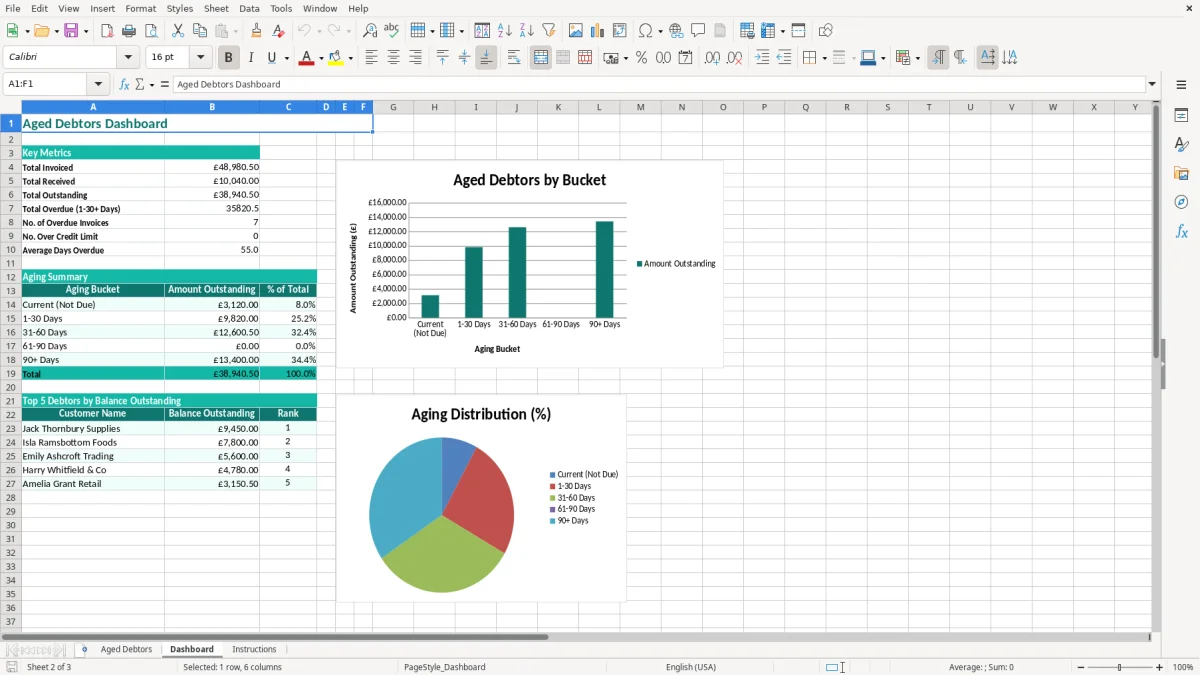
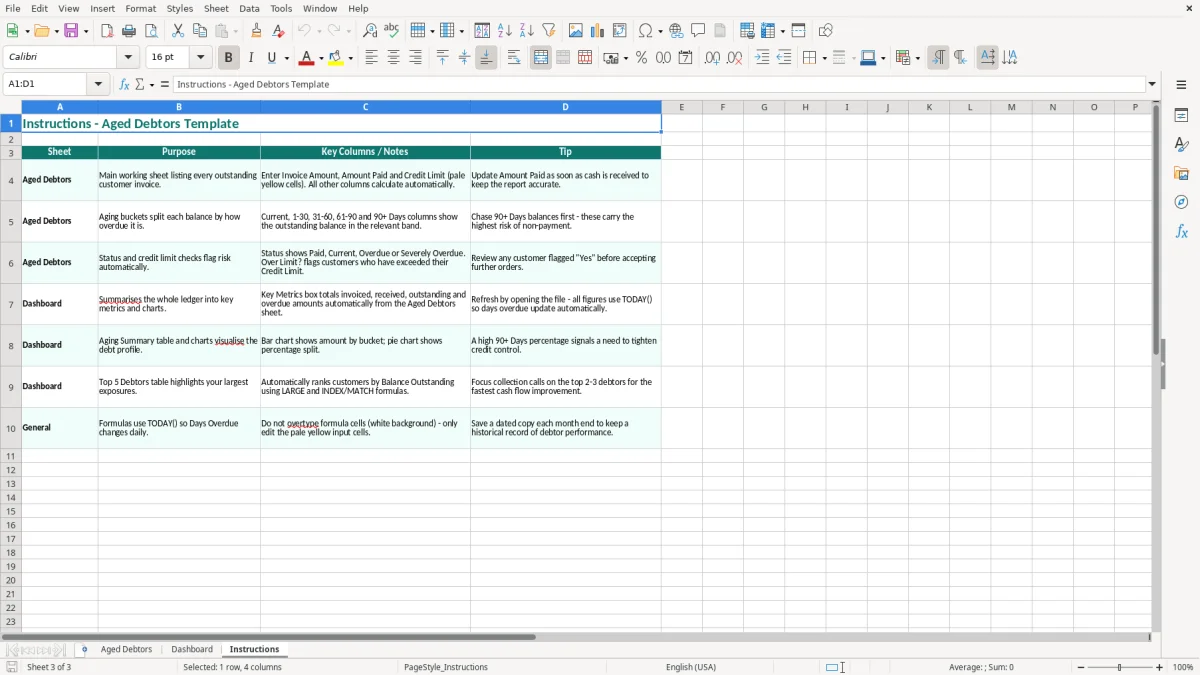
Use it before a monthly management meeting, before a major supplier payment, and at year-end when the accountant needs evidence supporting trade receivables. The Dashboard shown in image 2 gives management a quicker summary, while image 3 contains the Instructions sheet for the person maintaining the file.
An aged debtors workbook is a management record, not a substitute for proper accounting records. HMRC expects you to retain records supporting sales, payments and tax calculations. A limited company normally keeps accounting records for 6 years from the end of the relevant financial year; a self-employed person generally keeps records until at least 5 years after the 31 January Self Assessment deadline.
For a VAT-registered business, the invoice list must agree to the sales ledger and VAT returns. The standard VAT rate is 20%, with 5% and zero-rated supplies applying to specified goods and services. If taxable turnover exceeds the £90,000 VAT registration threshold, registration is required. VAT returns are commonly submitted quarterly, including through Making Tax Digital (MTD), so an unexplained difference between invoice balances and the accounting system can become a return problem.
Each row should be traceable to a genuine invoice. A VAT invoice should show your business name and address, a unique invoice number, the invoice date, customer details, your VAT number and the VAT amount separately. The template’s Invoice No., Invoice Date, Customer Name and amount columns make that cross-check straightforward, but you still need to retain the original invoice and payment evidence.
For example, an invoice for £1,200 including 20% VAT contains £1,000 net sales and £200 output VAT. If the aged report shows £1,200 outstanding but the bank has received £600, the Amount Paid should be £600 and the remaining balance £600; do not overwrite the invoice amount.
At year-end, the total outstanding balance should reconcile to trade receivables in the balance sheet. A £4,000 debt that is 120 days old may need a specific recoverability review, but writing it off is an accounting and tax decision supported by evidence, not an automatic consequence of the 90+ Days column.
The most expensive error is often a report that looks tidy but does not reconcile to the bank or sales ledger. I have seen a bookkeeper mark a £3,500 invoice as paid because a customer paid a different invoice with a similar reference. The aged total was understated by £3,500 and the next credit-control call was aimed at the wrong account.
Entering the invoice total into Amount Paid is another common mistake. A £2,400 invoice with a £1,000 receipt should show £1,000 paid and £1,400 outstanding. If the full £2,400 is entered, the customer appears settled even though £1,400 is still due. Part-payments should be checked against the bank statement and remittance advice.
Dates cause a second set of problems. A due date of 01/06/2026 entered as 06/01/2026 can move an invoice into the wrong ageing band, particularly where a user imports dates from a system using American formatting. Check that dates display as DD/MM/YYYY and that the Report Date is the date on which you are reviewing the ledger.
A credit limit becomes misleading when it is copied from an old customer review. If three open invoices total £14,000 but the recorded limit is £10,000, the Over Limit? result should trigger a conversation before accepting another £6,000 order. If the limit has been formally raised to £20,000 but the workbook still shows £10,000, staff may unnecessarily refuse a sound customer.
Do not delete old rows merely to make the report shorter. Removing a disputed £2,000 invoice destroys the audit trail and makes it difficult to explain why the sales ledger, VAT return and customer statement disagree. Mark the position correctly, retain supporting correspondence and reconcile the report to the accounting system.
A report updated only at month-end can leave a £7,500 overdue balance untouched for four weeks. For a small firm, that may be more than a weekly wage bill. The Dashboard is useful only when the underlying rows, payments and dates are current.
Keeping overdue rows current also means having a credit control ledger in place, so the £7,500 balance is tracked, followed up and matched to the sales ledger without breaking the audit trail.
The simplest routine is to update the file immediately after the bank reconciliation, not when a customer complains. Choose a fixed time, such as Friday at 3 pm, and make the same person responsible for entering receipts, checking dates and reviewing the Dashboard. A 20-minute weekly update is easier to sustain than a three-hour rescue at month-end.
For example, a builder with 25 open invoices might have six accounts to review each Friday. Spending five minutes on each call gives a 30-minute routine and can identify a £2,800 disputed invoice before it becomes 90 days overdue.
Use consistent customer names and invoice references. Do not insert headings into the data area or rename the three sheets, because that can interfere with the workbook’s layout and any linked Dashboard presentation. Save a dated copy such as Debtors_2026-07-14.xlsx before a major clean-up.
Protect formula or calculated areas if several people use the file, and restrict editing to the input fields. Conditional formatting is useful for drawing attention to overdue or over-limit records, but colour should support the figures rather than replace them.
Move to an integrated bookkeeping or credit-control system when several users update the file at once, when you have thousands of invoices, or when customer statements, automated reminders and audit history are essential. A business with 300 monthly invoices may manage this workbook initially; once reconciliation takes more than an hour a week, automation is usually the better investment.
At that point, the next practical step is a cash flow forecast, so you can see whether the time saved on reconciliation is offset by tighter liquidity later in the month.
An aged debtors report lists unpaid customer invoices and groups them by how long they have been outstanding. This template uses Current (Not Due), 1–30 Days, 31–60 Days, 61–90 Days and 90+ Days categories.
Enter the customer name, invoice number, invoice date, due date, payment terms, invoice amount, amount paid and credit limit. Review the resulting balance, overdue days, status and Over Limit? fields.
It can support debtor monitoring and reconciliation, but it is not a VAT return. Keep the original VAT invoices and accounting records, and make sure sales and payments agree with your VAT records and MTD submission.
Weekly updating is suitable for many small businesses, ideally after the bank reconciliation. Update more frequently if you have high transaction volumes, short payment terms or tight cash-flow requirements.
Keep the original invoice amount unchanged and enter the receipt in Amount Paid. For example, a £2,400 invoice with £1,000 received should show £1,400 as the outstanding balance.
Consider an integrated accounting or credit-control system when several users need simultaneous access, invoice volumes become difficult to reconcile, or you need automated reminders, customer statements and a detailed audit trail.
Excel template by
Guide written by