Freelance Invoice Excel – Free Template (2026)
7
Free download
Reconcile a UK business bank account with Bank Statement, Cash Book, Reconciliation Summary and Instructions sheets.


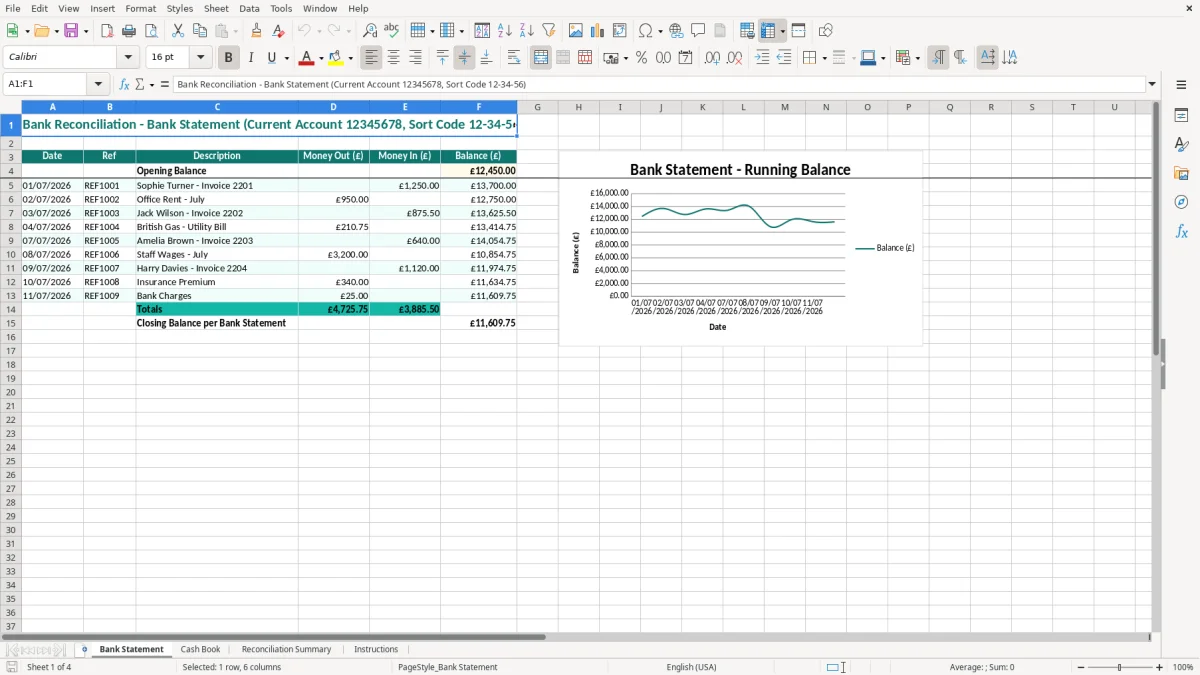
A bank reconciliation Excel template compares your business bank statement with your cash book so you can identify missing, duplicated or uncleared transactions. This workbook contains Bank Statement, Cash Book, Reconciliation Summary and Instructions sheets, with dated entries and £ currency formatting.
Use it at month-end, before preparing VAT records or whenever your book balance does not agree with the bank. Image 1 shows the Bank Statement sheet with Date, Ref, Description, Money Out, Money In and Balance columns; the remaining sheets help you record the book side and review the result.
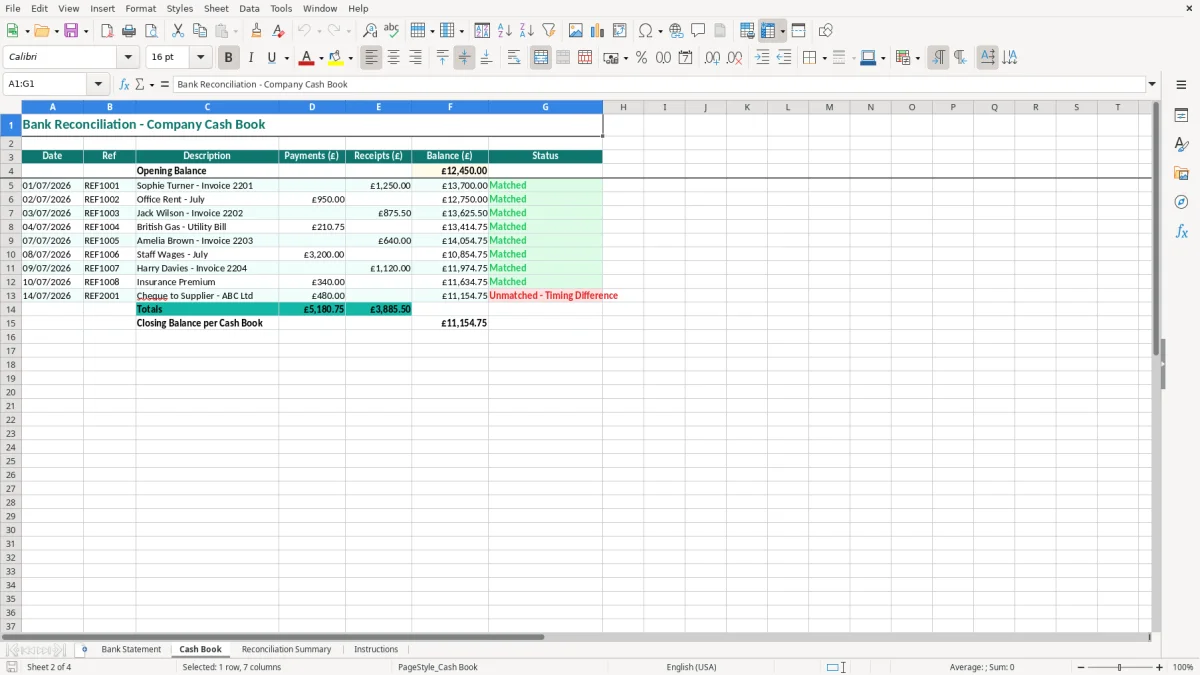
A bank reconciliation spreadsheet is useful wherever the balance in your bookkeeping does not automatically prove what has cleared the bank. A sole trader may complete it on the first Friday after month-end, while a bookkeeper at a small Ltd company may reconcile each account before posting the monthly management accounts.
The workbook is arranged for that practical job. Image 1 shows the Bank Statement sheet headed with a current account number and sort code, followed by Date, Ref, Description, Money Out (£), Money In (£) and Balance (£). Image 2 shows the Cash Book sheet, where you record the business-side transactions that should agree with the statement.
Take a plumbing firm with four employees. On 31 March, its cash book includes a £1,250 customer receipt and a £420 merchant supplier payment, but the receipt was paid in on 1 April and the payment has not yet cleared. The bank balance can therefore differ from the cash book without either record being wrong.
Enter the statement lines as they appear, then compare them with the cash book rather than changing the book balance to force an agreement. Image 3 shows the Reconciliation Summary sheet, which gives you a separate place to review the comparison and investigate the remaining difference.
A business preparing a quarterly VAT return can use the reconciliation to catch a £12.00 bank charge or a duplicated £600 receipt before the bookkeeping is used for the return. A company bookkeeper can perform the same check before sending figures to the accountant for year-end accounts.
Image 4 shows the Instructions sheet. It is particularly useful when the office manager normally performs the reconciliation but is away and a director or temporary bookkeeper needs to follow the same sequence.
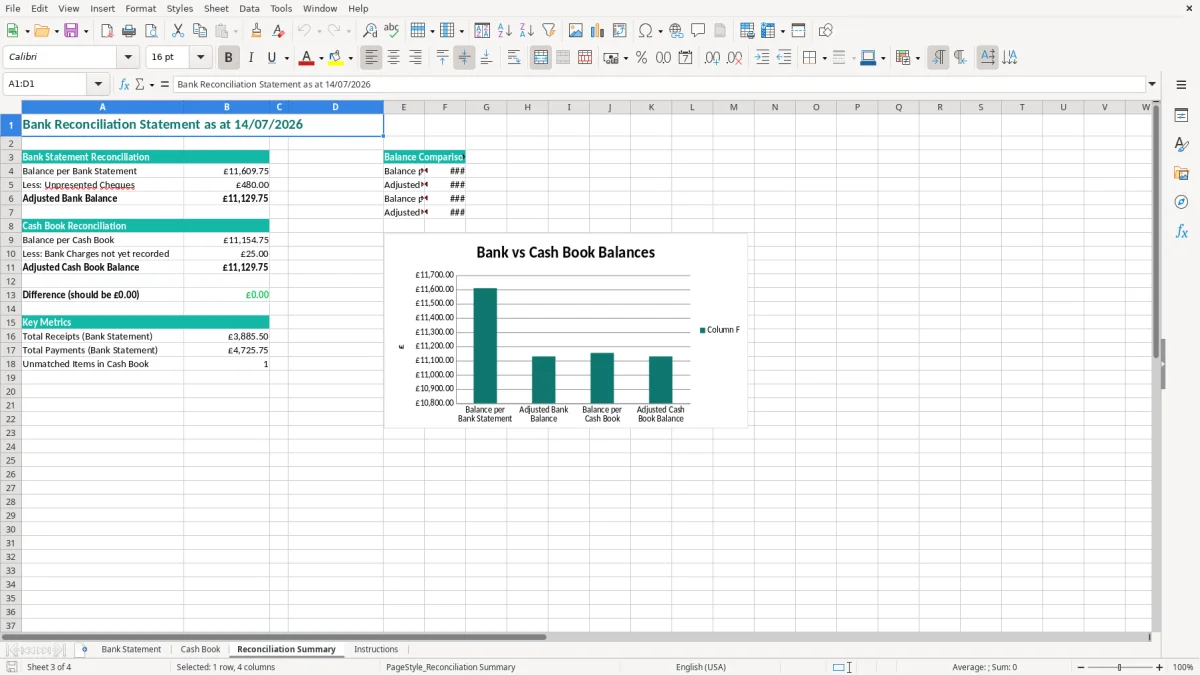
HMRC expects you to keep records that let it establish your business income and expenditure. For a company, accounting records are generally retained for 6 years from the end of the relevant financial year; a self-employed person normally keeps records until at least 5 years after the 31 January Self Assessment deadline for the tax year.
A bank reconciliation is not a separate tax return, but it is strong bookkeeping evidence. If your online shop has 300 orders in a month, a bank feed showing 300 deposits still needs to be matched to sales records, refunds, charges and any transfers between accounts. A spreadsheet helps you identify what the bank has actually recorded.
For a VAT-registered business, the standard rate is 20%, the reduced rate is 5% and many items are zero-rated. The VAT registration threshold is £90,000 of taxable turnover. Reconcile the bank before preparing a quarterly return under Making Tax Digital (MTD), but do not assume that the bank date alone determines the correct VAT tax point.
For example, a £1,200 bank receipt may represent £1,000 of net sales and £200 of output VAT at 20%. The reconciliation confirms the receipt, while the invoice and VAT records support the treatment. A bank charge may be £24.00 with no recoverable VAT, so copying every bank amount into the VAT return is a poor method.
Keep the bank statement, completed workbook and supporting invoices together. Companies also need accounting records for their accounts filed with Companies House; a sole trader needs records supporting the figures reported through Self Assessment.
Use the account heading, period and file name to create an audit trail. If the workbook shows a £12,450.00 opening balance, retain the statement that proves that figure and explain any difference rather than deleting it.
That same audit trail is easier to maintain when the figures already sit in a bookkeeping workbook with the bank statement, invoices and opening balance aligned in one place.
The expensive errors are usually ordinary omissions: a bank charge not entered in the cash book, a receipt posted twice, or a payment matched to the wrong supplier. I have seen a small firm spend half a day searching for a £35 difference when the real cause was a £350 payment entered as £315.
A cheque for £780 recorded in the cash book on 29 June may not appear on the bank statement until 2 July. If you alter the cash book to match the June statement, July will contain a second problem. Record the timing difference clearly and carry it forward until it clears.
The same issue occurs with card settlements. A retailer may make £2,400 of sales on Friday, receive £2,352 in the bank after £48 of processing fees on Monday, and wrongly treat £2,352 as the complete sales figure. The £48 difference needs an appropriate bookkeeping entry and supporting statement, not a forced reconciliation.
Transfers between two business accounts often appear as a payment in one account and a receipt in the other. Entering only one side leaves a £1,000 unexplained difference; entering the receipt twice inflates the cash position by £1,000. Reconcile each account separately and use the same reference for both sides.
Standing orders create a similar trap when the bookkeeper imports a recurring payment and then types it again from the statement. For a £250 monthly loan payment, one duplicate over 12 months produces a £3,000 understatement of cash and profit-related confusion.
A £500 difference can hide an omitted customer receipt, a supplier payment that was never posted or a personal withdrawal coded as a business expense. It can also distort the bank figure in the balance sheet and cause the owner to believe there is more cash available than there really is.
Do not plug the difference to a suspense account merely to make the summary agree. Identify the transaction, document the explanation and correct the source record.
Once the source record is corrected, the next pressure point is the overdue balance that caused the cash gap, and a credit control template keeps follow-up on unpaid invoices organised.
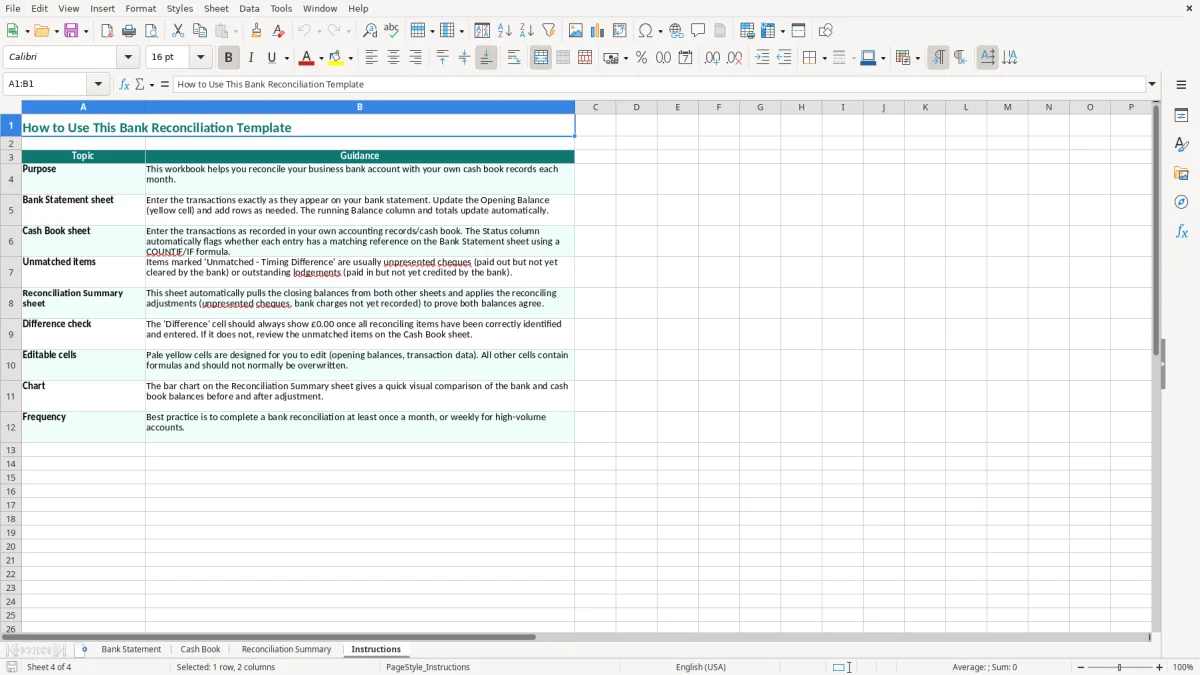
Choose a fixed reconciliation point and attach it to an existing task. For many small businesses, the first working day after the month-end bank statement arrives is better than waiting for the VAT deadline, when several weeks of transactions may need investigation at once.
For a business with 80 bank lines a month, this routine is manageable in 30 to 45 minutes. Waiting three months creates roughly 240 lines and makes a £19.50 charge or duplicate £640 payment much harder to locate.
Use the Bank Statement and Cash Book sheets for entry, then review the Reconciliation Summary rather than editing figures until they balance. Image 3 is the natural review point, while Image 4 provides the process for a substitute user.
Keep the file read-only after sign-off and store corrections in the next period's records. A simple file name such as Business Account - 30 April 2026, together with the original statement, gives your accountant a clear trail.
The template suits a straightforward account and modest transaction volume. Move to dedicated bookkeeping software when you have several bank accounts, more than 1,000 monthly entries, foreign currency, multiple users or a need for automatic bank feeds and locked audit trails.
Do not wait for a spreadsheet to become unreliable. If reconciliation takes two days every month or several people overwrite the same file, software will usually cost less than repeatedly correcting the resulting errors.
It is a workbook for comparing the transactions and balance on a bank statement with your business cash book. This template includes Bank Statement, Cash Book, Reconciliation Summary and Instructions sheets so you can record differences and investigate them.
The sheet has Date, Ref, Description, Money Out (£), Money In (£) and Balance (£) columns. It also has an opening balance field and a heading identifying the current account, account number and sort code.
Reconcile at least monthly, ideally soon after the statement is available. A business with frequent transactions should reconcile weekly; a quarterly check leaves too many lines to investigate when a duplicate or missing entry is found.
Yes, it can help confirm that money movements have been recorded before you prepare VAT figures. It does not calculate VAT or replace invoices and VAT records, so check the correct rate and tax point separately, including the 20% standard rate where applicable.
Check the opening balance, date range, duplicate entries, bank charges, transfers and uncleared payments or receipts. Compare the difference with individual amounts, such as a £25.00 charge or a £1,000 transfer, and correct the source record rather than adding an unexplained balancing figure.
Keep it with the bank statements and supporting bookkeeping records. Companies generally retain accounting records for 6 years from the end of the relevant financial year, while self-employed people normally retain records until at least 5 years after the 31 January Self Assessment deadline.
Excel template by
Guide written by