Freelance Invoice Excel – Free Template (2026)
7
Free download
Record small business income and expenses in Excel with net, VAT, gross and paid-status checks. Separate bookkeeping totals from recorded cash movement.


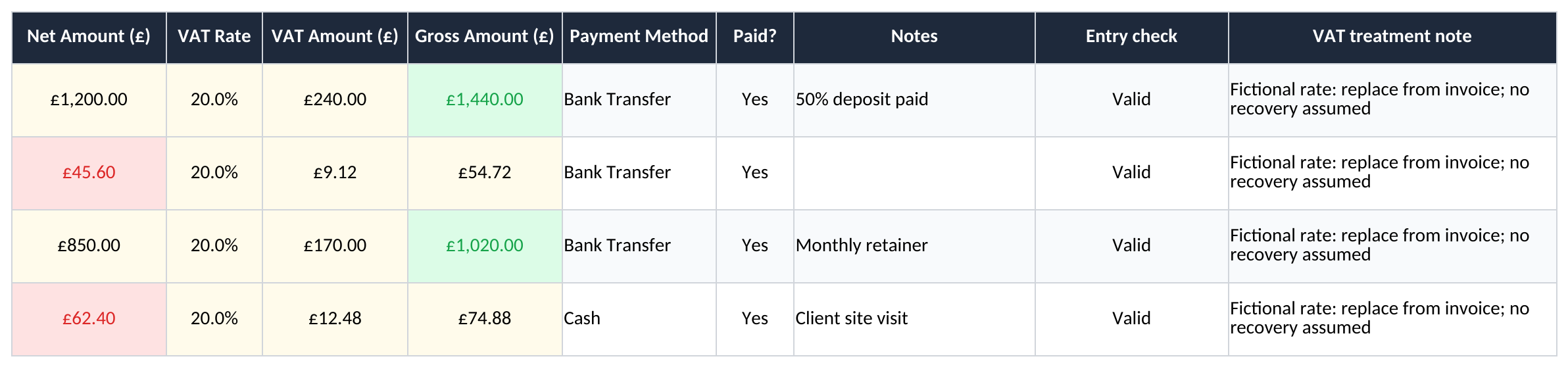
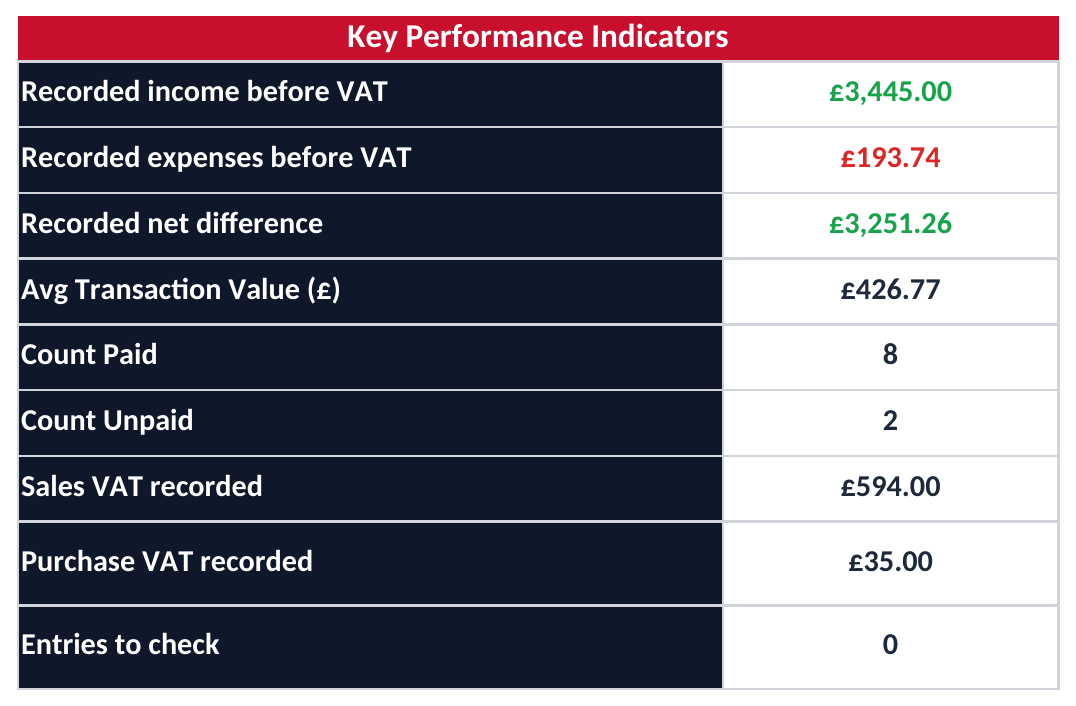
This small business bookkeeping Excel template records income and expenses with invoice references, net amounts, VAT, gross amounts and a paid status. The dashboard separates recorded income and costs from cash marked as received or paid. It is a working bookkeeping file with fictional examples, not a complete accounts package or HMRC filing service.
Use Transactions rows 2–500. Enter a real date, a unique reference, description, category, Income or Expense, net amount, VAT rate and Paid? status. An entry missing required information is marked “Check entry” in column O and excluded from the dashboard until corrected.
Choose a consistent reporting period for each file. There is no date selector in this workbook, so the dashboard includes every valid line in the entry range. Keep the invoice or receipt that supports the amount and reference. HMRC’s record-keeping guidance for self-employed businesses explains the underlying records to retain.
| Columns | Purpose | Example |
|---|---|---|
| H and I | Net amount and entered VAT rate | £100 and 20% |
| J and K | Calculated VAT and gross amount | £20 VAT; £120 gross |
| M | Paid? Yes or No | Yes only when the recorded amount is paid in full |
| O | Entry check | Flags missing inputs or duplicate references |
| P | VAT treatment note | Explain a zero rate or other treatment from the evidence |
Type 20% in the rate field, not the number 20. The internal value for 20% is 0.20. VAT is net amount multiplied by the entered rate, rounded to pennies; gross is net plus VAT. For example, £10.03 at 20% gives £2.01 VAT and £12.04 gross.
The category list does not assign VAT automatically. Where no VAT is separated, enter zero and record the reason in the treatment note. A zero arithmetic amount does not by itself identify whether a transaction is exempt, zero-rated, outside scope or supplied by a trader who is not VAT registered.
Check the invoice and current VAT rates; split mixed-rate items into distinct references if necessary. The dashboard shows sales VAT and purchase VAT separately. It does not declare all purchase VAT recoverable or calculate a VAT return liability. HMRC’s recovery guidance covers the conditions and evidence that the arithmetic alone cannot establish.
Headline income and expenses use net amounts from all valid records, including unpaid items. Their difference is a bookkeeping comparison. It is not a complete taxable profit calculation: the file has no adjustments for stock, assets, depreciation, non-deductible costs or other accounting requirements.
The cash figures further down the Dashboard use gross amounts marked Paid? Yes. Changing a record from No to Yes moves it into the cash view without changing the recorded net income or expense. These cash figures are not a bank reconciliation, because there is no opening account balance or bank-feed matching.
The model does not support partial-payment amounts or separate payment dates. Do not mark a partly paid invoice as paid in full. Use a suitable payment ledger when instalments or receipts in a different period matter. For physical cash kept in a tin or drawer, the petty cash book provides a separate count-and-reconcile workflow.
The category table covers ten example category-and-type pairs. Headline totals include other valid categories too, so compare the table with the totals when you change the category list. Existing charts retain their original subsets; extend their source ranges if you want additional categories to appear.
The file supports 499 transaction rows. Preserve formulas in J:K and O. Expand formulas, validations and summary ranges together if you need more entries. It does not import bank data, run payroll, calculate Corporation Tax or produce complete limited-company statutory accounts.
For a practical handover, resolve the “Entries to check” count, check references against invoices, reconcile paid records to bank or cash evidence and save a dated copy. A dashboard total can help with that work, but does not replace the supporting records.
This standalone XLSX has no Making Tax Digital connection and does not send updates or returns to HMRC. If you are required to use MTD, arrange the compatible software and digital links needed for your situation. HMRC’s software guidance for MTD for Income Tax explains how bridging software can work with spreadsheet records. This download has not been certified as an MTD submission solution.
It can be used as an internal transaction working record, but it does not produce complete statutory accounts, Corporation Tax calculations or Companies House filings.
The recorded income total includes valid income entries whether paid or unpaid. The separate cash-received figure includes only gross amounts marked Yes.
No. It has no HMRC connection. Where MTD applies, you need suitable compatible or bridging software and the required digital links.
Excel template by
Guide written by