Freelance Invoice Excel – Free Template (2026)
7
Free download
Track UK construction jobs, materials, labour, subcontractors, plant, overheads, profit, margin and status in four connected Excel sheets.


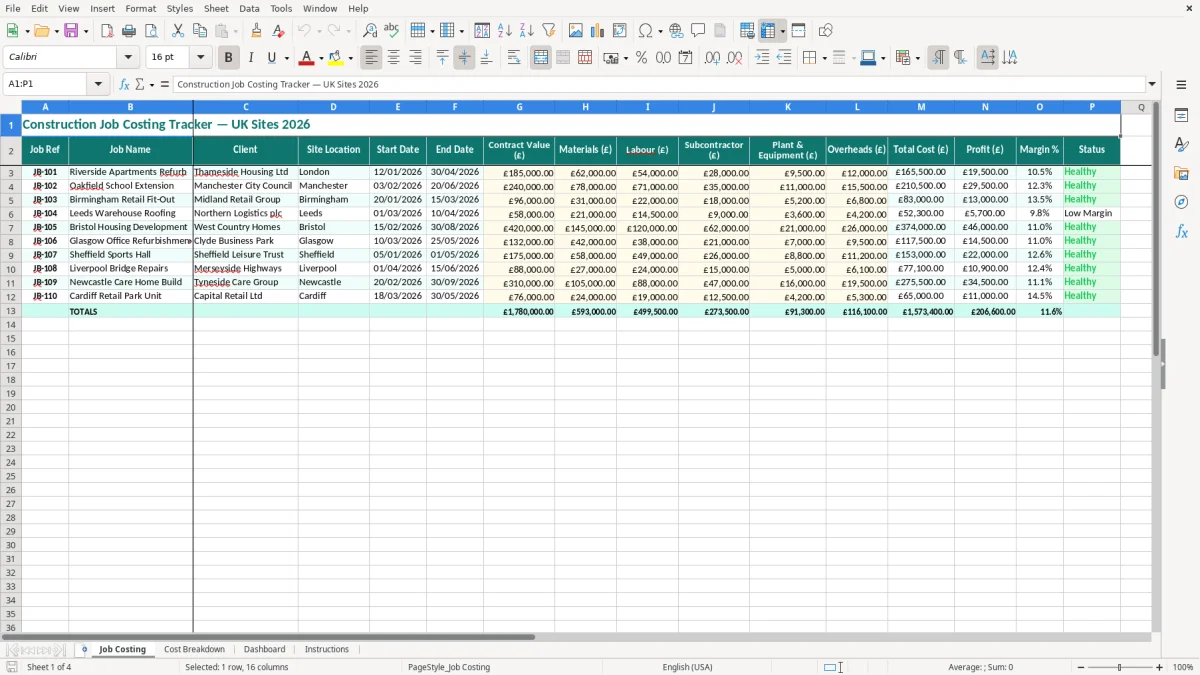
A construction job costing Excel template records each site's contract value, materials, labour, subcontractors, plant, overheads, total cost, profit and margin. This workbook contains a Job Costing register, Cost Breakdown analysis, Dashboard and Instructions sheet, giving you a practical view of job performance.
Use it for tenders, live projects and completed work. The main register includes job references, clients, locations, dates and status, while the supporting sheets help you investigate where costs have gone and whether the agreed contract value is producing the return you expected.
A construction job costing workbook is most useful when the person controlling the work needs a reliable answer to one question: is this site still making the margin allowed for in the tender? A small builder may update it every Friday after checking supplier invoices and labour sheets. A commercial manager at a larger contractor may review it at the monthly cost meeting with the site manager and quantity surveyor.
The Job Costing sheet is designed around one project per row. Image 1 shows the visible columns from Job Ref and Job Name through Client, Site Location, Start Date and End Date, followed by Contract Value (£), five cost categories, Total Cost (£), Profit (£), Margin % and Status. That layout suits a firm running several domestic extensions, refurbishments or commercial fit-outs at the same time.
Before work starts, enter the agreed contract value and the first cost forecast. A contractor pricing a £185,000 refurbishment can set out £62,000 of materials, £54,000 of labour, £28,000 of subcontractors, £9,500 of plant and £12,000 of overheads. The £165,500 total leaves £19,500 profit, or 10.5% of the contract value.
That figure is not a substitute for a detailed estimate. It is a control total that tells the contracts manager what the job must not drift beyond. If a variation is agreed, update the contract value with an audit note outside the sheet and make sure the cost forecast changes as well.
An office manager at a four-person building firm can collect figures from the purchase ledger, payroll allocation and subcontractor invoices. For an online trade contractor handling 300 smaller orders a month, the same method can be used at project level where separate site costs are available, rather than treating all bank payments as one construction expense.
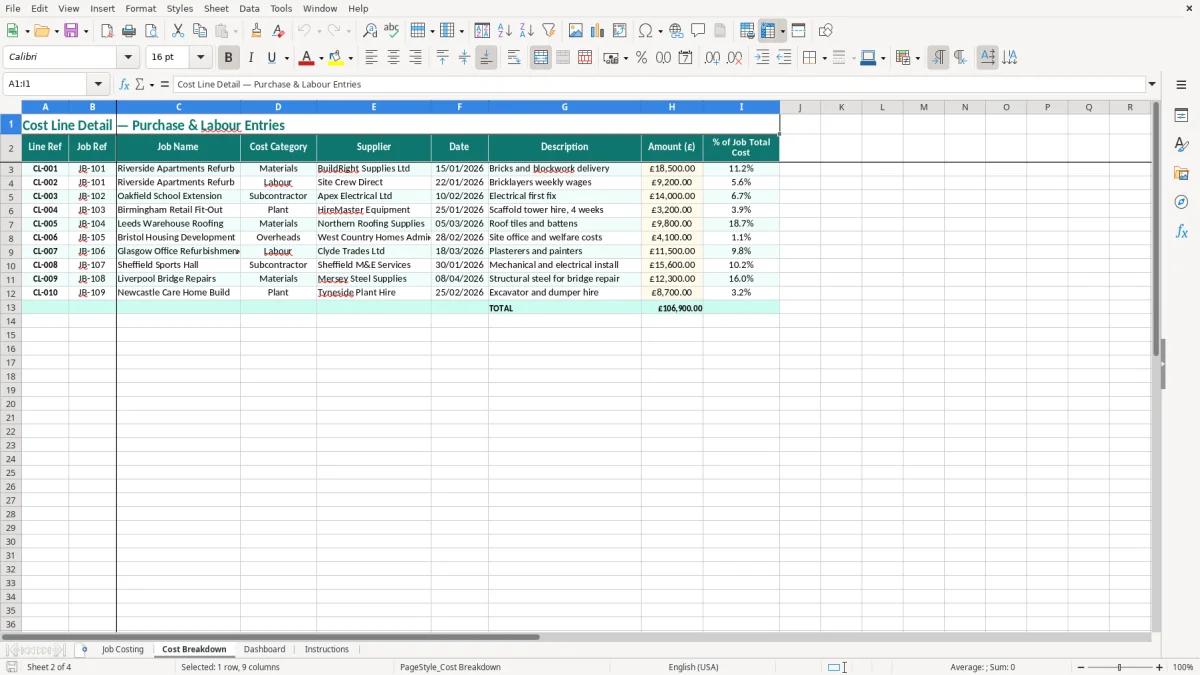
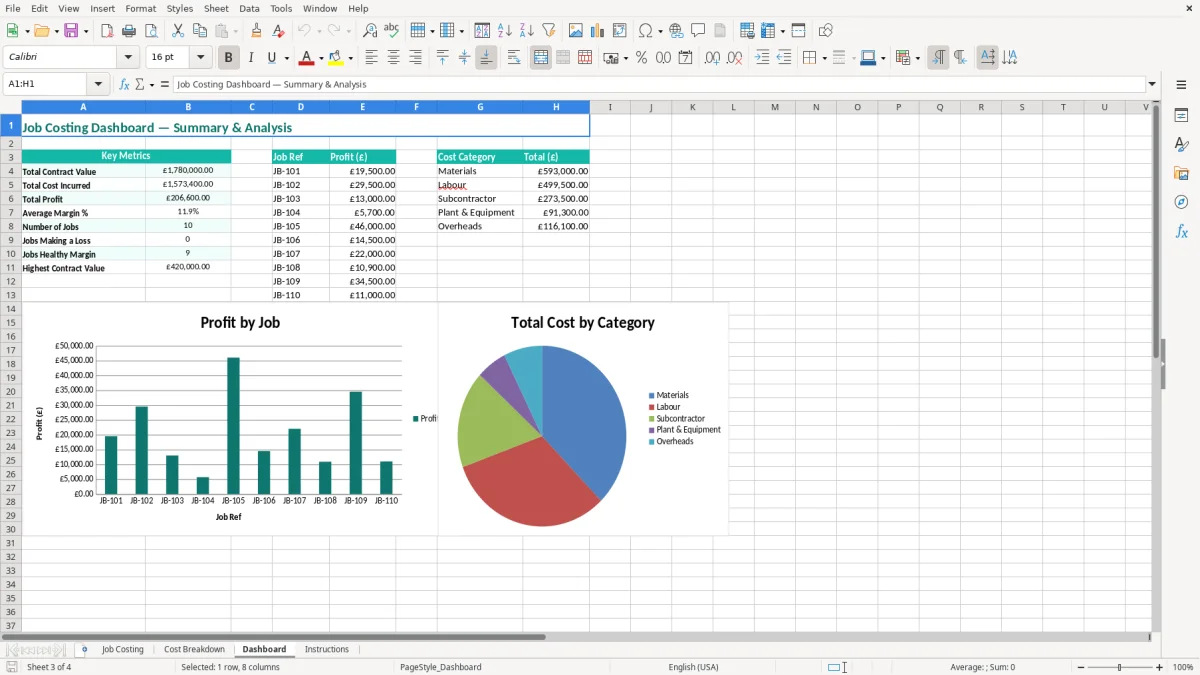
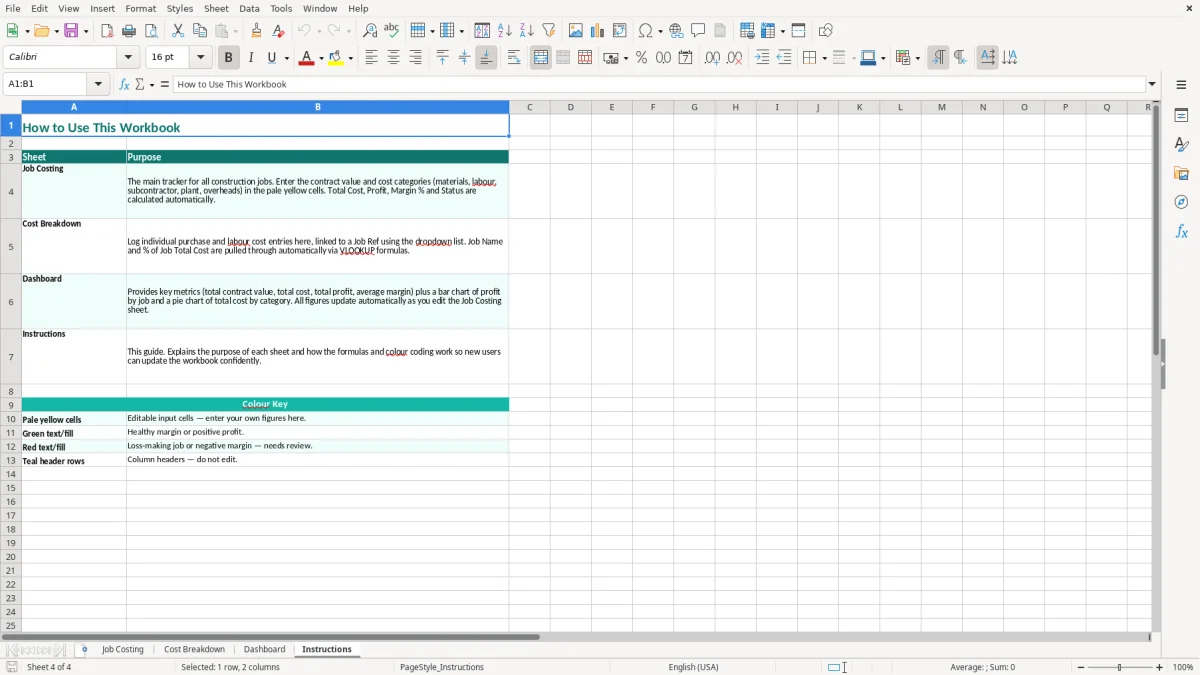
At completion, the bookkeeper can compare the final total with the original tender. The Cost Breakdown sheet, shown in image 2, helps explain whether the difference came from materials, labour, subcontractors, plant and equipment or overheads. Image 3 gives management a quicker portfolio view, while image 4 provides the workbook instructions.
Your job costing file supports management information; it does not replace the records required for HMRC. A limited company normally keeps accounting records for 6 years, while a self-employed contractor keeps records for 5 years after the 31 January Self Assessment deadline. Keep invoices, credit notes, timesheets, subcontractor statements, plant hire documents and evidence supporting every figure entered.
The standard VAT rate is 20%, with a reduced rate of 5% and a zero rate for particular supplies. VAT registration is required when taxable turnover exceeds £90,000. The contract value and cost columns in this workbook are management figures, so decide whether your internal policy records net amounts or gross amounts and apply it consistently.
For example, a £10,000 materials invoice from a VAT-registered supplier may be entered as £10,000 net with £2,000 input VAT kept in the VAT records. Do not add the £2,000 again as a job cost if your margin analysis is based on net costs. Quarterly VAT returns under Making Tax Digital require digital records and a digital link from the underlying records to the return.
When a contractor pays a subcontractor under the Construction Industry Scheme (CIS), verify the subcontractor's status and deduction rate before payment. The usual deductions are 20% for a registered subcontractor and 30% where HMRC has not verified the subcontractor; a gross-payment status produces no CIS deduction. The deduction affects the payment calculation, not the underlying subcontractor cost recorded for the job.
A £5,000 labour invoice subject to a 20% CIS deduction creates a £1,000 deduction and £4,000 paid to the subcontractor, but the job cost remains £5,000 before any VAT treatment. Keep the deduction statement with the project records and report the monthly CIS return by the 19th of the following tax month.
A sole trader has unlimited liability, whereas an Ltd company is registered at Companies House and has separate legal personality. Neither structure makes a spreadsheet an official cost ledger by itself. Use the workbook alongside double-entry bookkeeping, payroll records and the documents supporting the company's year-end accounts.
Those year-end accounts usually start with a profit and loss statement, which pulls the workbook figures into a clear record of turnover, costs and profit.
The most expensive failures I see are not usually a missing formula. They are timing and classification errors: a supplier invoice is posted to the wrong job, labour is left in a general wages account, or a subcontractor application is counted twice when the final invoice arrives. By the month-end meeting, the project can appear profitable even though the committed cost is already above budget.
A merchant invoice covering £6,000 of timber for two sites may be entered wholly against the job with the larger contract value. If £2,500 actually belongs to the other site, the first job's margin is understated and the second job's margin is overstated by the same amount. Require a job reference on the purchase order or delivery note, then split shared invoices before entering the Materials (£) column.
Price movement creates a second problem. A £20,000 allowance for materials can become £23,000 after three months of supplier increases. Without a weekly review, the extra £3,000 consumes a 10% margin on a £30,000 package. The Cost Breakdown sheet is valuable here because it points you towards the category requiring investigation rather than merely showing that profit has fallen.
On a four-employee builder's project, 160 hours at an internal cost of £22.50 per hour is £3,600 of direct labour. If the timesheets are entered only when payroll is processed, a site can look £3,600 better than reality during the intervening weeks. Use the actual approved hours and a consistent labour rate for management reporting, then reconcile the allocation to payroll and National Insurance costs.
Subcontractor costs also need an accrual where work is complete but the invoice has not arrived. A £12,000 roofing application omitted at month-end can turn an apparent £15,000 profit into £3,000 once recorded. That is not a spreadsheet fault; it is a failure to capture committed work.
Profit is contract value less the total of the five cost categories in this workbook. It is not the cash received from the client. A £100,000 contract with £92,000 of costs has £8,000 profit and an 8.0% margin, even if the client has paid only £50,000 at the review date. Mixing receipts with costs gives the contracts manager the wrong decision signal and can lead to unnecessary borrowing or premature hiring.
That is why the cash flow forecast sits alongside the contract margin, showing when receipts arrive and whether borrowing or hiring needs to wait.
The workbook becomes useful when its update is attached to an event that already happens. For most small contractors, Friday afternoon is better than an ambitious daily routine: the site manager can submit timesheets, the office can match delivery notes and the bookkeeper can update costs before the weekly progress call. A fixed 30-minute review is enough for three or four live jobs if the source documents are ready.
Do not spend the meeting reading every cell. Start with jobs where Margin % has fallen by 2 percentage points since the previous copy, where Total Cost is close to Contract Value, or where a project is marked complete but still has unallocated invoices. For a £240,000 project, a 2-point margin movement represents £4,800, which deserves a clear explanation.
Save a copy such as Job-Costing-2026-03-31.xlsx at each month-end. Compare the current Dashboard with the previous copy and retain the working papers behind changes. A spreadsheet is an appropriate control for a modest number of jobs; once you have hundreds of transactions, multiple users, live purchase commitments or detailed valuation requirements, move the transaction processing to construction accounting software and retain this workbook for management summaries.
This workbook tracks each project's reference, name, client, site location, start and end dates, contract value, materials, labour, subcontractors, plant and equipment, overheads, total cost, profit, margin percentage and status. It also includes Cost Breakdown, Dashboard and Instructions sheets.
Profit is calculated as contract value less materials, labour, subcontractor, plant and equipment, and overhead costs. For example, a £185,000 contract with £165,500 of recorded costs gives £19,500 profit and a 10.5% margin.
Use one consistent basis, normally net costs for a VAT-registered business that can reclaim input VAT. The standard VAT rate is 20%, but construction supplies can have different treatment, including the domestic reverse charge. Keep VAT calculations and supporting invoices in your bookkeeping records rather than adding recoverable VAT twice to job costs.
No. The workbook has a Subcontractor (£) cost column but does not replace CIS verification, deduction calculations or monthly CIS returns. A £5,000 subcontractor cost subject to a 20% deduction means £1,000 is withheld and £4,000 is paid, while the underlying job cost remains £5,000 before VAT treatment.
Update live jobs at least weekly if you have regular supplier invoices, labour hours or subcontractor applications. A Friday review works well for many small contractors, followed by a formal month-end reconciliation to purchase invoices, payroll, timesheets and committed costs.
A company generally keeps accounting records for 6 years. A self-employed contractor generally keeps records for 5 years after the 31 January Self Assessment deadline. Retain invoices, delivery notes, timesheets, subcontractor statements, plant records and notes supporting variations with the workbook or your accounting system.
Excel template by
Guide written by