Mileage Log Excel Template – Free (2026)
16
Free download
Free HMRC mileage claim Excel template, checked for 2026/27. Log business journeys, use the right 55p or 25p band and review claims before payment.


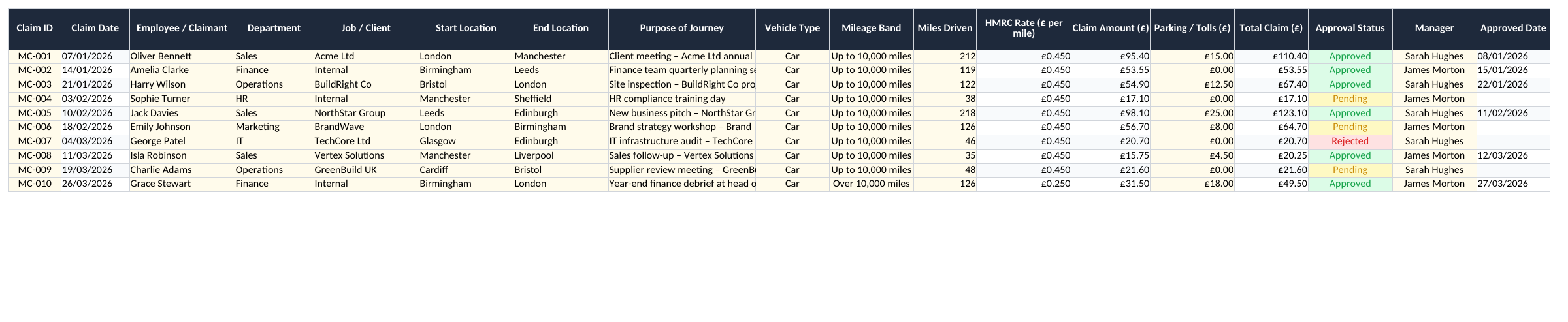
A useful mileage claim needs more than a distance and a total. It needs a journey date, a clear business purpose and the right rate for the vehicle and tax year. This free Excel workbook keeps those details together, calculates each claim and gives you a summary to review before payment.
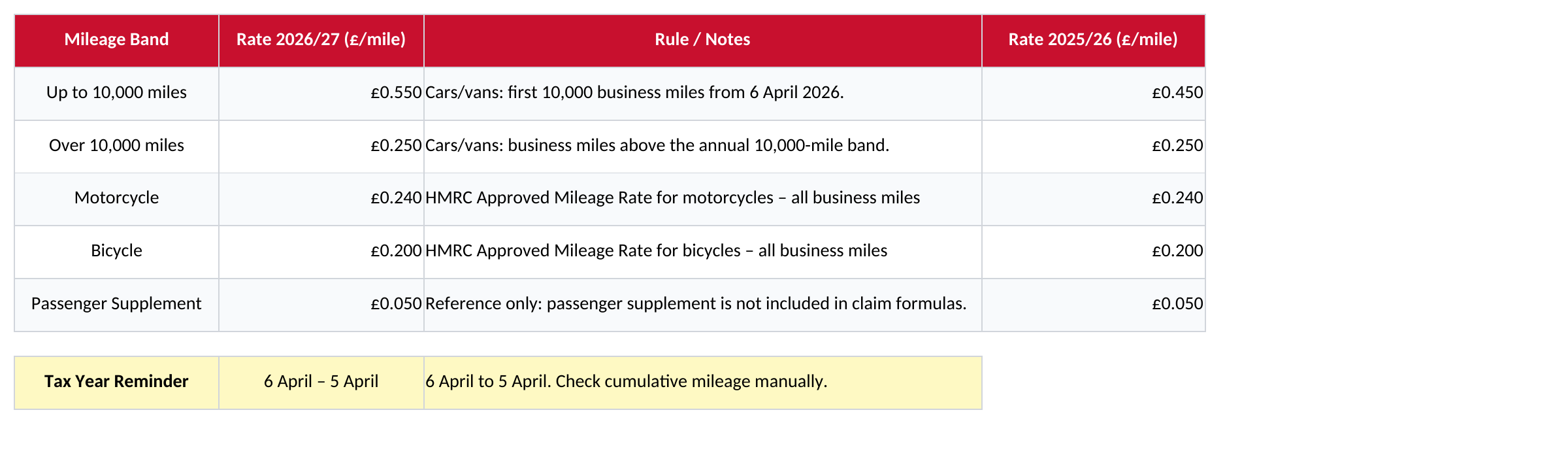
For journeys in the 2026/27 tax year, the approved car and van rate is 55p for the first 10,000 business miles, then 25p. The first band was 45p in 2025/26. The revised download keeps the two years separate: a journey on 5 April 2026 uses the earlier rate, while one on 6 April 2026 uses the new rate.
| Vehicle and band | 2025/26 | 2026/27 |
|---|---|---|
| Car or van: first 10,000 business miles | £0.45 per mile | £0.55 per mile |
| Car or van: miles above 10,000 | £0.25 per mile | £0.25 per mile |
| Motorcycle | £0.24 per mile | £0.24 per mile |
| Bicycle | £0.20 per mile | £0.20 per mile |
These figures were checked on 9 October 2026 against HMRC’s mileage rates. They concern business use of your own vehicle; company-car fuel uses a different framework. An approved mileage amount is not a promise that your employer will reimburse that amount.
In the file, the date, vehicle and selected band determine the rate. Dates outside 6 April 2025 to 5 April 2027 display “Check inputs”, so a later tax year cannot quietly inherit an unchecked rate. The Passenger Supplement row is reference information only: the claim formulas do not add passenger payments.
Open Mileage Claims and replace the ten fictional examples. Give each entry a claim reference, then record who travelled, the date, the start and end locations and the reason for the journey. “Client meeting at the Manchester office” is easier to check than “business travel”. A trip with several stops can be recorded as separate legs when that makes the evidence clearer.
Choose Car, Van, Motorcycle or Bicycle in Vehicle Type. For a car or van, select the mileage band yourself. Enter miles as a number in K; the rate in L and mileage amount in M are formulas. Parking and tolls go in N, and O adds them to the mileage amount. Check the organisation’s expenses policy before including an additional cost.
For example, a 100-mile car journey on 9 October 2026, entirely within the first band, calculates £55. With £8 of approved parking entered separately, the total becomes £63. That example tests the arithmetic; you still need to establish that the journey and extra cost are eligible.
The workbook has no GPS connection, route service or odometer import. Distance and journey purpose are entered by you. A spreadsheet also cannot decide whether a particular workplace or journey qualifies for tax treatment; use the relevant HMRC guidance and your employer’s process where the circumstances are uncertain.
The file does not calculate a cumulative annual mileage balance for each claimant. Changing the vehicle name does not work out how many miles that person has already travelled elsewhere. Before selecting a band, check the applicable business-mile total for the tax year and retain the calculation with the claim.
Suppose a claimant has 9,950 relevant car miles before a 100-mile journey in 2026/27. Split the journey into two entries with related references: 50 miles in the first band and 50 in the second. The amounts are £27.50 and £12.50, giving £40 in total. Put any parking charge on one entry only, so it is not counted twice.
Use the same claimant spelling and tax-year records throughout. If you keep separate monthly files, carry the cumulative mileage information between them outside this template. Starting a fresh workbook in November does not create a fresh first 10,000-mile allowance.
A band is an input, not an automatic threshold
The calculation can be arithmetically correct with the wrong band selected. Review the annual mileage position before approving a claim, especially when using several files or changing vehicles.
Approval Status, Manager and Approved Date record your review process. Choosing Approved is a manual action; it does not send an email, transfer money or create an accounting entry. Rejected rows remain in the workbook as part of the record.
Summary Dashboard contains overall mileage and claim totals, status counts and three charts. Its claim-value totals include Approved, Pending and Rejected rows. They show what has been entered, not the amount finance should pay. Filter the claim register and review individual statuses before preparing a payment list.
The filter covers the initial ten records. Filtering hides rows but does not change the ordinary SUM formulas in the dashboard. If you want an approved-only payment report, make that selection explicit in a separate reconciliation rather than treating the grand total as approved expenditure.
For a fuller view of vehicle spending, the car running costs workbook serves a different purpose. Do not add fuel and vehicle costs to an approved mileage calculation just because they appear in another spreadsheet; check how the claim is meant to be calculated.
The initial claims and key dashboard totals use rows 2 to 11. To add records, insert rows within that block, copy the rate and amount formulas and check that totals, conditional formatting and charts still include the new entries. Typing below the summary area does not expand every reference automatically.
Try a known 100-mile claim after extending the file. Check the date-selected rate, the mileage amount and the change in the dashboard total. If the rate says “Check inputs”, inspect the date, vehicle and band; do not replace the formula with a guessed amount just to remove the message.
Save the editable workbook before sharing. For a printable claim, choose the required rows and columns, use landscape orientation and check the preview. The register is wide, so forcing every column onto one A4 page may make it difficult to read. Export a PDF of the reviewed view when a recipient only needs a fixed copy, and retain the Excel file as the working record.
No. It calculates mileage and claim amounts from the entries. It does not calculate tax relief, deduct amounts already reimbursed by an employer or submit a claim to HMRC.
The built-in rates are for business use of an individual’s own vehicle. Do not use them as company-car fuel rates. Check the separate HMRC rules and use a suitable calculation for that arrangement.
Excel template by
Guide written by