Childminder Register Excel – Free Template (2026)
1
Free download
UK payslip Excel template with payroll data, tax and NI deductions, net pay, payslip layout, summary dashboard and instructions for small employers.


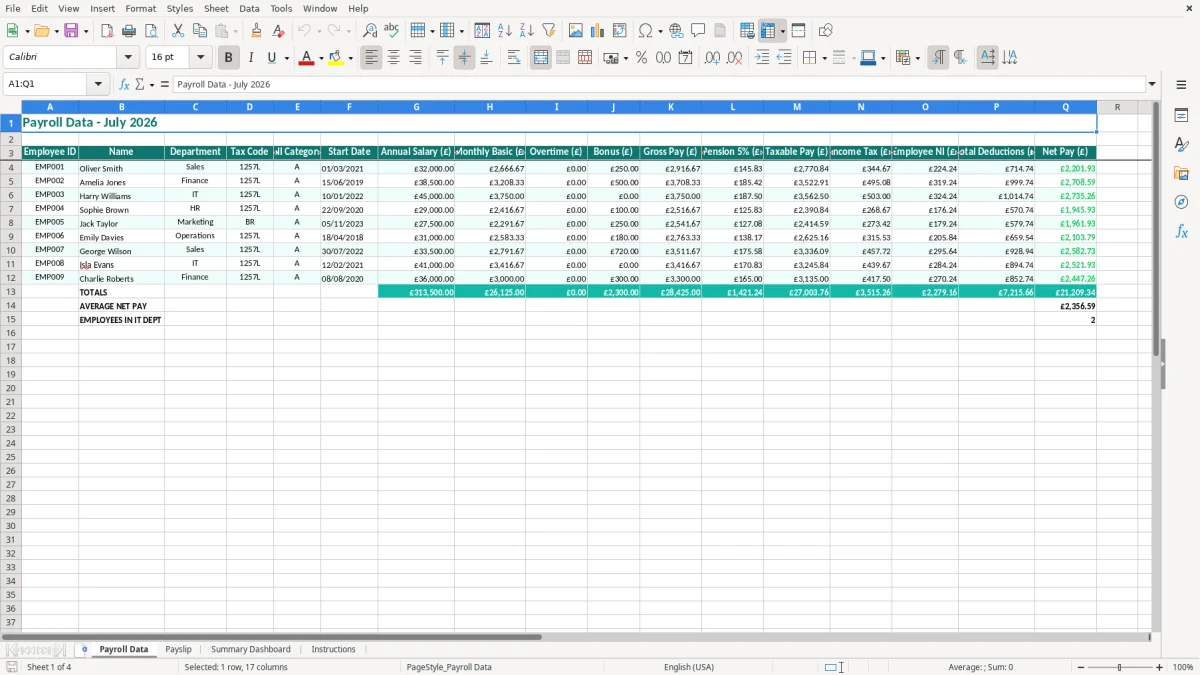
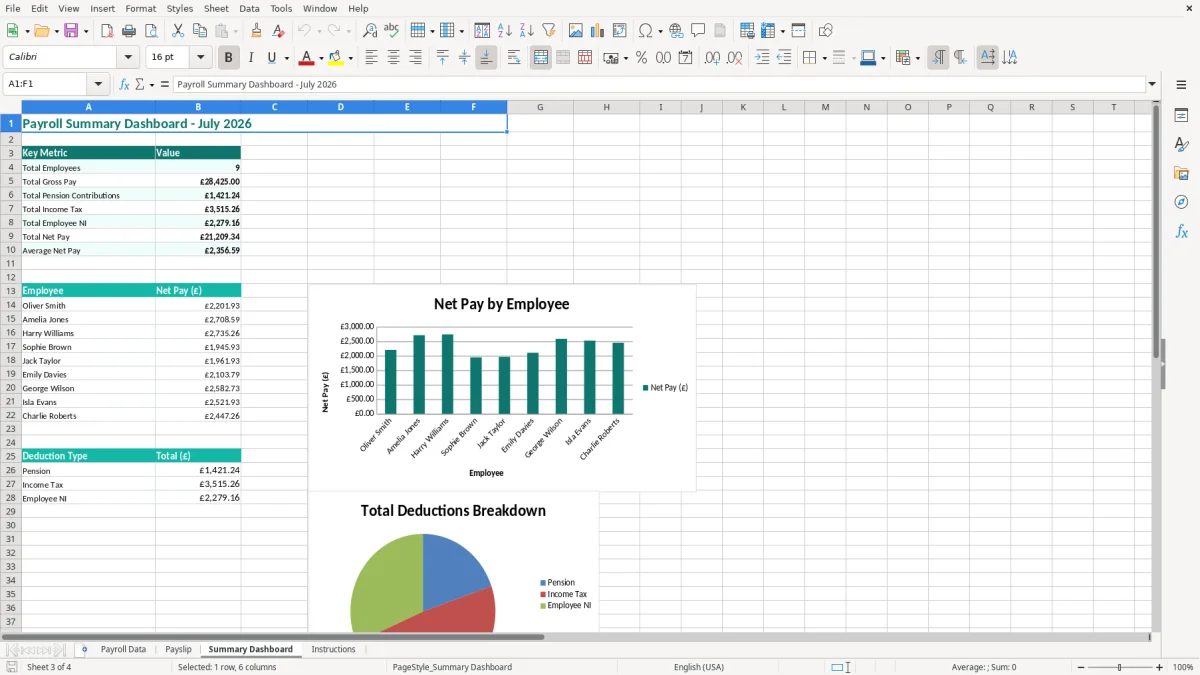
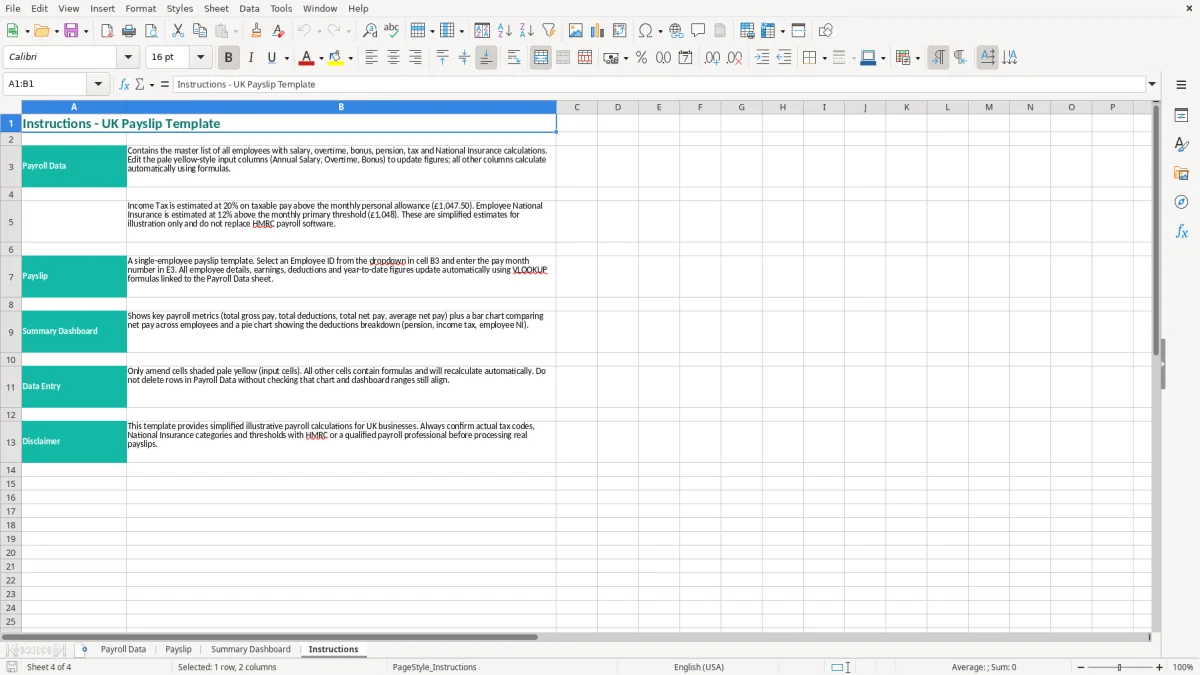
A payslip Excel template is a spreadsheet for recording employee pay and producing a clear monthly payslip. This UK version contains Payroll Data, Payslip, Summary Dashboard and Instructions sheets, with fields for salary, overtime, bonuses, pension, income tax, employee NI, deductions and net pay.
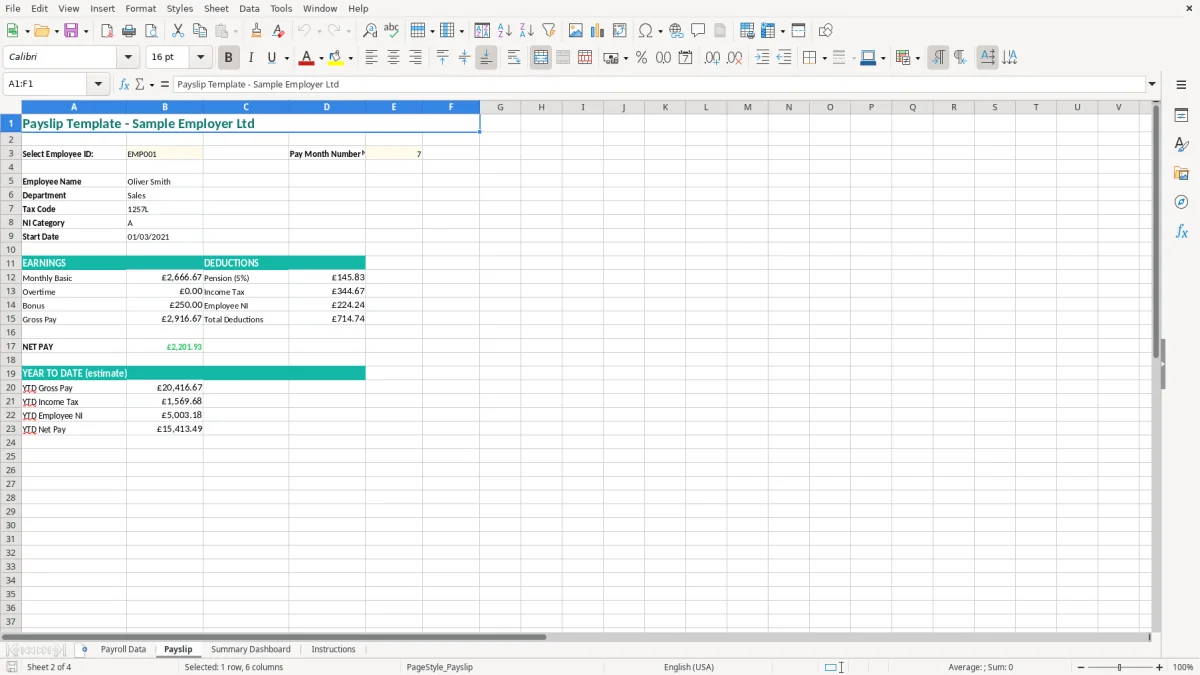
It suits a small employer, office manager or bookkeeper who needs a straightforward payroll record for July 2026. The Payroll Data sheet holds employee details and pay figures, while the Payslip sheet provides an individual employee view; image 1 shows the main payroll table and image 2 shows the payslip layout.
A payslip spreadsheet is most useful where a small employer runs a modest payroll but wants a visible audit trail. The office manager at a plumbing firm with four employees may prepare the figures on the last working day of the month, while the owner checks the totals before the payroll submission. A club treasurer may use the same approach for a paid administrator and a few casual workers.
The workbook's Payroll Data sheet is suited to a monthly pay run because each employee has one row with their identity, tax information and pay components. In the supplied example, Oliver Smith has an annual salary of £32,000 and £250 overtime, while Amelia Jones has £500 bonus pay. Those amounts can be checked separately before gross pay is accepted.
A bookkeeper at a small Ltd company can use the Employee ID and Department fields to keep names consistent between the payroll record and the payslip. Six employees across Sales, Finance, IT, HR, Marketing and Operations can be reviewed quickly without scrolling through separate files. The Summary Dashboard is useful when the director wants to see the overall payroll position rather than inspect every payslip.
Overtime and bonus columns are particularly helpful during a busy month. For example, a service business paying five employees £2,500 basic pay each month has £12,500 basic payroll before variable additions; three employees receiving £180 overtime adds £540 to gross pay. Keeping that £540 visible makes the approval conversation much clearer than entering one unexplained gross figure.
Use the template as a working schedule and payslip aid, not as a substitute for a compliant payroll calculation. The employer still needs to check the tax code, NI category and pension position for each pay period.
Under the Employment Rights Act 1996, an employee must receive an itemised payslip on or before payday. It must show gross pay, deductions and net pay, and variable deductions such as income tax, employee National Insurance and pension contributions should be understandable. The Payslip sheet is designed to present the figures recorded in Payroll Data; it does not remove the employer's legal duty to calculate them correctly.
PAYE income tax is calculated using the employee's tax code and the applicable payroll tables for the 2026 tax year. The common code 1257L represents a £12,570 annual personal allowance for a standard case, while BR generally taxes all pay in that employment at the basic rate. A code such as 1257L must not simply be copied to every employee: use the code on the employee's latest HMRC notice.
Employee NI depends on the employee's category letter and the relevant earnings thresholds for the pay frequency. Category A is common for standard employees, but category M, H, J and others can apply in particular circumstances. The template's NI Category column therefore needs checking before you rely on the Employee NI result.
Automatic enrolment normally requires minimum total pension contributions of 8% of qualifying earnings, including at least 3% from the employer. This workbook shows a Pension 5% column, so you must confirm whether that percentage represents the employee deduction, the total contribution or a particular scheme arrangement.
Send a Full Payment Submission to HMRC under Real Time Information before or on the day employees are paid, unless an accepted exception applies. Keep payroll records for three years from the end of the tax year to which they relate for National Minimum Wage purposes, and retain PAYE records for at least three years after the end of the tax year; longer retention may be needed for other obligations. The 6 April–5 April tax year should not be confused with a calendar-year workbook heading.
The same 6 April–5 April year is also the basis for tracking holiday entitlement records, so annual leave can be kept against the correct tax year rather than a calendar heading.
The most damaging spreadsheet error is changing a calculated result without correcting the underlying input. I have seen a small employer overwrite one employee's monthly basic pay with £2,500 even though the annual salary still showed £32,000. The row then appeared tidy, but the annual and monthly figures no longer agreed, making the next payroll review needlessly difficult.
A copied tax code can produce a materially wrong payslip. If an employee should be on BR but remains on 1257L, too little tax may be deducted; if 1257L is replaced by BR, the employee may lose much more from that month's pay. A £2,000 monthly payment taxed without the expected allowance can create a cash difference of hundreds of pounds, followed by an HMRC correction and an unhappy employee.
NI category errors create a similar problem. Treating every worker as category A ignores cases such as under-21 employees or qualifying apprentices. The result may be a wrong employee deduction and a wrong employer cost, even though the payslip appears professionally formatted.
Overtime and bonus are often entered twice: once in the gross-pay figure and again in their separate columns. An employee with £2,666.67 basic pay and £250 overtime should have £2,916.67 before any bonus, not £3,166.67 because the overtime was added twice. A duplicate £250 across six employees over six months costs £9,000 of overstated gross payroll.
Do not assume that the Pension 5% line is automatically correct for every worker. A pension deduction may be based on qualifying earnings, salary sacrifice or scheme rules, and an incorrect percentage can affect both the employee's take-home pay and the employer's contribution.
Finally, issuing a payslip without making the matching RTI submission is not a completed payroll run. Keep a submission confirmation with the monthly workbook and have a second person check unusual changes before payday.
That same control process often extends to staff scheduling, where confirmed shifts need to match the payroll workbook before payday.
Make payroll a fixed appointment rather than a task completed whenever someone remembers it. For example, ask managers for overtime and bonus changes by the 20th, update Payroll Data on the 22nd, review the Summary Dashboard on the 24th and complete the payroll submission before payday. A four-person payroll should take minutes to review when the inputs arrive in a consistent format.
Use the pale input cells for entries and avoid typing over formula cells. If you extend the data table, copy formulas from the preceding row and check that references move to the new employee rather than continuing to point at the old row.
Payroll contains personal data, so store it in a restricted folder and send payslips through an approved secure method. Under the UK GDPR, the employer is a data controller and should limit access to people who need it; emailing an unprotected workbook containing six employees' pay is poor practice.
A spreadsheet is suitable for a small, stable payroll. Move to dedicated payroll software when you have several pay frequencies, more than about 20 employees, statutory payments, salary sacrifice, attachment orders or repeated manual corrections. The cost of a proper system is usually lower than correcting a missed RTI submission or six months of inaccurate pension deductions.
Yes, it is structured for UK payroll information, including tax codes, NI categories, pension, income tax, employee NI, deductions and net pay. Check every calculation against current HMRC payroll guidance and your payroll software before issuing payslips.
It contains Employee ID, Name, Department, Tax Code, NI Category, Start Date, Annual Salary, Monthly Basic, Overtime, Bonus, Gross Pay, Pension, Taxable Pay, Income Tax, Employee NI, Total Deductions and Net Pay.
No. It records and presents payroll figures, but it does not replace a Full Payment Submission or other RTI process. Submit payroll information to HMRC through approved payroll software or another compliant method.
Yes. Replace the example employee IDs, names, departments, tax codes, NI categories and start dates, then enter the relevant salary, overtime and bonus figures. Keep a clean original copy before editing the workbook.
No. The workbook includes a Pension 5% column, but the correct deduction depends on the pension scheme, qualifying earnings, salary sacrifice arrangements and the employee's enrolment status. Confirm the basis used by your scheme before relying on the result.
Store it in a restricted business folder, limit access to authorised payroll staff and use a secure method for sending individual payslips. Payroll records contain personal data covered by the UK GDPR, so do not circulate the full workbook unnecessarily.
Excel template by
Guide written by