Childminder Register Excel – Free Template (2026)
1
Free download
Track hours, breaks, overtime and gross pay with a UK timesheet template for employees, contractors and payroll checks.


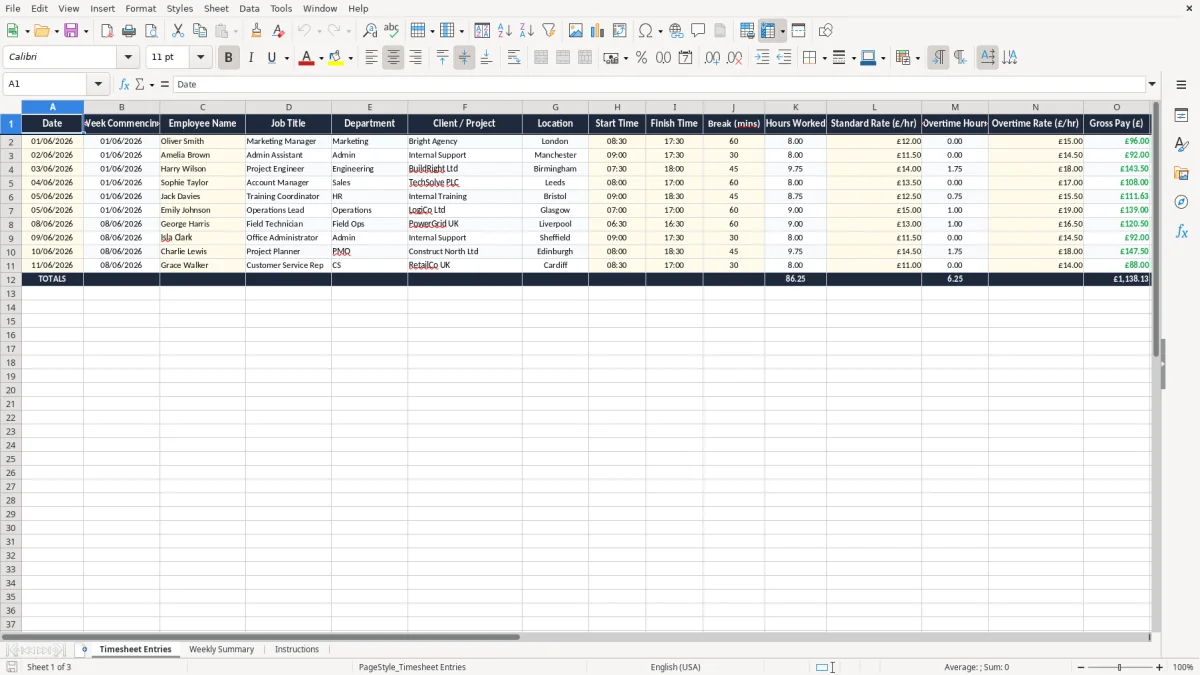
This timesheet Excel template records start and finish times, break minutes, hours worked, overtime and gross pay for each shift. It is built for UK businesses that need a clean weekly record for payroll, job costing or client billing.
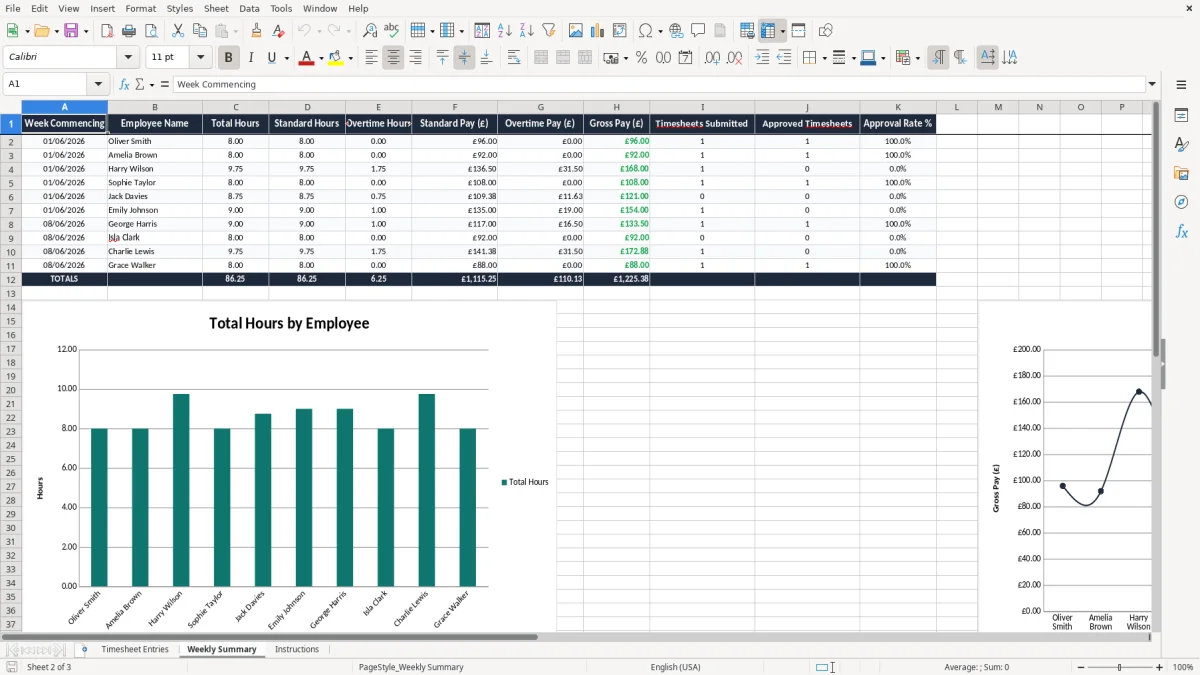
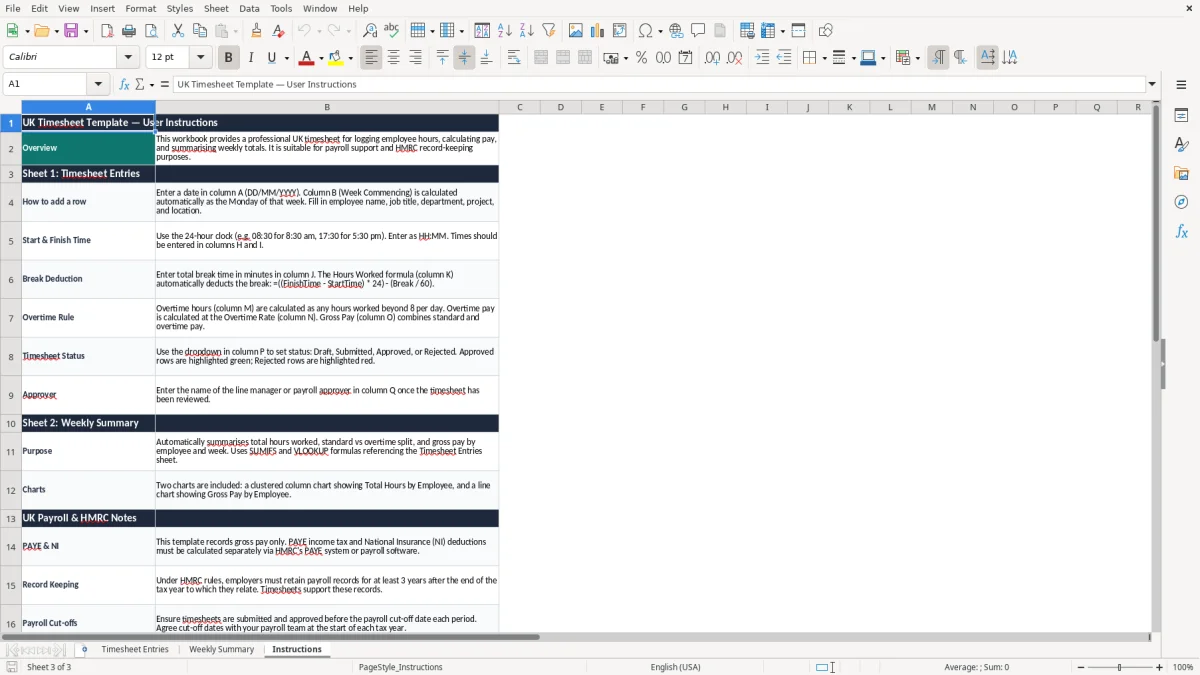
The workbook contains three sheets: Timesheet Entries, Weekly Summary and Instructions. Image 1 shows the entry grid, image 2 summarises hours and pay by employee, and image 3 explains how to use the file.
Use it for a small team, a contractor booking time to projects, or a payroll check before you run PAYE. If one employee works 37.5 hours at £12.00 an hour and 4 overtime hours at £15.00 an hour, the sheet gives you the gross pay figure without hand maths.
This template is for the moment when hours stop being a rough note in a diary and need to become a number you can trust. A bookkeeper in a Ltd company, an office manager in a trades firm, or a club treasurer paying casual staff all need the same thing: start time, finish time, break, hours and pay in one place.
The Timesheet Entries sheet (image 1) is set up for that daily grind. You can log one 8.5-hour shift for a warehouse operative, or a week of 6 jobs for a freelance designer who splits time between three clients.
Most people use this kind of sheet at payroll cut-off, at month-end, or when a client disputes a bill. If a builder has 4 employees doing 40 hours a week at £12.00 an hour, the sheet quickly shows whether the labour cost is £1,920 or more once overtime is added.
It is especially useful when you have a mixed team: one person on fixed hours, one on overtime, and one who only works certain projects. That mix is where manual notes go wrong, because a missing 45-minute break or a wrongly typed start time can move the pay total by £6 to £15 in a single shift.
For payroll use, the key point is that you need enough detail to support what you pay. If you run PAYE, the timesheet helps you back up the gross pay figure before you send RTI submissions to HMRC, and it also gives you a check against the National Insurance position for hourly staff.
UK record-keeping matters as well. Keep employment and payroll records for at least 3 years, and keep business records for 6 years if you are a company, or 5 years after the 31 January Self Assessment deadline if you are self-employed. If the sheet supports a VAT recharge or client invoice, it also helps with VAT records for the quarterly return under Making Tax Digital (MTD).
A standard week of 37.5 hours at £12.00 an hour gives £450.00 before tax. Add 4 overtime hours at £15.00 and the gross pay becomes £510.00, so a simple decimal mistake in the overtime column can cost £12.00 straight away.
The week commencing field is more than tidy labelling. It helps you line the entries up with the tax year from 6 April to 5 April, the payroll run, and any holiday pay calculation based on hours worked rather than a flat salary.
The expensive errors are usually small. A missing 60-minute break on a 5-day week, a start time typed as 08:00 instead of 08:30, or overtime entered at the standard rate can each move the weekly total by £5 to £40 for one worker.
The first is inconsistent entry. If one supervisor writes 17:30 and another writes 5.30 pm, the sheet becomes harder to sort and the wrong hours can creep into payroll.
The second is a blank approval trail. If the timesheet is used to invoice a client for 12 hours at £45.00 an hour, one unchecked line costs £540.00 of billable time, and the dispute usually takes longer than the original job.
A team of 6 staff with 2 shifts each week entered badly can waste an hour of admin time every Friday. Over a 52-week year, that is 52 hours lost — more than a full working week — just to untangle times, breaks and rates.
That same admin burden often shows up in leave records too, and a staff leave planner keeps holiday requests, approvals and cover dates in one place.
This works best when you attach it to a fixed job, not to spare time. The cleanest habit is to update the Timesheet Entries sheet at the end of each shift, then review Weekly Summary before the payroll run or client invoice goes out.
If your team has 15 to 20 people, or you need rota planning, annual leave and statutory holiday pay as well as hours worked, a spreadsheet may no longer be enough. At that point a proper workforce system is usually the better choice.
For teams that need rota planning as well as hours worked, a weekly rota template becomes the natural next step.
It tracks the date, week commencing, employee name, job title, department, client or project, location, start time, finish time, break minutes, hours worked, standard rate, overtime hours, overtime rate, gross pay, status, approver and notes.
Yes. It is suitable for payroll checks before a PAYE run, especially where hourly pay or overtime changes each week. It also helps you keep a clear working record for your files.
Yes. If you bill time to a client or project, the sheet gives you a simple record of hours and rates. For example, 12.5 hours at £45.00 an hour produces a billable figure of £562.50.
Enter the break in minutes and keep overtime separate from standard hours. That makes it easier to check a 7.5-hour paid day, a 40-hour week, or any higher rate that applies after contracted hours.
Yes. You can use it every day, then review it weekly for payroll or monthly for management reporting. The Weekly Summary sheet is there to make those totals easier to read.
Move on when you have a larger team, complex shift patterns, holiday booking, and approval workflows that need more control. If you are spending more than an hour a week fixing entries, a dedicated time and attendance system is usually the better option.
Excel template by
Guide written by