Freelance Invoice Excel – Free Template (2026)
7
Free download
UK expense report Excel template with claims log, VAT fields, category rates, dashboard and instructions for businesses and employees.


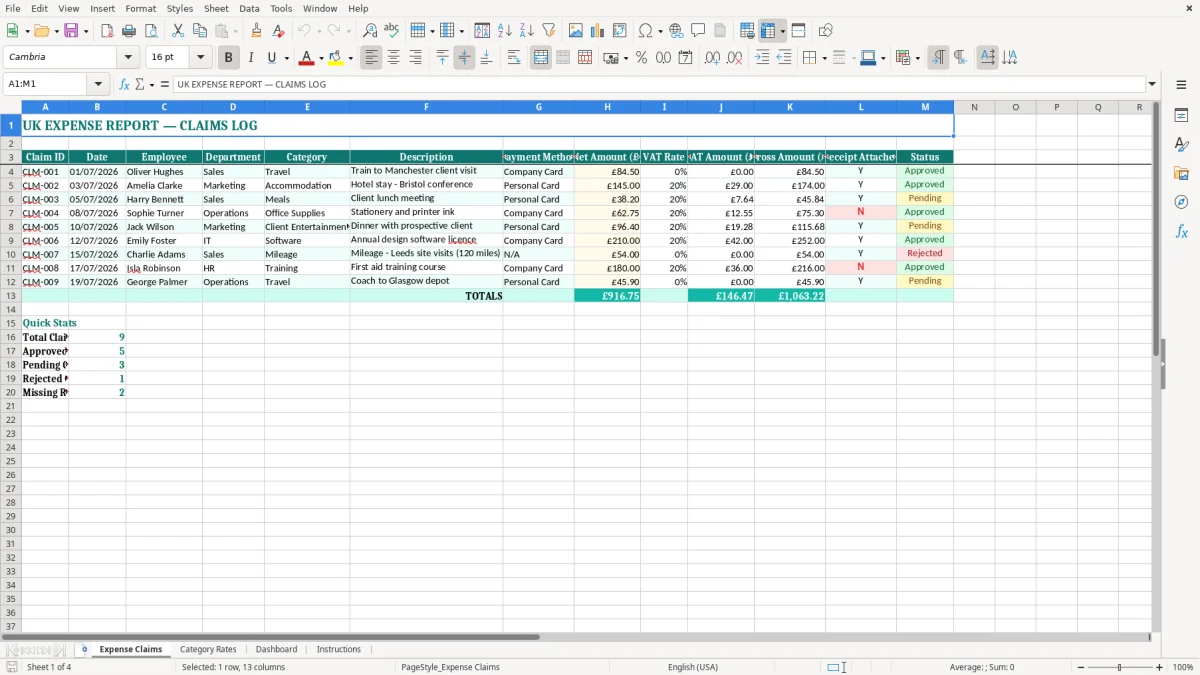
This UK expense report Excel template records employee claims, dates, departments, categories, payment methods, net costs, VAT, gross amounts, receipts and approval status. It includes an Expense Claims log, Category Rates reference, Dashboard and Instructions sheet, giving you one place to review business spending.
Image 1 shows the main claims table with sample July 2026 entries, including train travel, accommodation, meals and office supplies. The teal headings, pale input cells and currency formatting make it clear where you enter each claim and which figures need checking.
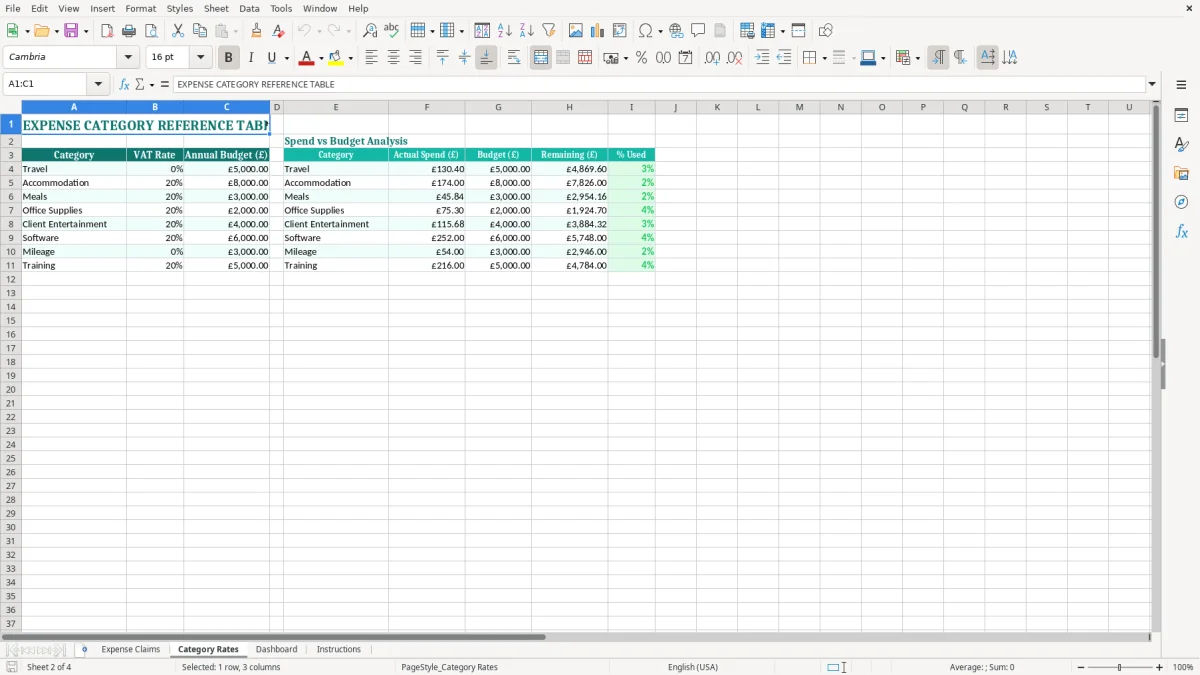
An expense report spreadsheet is useful when staff spend their own money on business activities and need repayment, or when a company card transaction must be allocated correctly. An office manager at a plumbing firm may enter fuel, parking and tool purchases each Friday; a bookkeeper at a Ltd company may review the same claims before the monthly payment run.
Take a four-person building firm. If each employee submits six claims a month, the log contains 24 rows before travel to suppliers and customer sites is included. A claim for £50.00 net at 20% VAT should be recorded as £10.00 VAT and £60.00 gross, not as a single £60.00 expense with the tax detail lost.
The Employee, Department and Category columns make that allocation visible. Sales travel can be separated from Operations supplies, while Payment Method shows which amounts are owed back to staff rather than already paid from the company account.
A sole trader can use the file to collect receipts before sending records to a bookkeeper. In a growing business, the person approving claims can filter the Status column each Friday and identify claims still awaiting evidence before the payroll or supplier payment run.
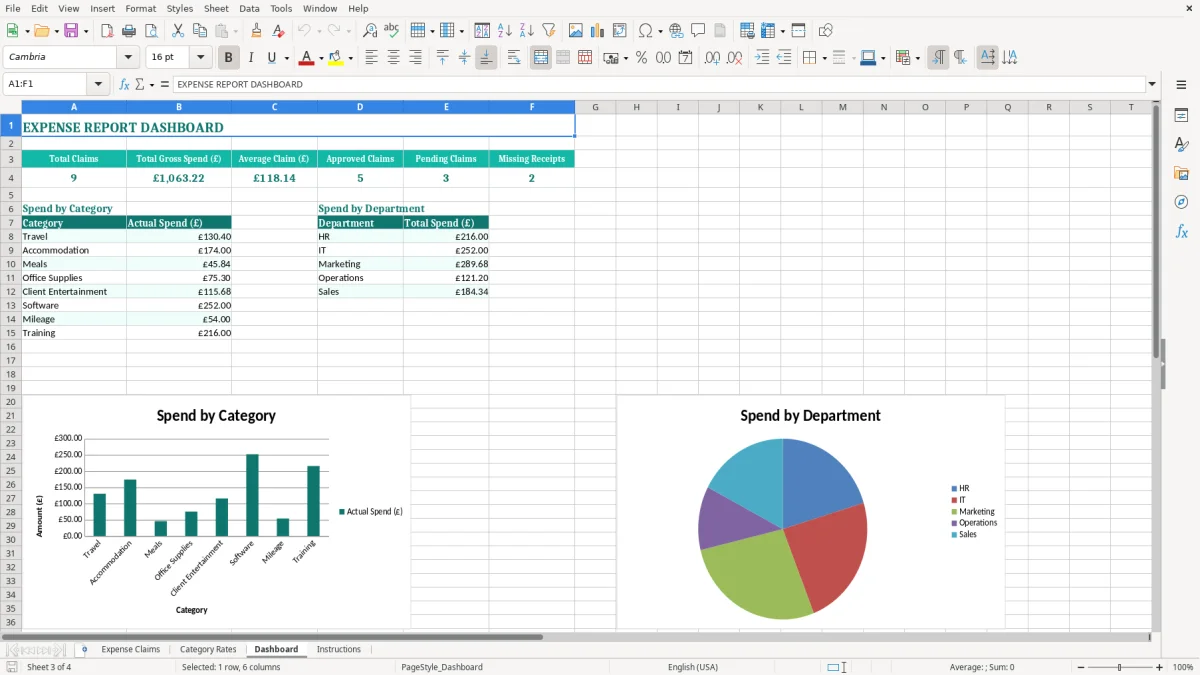
The Dashboard is most helpful when management wants a quick answer such as whether July travel exceeded accommodation. An online retailer with 300 orders a month may not use every category shown in the sample, but it can still use the same structure for courier visits, packaging purchases and staff expenses without mixing those costs into sales records.
The same structure also feeds a profit summary that keeps courier visits, packaging purchases and staff expenses separate from sales records.
Your expense report is an internal control record; it is not, by itself, proof that every cost is allowable. For HMRC, you need a clear business purpose and supporting evidence. Companies generally keep accounting records for 6 years from the end of the relevant financial year, while a self-employed person keeps records for 5 years after the 31 January Self Assessment deadline.
The standard VAT rate is 20%, with a reduced rate of 5% and a zero rate applying to specified supplies. A VAT-registered business should only reclaim input VAT where the purchase relates to its taxable business activity and the evidence supports the claim. A £240.00 gross invoice at 20% VAT contains £40.00 VAT and £200.00 net, not £48.00 VAT.
If taxable turnover exceeds the £90,000 VAT registration threshold, registration duties arise. VAT-registered businesses may also need quarterly returns under Making Tax Digital (MTD), so the VAT Rate, VAT Amount and Gross Amount columns should agree with the underlying invoice and bookkeeping entry.
A valid VAT invoice normally identifies the supplier, invoice number, date, goods or services, net amount, VAT rate and VAT amount. A card slip alone may not contain enough information to support a VAT reclaim. For employee reimbursement, retain the receipt and record why the cost was incurred, who paid it and whether the company or employee ultimately bears the cost.
Do not treat every meal or item of client entertainment as recoverable input VAT. Business entertainment has specific VAT restrictions, and private expenditure is not an allowable business cost simply because it was paid during a work trip.
The most expensive mistakes in an expense log are usually small entry errors repeated across many claims. I have seen a £1,200 monthly travel total become £1,440 after VAT was added twice, because staff entered gross receipts in the net column and the reviewer applied a VAT rate again.
Check the receipt before typing. If the document shows £84.50 net and £16.90 VAT, the gross claim is £101.40. Entering £101.40 as net produces £20.28 VAT and an overstated claim of £121.68. Across 20 similar claims, that error creates £405.60 of unnecessary gross expenditure.
Another common problem is using 20% for every purchase. A £100.00 item may be zero-rated, outside the scope of VAT, or subject to the 5% rate. The Category Rates sheet is a useful prompt, but it cannot decide the tax treatment where the receipt describes a different supply.
Two claims for the same train journey are easy to submit when one employee forwards a receipt and later enters the bank notification as a second row. Compare Claim ID, date, employee, description and amount before payment. A duplicate £145.00 hotel claim is a direct cash loss until recovered.
Receipts also disappear when photographs sit in personal phones or email inboxes. A blank Receipt Attached value should stop approval, not be silently treated as evidence. For a company with 40 claims a month, spending 10 minutes checking duplicates and receipts can prevent hours of later payroll corrections and disputed employee balances.
The spreadsheet works best when expense reporting is attached to an existing event rather than left until year-end. Set a Friday cut-off for employees, review new rows on the following Monday and make reimbursement part of the normal payment run. That gives a four-week month-end process at roughly 20 minutes per week instead of a half-day reconstruction.
For example, if 30 claims total £2,400 gross in August, compare that figure with the company card statement and the employee reimbursement list. A difference of £180 should be investigated while the receipts are recent, not carried forward as an unexplained balance.
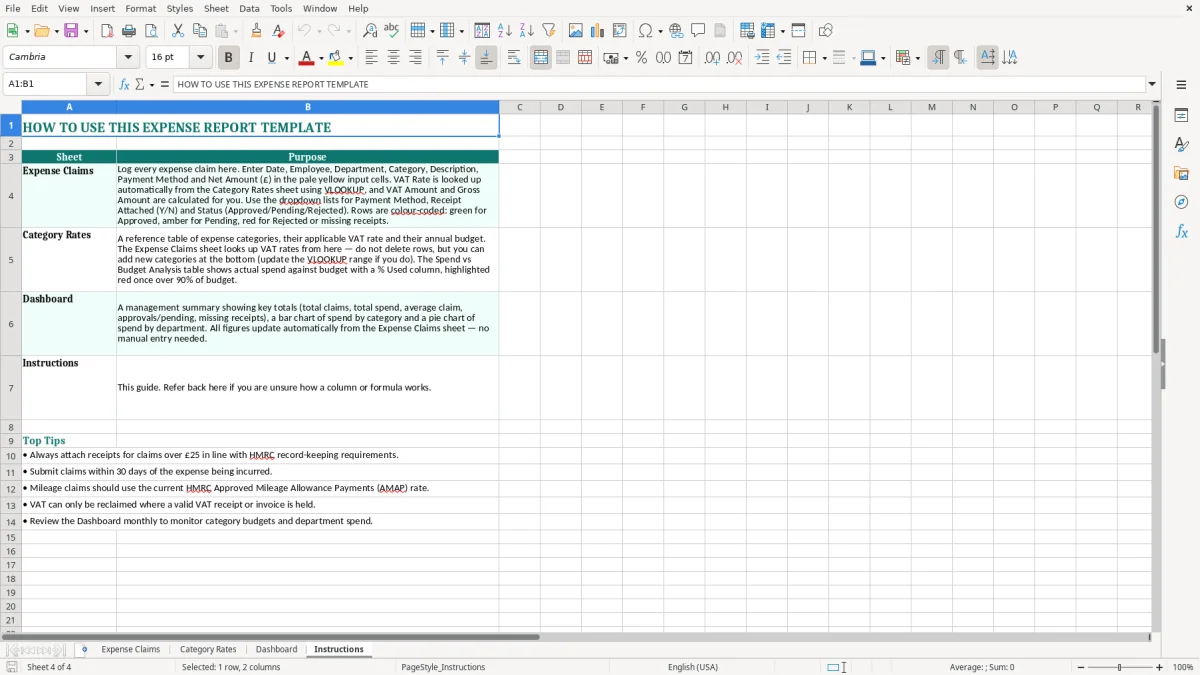
Keep one master workbook and save a dated copy such as Expense Claims August 2026.xlsx after approval. Use the Instructions sheet as the handover note when another administrator takes over. Avoid inserting random categories or changing VAT labels halfway through the year, because inconsistent names make the Dashboard harder to interpret.
Once you have several hundred rows, multiple approvers or claims linked to payroll, move to accounting software with an approval workflow and document storage. The spreadsheet remains suitable for a small team, but it becomes the wrong tool when duplicate checking, access control and audit history take longer than the claims themselves.
It contains four sheets: Expense Claims, Category Rates, Dashboard and Instructions. The claims sheet has fields for claim identification, dates, employees, departments, categories, descriptions, payment methods, net amounts, VAT rates, VAT amounts, gross amounts, receipt status and claim status.
Yes. Use Employee and Payment Method to identify who paid, enter the business cost in the amount columns, mark whether the receipt is attached and update Status as the claim is reviewed and paid. Keep the receipt and business purpose with your accounting records.
Enter the net amount and the applicable VAT Rate, then check the VAT Amount (£) and Gross Amount (£) fields. For example, £50.00 net at 20% VAT gives £10.00 VAT and £60.00 gross. Confirm the rate against the receipt before reclaiming input VAT.
No. The spreadsheet summarises the claim, but HMRC may require receipts, invoices and evidence of the business purpose. A VAT-registered business needs suitable VAT evidence to support an input VAT reclaim, and private costs should not be recorded as allowable business expenses.
You can adapt the workbook to your organisation, but make changes consistently. Keep category names stable throughout the period so the Dashboard groups comparable claims, and read the Instructions sheet before altering the layout or reference rates.
Companies generally keep accounting records for 6 years from the end of the relevant financial year. Self-employed people generally keep records for 5 years after the 31 January Self Assessment deadline. Retain receipts and supporting invoices with the workbook rather than keeping only the totals.
Excel template by
Guide written by