Childminder Register Excel – Free Template (2026)
1
Free download
Weekly rota template with staff names, shifts, hours, costs and summary sheets for small UK teams.


This weekly rota Excel template is a staff scheduling spreadsheet for UK businesses that need to plan shifts, track hours and see labour cost at a glance. It includes a Rota Data sheet, a Weekly Summary sheet and an Instructions sheet.
Use it for a shop, café, trades firm, care team or small office where the week changes fast and you need one place for names, roles, start and finish times, breaks and pay rates. The summary sheet turns the rota into a simple weekly view, so you can check cover before the payroll run.
The layout is built for quick entry rather than accounting complexity. You put the shift details in once, then use the summary to spot gaps, overtime and expensive shifts before they cause trouble.
A weekly rota is most useful when you are juggling shifts, cover and pay in a small UK team. That usually means a shop manager, café supervisor, office manager, care coordinator or trades business owner who needs to see the whole week before Monday morning arrives.
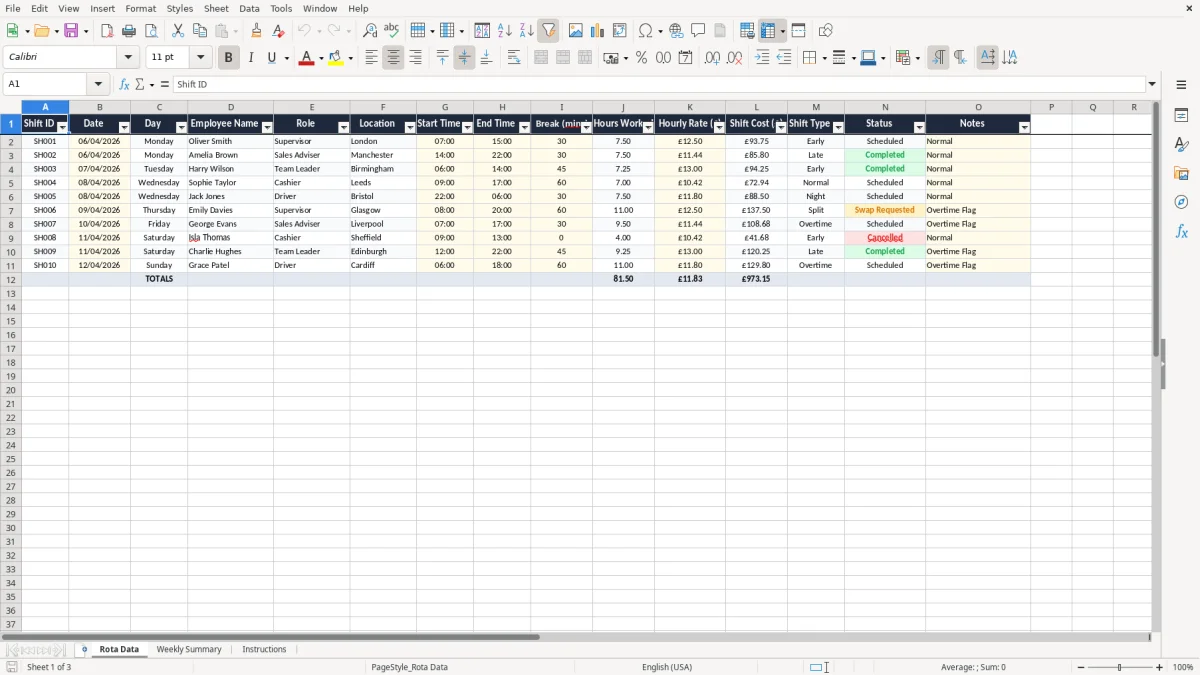
Image 1 shows the Rota Data sheet with columns for Shift ID, Date, Day, Employee Name, Role, Location, Start Time, End Time, Break (mins), Hours Worked, Hourly Rate (£), Shift Cost (£), Shift Type, Status and Notes. If you have 4 staff on 5 shifts each, that is 20 rows of decisions, not a whiteboard full of crossed-out names.
The main job is to stop rota work living in text messages and notebooks. If a plumbing firm has 4 employees on different start times, one late change can affect travel, job handover and overtime in the same week.
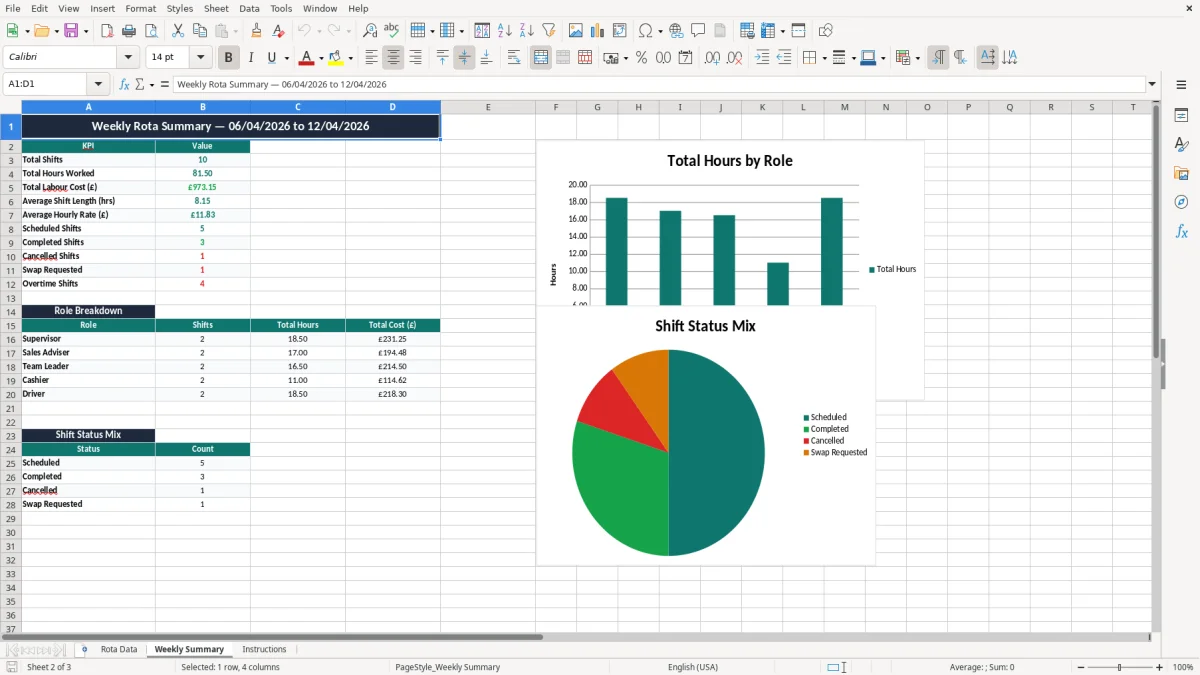
Image 2 shows the Weekly Summary sheet, which gives you a cleaner view after you have entered the shifts. That is useful when you need to check cover before a weekend, or when a 25-person retail team needs one person moved from 07:00 to 10:00 without upsetting the rest of the week.
That same kind of weekly check also matters when tracking rental income records, where one missing entry can change the totals for the month.
This rota is built around working time, pay and basic record-keeping rather than payroll processing. The PAYE system still sits outside it, but the hours and rates here give you the raw numbers you need for pay review, overtime checks and holiday planning.
For most weekly rotas, the practical test is simple: if an employee is on £12.50 an hour for 7.5 paid hours after a 30-minute break, the shift costs £93.75 before employer National Insurance and pension. If five such shifts land in one week, that is £468.75 for one person, so a small scheduling error shows up quickly.
Statutory holiday entitlement is 5.6 weeks per year, so a rota that shows only weekly cover is not enough on its own. You still need to plan around annual leave, bank holidays and sickness cover, especially if three people can cover the same role and one of them is already booked off.
Keep rota records alongside pay and attendance evidence for at least 6 years if you are running a company, and for 5 years after the Self Assessment deadline if you are self-employed. That matters if a worker disputes hours, a payroll error is queried, or you need to back up a holiday pay calculation.
The most expensive rota mistake is not a missing name, it is a wrong assumption about hours. A shift entered as 8.0 hours when the person actually had a 45-minute unpaid break should be 7.25 paid hours, which is a £9.38 error at £12.50 an hour and £47.00 across a five-shift week.
Another common problem is double-booking the same employee across two sites. In a business with 2 locations and 8 staff, one overlap can mean a desk left unmanned, a customer waiting 20 minutes, or a supervisor paying someone overtime to fix the gap.
When a shift changes after the fact and nobody updates the spreadsheet, the numbers drift away from the payroll run. Over a month, even a small error of £15 per person per week becomes £60 for a four-person team and £720 over a year.
The Status column in Image 1 is there for a reason. If you leave every shift marked as scheduled, you lose the history of what was completed, what changed and what turned into overtime, and that makes it harder to challenge a bad pattern next month.
That audit trail becomes more useful when it feeds a cash flow forecast, because the overtime and late-change costs can then be carried into the next payroll cycle.
Best results come when the rota is fixed to a regular point in the week, not done whenever someone remembers it. Most small firms do better if one person updates it every Thursday afternoon or Friday morning, before the weekend shifts and payroll checks.
Copy the prior week’s entries, then adjust only the changes. If 80% of the rota stays the same, you should be editing 4 or 5 rows instead of rebuilding 25 from scratch.
If you are running multiple sites, rotating 30+ staff, or need automatic holiday accrual and live absence management, a proper workforce system will usually be better. Until then, this spreadsheet is enough to keep a weekly rota controlled, visible and quick to update.
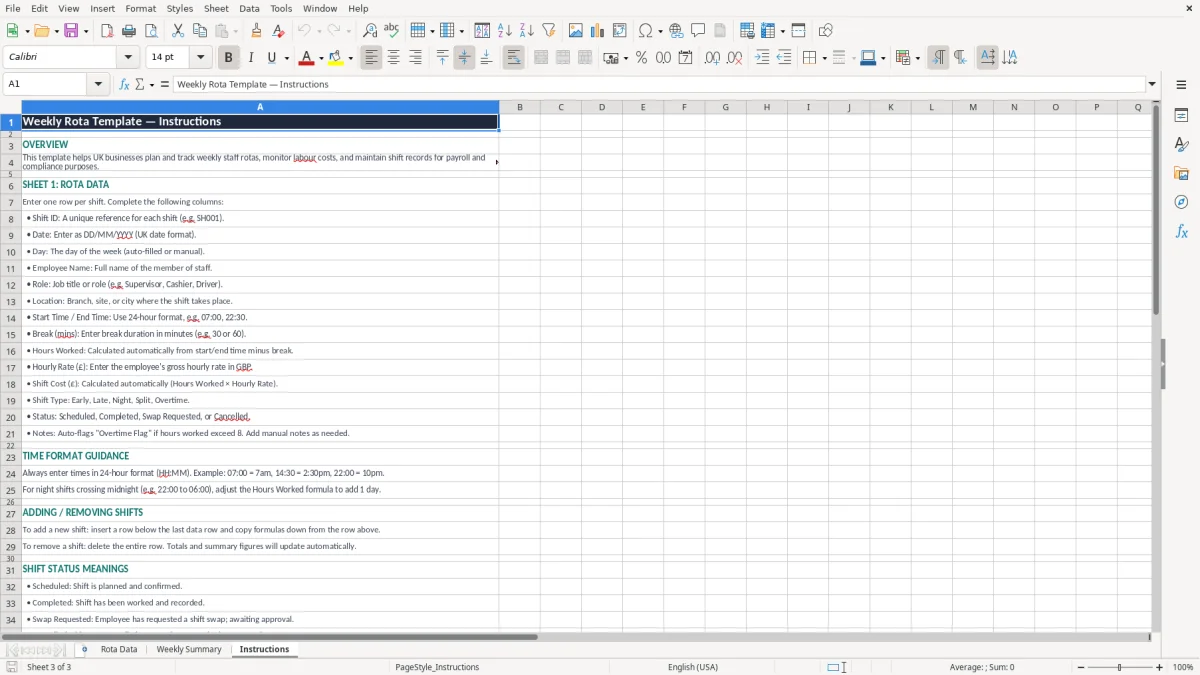
It includes a Rota Data sheet, a Weekly Summary sheet and an Instructions sheet. The rota sheet has columns for employee names, roles, locations, times, breaks, hours worked, hourly rate, shift cost, status and notes.
Yes. It works well for a team of 3 to 20 people, especially where shifts change each week and you need a simple record of who is working and what the week will cost.
The sheet is designed to hold hours worked alongside the other shift details. If a shift runs from 07:00 to 15:00 with a 30-minute break, the paid time is 7.5 hours, which is the figure you use for pay and cost review.
Yes. Enter the hourly rate and use the shift cost column to see what each shift costs in pounds. That makes it easier to compare a £12.50 day shift with a £15.00 late shift before the week is locked in.
It is useful for checking hours before payroll, but it does not replace a payroll system. Use it to review shifts, breaks and totals, then pass the agreed hours into your PAYE process.
Copy the previous week, change only the new shifts and review the summary before you share it. That cuts data entry and helps you spot gaps, overtime and clashes quickly.
Excel template by
Guide written by