Freelance Invoice Excel – Free Template (2026)
7
Free download
Download a free petty cash book in Excel with running balances, voucher checks and reconciliation against a separate physical cash count.


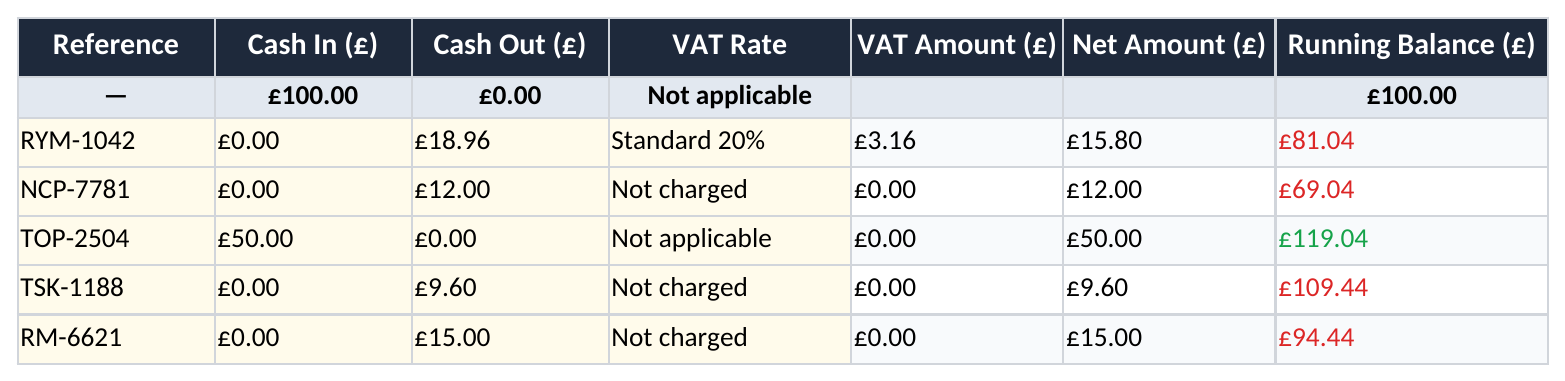
Use this petty cash book Excel template to record cash paid in and out, follow a running balance and compare the expected balance with a physical cash count. The workbook includes a transaction sheet, a reconciliation summary and instructions. It comes with fictional examples and space for 497 movements, separate from the opening float.
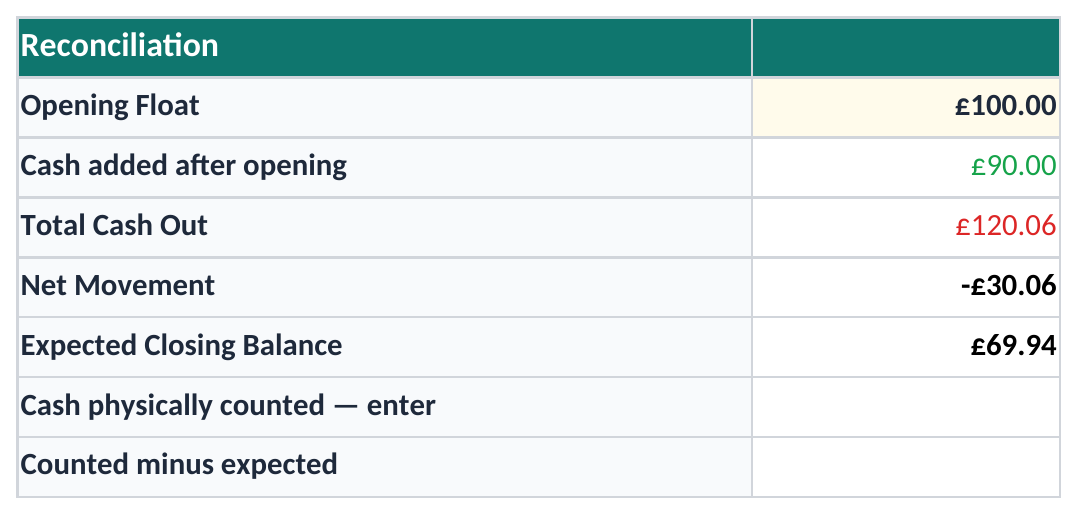
Put the opening amount in Petty Cash Book!H3. Row 3 is reserved for the opening float; start receipts and payments on row 4. The Summary takes the opening figure directly from H3 and adds only subsequent cash movements, so a top-up is not confused with the starting balance.
For each movement, enter a real date, a unique voucher reference and a description. Enter a positive value in Cash In or Cash Out and zero in the unused amount column. A blank is treated as missing information. Duplicate vouchers, missing dates and amounts on both sides are flagged in Entry check.
| Amount | Where it comes from | What to do |
|---|---|---|
| Opening float | Petty Cash Book!H3 | Enter the cash held at the start |
| Expected closing balance | Opening + valid cash in − valid cash out | Resolve flagged entries before relying on it |
| Cash physically counted | Summary!B9 | Count notes and coins and enter the result yourself |
The expected closing figure is a calculation. The physical count is an independent observation, so Summary!B9 is deliberately an input cell. It stays blank until you count the cash. A count of £0 is valid and will show a shortage if the expected balance is positive.
The difference is counted minus expected. For example, an expected balance of £69.94 and a count of £68.94 produce −£1.00. Check the vouchers, top-ups and recorded payments before changing an entry to make the figures agree.
While an entry needs checking, the expected closing balance is withheld. The running balance also stops from the first flagged row onwards. Valid-entry totals remain visible to help locate the problem, but they are incomplete until the flagged records are corrected.
Cash Out is the gross amount paid. For a receipt wholly at 20%, the VAT element is gross ÷ 6; for 5%, it is gross ÷ 21. The workbook rounds the result to pennies. Thus, £18.96 including 20% VAT contains £3.16 VAT and £15.80 net.
The available choices distinguish Standard 20%, Reduced 5%, Zero rate, Exempt and Not charged. Top-ups use Not applicable. Follow the actual receipt and relevant treatment rather than choosing a rate from the shop name or expense category. Split mixed-rate receipts into separate lines with distinct references.
The current GOV.UK VAT rates describe the rates and distinguish exempt items. A calculated VAT amount in this file is not automatically reclaimable. Check eligibility and supporting evidence against HMRC’s guidance on reclaiming VAT. This workbook does not prepare or submit a VAT return.
Use rows 4–500 for movements; totals are on row 501. Preserve the formulas in K:M and P. The category analysis covers the named example categories, while the headline cash totals include every valid entry. Extend all dependent ranges before adding records beyond row 500.
Keep a receipt or voucher reference for each payment, mark reconciled entries and retain the finished file. When starting another period, carry the agreed closing cash into the new opening float. A transfer into petty cash replenishes the float; it is not new business income.
For a wider record of sales and expenses, use the small business bookkeeping template alongside your supporting records.
Check the “Entries to check” count and column P. The expected figure is withheld while a transaction has incomplete amounts, an invalid date or a duplicate voucher. Also check that the opening float is entered.
No. Enter it once in H3. Subsequent top-ups belong in Cash In on rows 4–500.
No. It is an arithmetic total based on the treatment entered. Recovery depends on the transaction, evidence and applicable VAT rules.
Excel template by
Guide written by