Funeral Cost Planner Excel Template (2026)
0
Free download
Track monthly income, spending, VAT and variances with Budget Planner, Summary Dashboard, Category Setup and Instructions sheets.


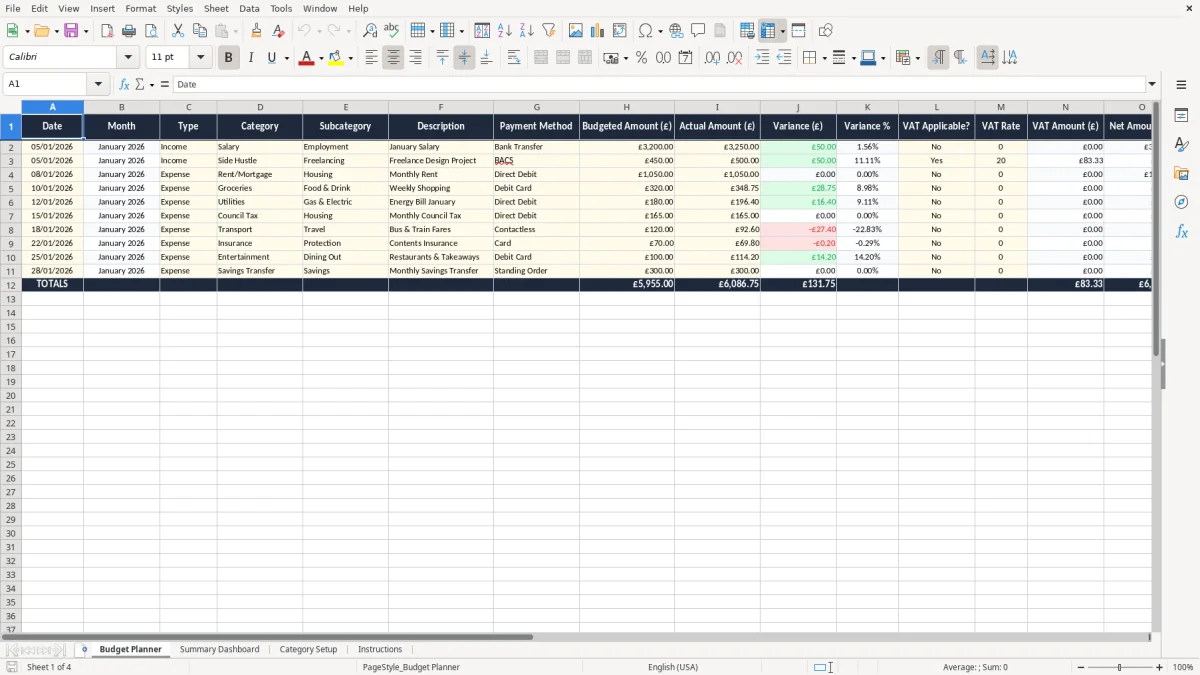
This monthly budget planner Excel template is a simple way to track income, expenses, VAT and monthly variances in one file. It includes four sheets: Budget Planner, Summary Dashboard, Category Setup and Instructions.
Use it if you want a clear month-by-month view of what you budgeted, what you actually spent, and where the difference sits. The layout is built for practical use in a UK household, sole trader or small business setting.
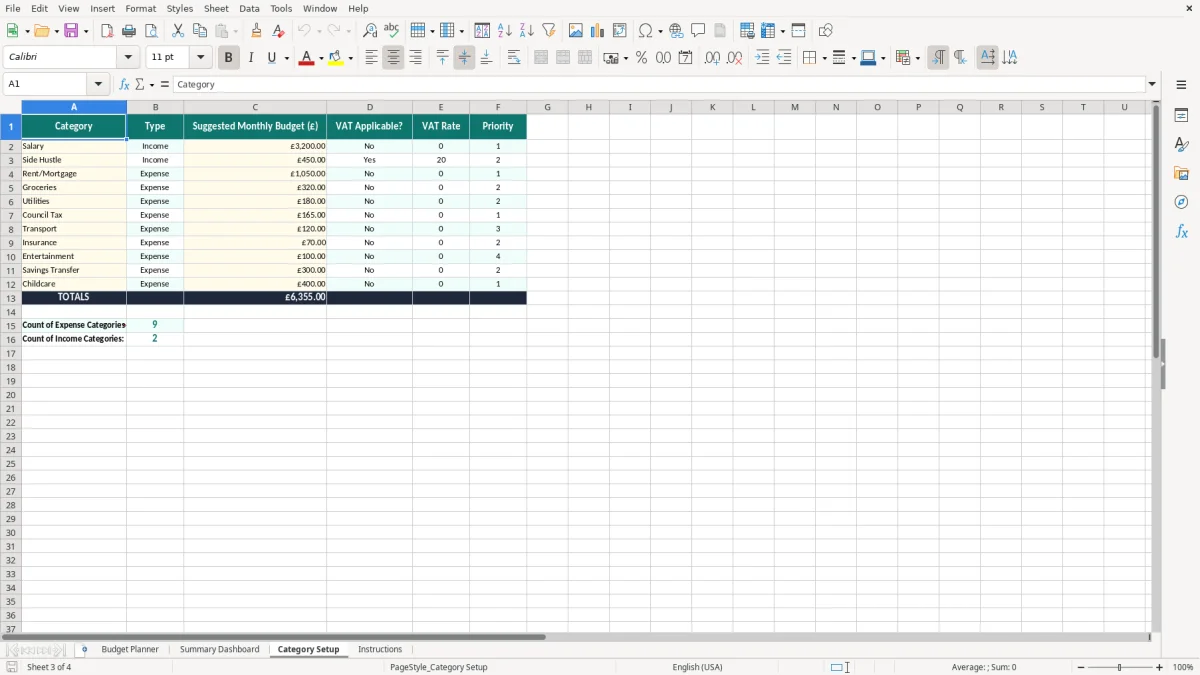
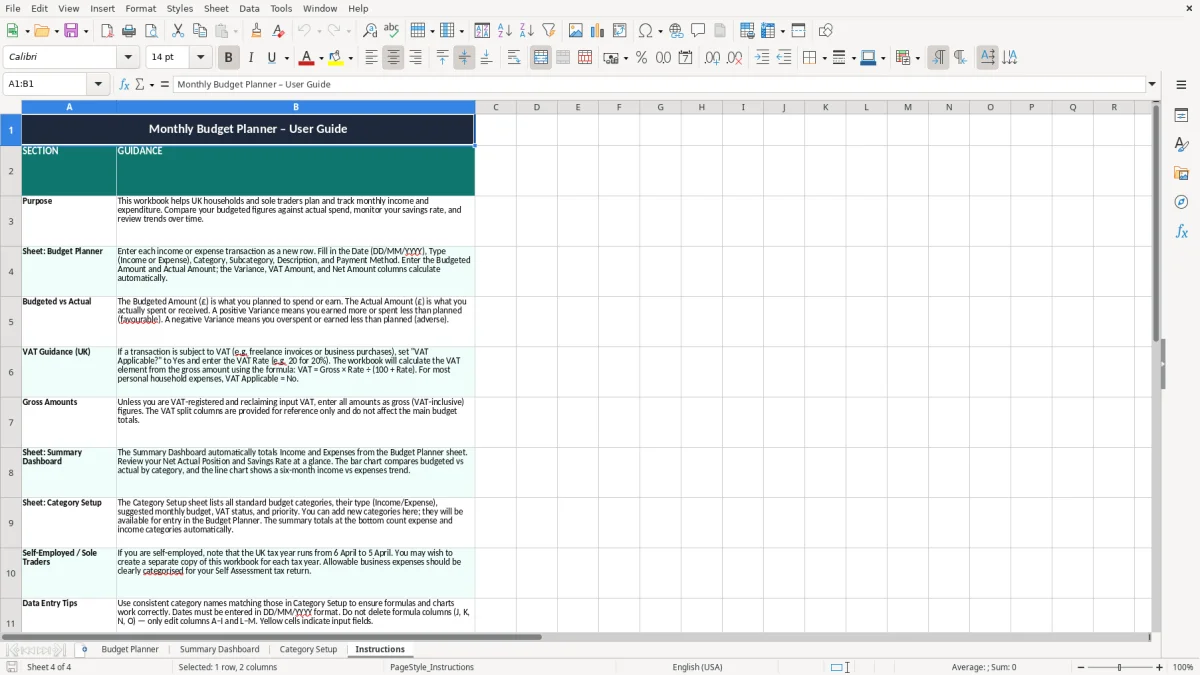
Image 1 shows the Budget Planner sheet with dated rows, category fields, payment method, VAT columns and formula-driven variance figures. Image 2 shows the dashboard summary, while Images 3 and 4 cover the category list and the step-by-step guide.
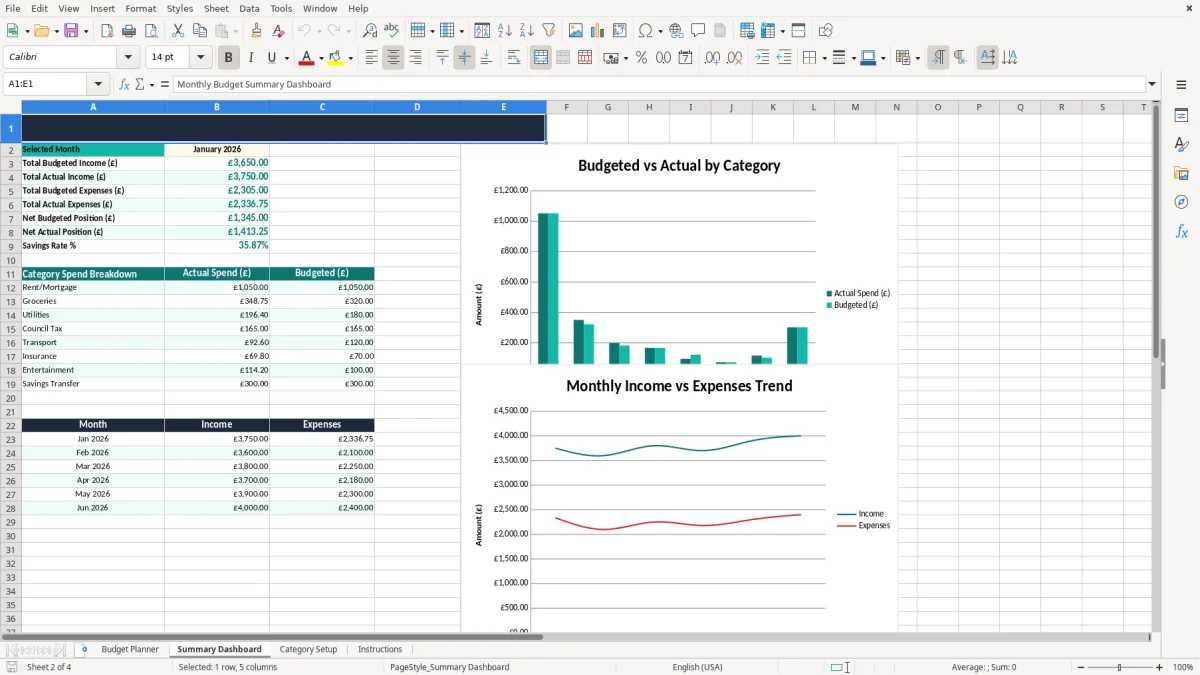
A monthly budget planner Excel file is useful when you need one place to compare planned spending with actual spending over a single month. A sole trader checking cash flow before a VAT return, a bookkeeper at a Ltd company, or a family trying to keep food and bills under control will all use it in the same basic way.
It also suits anyone who needs to break a month into clear lines: salary, rent, subscriptions, fuel, card payments and ad hoc purchases. If a household has two incomes of £2,400 and £1,850 a month, and fixed costs of £2,900, the dashboard quickly shows whether the remaining £1,350 can cover variable spending.
This is the point where the spreadsheet earns its keep. You close the month, enter the last receipts, and see whether you stayed within the plan or drifted by £50, £150 or more.
In a trades firm with four employees, the office manager can separate wages, materials and vehicle costs. In a household, you can split groceries, utilities and school costs, then compare each line with the original budget without rebuilding the workbook.
The template is built around UK money and VAT handling. If an item is VAT-applicable, the sheet gives you a place to show the VAT rate and VAT amount separately, which matters because the standard rate is 20%, the reduced rate is 5% and the zero rate applies to many basic items.
For a business registered for VAT under Making Tax Digital, quarterly returns are the normal pattern. If taxable turnover passes the £90,000 registration threshold, you need to register, and a planner like this helps you see gross spend, net spend and VAT at line level before you post anything to your books.
HMRC expects usable records, not vague estimates. For a self-employed person, keep records for 5 years after the 31 January Self Assessment deadline for that tax year; companies keep accounting records for 6 years, so a monthly planner gives you a clean monthly trail you can file with other papers.
If you budget £1,200 for the month and actually spend £1,365, the £165 overspend is not just a feeling — it is a concrete gap to correct. That is the right way to use a planner: not as a diary, but as a control sheet that shows whether the month is still on target.
That same control mindset carries into staffing, where a weekly rota keeps shifts, hours, and cover gaps visible before the week starts.
The first error is leaving entries until the end of the month and then guessing the figures. A missing £38 fuel card payment, a £74 subscription renewal or a £250 supplier invoice can distort the whole variance column, and the result is a dashboard that looks tidy but is wrong.
The second error is mixing gross and net amounts without a clear rule. If you put a £120 gross purchase in one line and a £100 net purchase in another, your monthly spend will be overstated by 20% on that item, and your VAT view will be wrong by £20.
On a £3,000 monthly budget, an untracked £45 here and a duplicated £60 there means £105 of unexplained movement. That is enough to throw off a household plan or make a small business think it has more cash available than it really does.
If you call the same item groceries, food and supermarket, your summary becomes messy and the category totals lose meaning. Standardising the labels in Category Setup avoids that drift and keeps the monthly review honest.
Vehicle expenses can drift just as easily, so a mileage claim record keeps business travel categories consistent and stops those totals from getting muddled.
The simplest routine is to update the sheet on the same day you do another fixed task. For a sole trader that might be every Friday after bank reconciliation; for a household it might be the first Sunday of the month with the bank app open and the bills in front of you.
Once the habit is set, copy the previous month’s structure rather than starting from scratch. That saves time and keeps the categories, formulas and formatting stable from one period to the next.
If you are dealing with thousands of transactions, multiple users or live bank feeds, move to accounting software. Excel is ideal for disciplined monthly control, but once you need automatic posting, audit trails and tighter access control, a proper system is the better choice.
It includes four sheets: Budget Planner, Summary Dashboard, Category Setup and Instructions. The main sheet tracks date, month, type, category, payment method, budgeted amount, actual amount, variance and VAT fields.
Yes. It works for a family budget, a sole trader’s personal drawings and spending, or a small business month-end review, because the layout is based on income, expense and variance tracking rather than one narrow use.
The planner gives you fields for whether VAT applies, the VAT rate and the VAT amount. That makes it easier to separate gross and net figures before you post anything into your bookkeeping records.
Because the difference between plan and reality is the point of the file. If you budget £800 for one category and spend £925, the £125 variance shows immediately and you can act on it.
It gives you a cleaner view of the totals without scrolling through the full transaction list. That is useful at month-end when you want to check spending by category before you file the month away.
Update it regularly, use the same category names every time and review the totals before the month closes. If you leave ten or twenty entries until later, the file becomes less reliable and the variance figures are harder to trust.
Excel template by
Guide written by