Freezer inventory Excel Template – Download (2026)
4
Free download
Track UK purchase orders, suppliers, VAT, delivery dates and lead times with four practical Excel sheets for small businesses.


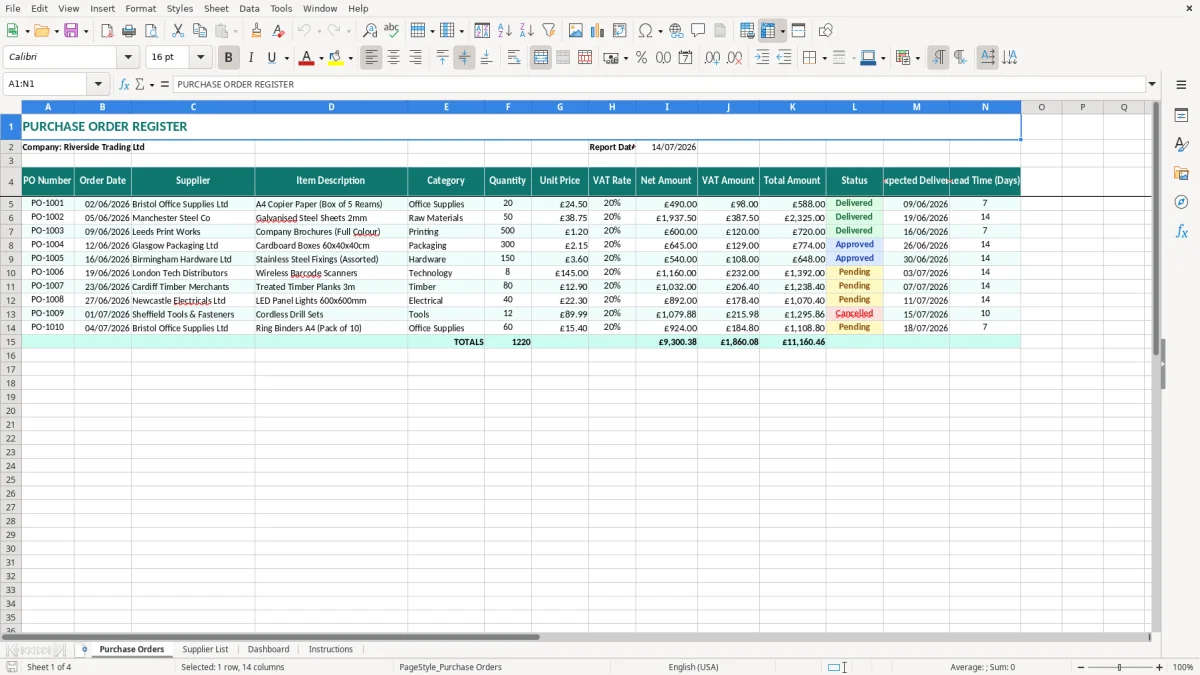
This purchase order Excel template records supplier orders, quantities, unit prices, VAT rates, delivery dates, statuses and lead times. It contains a Purchase Orders register, Supplier List, Dashboard and Instructions sheet, giving you one place to monitor committed purchasing costs.
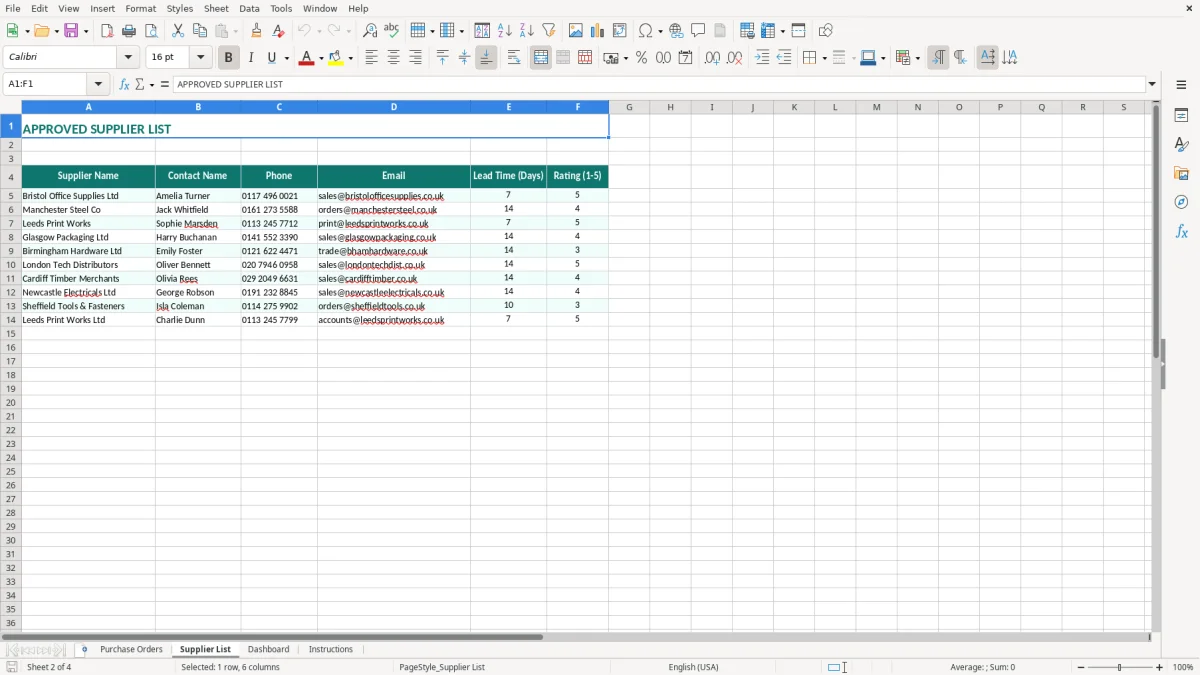
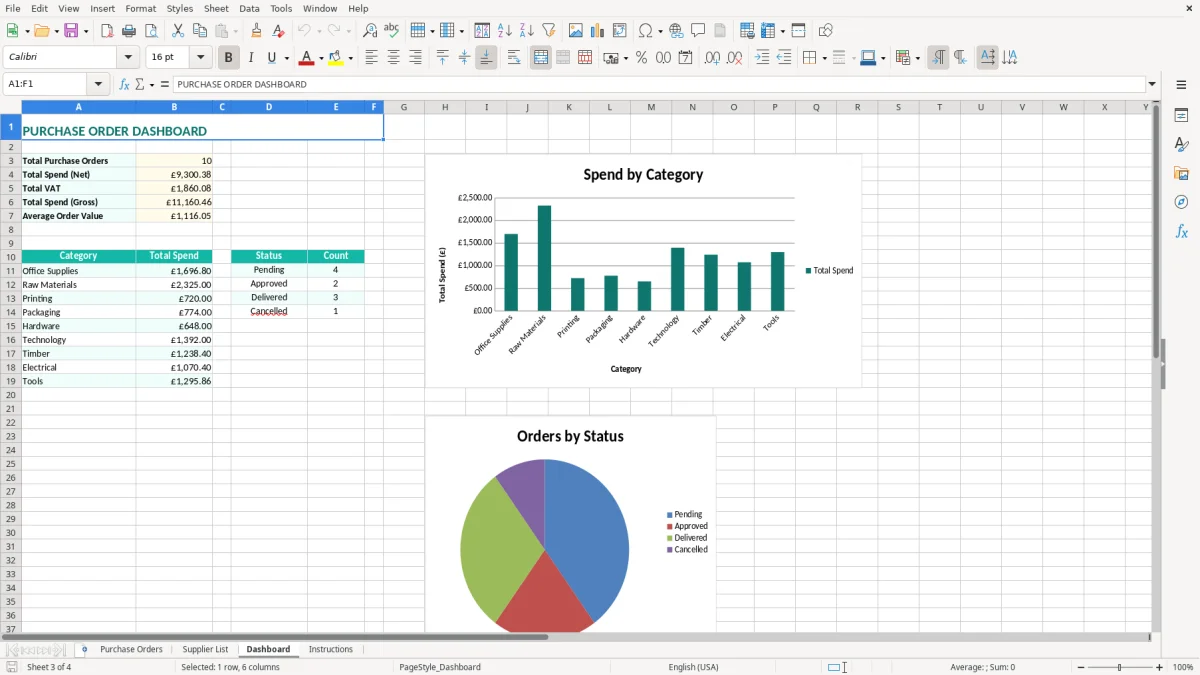
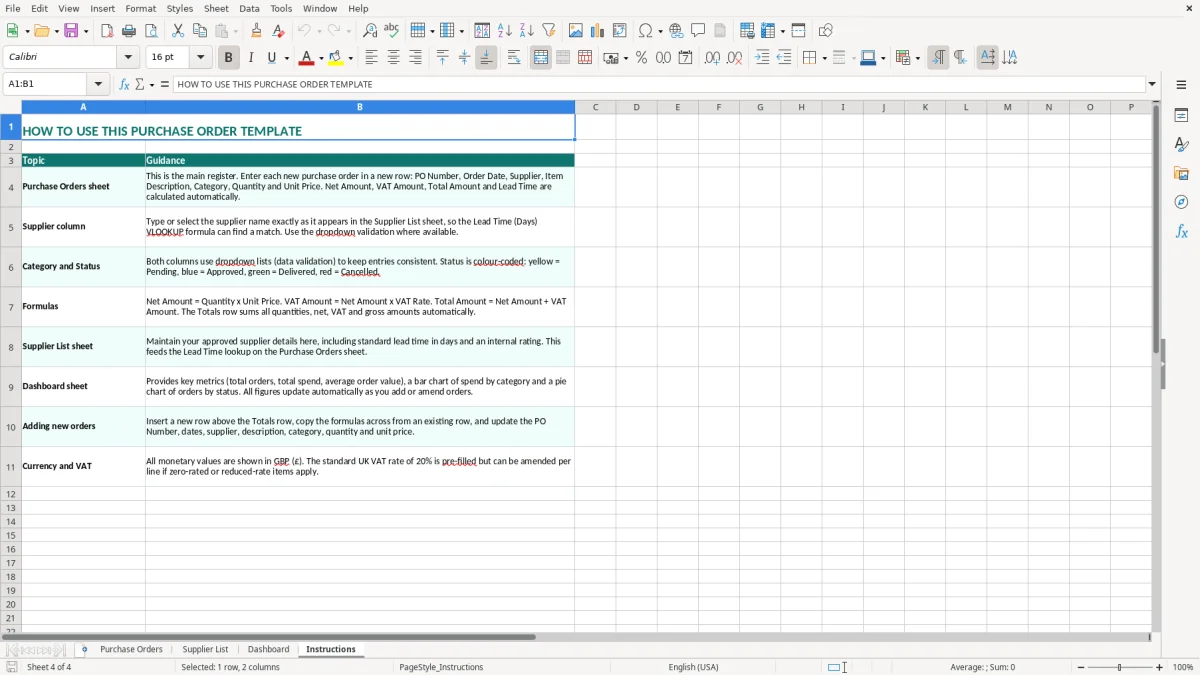
Use it before placing an order and update it when goods arrive. The Purchase Orders sheet uses £ currency and DD/MM/YYYY dates, while the teal table formatting makes the register straightforward to scan. Image 1 shows the main register, image 2 the supplier information sheet, image 3 the dashboard and image 4 the instructions.
A purchase order register is useful when a business buys repeatedly but does not yet need a full procurement system. An office manager at a plumbing firm might raise an order for 30 copper fittings, 12 pipe coils and two tool cases, then record each line with a supplier, category, quantity and expected delivery date. The register provides a reference before the supplier invoice arrives.
For a small Ltd company, the purchase order is also a control over who has committed the business to spend. A director can review the register on Friday and see that three orders total £2,460.00, rather than discovering the commitment from a bank statement several weeks later.
A bookkeeper can use the Purchase Orders sheet at month-end to identify items ordered but not delivered. For example, an online retailer placing 300 orders a month may have £4,800 of packaging and stock on order across four suppliers. The Status and Expected Delivery columns show which items should be chased and which should be matched to a delivery note.
The Category column is particularly useful when purchasing is split between Raw Materials, Office Supplies and other internal categories. If Raw Materials show £18,000 of orders in a month but the business expected £12,000, the difference is a prompt to investigate production demand or duplicate orders.
Image 1 shows the 14-column Purchase Orders register, including the Riverside Trading Ltd heading and 14/07/2026 report date. Image 2 shows the separate Supplier List, which keeps supplier information away from transaction lines. Image 3 shows the Dashboard for a quicker management view, while image 4 shows the Instructions sheet and the intended operating steps.
That separation suits a sole trader, office manager or volunteer treasurer who needs an auditable list without learning a full purchasing package. It is most effective when one person enters the order and another checks receipt against the recorded quantity.
A purchase order records your request to a supplier; it does not by itself support a VAT reclaim. The supplier's VAT invoice is the evidence normally needed for input VAT, and it should show the supplier's name and address, a unique invoice number, invoice date, customer details, VAT number and VAT amount separately where the supplier is VAT-registered.
The template includes a VAT Rate, Net Amount, VAT Amount and Total Amount column so you can compare the order with the invoice. At the standard VAT rate of 20%, a net order of £2,500.00 produces £500.00 VAT and £3,000.00 total. A 5% reduced-rate or zero-rated purchase must not be forced into 20% merely because it is the default used elsewhere.
If your taxable turnover exceeds the VAT registration threshold of £90,000, registration and VAT accounting become relevant. VAT-registered businesses generally submit quarterly VAT returns under Making Tax Digital (MTD), so the order register should be reconciled to purchase invoices and the bookkeeping system rather than treated as the VAT return itself.
Keep company accounting records for 6 years. A sole trader normally keeps Self Assessment records for 5 years after the 31 January online filing deadline. The purchase order number is useful evidence linking an approved order, delivery note and invoice, particularly when several invoices from the same supplier arrive in one month.
A sole trader has unlimited liability and can use a simple approval rule, such as checking every order above £500. A Ltd company registered at Companies House should make sure the people approving spend match its internal authority limits; the spreadsheet does not replace board records or year-end accounts.
Use the relevant tax year, which runs from 6 April to 5 April, when comparing annual purchasing reports with tax records. Do not post a purchase order as an expense until the goods or services have been received and the accounting treatment has been checked.
One of the most expensive errors I see is reusing a PO number. A supplier sends two deliveries marked PO-1042, the bookkeeper matches both invoices to the same order and £860.00 is paid twice. A sequential reference such as PO-1043, followed by a quick search of the register, prevents that particular failure.
Supplier names also drift: Manchester Steel Co, Manchester Steel Company and M Steel can appear to be three suppliers in a filter. That fragments the total and makes a £6,000 monthly spend look like three smaller balances. Maintain one agreed name in the Supplier List and copy it consistently into the register.
Entering a total from a quotation into Unit Price is another common mistake. If the quantity is 50 and the quoted unit price is £38.75, the net amount should be £1,937.50. At 20% VAT, the VAT is £387.50 and the total is £2,325.00; entering £2,325.00 as the unit price would inflate the order to £139,500.00.
Do not assume every supplier charge is standard-rated. A mixed order can contain zero-rated goods and 20% standard-rated items, and rounding can leave a few pence difference between a line calculation and the invoice. Compare the template with the actual VAT invoice before posting the purchase.
Leaving an order as outstanding after delivery damages the usefulness of the register. A builder with four employees may have £7,200 of materials recorded as expected but already received; the manager then orders the same fixings again because the old line still looks open.
Check quantity and condition against the delivery note, then update Status and the delivery information promptly. For a late £1,500 item needed on a job, a two-day chase can be cheaper than a lost day's labour for four employees. Keep the delivery note with the invoice so the order, receipt and payment tell one consistent story.
That same receipt trail is easier to reconcile when the quantities already sit beside a stock control record.
Do not wait for a month-end memory exercise. The most reliable routine is to enter the order immediately after approval, then spend 15 minutes every Friday checking expected deliveries and updating statuses. If the payroll run is every Wednesday, the office manager can also review supplier commitments at the same time, before cash leaves the bank.
For a business raising 25 purchase orders a month, five minutes per order is just over two hours of entry. That is considerably less time than reconstructing £20,000 of commitments from email threads when the VAT return or management accounts are due.
This workbook is a sensible starting point for one buyer or a small team. It becomes unsuitable when several people edit it simultaneously, approval limits need enforcement, stock quantities must update automatically, or the register has grown to thousands of lines and regular reconciliation takes more than an hour.
At that point, move to purchasing software or an integrated bookkeeping system rather than adding more manual tabs. Export the historical register first, retain the original workbook securely, and agree which system becomes the single record from a defined date.
That handover is also a sensible moment to set up a service reminder tracker so routine compliance dates do not get lost during the changeover.
It contains four sheets: Purchase Orders, Supplier List, Dashboard and Instructions. The main register includes PO Number, Order Date, Supplier, Item Description, Category, Quantity, Unit Price, VAT Rate, Net Amount, VAT Amount, Total Amount, Status, Expected Delivery and Lead Time (Days).
The register is structured for net, VAT and total values, with VAT Rate shown separately. Check the figures against the supplier quotation and final VAT invoice, particularly where an order contains standard-rated 20%, reduced-rate 5% or zero-rated items.
No. A purchase order is your instruction or request to buy. You normally need the supplier's valid VAT invoice, showing the required invoice details and VAT separately, to support an input VAT reclaim.
A sole trader, office manager, bookkeeper at a Ltd company or club treasurer can use it to control orders and deliveries. It is best suited to a small operation where one or a few people maintain the register.
Use a unique, sequential reference such as PO-1001, PO-1002 and PO-1003. Do not reuse a number after cancellation; mark the order as cancelled and continue the sequence so every reference remains explainable.
Update it when the supplier confirms dispatch, when the goods arrive and when any shortage or delay is resolved. Compare the delivery with the recorded quantity and keep the delivery note with the related invoice for a clear audit trail.
Excel template by
Guide written by