Chore Chart Excel Template – Free (2026)
0
Free download
Download a UK task list Excel template to organise tasks, owners, priorities, deadlines, progress, hours and costs in one worksheet.


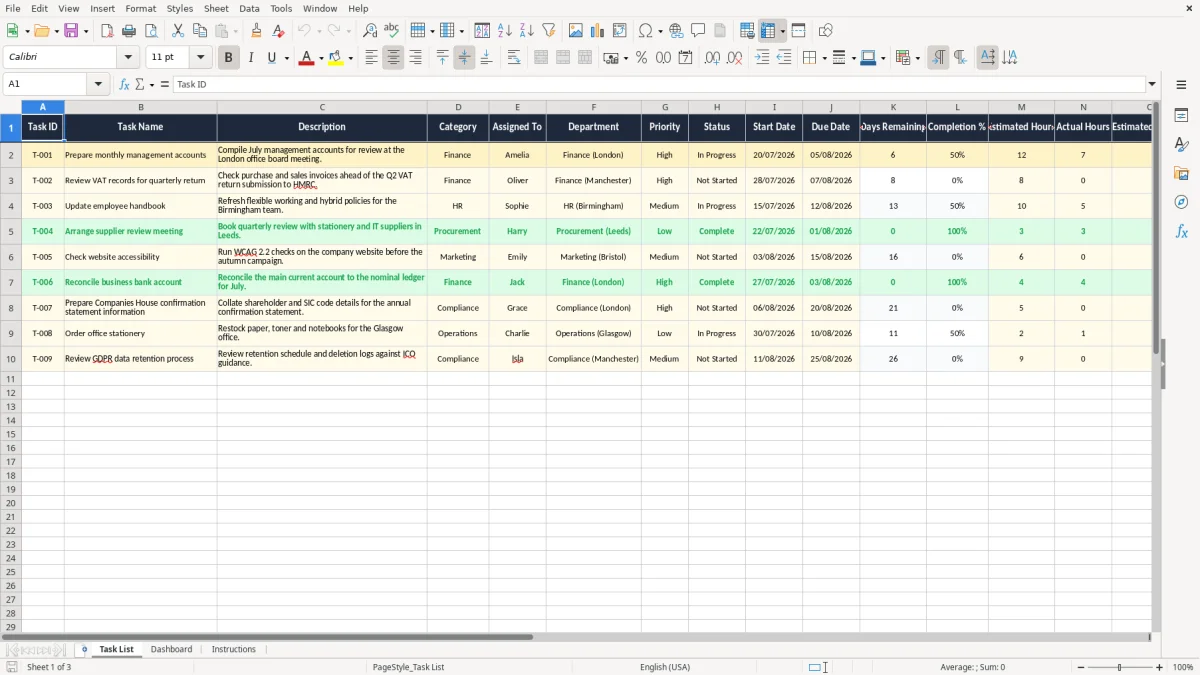
Keep projects, team responsibilities and everyday actions organised with this practical task list Excel template for UK businesses and individuals. The workbook helps you record what needs to be done, who is responsible, when work is due and how much time or money may be involved.
It includes a clear Task List worksheet with example UK business tasks and fields for planning, monitoring and reviewing activity. Use it for finance, HR, administration, operations, project work, compliance actions or personal planning, then adapt the columns and sample content to suit your own workflow.
Download and open the workbook in Microsoft Excel or a compatible spreadsheet application. Replace the example tasks with your own work items, or use them as a starting point for your process. Give each task a unique ID, then enter a concise task name, description, category, assigned person and department.
Select the appropriate priority and status, and add start and due dates using the date format used by your organisation. Update Days Remaining, Completion %, Actual Hours and Notes as work progresses. Use Estimated Hours and Estimated Cost (£) when planning work or preparing a budget.
Review the worksheet regularly to identify overdue tasks, upcoming deadlines, high-priority actions and items that need reassignment. You can also add filters, project references, dependencies or extra worksheets if your task management process requires more detail.
A task list Excel template is a ready-made spreadsheet for recording and managing work in a consistent format. Instead of keeping actions in separate emails, notebooks or documents, you can place each task on one row and use columns to capture the information needed to complete it. This UK task list template includes fields for a task ID, name, description, category, assigned person, department, priority, status, start date, due date, days remaining, completion percentage, estimated hours, actual hours, estimated cost and notes.
That structure gives you a simple overview of both the work itself and the resources needed to deliver it. The template is useful for a small business, department, project team or individual who wants a straightforward Excel-based task tracker without building a worksheet from scratch. It can support recurring administration, meeting actions, finance processes, HR updates, operational checks, compliance work and personal planning.
The included examples demonstrate how tasks can be described in a UK business setting, including departmental locations and costs shown in pounds. You can remove the examples and enter your own activities, or keep them as a guide while developing a repeatable process. Because the workbook is editable, you can rename categories, change people and departments, add project references or create separate sheets for different workstreams.
Excel also makes it easy to sort and filter the list, helping you focus on urgent, upcoming or incomplete tasks. The result is a practical central record that improves visibility and supports more consistent follow-up.
It is especially useful when several people need a shared view of responsibilities but do not need a complex project management system. Regular updates will keep the information meaningful and help turn the worksheet into a dependable working record.
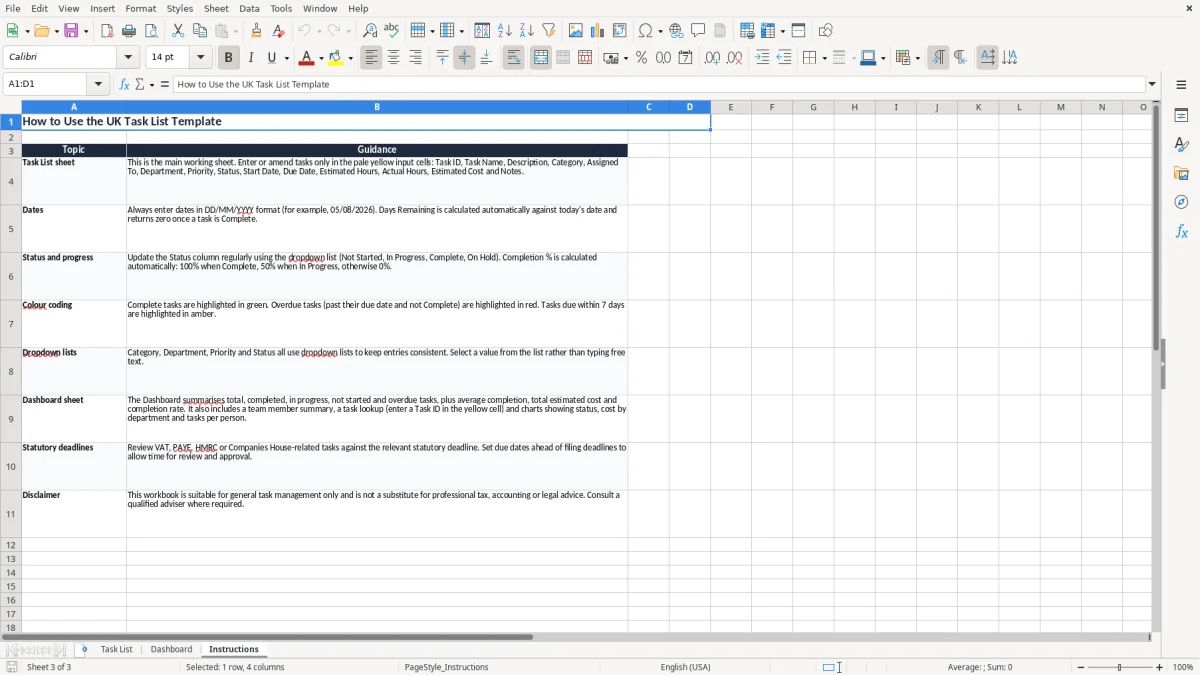
UK businesses can use this task tracker to coordinate routine responsibilities, project actions and deadline-driven work across teams. A finance department might use it to manage management accounts, invoice checks, VAT preparation and cash-flow reviews. An HR team could track handbook updates, recruitment actions, training arrangements and policy communications.
Operations teams may record supplier checks, maintenance activities, compliance reviews and customer follow-ups. The Assigned To and Department columns make responsibility visible, while Priority and Status help managers understand what needs attention first. Start Date and Due Date provide a basic schedule, and Days Remaining offers a quick way to review approaching deadlines.
The template can also support meetings: enter each agreed action as a task, assign an owner and use Notes to record decisions or dependencies. For project work, add a project or client column, then filter the worksheet to view one workstream at a time. Small businesses and sole traders can use the same structure for sales administration, bookkeeping, marketing, client delivery and business development.
Estimated Hours and Actual Hours help compare planned effort with time spent, which can improve future quotations and workload planning. Estimated Cost (£) is useful when tasks involve suppliers, contractors, travel or internal budgets. The example content includes UK-focused references such as HMRC and pound sterling, but the worksheet is flexible enough for any sector.
Dates, departments, names and categories can all be changed to match your organisation. By reviewing the list regularly, teams can identify overdue actions early, reallocate work when priorities change and maintain a clearer record of accountability. It can also provide a useful agenda for weekly reviews, helping managers discuss blockers, confirm next steps and close completed actions without searching through multiple systems.
The same weekly review can also capture contractor paperwork, and a CIS subcontractor statement keeps those details in one place for each payment cycle.
Effective task management starts with entering enough detail for another person to understand the action without needing a separate explanation. Use a clear Task Name, add a concise Description and record useful context in Notes. Give every item a unique Task ID so it can be discussed in meetings, emails or progress reports.
Assign one person as the main owner and select a department where this helps with accountability. Priority should reflect business importance or urgency, while Status should describe the current stage of the task. Add realistic Start Date and Due Date values, then update progress as work develops.
Completion % is useful when an action is partly finished, although status should still be maintained so the overall position remains clear. Review Days Remaining frequently, especially for statutory, customer or project deadlines. You can use Excel filters to show high-priority tasks, incomplete work, one department or a particular date range.
Conditional formatting can be added to highlight overdue items, tasks due soon and completed work. Sorting by Due Date creates a simple action schedule, while sorting by Assigned To supports team check-ins. For larger lists, convert the range into an Excel Table so filters and formatting expand as new tasks are added.
Estimated Hours and Actual Hours can reveal repeated underestimates, overloaded team members or opportunities to improve a process. Notes can record blockers, approvals and next steps, but detailed project documentation may be better kept in a linked system. The template works best when updated consistently, reviewed at an agreed frequency and supported by clear ownership.
A short weekly review is often enough for a small list, while active projects may need daily updates. When a task is complete, update its status and completion percentage promptly so reports and discussions reflect the current position.
A weekly update becomes more useful when the tasks are tied to a project timeline chart, so status, dependencies and completion percentages line up with the current position.
A UK Excel task list template offers a familiar and flexible way to organise work without the setup time or subscription requirements associated with dedicated task management software. Many businesses already use Excel for budgets, schedules and reports, so team members can adopt a task worksheet quickly. This template uses pound sterling in the Estimated Cost (£) field and includes UK-oriented sample content, including departments based in London, Manchester and Birmingham and a reference to an HMRC VAT return deadline.
These examples make the worksheet relevant to common UK business administration while remaining easy to replace with your own information. The template is suitable for a sole trader managing client work, a small business coordinating staff tasks or a larger department maintaining an action log. It can be stored locally, shared through a workplace system or copied into an existing workbook, subject to your organisation's document controls.
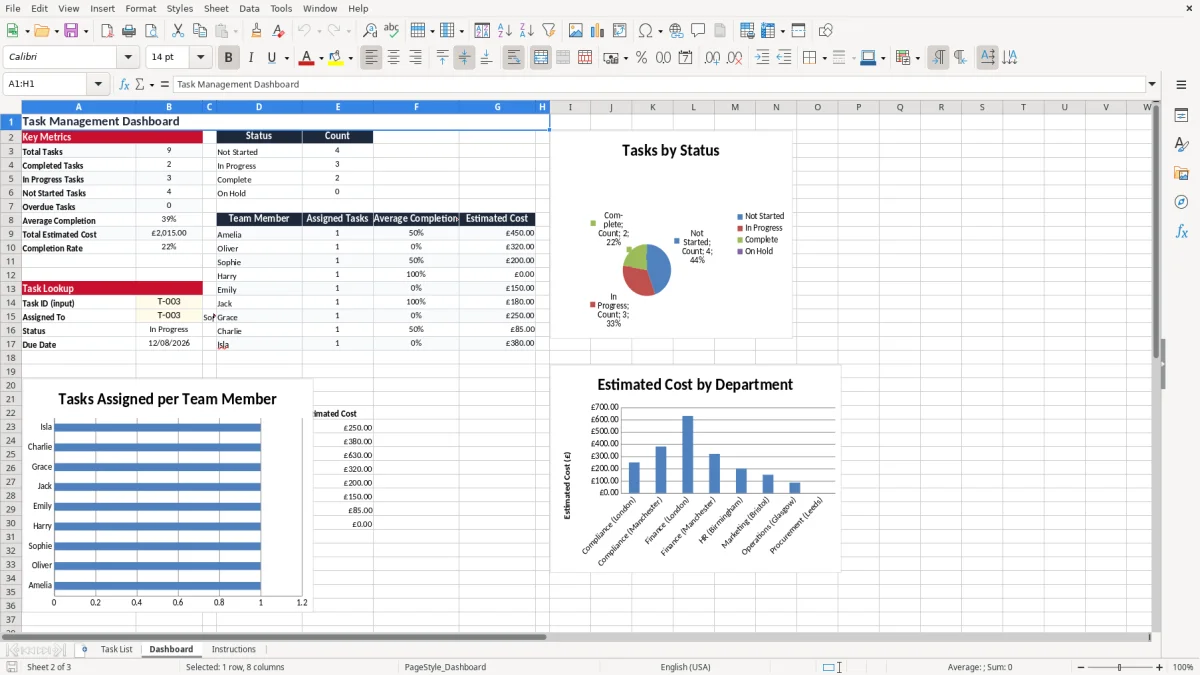
Excel also provides useful options for printing, filtering, sorting and adding formulas or charts as your needs develop. You can create separate tabs for projects, teams, recurring tasks or reporting periods, or keep a single list for a simpler process. The design includes planning fields for time and cost as well as progress and ownership fields, allowing you to review more than just a list of task names.
It is not intended to replace specialist systems where you need automated workflows, permissions, audit trails or complex dependencies. However, it provides a practical starting point for everyday task control and can be customised without specialist technical knowledge. Download the template, remove or edit the sample rows and establish a regular review routine.
With consistent updates, the worksheet can improve visibility, support accountability and help UK teams keep important work moving. It is also a useful option when you need a simple, printable task register that colleagues can understand immediately.
It is a pre-formatted spreadsheet for recording, assigning and tracking work, including deadlines, priorities, status, progress, time and cost.
Yes. It includes pound sterling cost tracking, UK-focused examples and fields that can be adapted for UK teams, departments and processes.
Yes. Add project names, milestones or dependencies if required, then use the owner, priority, status, date, progress and hours fields to manage actions.
Yes. Use the Estimated Cost (£) column to record planned costs in pounds sterling.
Yes. Replace the example tasks, people, departments, dates and notes with information relevant to your own organisation.
Estimated Hours records the expected time, while Actual Hours records time spent. Comparing them can improve planning and workload forecasting.
Excel template by
Guide written by